

SeaWorld
- 3.02K
- 4.3
- Installs
- 1.00M
- Price
- Free

Screenshots

Analysis by Reviewed
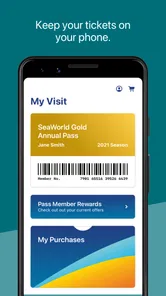
For a visit to a SeaWorld park, I’d treat the app as a practical companion for checking where to go and choosing what to do next. Its value is in helping with maps, wait times, and park hours—not in replacing the wider planning tools or information a visitor may need. That focused role matters most when a group is making decisions on the move.
Maps that help you make a plan
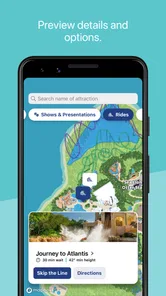
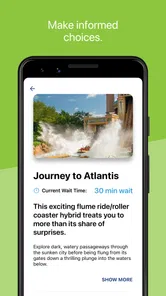
When I’m somewhere busy and unfamiliar, I want to answer simple questions quickly: where am I, what’s nearby, and how much time might a popular attraction take? A park map and wait-time information are valuable for exactly that. I’d check the map before walking across the grounds, then use wait times to decide whether to head for an attraction now or save it for later. Park hours also help set realistic expectations for the day.
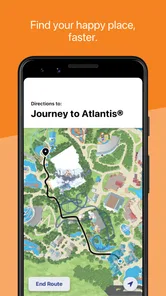
A useful way to work with the map is to choose a broad route rather than plot every stop. I’d pick one priority, notice what else lies in that direction, and leave room to change course if a queue or the group’s energy shifts. This avoids a common theme-park mistake: crossing the grounds for one attraction, only to discover that another planned stop was nearby earlier. The map is most helpful as a decision aid, not as a promise that the day will follow a fixed itinerary.
There is a useful trade-off here. A dedicated park app is more relevant to navigating SeaWorld than a general map app, while a general map is better for the wider journey, such as getting to the park or finding places nearby. I’d keep the SeaWorld app for the visit itself and use a familiar navigation app for the trip there. Neither replaces the other.
Readable, but best used with a little preparation
I’d treat the app as a planning aid rather than something to study while walking. Before setting off, I’d look over the map and pick a first destination; once inside, short checks are less distracting than repeatedly stopping to work out the whole day. This can make the experience easier for someone who finds crowded spaces or changing plans tiring, though the app itself cannot remove the noise, queues, or walking involved in a theme park visit.
For visitors with low vision, limited dexterity, or sensory sensitivities, the useful question is not simply whether an app has a map. It is whether its information is comfortable to read and operate on their particular phone, in the moment they need it. I’d test the map and wait-time screens at home, adjust the phone’s own display settings if helpful, and avoid relying on a tiny screen while moving through a crowd. A companion can also help interpret directions or make decisions when the environment gets overwhelming.
I would also decide in advance who in the group is going to check the phone. Passing it back and forth while everyone stands in a busy walkway can make a quick glance into a frustrating pause. One person can look up the next choice, then explain it aloud or show the map to anyone who wants to see it. That small routine is useful for mixed-age groups and for visitors who would rather not handle a phone repeatedly during the day.
More From Our News Desk

 Weather - By Xiaomi
Weather by Xiaomi Review: Clear at a Glance, Less Clear Up Close
Xiaomi’s weather app makes everyday forecasts quick to scan, but its calm surface can leave useful details and recovery paths harder to find than they should be.

 X
XX Under Pressure: Can It Recover When Posting Goes Wrong?
A resilience-focused review of X, examining setup, mistaken posts, interruptions, weak connections, and the gaps that matter when recovery needs to be dependable.

 Clash of Clans
Clash of Clans Is Won Between the Battles
Its raids are quick; its community is a long-term project of coordination, teaching, rivalry, and shared responsibility—with all the friction that entails.

 Android Auto
Android Auto Makes the Case for Quieter Car Software
The car interface is no longer judged by how much it can do, but by how quietly it helps. Android Auto shows what drivers now expect—and what still gets in the way.

 MobiOffice: Word, Sheets, PDF
MobiOffice: Transforming Mobile Productivity with Seamless Integration
MobiOffice: Word, Sheets, PDF is redefining mobile productivity with a surprising blend of functionality and innovation.

 EA SPORTS FC Soccer Mobile 26
EA SPORTS FC™ Mobile Soccer: Redefining Mobile Sports Gaming
Dive into EA SPORTS FC™ Mobile Soccer, where immersive gameplay and strategic depth transform mobile sports gaming.
Latest News



Who gets the most from it
I can see this being especially handy for a family trying to coordinate different priorities: one person wants to visit a particular attraction, another needs a break, and everyone wants to avoid unnecessary backtracking. If wait times change during the day, checking them before choosing the next stop can make the plan more flexible. For a short visit, that kind of quick decision support may matter more than trying to map out every hour in advance.
Consider a realistic afternoon visit: the group arrives with a few hours available, but nobody agrees on the next stop. I’d use the map to find a nearby option, check its wait time, and compare that with the walk to a farther priority. If the group is tired, the closest reasonable choice may be better than chasing a perfect schedule. The app cannot make that decision for you, but it can put the relevant location and queue information in one place so the conversation is less vague.
It may be less useful if you are not visiting a SeaWorld park, or if you prefer to wander without checking schedules and queues. It also shouldn’t be your only plan for someone who needs highly tailored accessibility directions or hands-on assistance; check the park’s current visitor information and ask staff about individual needs. The app can support decisions, but it is not a substitute for confirming that a route or attraction suits a particular visitor.
Planning around different needs
For visitors who need a predictable pace, I’d use the app to make a short list of priorities and keep the rest optional. That is more forgiving than treating every map marker as a commitment. A change in wait time, a need to sit down, or a companion wanting a different activity can then prompt a nearby alternative instead of making the whole plan feel derailed. The practical benefit is flexibility, not a guarantee of a smooth or accessible route.
Someone with limited dexterity may find frequent phone use tiring, especially if they are also carrying belongings or helping a child. In that case, checking the next destination while stationary and handing the phone to a companion for occasional updates can reduce repeated taps. Visitors sensitive to visual or sound-heavy environments may also prefer to do their planning before entering a crowded area, then use only brief checks on site. These are workarounds, not special functions of the app, but they make its basic tools easier to fit into a real outing.
A focused companion, not a complete guide
SeaWorld is a free Travel & Local app from SeaWorld Parks & Entertainment Inc. It has a 4.4 average from around 12,000 ratings, and more than a million installs. Its Everyone age rating makes it suitable for a broad audience, while the practical value depends much more on whether a park visit is on your calendar. The app has been available since April 14, 2011, and version 7.1.0.113681 is the current release; it requires Android 9 or later.
Compared with relying on a paper map, the app’s appeal is having park-oriented information available on a phone, including wait times that can help shape the next decision. Paper can still be easier for a group to look at together, and it does not require someone to keep unlocking a device. A general map app is the better companion for the journey beyond the park, while a park-focused app is the more relevant choice once you are planning movement around SeaWorld. I’d use each for the job it handles best rather than expect one tool to cover everything.
It is worth opening the app before the visit instead of waiting until everyone is already trying to move. That gives you a chance to see whether the basic map and information are comfortable to use on your phone and to make sure the device is ready for a day out. I’d also keep the plan understandable without the screen: agree on a meeting point with your group and tell companions the next destination. A mobile guide is helpful, but it should not be the only way people in a group know what is happening.
My everyday scenario would be arriving with a loose plan, checking park hours before the day, then using the map and wait times to choose the next stop as the group’s energy changes. I’d check key details before leaving home, too, rather than assume the phone will be easy to use in every crowded spot. That small bit of preparation is a sensible safeguard whenever your day depends on a mobile guide.
So, I recently dived into the world of SeaWorld, and let me tell you, it’s quite the adventure! If you’re a fan of marine life and interactive gaming experiences, then you’re in for a treat. This app is not just about watching virtual fish swim around; it’s about engaging with the ocean in a way that’s both entertaining and educational.
Exploring the Depths
Once you open the app, you’re immediately greeted with a stunningly vibrant underwater world. The graphics are top-notch, bringing to life a variety of sea creatures that you can interact with. From playful dolphins to majestic whales, SeaWorld offers an immersive experience that’s hard to match. The attention to detail is impressive, making you feel like you’re actually swimming alongside these magnificent creatures.
Interactive Features
What really sets this app apart is its interactive features. You’re not just a passive observer; you get to feed the fish, play games with the dolphins, and even embark on quests to discover hidden treasures. It’s like having a personal aquarium at your fingertips, but way cooler. Plus, the app includes some educational elements, teaching you about marine life and the importance of ocean conservation. It’s a fun way to learn while you play!
Challenges and Rewards
The game includes various challenges that keep you hooked. Whether it’s completing a set of tasks to unlock new sea creatures or earning rewards for taking care of your virtual ocean, there’s always something to strive for. The rewards system is quite engaging, encouraging players to keep exploring and interacting.
And let’s not forget the social aspect. You can connect with friends, share your achievements, and even visit each other’s virtual oceans. It adds a layer of community and competition that makes the experience even more enjoyable.
Final Thoughts
All in all, SeaWorld is a must-download for anyone who loves the ocean or is looking for a unique gaming experience. It combines stunning visuals, interactive gameplay, and educational content into one fantastic package. Whether you’re a kid or just a kid at heart, this app promises hours of fun and discovery. Dive in and explore the wonders of the sea without leaving your couch!
SeaWorld Frequently Asked Questions
Can I use SeaWorld to plan a visit to a park?
Yes. SeaWorld is a travel and local app designed to help visitors plan and navigate a park visit. Its main tools include park maps, wait times, and park hours, making it useful for checking practical details while organizing your day or moving around the park. The app is free to download and is published by SeaWorld Parks & Entertainment Inc.
What is SeaWorld and what does it offer?
SeaWorld is an engaging and educational app that brings the wonders of marine life to your fingertips. It offers users a virtual experience of exploring the ocean's depths, learning about different marine species, and understanding ocean ecosystems. The app features interactive elements, quizzes, and multimedia content to enhance user understanding and engagement with marine environments.
Is SeaWorld suitable for children?
Yes, SeaWorld is designed to be family-friendly and suitable for children. The app provides educational content that is both informative and entertaining, making it a great tool for kids to learn about marine life. Parental controls and child-friendly navigation ensure a safe and engaging experience for young users. Additionally, the app uses colorful graphics and simple language to appeal to children.
Are there any in-app purchases or advertisements in SeaWorld?
SeaWorld may include in-app purchases that allow users to access additional content or features, such as exclusive marine species or advanced learning modules. While the app is free to download, users should be aware of potential costs associated with these optional purchases. Additionally, the app may display advertisements, but users can opt for an ad-free experience through a premium subscription.
How often is the content updated in SeaWorld?
The developers of SeaWorld are committed to providing fresh and accurate content. The app is regularly updated with new marine species, interactive elements, and educational materials to ensure users have access to the latest information. Updates are typically released monthly, and users are encouraged to keep their app updated to benefit from new features and corrections.
Pros
- Immersive aquatic experience
- High-quality graphics
- Family-friendly content
- Educational marine life facts
- Interactive activities for kids
Cons
- Can be resource-intensive
- Limited offline features
- In-app purchases required
- May not suit all age groups
- Occasional updates needed












