

Busch Gardens
- 2.29K
- 4.3
- Installs
- 1.00M
- Price
- Free

Screenshots
Analysis by Reviewed
I treat a park app differently from a general travel guide: its value comes down to whether it helps me make the next decision while I’m already on the move. Busch Gardens is designed for that kind of visit, putting park navigation and practical day-planning tools in one place. It is a free Travel & Local app from SeaWorld Parks & Entertainment Inc., and its focus makes most sense when you are preparing for a day at the park rather than looking for a broad guide to the surrounding area.
What to expect from its speed
I would approach the app as a quick reference, not as something that replaces planning altogether. A map and wait-time information are most useful when you can check them briefly, make a choice, then put your phone away. Before arriving, it is worth opening the app and getting familiar with the layout; that small step can make it easier to find your bearings when you are standing among crowds and deciding where to go next.
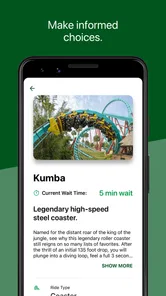
Its usefulness depends on the information being current, so I would treat wait times as guidance rather than a promise. A short displayed wait can change while you walk across the park, and the best choice is not always the ride with the lowest number. Distance, the interests of the people in your group, and any plans you have already made all matter. The practical win is having another point of reference, not a guarantee of a queue-free day.
Busy-day habits that help
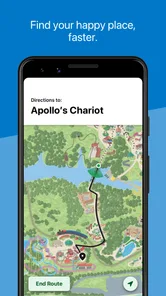
On a full park day, I would check the map before setting off and use it to group nearby stops. That avoids the tiring pattern of crossing the park repeatedly because someone spots the next attraction only after the group has walked away. For families, it also gives everyone a shared reference point: agree on a general direction before moving, then use the map to regroup if the plan changes.
There is a trade-off to using a phone as your guide. Rechecking it constantly can interrupt the visit, and a screen is less convenient when you are carrying food, helping a child, or trying to keep the group together. I would make a quick plan at the start of each stretch, check again when circumstances change, and keep paper or a meeting-point plan in mind as a backup. The app should reduce small decisions, not become another task to manage.
Simplifying Your Adventure
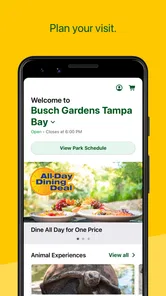
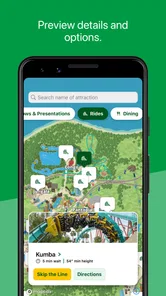
First things first, the app is a breeze to use. I downloaded it right before my trip, and within minutes, I felt like I had a solid game plan for the day. The app's interface is clean and intuitive, making it super easy to navigate. Right from the get-go, I could check out the park map, which was a lifesaver. No more wandering around aimlessly or trying to decipher paper maps that inevitably end up wet or torn.
Real-Time Updates
One of the coolest features is the real-time updates. I was able to see wait times for rides, which meant less standing in line and more time enjoying the attractions. Plus, I could schedule my day around the shows I didn’t want to miss. The app sends notifications about showtimes and special events, so you're always in the loop, which is especially handy if you’re traveling with kids who want to see everything.
More From Our News Desk

 Weather - By Xiaomi
Weather by Xiaomi Review: Clear at a Glance, Less Clear Up Close
Xiaomi’s weather app makes everyday forecasts quick to scan, but its calm surface can leave useful details and recovery paths harder to find than they should be.

 X
XX Under Pressure: Can It Recover When Posting Goes Wrong?
A resilience-focused review of X, examining setup, mistaken posts, interruptions, weak connections, and the gaps that matter when recovery needs to be dependable.

 Clash of Clans
Clash of Clans Is Won Between the Battles
Its raids are quick; its community is a long-term project of coordination, teaching, rivalry, and shared responsibility—with all the friction that entails.

 Android Auto
Android Auto Makes the Case for Quieter Car Software
The car interface is no longer judged by how much it can do, but by how quietly it helps. Android Auto shows what drivers now expect—and what still gets in the way.

 MobiOffice: Word, Sheets, PDF
MobiOffice: Transforming Mobile Productivity with Seamless Integration
MobiOffice: Word, Sheets, PDF is redefining mobile productivity with a surprising blend of functionality and innovation.

 EA SPORTS FC Soccer Mobile 26
EA SPORTS FC™ Mobile Soccer: Redefining Mobile Sports Gaming
Dive into EA SPORTS FC™ Mobile Soccer, where immersive gameplay and strategic depth transform mobile sports gaming.
Latest News



Dining and Shopping Made Easy
Alright, let's talk about food because, seriously, who doesn’t love a good meal at a theme park? The app has a comprehensive list of dining options, complete with menus and prices. I could even filter by dietary preferences, which was fantastic for my vegan friend who came along. When hunger struck, it was easy to find a spot that catered to everyone’s tastes. And for the shopaholics out there, the app also lists all the shopping outlets, so you can easily find that perfect souvenir to remember your adventure.
Choosing it over a general map
For finding a road, hotel, or place to eat beyond the park, a general maps app is the better tool; this one is useful when the question is specifically what to do inside Busch Gardens. I would use the two together rather than expect either to cover everything. A practical trick is to use the park map for the next nearby stop, then switch back to a general map only when planning the journey to or from the park. That keeps each app focused on the job it handles best.
It is especially suited to visitors who want to make spontaneous choices without losing track of the day, including families balancing different interests and people visiting for the first time. If you already know the park well and prefer to wander without checking a screen, you may get less from it. Likewise, someone researching a wider trip will still need other travel tools. The app is a companion for the visit, not a replacement for every part of travel planning.
Reliability, recovery, and device fit
For reliability, I would keep the app as one source of information rather than the only plan for the group. If a screen takes time to load or you lose your place while switching between tasks, returning to the map and checking your next destination is a simple way to reset. I would also make sure the phone has enough charge for the rest of the day; relying on any park guide heavily can mean more screen use than expected, especially when you keep checking directions and waits.
The app has an average rating of 4.3 from around 7,000 ratings, with more than 2,000 written reviews, and it has been installed over a million times. It is rated for Everyone, was released in 2011, and its current version is 7.1.0.113681, requiring Android 9 or later. Those details make it a straightforward option for many compatible Android phones, though an older device may not meet that operating-system requirement. I would check compatibility before the visit rather than discover the constraint at the entrance.
Exclusive Offers
Just when I thought it couldn’t get better, I stumbled upon some exclusive offers and discounts right there in the app. Who doesn’t love saving a few bucks while having a blast? From time to time, the app features deals on food, merchandise, and even future tickets, making it a valuable tool for anyone looking to maximize their experience without breaking the bank.
Who will get the most from it?
One realistic use is arriving with a loose plan rather than a rigid itinerary: check the map, choose a nearby attraction, then reassess after the group has had a chance to eat or rest. If a ride’s wait looks unattractive, the map can help you pick a different nearby activity instead of crossing the park on guesswork. For a family with different priorities, that kind of small adjustment can be more useful than trying to schedule every hour in advance.
I would still avoid treating offers, schedules, or wait information as the sole basis for a decision. Plans can shift during a busy day, so check the current screen before setting off and keep a flexible alternative. That is a useful habit whether you are visiting with children, meeting friends, or going solo: decide what matters most, then use the app to support the choice rather than letting it dictate the whole day.
Planning around a group
A useful way to share the app’s benefits is to let one person handle navigation while the group agrees on a simple next step. If everyone is checking separate screens, the visit can become a string of negotiations instead of a day out. I would pick a meeting point before splitting up, especially with older children or friends who may browse shops at different speeds. The map can help the group reconnect, but a named landmark and a clear time to meet are easier to remember than a sequence of phone instructions.
For a first visit, I would also decide which experiences are priorities before entering the busiest part of the day. The app can help you respond when queues or timing alter the plan, but it cannot decide what your group will enjoy. A parent may value an easy route to a meal, while a thrill-seeker may be willing to walk farther for a particular ride. Agreeing on one must-do each gives the map a practical job: helping everyone fit their priorities into the day without pretending every stop will work out perfectly.
When a simpler plan is better
There are visitors who may not need to install a dedicated park app. If you are making a brief visit, already know your route, or would rather explore without checking a phone, a paper map and staff guidance may be enough. The same goes for someone whose main questions concern transport, lodging, or nearby attractions; a general travel map is better suited to those decisions. I see this app as useful when park-specific information can change the next move, not as an essential screen to keep open from morning to closing.
Another sensible trade-off is to avoid keeping the display on while walking. Check the route while stationary, remember the next landmark, and put the phone away until you need another decision. That is kinder to your attention and helps you stay aware of the people around you. If your battery is already low, save checks for moments when they matter—such as choosing between nearby options—rather than repeatedly reopening the map without a plan.
When choosing between this app and a general map, I would not frame it as one replacing the other. A general map is stronger for getting to the park and understanding the surrounding area; the park app is the more relevant companion once your questions are about locations and activities inside the grounds. Keeping both available gives you a cleaner workflow than trying to force one tool to answer every travel question. It is a small distinction, but it prevents the common frustration of using the wrong map for the task.
In a nutshell, the Busch Gardens app is a must-have for anyone visiting the park. It takes the stress out of planning and lets you focus on what really matters—having fun! So, whether you're a thrill-seeker, a food lover, or someone who just wants to take in the sights, this app is your ticket to a smooth and enjoyable day at the park. I can’t wait to use it again on my next visit!
Busch Gardens Frequently Asked Questions
What devices can run the Busch Gardens app?
Busch Gardens is a travel and local app available for Android and iOS. On Android, it requires version 9 or later, so it is worth checking your device’s operating system before downloading. The app is free to install, and its main purpose is to help visitors plan and navigate a Busch Gardens park visit.
Who makes the Busch Gardens app, and is it intended for families?
The app is published by SeaWorld Parks & Entertainment Inc. and is rated Everyone, making it suitable for a broad audience. Families can use its park-focused information to help organize a visit, while individual guests can check maps, wait times, and park hours. Its usefulness is mainly tied to planning and managing time at Busch Gardens.
What is Busch Gardens and what can I do with the app?
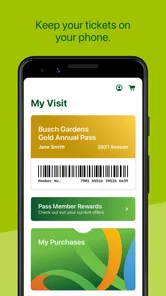
Busch Gardens is a theme park app designed to enhance your visit to the park. The app provides you with interactive maps, ride wait times, show schedules, and special event information. It's an essential tool for planning your day efficiently, ensuring you don't miss out on any attractions. Plus, the app often offers exclusive deals on tickets and merchandise.
Is the Busch Gardens app free to download and use?
Yes, the Busch Gardens app is free to download and use on both Android and iOS devices. While the app itself doesn’t require any payment, note that certain features, like purchasing tickets or in-app purchases for exclusive content, will require payment. Always check for in-app purchase options if you're concerned about costs.
Does the Busch Gardens app work offline?
The Busch Gardens app requires an internet connection to access all its features fully. However, you can still use some features offline, like viewing maps or saved tickets. For the best experience, especially to get real-time updates on ride wait times and show schedules, ensure you have a stable internet connection while in the park.
Pros
- Exciting roller coasters
- Beautiful animal exhibits
- Great for families
- Variety of dining options
- Seasonal events
Cons
- Expensive entry tickets
- Long waiting lines
- Limited shade areas
- High food prices
- Crowds during peak times












