Saturn Calendar
- 767.00
- 4.3
- Installs
- 500.00K
- Price
- Free

Screenshots
Analysis by Reviewed
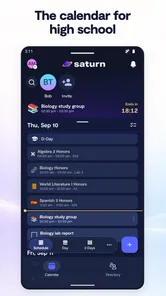
I started using Saturn Calendar because I wanted more than a place to write down appointments. My real question was whether a calendar could make everyday planning feel more connected to the people and activities around me, rather than turning every day into a list of isolated blocks. After spending time with this productivity app, I see its appeal clearly: it is designed for schedules, events, and friends, with a social angle that makes it feel different from a traditional personal planner.
That difference matters. A standard calendar is usually excellent at recording commitments, but it can feel passive. You add an event, receive a reminder, and move on. Saturn Calendar is more interesting when your week depends on other people, shared plans, changing routines, or a busy school and social life. At the same time, I would not recommend it automatically to everyone. The best choice depends on whether you want a social planning experience or simply the fastest possible way to manage appointments.
What I looked for when deciding whether it fits
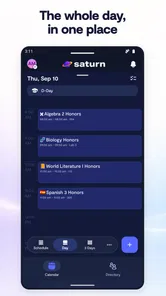
My first test was simple: could I understand the week quickly? A useful calendar should answer practical questions without making me dig through menus. What is happening today? Which plans involve other people? Where are the gaps? What needs attention soon? Saturn Calendar makes the most sense when those questions are connected, because its identity is built around both scheduling and relationships.
I also paid attention to the effort required to keep a calendar accurate. A planning tool can look attractive at first and still become frustrating if every small change requires too much editing. For me, the important trade-off is between a more expressive, people-focused calendar and a minimalist utility that stays out of the way. Saturn Calendar leans toward the first option.
Another decision point is audience. This is an app for general audiences, with an Everyone content rating, so it is approachable for a broad range of users. I can imagine it being useful for students, friends organizing plans, families coordinating activities, and anyone whose schedule is closely tied to a group. Someone managing complex professional appointments may judge it by different standards, especially if they depend on advanced business-calendar workflows.
The app is free, which removes the biggest barrier to trying it. That does not mean switching has no cost, though. The real cost is time: learning how its calendar view works, deciding how much of your social planning to move into it, and maintaining a second system if you still need another calendar for work or formal appointments.
A practical test: the busy weekday
Imagine a weekday with classes or work, a group activity, a meal with friends, and a last-minute change. In a basic calendar, the challenge is not adding the events; it is keeping the whole picture understandable when plans overlap or depend on different people. Saturn Calendar is at its strongest in that kind of situation because the schedule is not treated as a private checklist alone.
More From Our News Desk

Weather by Xiaomi Review: Clear at a Glance, Less Clear Up Close

X Under Pressure: Can It Recover When Posting Goes Wrong?

Clash of Clans Is Won Between the Battles

Android Auto Makes the Case for Quieter Car Software

MobiOffice: Transforming Mobile Productivity with Seamless Integration

EA SPORTS FC™ Mobile Soccer: Redefining Mobile Sports Gaming
I would use it by checking the day before making new plans, then looking at the surrounding week rather than only the next appointment. That small habit helps reveal whether a free-looking evening is actually the only realistic time for rest. The social context can also make planning feel less abstract: an event is connected to the people and plans that give it meaning.
One useful insight is that a calendar like this can help with decision-making before an event is created. Instead of accepting every invitation immediately, I can look at the shape of the week and notice when several commitments are already clustered together. That is more valuable than simply receiving another reminder after the week has become overloaded.
Where Saturn Calendar feels different
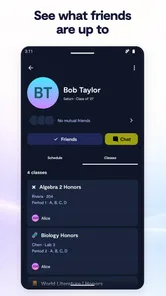
The strongest part of Saturn Calendar is its combination of personal scheduling and social awareness. Many calendar apps are built around appointments first and people second. Here, friends are part of the product’s central idea. That makes the app feel more natural for plans that are created together rather than merely announced to others.
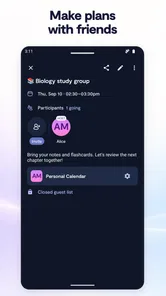
This is especially helpful when your schedule changes through conversation. A group plan may begin as a vague idea, become a confirmed event, and later move to another time. In a conventional calendar, those stages often live in separate places: messages, notes, and finally an event entry. A social calendar can reduce that fragmentation by making the plan part of the same environment where you view your schedule.
I also like the possibility of using the calendar as a boundary-setting tool. If friends can understand when I am occupied, I do not need to explain my availability repeatedly. That can make coordination easier, but it also requires care. I would review what I share and with whom, because convenience should not replace control over personal scheduling information.
A second non-obvious strength is that the app can support availability-based planning rather than invitation-based planning. The distinction is important. An invitation asks someone to react to a fixed plan. Availability helps a group find a time before the plan becomes fixed. For friends who regularly struggle to coordinate, that change in workflow can save more effort than another reminder notification.
The app also has a useful psychological advantage: it encourages me to see time as something shared. That sounds minor, but it changes how I plan. Instead of filling every open space with individual tasks, I am more likely to notice recurring social commitments, recovery time, and the practical distance between events. The result is not automatically a better schedule, but it can produce a more realistic one.
Who is most likely to enjoy it
I think Saturn Calendar is a strong candidate for people whose daily life is organized around groups. Students coordinating classes and activities, friends arranging meetups, and families trying to keep several routines visible can all understand the appeal quickly. It is also a good fit for someone who finds a standard calendar too solitary or too formal.
It may suit users who want to move away from scattered planning conversations. If your current system is a mixture of chat messages, memory, screenshots, and a personal calendar, bringing more of that planning into one calendar-centered experience could make the week easier to follow.
The app is also approachable for someone who does not want to pay before deciding whether a new planning habit will stick. Since it is free, I would treat the first period as a trial of the workflow rather than a commitment to replace every other tool immediately.
Where a conventional calendar may still be better
Saturn Calendar is not automatically the best choice for a user who wants a quiet, private, highly utilitarian planner. If your needs are limited to adding appointments, checking dates, and receiving reminders, a conventional calendar may feel faster because it has fewer social considerations. The extra context that makes Saturn Calendar distinctive may feel unnecessary when your schedule is mostly individual.
I would also hesitate to make it the only planning tool for a demanding professional schedule without testing it against your actual routine. Work calendars often involve formal invitations, multiple calendars, recurring obligations, and detailed coordination. If those functions are central to your day, a dedicated professional calendar may remain the better primary system, while Saturn Calendar handles personal and social planning.
There is another trade-off: social visibility can improve coordination, but it can also create pressure. Some people do not want friends to interpret their calendar or expect availability based on what appears open. For them, a private calendar with selective sharing may be more comfortable. Saturn Calendar makes the most sense when its social layer feels helpful rather than intrusive.
A third insight is that the app should not be judged only by how quickly it creates an event. Its real value appears in the coordination cost it can remove over an entire week. If you rarely arrange plans with other people, that benefit may be too small to matter. If you repeatedly ask the same group when everyone is free, the social structure becomes much more meaningful.
Switching without making your schedule worse
I would not begin by moving every appointment into Saturn Calendar. That creates unnecessary confusion and makes it difficult to tell whether the app itself works for you. I would start with one part of life, such as friend plans or a recurring group activity, and keep the existing calendar for everything else during the trial.
That approach answers an important practical question: can Saturn Calendar improve coordination without forcing me to rebuild my entire routine? It also exposes friction early. If I repeatedly forget to check the app, duplicate events, or return to messages for the same information, I learn that the problem is not solved simply by installing another calendar.
My suggested workflow would be to establish a single source of truth for each type of commitment. Personal appointments can remain in the calendar you already trust, while shared plans live in Saturn Calendar. After a week or two, I would review whether that division feels clear or whether it creates too many places to check.
When moving an existing routine, I would prioritize recurring events and plans involving several people. Those are the entries most likely to benefit from a social calendar. One-off private reminders are less important because nearly any basic calendar can handle them well.
The current version is 3.41.01.1586, and the app requires Android 10 or later. That makes the operating-system requirement relevant before installing: users on older Android devices should check compatibility first. For supported devices, the low price of entry makes experimentation straightforward, but I would still avoid treating installation as a guarantee that every existing calendar habit will transfer smoothly.
How established adoption affects my confidence
Saturn Technologies Inc. is the developer behind the app, which has reached over 500 thousand installs and holds an average rating of 4.3 from around 4.5 thousand ratings. Those figures suggest that it has found a real audience rather than remaining a niche experiment. I treat that as useful context, not as a substitute for testing the workflow myself.
The app was released on April 24, 2024, so I see it as a relatively young product compared with long-established calendar tools. That can be an advantage when the experience is designed around modern social habits, but it also means I would pay attention to how well it fits mature, complicated scheduling routines. A newer approach can be refreshing without being universal.
The store summary, “Schedules, Events, & Friends,” describes the product’s focus accurately without explaining the important choice it asks users to make: do you want your calendar to be a social planning space, or do you want it to remain a private utility? That is the question I would put ahead of ratings, install counts, or visual appeal.
My recommendation for different types of users
I recommend Saturn Calendar to someone who regularly plans with friends and wants those plans to sit closer to the rest of their schedule. I would also recommend it to students and socially active users who need a clearer view of shared commitments, especially when ordinary messaging has become the unofficial calendar.
I would recommend trying it gradually rather than replacing every calendar immediately. Start with shared events, observe whether coordination becomes easier, and keep the system only if it reduces repeated questions and missed context. The free price makes that cautious approach practical.
I would skip it as a primary calendar if your priority is a purely private, minimal interface or a heavily professional scheduling workflow. In those cases, a conventional personal calendar or a business-focused alternative may be a better center of gravity. Saturn Calendar can still be useful as a companion, but its social emphasis should not be treated as an advantage when you do not want that kind of interaction.
For me, the final judgment is positive because the app solves a specific problem rather than trying to be everything to everyone. It makes the most sense when time is shared, plans change through groups, and the usual separation between calendar and conversation is causing friction. If your week is shaped by other people, Saturn Calendar is worth trying; if your calendar is mainly a private list of appointments, choose the simpler tool that matches that reality.
That is why I see Saturn Calendar as a decision rather than an automatic upgrade. Its best feature is not merely recording an event. It is helping me understand how plans, people, and available time fit together. When that is the problem I am trying to solve, the app feels purposeful. When it is not, its social direction may be more involvement than I need.
Saturn Calendar Frequently Asked Questions
Is Saturn Calendar available for my device?
Saturn Calendar is a productivity app for Android and iOS, with a minimum operating-system requirement of version 10. Check your device’s operating-system version before downloading, and choose the official app-store listing for your platform. The app is developed by Saturn Technologies Inc. and is intended for a general audience, so its age rating is Everyone.
What is Saturn Calendar, and what can I use it for?
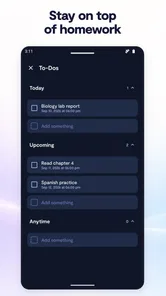
Saturn Calendar is a digital calendar and planning app designed to help users organize events, classes, tasks, reminders, and personal commitments in one place. It is particularly useful for students and people managing busy schedules, as it can provide a clearer view of upcoming activities. Before downloading, check the current feature list because available tools may vary between Android and iOS versions.
Is Saturn Calendar suitable for students and school schedules?
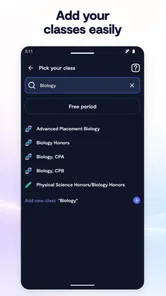
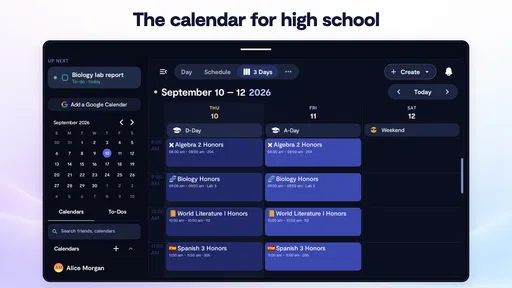
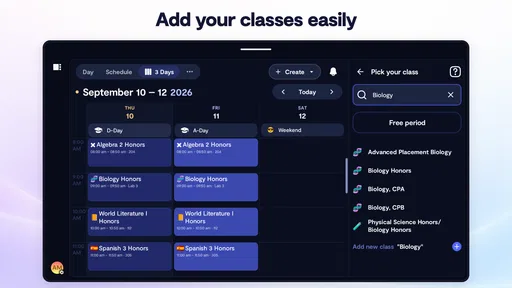
Yes, Saturn Calendar is mainly appealing to students who need to track classes, assignments, exams, extracurricular activities, and social plans. Its calendar-focused layout can make recurring school events easier to follow than a basic notes app. However, the experience depends on how much information you enter and whether your school or institution is supported. Verify compatibility and account requirements before relying on it for important academic deadlines.
Does Saturn Calendar require an account or internet connection?
Saturn Calendar may require users to create or sign in to an account so schedules and calendar information can be stored and synchronized across devices. Some parts of the app may work with limited connectivity, but features involving synchronization, shared schedules, updates, or online services generally need internet access. Review the app’s permissions and privacy information during setup to understand what data is collected and how it is used.
Can I customize events, reminders, and calendar views in Saturn Calendar?
The app is designed to make schedule management more flexible by allowing users to add events and organize activities according to their needs. Depending on the version, customization may include colors, categories, recurring events, reminders, and different calendar views. It is worth testing these options after installation, since some advanced tools may be limited by device, operating system, account type, or future app updates.
Pros
- Clean planetary design makes dates and schedules easy to scan.
- Useful calendar views help organize events at a glance.
- Supports recurring events for regular tasks and appointments.
- Simple interface is approachable for users new to digital calendars.
- Can help separate personal
- work
- and other scheduling needs.
Cons
- Some advanced planning tools may be less complete than in major calendar apps.
- Customization options for colors and layouts may feel limited.
- Users may need another app for detailed task or project management.
- Calendar data and syncing can depend on proper account permissions.
- The space-themed design may not suit users who prefer a traditional interface.











