

Sanford Health
- 420.00
- 4.1
- Installs
- 100.00K
- Price
- Free

Screenshots
Analysis by Reviewed
When I use a health app, I want it to reduce small bits of friction rather than make me manage another complicated digital account. Sanford Health takes that practical route. Developed by Sanford Health, it is a free medical app aimed at people who want a single place to begin handling everyday health needs. My overall impression is that its value depends less on entertainment or clever extras and more on whether Sanford Health is part of your normal care routine.
The app is available to everyone in its age-rating category, and it has built a respectable audience: more than one hundred thousand installs, with an average score of 4.1 from roughly one thousand four hundred ratings. Those figures suggest a useful, established service, but they do not make it a universal replacement for a doctor, a pharmacy, or an emergency service. I would treat it as a convenience layer around healthcare, not as a medical authority in your pocket.
What Sanford Health is really useful for
The first thing I noticed about this kind of app is that the benefit comes from bringing health-related tasks closer together. Instead of searching the web for general information, opening a browser to find a health organization, and then trying to remember which page matters, I can start with a service connected to Sanford Health. That makes the app more relevant for existing patients than for someone looking for a general wellness tracker.
The store summary describes it as covering all your health needs, but I would interpret that carefully. A broad health app can be a useful front door, while the actual value still depends on the services available through the Sanford Health system and on the user’s relationship with that organization. If you already receive care there, the app has a clearer purpose. If you do not, its usefulness may be more limited than the broad wording first suggests.
That distinction is important because people often expect a medical app to work like a universal health dashboard. Sanford Health is better understood as an organization-focused tool. It is not the same thing as a standalone symptom checker, a fitness tracker, a medication reminder, or a general emergency guide. Those alternatives may be better for specific tasks, while this app makes more sense when you want to interact with Sanford Health digitally.
Free access changes the decision
There is no purchase price to weigh here: Sanford Health is free to use. That makes trying it relatively straightforward, especially if you already use Sanford Health services. You are not deciding whether a subscription will pay for itself, and you are not buying a package of premium tools with a fixed promise of advanced tracking. The practical question is whether the app saves enough time in your own healthcare routine.
Free does not automatically mean valuable for every person. If you rarely interact with Sanford Health, installing another medical app may simply add clutter. I would not download it because it is free alone. I would download it when I have a clear reason, such as wanting easier access to Sanford Health-related tasks or wanting to keep that organization’s digital service close at hand.
More From Our News Desk

 Instagram
Instagram’s Power Comes From Its Place in Your Phone
A close look at how Instagram turns Meta’s reach, recommendation systems and everyday camera habits into durable platform power—and what that costs users.

 Gmail
GmailGmail in a Busy Inbox: Who Benefits Most?
From first account to crowded workday, Gmail earns its place through dependable search and flexible sorting—but its best fit depends on how much inbox maintenance you can tolerate.

 Prime Video
Switching to Prime Video: What Changes in Your Viewing Routine
Prime Video can make a compelling second home for streaming, but switching means learning a different catalog, rental layer, and route from browsing to playback.

 Universal TV Remote Control
Universal TV Remote Control Works Best as a Reliable Backup
A phone remote earns its place through quick setup and reliable habits. Here is how to get more from Universal TV Remote Control—and where its limits show.

 Weather - By Xiaomi
Weather by Xiaomi Review: Clear at a Glance, Less Clear Up Close
Xiaomi’s weather app makes everyday forecasts quick to scan, but its calm surface can leave useful details and recovery paths harder to find than they should be.

 X
XX Under Pressure: Can It Recover When Posting Goes Wrong?
A resilience-focused review of X, examining setup, mistaken posts, interruptions, weak connections, and the gaps that matter when recovery needs to be dependable.
Latest News



That is also why I would avoid comparing it with paid health subscriptions as though they offer the same product. A paid fitness platform may justify its cost with coaching, exercise plans, or detailed activity analysis. Sanford Health is offering a different kind of value: access and convenience around a healthcare provider. Since there is no charge to compare, the trade-off is mostly about relevance, not price.
How it fits into a normal day
Imagine that I have a routine appointment coming up and I am away from my computer. I would rather open the Sanford Health app than search through old messages, guess which webpage is current, or call a general line immediately. In that situation, the app’s value is not dramatic; it is the few minutes and small amount of uncertainty it can remove from a routine task.
Another realistic situation is managing several healthcare errands in the same week. I might need to think about an appointment, a question for my care team, and information connected with my Sanford Health relationship. A provider-specific app can make those tasks feel like parts of one workflow instead of unrelated searches. That is where I see the strongest everyday case for it.
I would still keep a paper or digital backup for important information. Medical access should not depend on one phone, one login, or one app behaving perfectly at the exact moment I need it. The app can be the convenient first stop, but it should not be the only way I know how to contact a clinic or obtain urgent help.
Where the value is strongest—and where it stops
I find Sanford Health most valuable when it shortens the distance between a patient and the organization already involved in their care. That makes it worth judging by how naturally it fits into ordinary health errands, rather than by how many unrelated tools it might replace. The same focus sets a boundary, though, and that boundary matters when deciding whether a provider-specific app belongs in your daily routine.
A better front door for Sanford Health patients
The clearest strength is focus. Because Sanford Health is made by Sanford Health, it has a natural advantage over a generic medical app when the task involves that specific organization. A general healthcare app may provide broad information, but it cannot be expected to understand the same provider relationship. For a Sanford Health patient, that focus can make the app feel more direct and less like a collection of unrelated health tools.
That focus also gives me a useful way to judge whether it belongs on my phone. I would ask: “Do I expect to use Sanford Health services often enough to benefit from a dedicated digital entry point?” If the answer is yes, the free installation is easy to justify. If the answer is no, the app may not add much beyond a browser bookmark or a phone contact.
One non-obvious advantage of using a provider’s own app is continuity of context. When I move between generic health websites, I have to translate general advice into my own care situation. A provider-centered app starts closer to that relationship. It does not remove the need for professional judgment, but it can reduce the distance between a healthcare organization and the person using its services.
Do not confuse access with medical advice
This is a medical app, but that label should not encourage overconfidence. I would not use it to diagnose chest pain, breathing difficulty, severe allergic reactions, or any other emergency symptom. In those situations, the right response is urgent medical help, not browsing through an app. Even for less urgent concerns, a digital tool should support communication with professionals rather than replace it.
The same caution applies to health information. A short explanation can be useful for preparing questions, but it cannot account for a person’s full history, current medicines, allergies, test results, or changing symptoms. I find provider-connected tools most helpful when they help me navigate care, not when I expect them to make a clinical decision for me.
This is one of the main trade-offs compared with a symptom-checking service. A symptom checker may feel more immediately useful when I have a vague complaint and want possible explanations. Sanford Health is a better choice when my goal is to connect with Sanford Health or organize part of that care journey. Choosing between them depends on the task, not on which app sounds broader.
Small habits that make it more useful
I would install the app before I urgently need it, not during a stressful health problem. That gives me time to sign in, understand where the important sections are, and check that my basic access works. This is a simple step, but it is one of the most practical ways to avoid turning a routine digital task into a last-minute obstacle.
I would also use it as a preparation tool. Before contacting a healthcare provider, I can write down the main question I need answered, collect relevant dates, and decide whether the issue is routine or urgent. The app may help me reach the right part of Sanford Health, but the quality of that interaction still depends on how clearly I explain what I need.
A second useful habit is separating convenience from record keeping. I would not assume that every detail I care about belongs only inside the app. For important appointments, instructions, or medication changes, I would keep my own notes and follow the directions given by qualified professionals. That approach makes the app helpful without making it a single point of failure.
Finally, I would avoid installing it simply to monitor general wellness if that is my main goal. A dedicated fitness or habit app may offer a more suitable experience for exercise, sleep routines, or daily activity. Sanford Health’s advantage is its connection to Sanford Health, so using it outside that purpose may produce less value than choosing a tool designed for the specific habit.
Compatibility and maintenance matter
The current version is 3.20.0, and the minimum operating-system requirement is version 11. That is worth checking before installation, particularly if I use an older phone or keep an older device as a backup. A free app is not genuinely convenient if the device cannot run it or if I discover the compatibility issue when I am already trying to handle a healthcare task.
I also see the version number as a reminder to keep the app updated when possible. Medical and account-related apps need to remain usable as operating systems change. Updates can sometimes bring interface changes that require a short adjustment period, but staying on an old release can create its own friction. I would update it when my phone supports the current release and then take a moment to confirm that I can still find the functions I use most.
The age rating of Everyone makes the app broadly approachable from a content-classification perspective. That does not mean every healthcare situation is appropriate for independent use by a child. A parent or guardian should still guide younger users through medical decisions, account access, and communication with healthcare professionals. The rating describes general suitability, not clinical independence.
Who should install it?
I would recommend Sanford Health first to people who already receive care through Sanford Health or expect to use its services regularly. For them, a dedicated free app can be a sensible convenience, especially when the alternative is repeatedly searching for the same organization online. Patients who prefer handling routine tasks from a phone are the most likely to notice its value.
It may also suit caregivers who help a family member stay organized, provided they follow the appropriate access and privacy arrangements. A caregiver’s needs are different from a patient’s: clarity, preparation, and reliable communication matter more than having a large collection of wellness features. I would use the app as one part of a shared routine, while keeping important instructions visible in a separate, agreed-upon place.
I would be more cautious if I were looking for a universal health companion. Someone who wants calorie tracking, workout plans, sleep analysis, or broad medication reminders may be happier with specialized apps. Someone seeking immediate emergency guidance should use emergency services or established urgent-care channels instead. Someone without a Sanford Health connection should consider whether a general provider-neutral option would be more relevant.
There is also a privacy and attention trade-off that applies to any healthcare app. I would only use it on a device I control, protect the phone with a lock, and avoid leaving sensitive screens open in public. I would not treat the convenience of digital access as a reason to share account access casually. These are not reasons to reject the app; they are sensible boundaries for using any medical service on a phone.
My final recommendation
After looking at Sanford Health as a real everyday tool rather than a general promise, I see it as a focused, worthwhile download for the right audience. Its free access removes the financial barrier, its provider-specific identity gives it a clear role, and its established presence suggests that it is more than a temporary experiment. The 4.1 average from around one thousand four hundred ratings is encouraging, while still leaving room for individual experiences to vary.
My recommendation is simple: install it if Sanford Health is part of your care, and skip it if you want a general wellness or symptom app. That is not a criticism; it is the central trade-off. The app’s value comes from reducing distance between you and Sanford Health, not from trying to become every kind of health tool at once.
For me, the best way to use it would be as a prepared, convenient access point: set it up before an appointment, learn where routine needs are handled, keep independent notes for important medical information, and never rely on it for emergencies. Used with those expectations, Sanford Health earns a place on the phone of an existing Sanford Health patient. Used without that connection, its free price is not enough by itself to make it a must-have.
Sanford Health Frequently Asked Questions
What devices and operating systems can run the Sanford Health app?
Sanford Health is a medical app for mobile devices, and its current version is 3.20.0. On iOS, it requires iOS 11 or later. Before downloading, check that your device meets this requirement and has enough available storage. Keeping your operating system and the app updated can also help you use its features smoothly.
Who develops the Sanford Health app, and what is it rated for?
The app is developed by Sanford Health and is intended for a general audience. It has an average rating of 4.1 from around 1,400 ratings, with roughly 420 written reviews. These figures offer a broad sense of user feedback, but experiences can vary depending on a person’s device, location, account access, and the healthcare services they need.
What is the Sanford Health app used for?
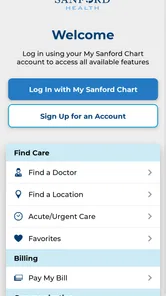
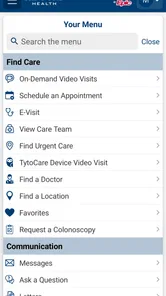
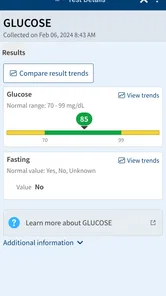
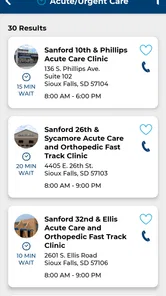
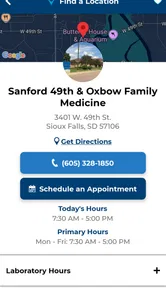
The Sanford Health app is designed to help patients manage many healthcare tasks from a mobile device. Depending on your location and available services, you can use it to view medical information, schedule or request appointments, communicate with care teams, review test results, manage prescriptions, access virtual care, and find Sanford Health locations. Available features may vary by patient status and region.
Do I need a Sanford Health account to use the app?
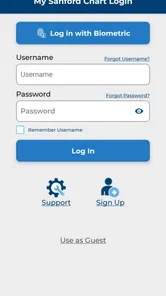
Most personal healthcare features require you to sign in with a Sanford Health or MyChart account. New users may be able to create an account through the app or receive activation instructions from Sanford Health. Identity verification may be required to protect sensitive medical information. Some general tools, such as location searches or health information, may be available without signing in.
Can I schedule appointments and communicate with my doctor through Sanford Health?
The app may allow eligible patients to schedule, request, or manage appointments, although the options depend on the provider, department, appointment type, and local availability. Secure messaging can also be available for communicating with participating care teams. It should not be used for emergencies, and messages may not receive an immediate response, so urgent concerns require appropriate medical attention.
Pros
- Easy access to appointments
- test results
- and medical records.
- Secure messaging helps you contact Sanford Health care teams directly.
- Prescription refill requests can be sent through the app.
- Health information is organized in one convenient mobile location.
- Useful for managing care across Sanford Health clinics and services.
Cons
- Most features require an active Sanford Health patient account.
- Functionality may be limited outside the Sanford Health service area.
- Some appointments may not support online scheduling.
- App performance and available tools can vary by device.
- Notifications and messaging depend on clinic response times.











