San Francisco 49ers
- 3.16K
- 4.3
- Installs
- 1.00M
- Price
- Free

Screenshots
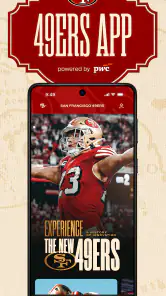
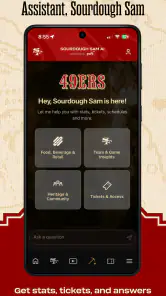
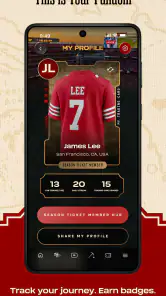
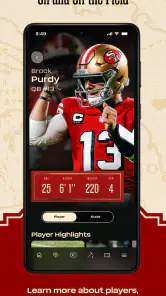
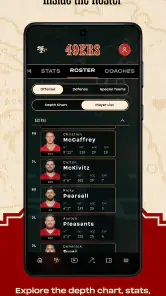
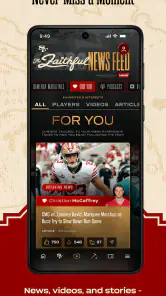
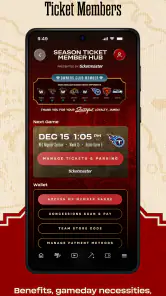
Analysis by Reviewed
I approached San Francisco 49ers as a practical companion for following the team, rather than as a general sports hub. It is the official sports app from SF 49ers, and that matters if your main interest is San Francisco football news, team updates, and a more focused way to keep up with the club. After spending time with it, my impression is that its strongest quality is focus: it is built around one team instead of asking you to sort through every league, club, and competition.
The app is free, rated for Everyone, and has been available since September 17, 2010. Its current version is 8.2.21, and it works on operating systems starting with version 9. That combination makes it accessible to a broad range of users, including people who do not want to replace an older phone simply to follow their team. It has also passed the point where an app feels experimental, with over a million installs and an average rating of 4.3 from around thirteen thousand ratings.
What kind of 49ers experience this app provides
The first thing I noticed is that this is not trying to be a neutral, all-purpose sports application. The identity is unmistakably tied to the San Francisco 49ers. That makes the experience easier to understand: if you want team-centered information, this is a natural place to start; if you want broad coverage across several sports or clubs, you may find a league-wide alternative more efficient.
That narrow focus is useful on an ordinary day. Instead of opening a large sports platform and filtering through scores, headlines, and unrelated notifications, I can use a dedicated team app when my attention is specifically on San Francisco. It feels more like keeping a team channel close at hand than subscribing to an entire sports network.
I would recommend it most to a supporter who wants a direct connection to the club’s official digital presence. It also makes sense for someone who follows the 49ers casually but wants a single place to check during the season. The official status gives it a different role from social media: a social feed may be faster or more conversational, while this app is better suited to a structured team-following routine.
That distinction is important when deciding whether to install it. The app is not automatically the best choice for a person who wants detailed coverage of many NFL teams, historical research, fantasy tools, or a broad comparison of league-wide results. For those needs, a general sports service may offer more depth across the whole competition. The 49ers app earns its place by being specific, not by trying to replace every other sports tool.
Trust starts with the official source
For me, the developer is one of the clearest trust signals here. SF 49ers is not an unrelated publisher borrowing the team name; the app is presented as the official 49ers app. That does not mean every user should install an app without thinking about privacy or notifications, but it does give the product a clear purpose and accountability that unofficial fan applications often lack.
More From Our News Desk

Clash of Clans Is Won Between the Battles

Android Auto Makes the Case for Quieter Car Software

MobiOffice: Transforming Mobile Productivity with Seamless Integration

EA SPORTS FC™ Mobile Soccer: Redefining Mobile Sports Gaming

How Microsoft OneDrive Became a Mobile Productivity Giant

How Google Translate Breaks Language Barriers Effortlessly
That official context is particularly helpful when several apps, social accounts, and websites use similar team branding. I would still check the developer name before installing, especially if searching from a crowded results page. Seeing SF 49ers attached to the listing helps distinguish the intended app from third-party products that may use the same colors or imagery without representing the club.
The long public presence also adds useful context. An app that has been around since 2010 has had time to remain part of the team’s digital ecosystem, while the present version shows that it continues to receive maintenance. I do not treat longevity as proof that an app is perfect, but it makes me more comfortable using it as a regular source than a newly published imitation.
The rating gives a generally positive signal without making the decision for me. An average of 4.3 suggests that many users find value in it, while the presence of roughly three thousand reviews means there is enough public feedback for the score to represent more than a handful of opinions. I would read that as encouragement, not a guarantee: a fan who only wants team news can be satisfied, while another user may expect broader sports functions and judge it differently.
Permissions, data choices, and what I would check
My cautious approach with any sports app is to review the permission prompts and privacy choices as they appear during setup. I do not grant access automatically just because an app is official. I look at each request, decide whether it supports something I genuinely want, and decline anything that does not fit my use. That habit is more reliable than assuming a familiar logo means every permission is necessary.
The most sensitive moment is usually the first launch, when an app may ask about notifications, location, or account-related access. I would treat each prompt separately rather than accepting a bundle of choices in a hurry. Notifications can be useful for a supporter who wants timely team updates, but they can also become distracting if every alert is enabled. Location access deserves an especially deliberate decision; I would only allow it if a visible feature clearly requires it and I actually plan to use that feature.
I also recommend checking the operating system’s app-permission screen after installation. This gives me a second opportunity to review access and revoke anything I no longer want. The exact controls depend on the phone and operating system, so I would use the device settings rather than assume the app’s own menus show every option. This is a small step, but it keeps control in the user’s hands.
Account creation is another point where I prefer to slow down. If the app offers features that require an account, I would first decide whether those features are important enough to justify registering. I would use a password that is not reused elsewhere and keep track of how to sign out or remove the account later. If I only need occasional team information, I would avoid creating an account until the app demonstrates a clear benefit for doing so.
That is also where the app’s official identity should be kept in perspective. Being the official 49ers application helps me understand who stands behind the product, but it does not remove the need to inspect visible choices. I still want to know what notifications I can control, which permissions are optional, and whether I can use the basic experience without sharing more than necessary.
How I would use it during a normal week
My realistic routine would be simple. On a weekday, I might open the app briefly to check the latest team developments, then close it rather than leaving it running as a constant feed. Before a game, I would review the available team information and adjust notifications so that I receive only the alerts I care about. Afterward, I would return for follow-up coverage instead of relying entirely on scattered posts across several platforms.
This workflow works because it gives the app a defined job. I would not use it as my only source for every sports story. I would use it as the 49ers-specific layer in my routine, while a broader sports service handles other teams or competitions. That division keeps the experience focused and prevents the common problem of installing one app for a single purpose, then expecting it to become an entire sports media library.
A useful tip is to decide your notification style before the season becomes busy. If I want the app mainly for occasional checks, I would keep alerts limited or disabled and open it on my own schedule. If I follow games closely, I would enable only the categories that genuinely help me. The best setup depends less on the app than on how much interruption I am willing to accept during work, travel, or family time.
Another practical habit is to use the app as a starting point rather than a final authority for personal planning. If I am arranging my day around a game, I would verify the relevant schedule details close to the event and account for local time settings on my phone. A team app can make following the club easier, but I would still avoid treating any single screen as a substitute for checking the details that affect my own plans.
Where the app gives me control, and where friction can appear
The main form of user agency is the ability to choose how deeply the app enters your routine. I can install it without paying, decide whether notifications are worthwhile, review permissions through the phone, and choose whether an account is justified. Those choices make the experience feel manageable for a casual fan, provided the setup screens explain each request clearly.
At the same time, official team apps can create a subtle pressure to enable more alerts than a user really needs. The excitement of following the 49ers can make every update seem important at first. My advice is to start conservatively. It is easier to add notifications later than to spend a week silencing a stream of alerts that has become annoying.
Storage and battery are also worth considering in a general sense, particularly on an older device. The minimum operating system requirement is version 9, which is friendly to older phones, but compatibility alone does not tell me how comfortable the app will feel on every model. If the experience seems slow, I would first update the phone, close unused apps, and check whether excessive notifications or background activity are contributing to the problem.
I would also keep expectations realistic about the difference between an official app and a complete sports workstation. A dedicated team application may be more convenient for club-focused updates, but a specialist scores app can be faster for comparing many live events. A news reader may offer more independent reporting, and a social platform may provide more fan conversation. Choosing the 49ers app means prioritizing official team focus over maximum breadth.
Who should install it, and who should skip it
I think it is a strong fit for a San Francisco supporter who wants a free, team-specific sports app and prefers an official source over a collection of unofficial feeds. It is also suitable for a casual follower who wants to check in during the season without building a complicated setup. The Everyone age rating makes it approachable for a wide audience, although younger users should still use normal family guidance around accounts, notifications, and device permissions.
I would be more hesitant to recommend it as the only sports app for someone who follows multiple teams or wants a single dashboard for every major game. That person may save time with a broader service. I would also suggest skipping it if you dislike team-branded content or prefer independent analysis as your primary source. The app’s value comes from its connection to the 49ers, so that connection will feel like a benefit to one user and a limitation to another.
There is a similar trade-off for data-conscious users. I would not reject the app simply because it is official, but I would install it with a deliberate privacy routine: inspect prompts, limit permissions, control notifications, and avoid registering unless the account features are useful. Someone unwilling to review those settings may be more comfortable using a browser-based source with fewer app-level controls, depending on their own privacy preferences.
For travelers or fans who follow games while moving between locations, I would pay attention to how the phone handles time zones and connectivity. I would not assume that an app removes the need for planning when reception is poor or schedules change. A quick check before leaving home, plus a backup way to confirm important details, is sensible. That is not a criticism unique to this app; it is simply good practice when a sports routine depends on a mobile connection.
My cautious verdict after using it
San Francisco 49ers succeeds because it knows exactly whose supporter it is serving. The official connection, free access, broad device compatibility, and established user base make it an easy app to consider for fans who want a focused team experience. I like that it can occupy a specific place in my routine without forcing me to replace every other sports source I use.
My recommendation comes with a condition: treat it as a focused companion, not as an all-purpose sports platform. Start with the smallest set of notifications and permissions that makes sense, review account choices before registering, and use the phone’s settings to keep control over access. Those steps do not reduce the app’s usefulness; they make the relationship with it more intentional.
With an average of 4.3 and more than a million installs, it has a solid public track record, but the right choice still depends on what you expect. For a 49ers fan who values official team-centered information, I would install it and configure it carefully. For someone seeking league-wide comparison, independent reporting, or advanced cross-sport tools, I would choose a broader alternative and keep this app only if the team-specific focus adds something worthwhile.
My final view is positive but measured: this is a sensible free companion for following San Francisco, especially when you want a direct and focused team source. Its strongest feature is not endless breadth; it is the convenience of keeping the 49ers at the center. Use that focus deliberately, keep visible choices under your control, and the app has a clear place in a thoughtful sports-following setup.
San Francisco 49ers Frequently Asked Questions
Is the San Francisco 49ers app suitable for younger fans?
The app is rated for Everyone, making its listed age suitability broad. It is a sports app centered on the 49ers, with team news, scores, schedules, and other fan-focused information. Parents can still review the app’s privacy details and consider which permissions or linked services they are comfortable with before a child uses it.
How much space or data should I expect the San Francisco 49ers app to use?
The app needs available storage for its installation and future updates, so it is sensible to check free space on your phone or tablet before downloading. Using features such as video and frequent updates can also consume mobile data. If you have a limited data plan, consider using Wi-Fi for downloads and video viewing where available.
Can I use the San Francisco 49ers app when I am away from San Francisco?
The app is designed for 49ers fans and can be useful wherever you are, with team news, schedules, scores, and other updates gathered in one place. Some services, especially live video or audio, may be subject to location restrictions or subscription requirements. Your access to those features can therefore differ from the general team information available in the app.
What devices and operating systems can run the San Francisco 49ers app?
The San Francisco 49ers app is available for Android and iOS devices, with support depending on your device’s operating system. The current version is 8.2.21, and Android users need version 9 or later. Before downloading, check that your phone or tablet meets the platform requirements and has enough available storage for the app and its updates.
Who develops the San Francisco 49ers app, and is it the official team app?
The app is developed by SF 49ers and is the official 49ers app, making it a team-focused option rather than a general NFL results app. It brings together team-related updates and features in one place for fans. The app is free to download and is rated for Everyone, so its listed age suitability is broad.
Pros
- Official team news
- scores
- and updates in one place.
- Useful for tracking the 49ers during the NFL season.
- Includes team history
- roster details
- and player information.
- A good companion for fans attending games at Levi’s Stadium.
- Helps supporters stay connected with the team community.
Cons
- Some features may require an account or location permissions.
- Content can feel heavily focused on team promotion.
- Live updates may depend on your internet connection.
- Notifications can become frequent during games and breaking news.
- Not ideal for fans seeking broad coverage of other NFL teams.

- Category
- Sports
- Version
- 8.2.21