Samsung Galaxy SmartTag
- 195.00
- 3.2
- Installs
- 50.00K
- Price
- Free
Screenshots
Analysis by Reviewed
I’ve found that a tag is most useful when I build it into a routine rather than waiting until something goes missing. If I attach one to the keys I grab every morning, the app becomes a practical last step before leaving: check where they were last seen, then use the nearby search when I’m back inside. That small habit matters more than a clever feature, because it makes the tag useful before a rushed departure turns into a full-house search.
Who Gets the Most from It
This setup makes the most sense if you already use a compatible Samsung phone and SmartThings, and regularly misplace items that stay within your day-to-day orbit: keys, a bag, or another small possession. It is less compelling if your household uses a mix of phone brands or if you need a tracker that works independently of Samsung’s ecosystem. Before buying, I’d also check that the particular tag you have is supported by the app you plan to use; the name alone isn’t a guarantee that every Samsung tag generation behaves identically.
Build a Routine Around the Tag
For a realistic morning workflow, I’d attach the tag to the item that most often delays me, then make checking its last known location part of getting ready—not a step I remember only once I’m already late. If the keys are at home, I can narrow the search with the map and then try the nearby search. If I take them to work, the location history clue can help me retrace the day. The useful result is not constant surveillance; it is having a better first place to look.
I’d also test the whole routine when I’m calm. Leave the tagged item in a few familiar places, then see whether the app can connect and help you locate it from the distances you actually encounter at home. That simple trial tells you more than assuming a feature will work from its description. It also makes clear whether the tag is attached securely and whether its sound is audible in the rooms where you tend to misplace things.
A More Useful Search Routine
When I can’t find a tagged item at home, I’d first look at its last known location, then try the sound if the tag is close enough to connect. The map is a starting clue, not a live view of every room, so I’d use it to narrow the search rather than assume it pinpoints the object’s current position. If the item may have been left elsewhere, the nearby-device network can help, but its usefulness depends on compatible Galaxy devices being around. That is a helpful handoff, not a guarantee of recovery.
There’s a practical difference between an item lost under a cushion and one left behind across town. At home, a direct connection and sound are the steps I’d try first. Away from home, I’d use the last location as a clue and give the wider network a chance to help. I would not treat either result as proof that the item is still there: a location can guide a search, but the actual recovery still depends on getting to the place and checking carefully.
Choosing Between Tracking Options
Compared with searching manually, a tag can save time on repeat searches for small belongings. Compared with phone-platform trackers designed for a broader mix of users, this route is more natural for someone already invested in Samsung, while less suitable for an iPhone household or anyone wanting a platform-neutral solution. For a lost phone, I’d use the phone’s own find function; for an item that moves with you, a tag is the more relevant tool. Neither replaces sensible habits when an item is valuable or urgent to recover.
More From Our News Desk

Clash of Clans Is Won Between the Battles

Android Auto Makes the Case for Quieter Car Software

MobiOffice: Transforming Mobile Productivity with Seamless Integration

EA SPORTS FC™ Mobile Soccer: Redefining Mobile Sports Gaming

How Microsoft OneDrive Became a Mobile Productivity Giant

How Google Translate Breaks Language Barriers Effortlessly
That ecosystem trade-off is worth considering before adding tags to several belongings. A household using mostly Samsung phones may find the workflow easy to share as part of its existing habits. In a mixed-device home, agreeing on who can check a location and which phone is the reliable one can become more awkward than the search itself. If several people need equal access from different platforms, I’d compare options designed for that mix rather than assuming this companion will bridge the gap.
For something important, I’d use the tag as one layer of help rather than the entire recovery plan. A label with contact details, keeping valuables in a consistent place, and checking pockets before leaving are ordinary measures that still matter. The tag is most convincing for frequent, low-stakes losses—keys, a bag, or a case—where a quick clue saves frustration. It is a less comfortable sole safeguard for an item whose loss would create a serious problem.
There is also a useful two-way detail: the tag can help locate a phone through its button, so I’d keep it attached to something I can reach even when the phone is misplaced. That turns it into a small backup control rather than a one-directional locator. I would not rely on this workflow if the tag and phone are separated beyond their connection range and I need an immediate result; in that moment, the map and wider network are the next steps, with their own limits.
When Another Approach Makes More Sense
I’d skip this setup if I’m buying for someone who does not use a compatible Samsung phone, or if I need a tracker that a household can manage across different phone platforms. I’d also choose a different approach for a phone that goes missing: the phone’s own find service is the direct tool for that job. For belongings that rarely leave one room, a fixed storage spot may solve the problem with less effort than adding another device and app to manage.
There is a further trade-off between a Bluetooth-style nearby search and a network-assisted search. The nearby method is useful when the tag and phone can connect directly; the network route depends on compatible Galaxy devices being in the area. That means a quiet or remote location may be harder to recover from than a busy place. I would not buy on the assumption that every lost item will produce an immediate location update.
Ever had that moment where you just can't seem to find your keys or your favorite bag? Yeah, me too. Enter Samsung Galaxy SmartTag, the tiny device that promises to save us from our forgetful selves. I've given this gadget a whirl, and here’s the lowdown.
First Impressions: Tiny Yet Mighty
So, when I first got my hands on the Samsung Galaxy SmartTag, I was surprised by its compact size. It's small, lightweight, and comes in a sleek design that easily attaches to your keychain or bag. The setup was a breeze. You just need a Samsung phone, and boom, you're connected through the SmartThings app.
Functionality: Does It Really Work?
In one word: Yes! Once you have it linked, you can make it ring loudly if it’s within Bluetooth range, which is about 120 meters. Perfect for those "where on earth did I put that?" moments at home. It even has a feature where you can locate your phone by double pressing the button on the tag. Talk about convenience!
I’d treat that range as a best-case guide rather than a promise for every room or building. Walls, floors, and the way an item is tucked away can all make a direct search less straightforward. If the tag does not respond at once, I’d move through likely spots and retry instead of concluding that the item is gone. The most dependable habit is to use the ring when you’re reasonably close, then switch to the map clue if you are not.
SmartThings Integration
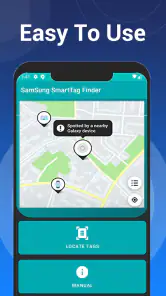
The integration with Samsung’s SmartThings app is where this little gadget truly shines. You can see the last known location of your item on a map, making it easier to backtrack and find it. Plus, if you’re out of range, the SmartThings Find network can help locate it using nearby Galaxy devices. It’s like having a community of helpers!
The handoff between phone and network is the part I’d keep in mind when deciding what to track. Your phone can help directly nearby, while other compatible Galaxy devices may help when the item is farther away. That second route is useful, but it is not the same as a guaranteed live connection to the tag. If I were trying to recover a bag after a commute, I’d note the location clue, think through where I last handled it, and check with the places I visited rather than wait passively for a map to settle the question.
Battery Life: A Pleasant Surprise
One of my initial concerns was how often I’d have to change the battery. Thankfully, the SmartTag boasts a battery life of up to a year, which is impressive. When it does run out, swapping out the battery is straightforward. Just pop it open and replace it with a standard CR2032 battery.
For a tag attached to keys, I’d make battery checking part of a broader occasional check of the item: make sure it is still fastened securely and that the app can still connect. A tracker is easy to forget precisely because it is meant to sit quietly in the background. Finding out that it needs attention during a stressful search is the wrong time, so a quick test now and then is a sensible precaution.
The Samsung Galaxy SmartTag is a game-changer for anyone prone to losing things. It's not just about finding your stuff; it's about peace of mind. Knowing that your items are just a tap away is comforting, especially for those of us who are a bit scatter-brained. Although it’s tailored for Samsung users, the ease of use and reliability make it a worthy addition to any household.
What the App Is—and Isn’t
The app itself is a free Libraries & Demo utility from kahlochSto, rather than the tag hardware. Its store summary describes a way to connect with and find a smart tag, and its short name is Samsung SmartTag. That distinction is worth keeping clear: installing software alone will not give you a physical tracker, and the experience depends on having a compatible tag and phone. I’d treat it as a focused companion, not a replacement for Samsung’s broader SmartThings tools.
That distinction also matters if you are starting from scratch. I would first confirm that I have the physical tag, a compatible phone, and the right app workflow before relying on it for anything important. The software is the interface for finding the accessory; it cannot make an ordinary keyring trackable by itself. If all you need is to locate a phone, the phone’s existing find tools are a more direct starting point than purchasing a separate tag.
Compatibility and Expectations
It is aimed at Everyone and has a 3.2 average from around 1.4 thousand ratings, with over 50 thousand installs. The app first appeared on January 9, 2023, and its current version is 16.0; it requires Android 7.0 or later. Those details make it easy to judge basic fit, but I would still confirm that the specific Samsung tag model and phone you own work with this companion before building a tracking routine around it. That check is especially useful if you are comparing it with Samsung’s official ecosystem apps, since a third-party utility may not provide the same depth or continuity.
The practical question is not only whether the phone meets the minimum system requirement, but whether the whole combination suits the person who will use it. I’d check the exact tag model and test the connection before attaching it to something I cannot afford to lose. The app is free, so trying it with a low-stakes item can be a reasonable way to judge the experience. Still, free installation does not remove the time cost of setting up a routine, keeping the tag attached, and learning which search step works in each situation.
My Verdict After Thinking Through the Workflow
My practical verdict is cautious: this can be worth trying if you want a simple way to connect with a compatible SmartTag and your phone meets the requirements, but I would not assume it offers every SmartThings feature described above. The 195 written reviews and middling average suggest a mixed reception, so I’d start with one everyday item rather than trusting it immediately with something essential. For a wallet or keys, test the connection and recovery steps at home first; if the app feels unreliable, use the official Samsung route or another tracker system that fits your phone platform better.
For me, the best candidate is an item that is easy to misplace, travels through familiar places, and is not the only thing standing between me and a serious loss. Keys are a natural trial because I can test the ring at home and build a simple leaving routine around them. A person who rarely loses belongings, uses an iPhone, or expects every tag to be findable regardless of nearby devices will probably be happier with another solution—or no tracker at all.
Overall, I’d judge this app by a small real-world test rather than by expectations of perfect tracking. Attach a compatible tag, try the nearby search in the places you actually use it, and learn how the last-location clue behaves during an ordinary day. If that flow makes a familiar annoyance easier to handle, it earns its place. If the phone, tag, and app do not work smoothly together, I would switch to the official Samsung option or a tracker built for the devices your household already uses.
Samsung Galaxy SmartTag Frequently Asked Questions
What is the Samsung Galaxy SmartTag app, and what does it do?
Samsung Galaxy SmartTag is an app in the Libraries & Demo category designed to connect with and help find a compatible SmartTag. Its purpose is to let you use the app with a smart tag, making it a companion option for people who want to locate belongings with a tag. The app is free, and its straightforward description makes compatibility with a SmartTag the main point to consider before downloading.
Is the Samsung Galaxy SmartTag app free, and what should I know before downloading it?
The app is free to download, and it is rated for Everyone, so its listed age suitability is broad. It has an average rating of 3.2 from around 1,400 ratings, with about 195 written reviews. Those figures can offer a general sense of other users’ experiences, but the key practical consideration is whether you have a compatible SmartTag and want an app intended to connect with it.
What is the Samsung Galaxy SmartTag and how does it work?
The Samsung Galaxy SmartTag is a compact Bluetooth device that helps you locate your personal items. By attaching it to keys, bags, or other belongings, you can track their location using the SmartThings app on your smartphone. It uses Bluetooth Low Energy (BLE) to communicate with your device, showing the tag's last known location on a map. If you lose an item, you can trigger the tag to emit a sound, helping you find it quickly. The SmartTag also supports Samsung's Galaxy Find Network, enhancing its tracking capabilities even when away from your phone's Bluetooth range.
Is the Samsung Galaxy SmartTag compatible with all smartphones?
The Samsung Galaxy SmartTag is primarily designed to work with Samsung Galaxy smartphones. To use its full range of features, such as the SmartThings app and Galaxy Find Network, you need a Samsung device running Android 8.0 or higher. Although it can connect to other Android devices via Bluetooth, non-Samsung users may experience limited functionality, missing out on some advanced tracking features available to Samsung users.
How long does the battery last on a Samsung Galaxy SmartTag?
The Samsung Galaxy SmartTag is equipped with a replaceable CR2032 battery, which typically lasts for about 300 days, depending on usage. This long battery life means users can rely on the SmartTag for nearly a year without worrying about frequent battery changes. When the battery does run out, it's easy to replace, ensuring continuous tracking of your important items without interruption.
Pros
- Helps track lost items easily
- Integrates with SmartThings app
- Long-lasting battery life
- Compact and portable design
- Compatible with both Android and iOS
Cons
- Limited range without network
- Requires Samsung account
- No GPS tracking capability
- Can be easily misplaced
- Limited third-party integrations
- Category
- Libraries & Demo
- Version
- 16.0











