

Apple tv Remote
- 130.00
- 4.2
- Installs
- 10.00K
- Price
- Free
Screenshots
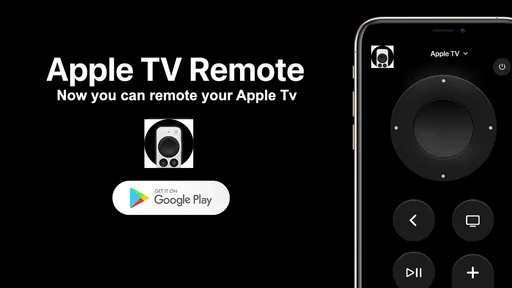
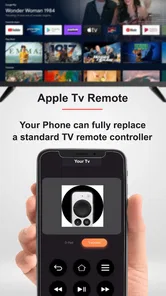
Analysis by Reviewed
I judge a remote app less by how many buttons it can imitate and more by whether it removes small annoyances from an ordinary evening. Apple TV Remote is aimed at a very specific job: using a phone to control Apple TV. That focus can be useful if the physical remote is out of reach, its battery is flat, or you simply prefer tapping on a device already in your hand. It is not a general TV controller, though, so its appeal depends on owning and regularly using Apple TV.
The app is free, which makes trying it an easy decision for someone who already has a compatible Apple TV setup. I would not confuse that with a promise that every possible control option works in every room or with every television: the practical value is in the Apple TV experience, and the rest of the setup matters. It is listed for everyone, and the developer is kahlochSto. Its library-and-demo category is a slightly unusual fit for something people will chiefly treat as a remote, but the basic purpose is clear.
What the free option is worth
There is no purchase price to weigh against the convenience, so I see the main cost as attention: you need to set up the app and keep your phone nearby when you want to use it. For a household that already reaches for an iPhone or iPad while watching, that is a small trade. If you would need to pick up and unlock a phone every time you wanted to pause, a dedicated remote may remain simpler. In other words, free access makes it easy to test, but it does not automatically make the phone the better controller for everyone.
The app has a 4.3 average from 714 ratings, with 10K+ installs. Those figures suggest that people have found a reason to try it, but they do not tell me whether it suits your particular room, habits, or Apple TV setup. I treat that as context rather than a substitute for asking a more useful question: will controlling Apple TV from your phone solve a real inconvenience for you?
Seamless Integration with Your Apple Ecosystem
The Apple TV Remote app is designed to work flawlessly with your Apple TV, iPhone, and iPad. If you're already deep into the Apple ecosystem, you'll appreciate how seamlessly this app integrates into your digital life. You just fire it up, and voila, you're ready to navigate through your favorite shows and movies with a swipe of your finger.
Intuitive Touch Controls
One of the standout features of this app is its intuitive touch controls. Instead of pressing buttons, you simply swipe and tap. It’s like having a mini trackpad right in your hand, making it super easy to scroll through menus, select apps, and even fast forward or rewind your favorite scenes. Trust me, once you get used to this, going back to a traditional remote feels like stepping back in time.
That swipe-based approach has a useful trade-off: it can be quicker than repeated directional presses when browsing a long row, but it may feel less precise if you are accustomed to moving one item at a time. I would use touch navigation for broad movement and tapping for a clear selection, rather than swiping quickly when a menu is crowded. This small adjustment helps avoid overshooting a title and having to retrace your steps.
More From Our News Desk

 Gmail
GmailGmail in a Busy Inbox: Who Benefits Most?
From first account to crowded workday, Gmail earns its place through dependable search and flexible sorting—but its best fit depends on how much inbox maintenance you can tolerate.

 Prime Video
Switching to Prime Video: What Changes in Your Viewing Routine
Prime Video can make a compelling second home for streaming, but switching means learning a different catalog, rental layer, and route from browsing to playback.

 Universal TV Remote Control
Universal TV Remote Control Works Best as a Reliable Backup
A phone remote earns its place through quick setup and reliable habits. Here is how to get more from Universal TV Remote Control—and where its limits show.

 Weather - By Xiaomi
Weather by Xiaomi Review: Clear at a Glance, Less Clear Up Close
Xiaomi’s weather app makes everyday forecasts quick to scan, but its calm surface can leave useful details and recovery paths harder to find than they should be.

 X
XX Under Pressure: Can It Recover When Posting Goes Wrong?
A resilience-focused review of X, examining setup, mistaken posts, interruptions, weak connections, and the gaps that matter when recovery needs to be dependable.

 Clash of Clans
Clash of Clans Is Won Between the Battles
Its raids are quick; its community is a long-term project of coordination, teaching, rivalry, and shared responsibility—with all the friction that entails.
Latest News



Voice Command for Effortless Searching
Another highlight is the voice command feature. We all know typing on a TV screen can be a pain, but with Siri integrated into the app, you can just say what you want to watch. It's not just cool; it's a game-changer. Need to find that obscure indie film or skip to the latest episode of your favorite series? Just ask Siri, and you're good to go.
Voice search is most valuable when you already know what you want and can say its name clearly; it is less helpful when you are still browsing or weighing several options. I would treat it as a shortcut for a known title, not as a replacement for exploring menus. It can also be the wrong choice in a shared room where speaking aloud would disturb someone or where you would rather keep a search private. In those moments, the keyboard or touch controls are more appropriate.
Enhanced User Experience
The app isn’t just functional; it’s designed to enhance your viewing experience. With features like keyboard support for entering text, you can easily log in to apps and search for content without the hassle of toggling through letters on the screen. Plus, the ability to control the volume and even turn your TV on or off right from the app makes it a one-stop solution for all your media needs.
The keyboard is a practical advantage for the occasional task that is especially tedious with a television interface: entering an account detail, correcting a search, or typing a title with an unfamiliar spelling. I would still keep the physical remote available while signing in, since a phone keyboard is convenient for text but does not remove the need to follow the television's prompts carefully. For a household with several people sharing the screen, this can make setup and searching less of a chore without changing how each person chooses what to watch.
A sensible routine for shared viewing
Here is where I think the app makes the most everyday sense. Imagine settling onto the sofa after dinner, only to find that the remote has slipped between cushions. Rather than pause the evening to search the room, you can reach for the phone you already have nearby, open the remote app, and use touch controls to get back to the programme. Later, when someone wants to find a particular film, voice search or the keyboard can spare the group the slow business of moving letter by letter across the screen.
That routine works best when the phone is already close and the person using it is comfortable sharing control. It is less ideal if one person wants to keep their phone put away, if the device needs charging, or if several viewers expect to take turns navigating. A physical remote is easy to pass around without handing over a personal device. I would think of the app as a convenient second way to control Apple TV, not necessarily as the household’s only remote.
Where it differs from other remote choices
Compared with a conventional handheld remote, a phone offers a useful keyboard and a familiar touch surface, while a physical remote is ready to grab and does not require opening an app. Compared with a general-purpose TV remote app, this one is specifically about Apple TV rather than serving as a universal controller for a mix of equipment. That specialisation is a strength when Apple TV is the device you want to control; it is a limitation if you are hoping to manage a television, sound system, and other brands from one place.
That distinction matters before installing it. If your frustration is mainly navigating Apple TV, the focused controls may be enough. If you want one controller for a complicated living-room setup, check whether the controls you rely on are already available through your usual remote or other device-specific tools. I would not replace a dependable physical remote on the assumption that a phone app will cover every function in a mixed setup. The better choice depends on which device you actually need to control most often.
Small habits that make phone control smoother
For a less fussy experience, I would open the app before settling into a film rather than wait until the screen is paused and everyone is waiting. It is also worth keeping the phone within easy reach and deciding who is navigating when watching with other people. Those habits sound simple, but they avoid turning a quick pause or search into a discussion about whose phone should be used. If you often type searches, getting comfortable with the phone keyboard is likely to matter more than learning every touch gesture.
Another useful habit is to choose the control method to match the task: use swipes for moving around menus, taps when you want a deliberate selection, voice for a title you already have in mind, and keyboard input when spelling or account text matters. None of these methods makes every other one unnecessary. Treating them as complementary shortcuts is more realistic than expecting one gesture or voice command to handle every kind of navigation equally well.
Limits worth considering before relying on it
The main limitation is also the app’s defining boundary: it is for controlling Apple TV from a phone, not a universal replacement for every remote in the home. Its usefulness therefore falls sharply if you rarely watch Apple TV, prefer a tactile set of buttons, or do not want your phone involved in viewing. Touch controls can take a little adjustment if you rely on precise button presses, and voice control is not suited to every room or every moment. Those are not reasons to dismiss the app; they are reasons to match it to the way you watch.
I would also avoid making it the only plan for a group viewing session until you know that phone-based navigation fits your household. A phone can be personal, busy, or out of reach, while a dedicated remote is straightforward to hand to another viewer. If the physical remote is missing or inconvenient, the app offers another route; if the phone itself is the object you keep misplacing, it will not solve that problem. The best setup may simply be keeping both options available.
The app is currently at version 101.0 and supports Android 7.0 or later. That gives prospective Android users a concrete compatibility point to check against their device before installing. The listing also shows 127 reviews, which offer another kind of user feedback alongside its rating; I would still focus on whether the core phone-to-Apple-TV use case matches your own rather than treating review totals as proof that every setup will feel identical.
Who is likely to get the most from it
I would recommend giving it a try if you use Apple TV often, keep your phone close while watching, and find text entry on the television frustrating. It also makes sense for someone who wants a backup way to pause, browse, or search when the physical remote is not handy. A person who already uses voice search may appreciate having that option in the same phone-based routine, while a frequent account sign-in or title searcher may care most about the keyboard.
I would skip it, or at least avoid relying on it as the main controller, if you do not own Apple TV, want a universal remote for several brands, or value a physical button for every action. It is also a weaker fit for viewers who keep phones away during films, share one television but are reluctant to hand over a personal device, or prefer not to speak searches aloud. In those cases, a physical remote or a controller designed for the rest of the equipment may be the more comfortable everyday option.
My verdict is that the free Apple TV Remote app has a clear, practical role: it gives Apple TV owners a phone-based way to navigate, search, enter text, and handle viewing controls. Its appeal is strongest as a handy companion, not as a promise to replace every remote in a living room. I would try it if the convenience of using a phone solves a problem you actually have; if you are happy with a physical remote and do not need phone typing or voice search, there is little reason to change your routine.
A straightforward verdict for Apple TV owners
In conclusion, the Apple TV Remote app is a must-have for any Apple TV owner. Not only does it make controlling your TV incredibly easy, but it also enhances your overall viewing experience. Whether you're a tech-savvy user or someone who just wants to make life a little easier, this app has something for everyone. So, if you haven't downloaded it yet, do yourself a favor and give it a try. You won't regret it!
Apple tv Remote Frequently Asked Questions
Does Apple tv Remote work with a non-Apple television or streaming device?
Apple tv Remote is presented as a phone-based way to control Apple TV, so it is intended for use with an Apple TV rather than as a universal remote for televisions and streaming devices from other brands. Before downloading, consider whether your device is actually an Apple TV and whether you can connect it to the same Wi-Fi network as your phone.
What should I check before installing Apple tv Remote on my phone?
Check that your phone meets the app’s minimum operating-system requirement and that you have an Apple TV available to control. The app is listed as a free utility for everyone, and its purpose is straightforward: using your phone to control Apple TV. These basics can help you decide whether it fits your setup before you install it.
What is the Apple TV Remote app and what devices are compatible with it?
The Apple TV Remote app is a convenient tool that allows users to control their Apple TV using an iOS device. It is compatible with iPhone, iPad, and iPod touch devices running iOS 12.2 or later. The app provides a touch-based interface that mirrors the functions of the physical Apple TV Remote, making it easy to navigate through your entertainment options.
Can I use the Apple TV Remote app without an internet connection?
No, the Apple TV Remote app requires a Wi-Fi connection to function. It connects to your Apple TV through the same Wi-Fi network, allowing you to control the device remotely. Without an active Wi-Fi connection, the app will not be able to communicate with your Apple TV, rendering it unusable.
What features does the Apple TV Remote app offer?
The Apple TV Remote app offers a variety of features to enhance your viewing experience. It includes touch navigation, a keyboard for easy text input, and support for Siri voice commands. Users can play, pause, rewind, and fast-forward content with ease. The app also allows for quick access to the Apple TV app and other installed apps, making it a versatile tool for managing your entertainment.
Pros
- Seamless integration with Apple devices
- User-friendly interface for easy navigation
- Allows control of multiple Apple TVs
- Siri voice control for hands-free usage
- Quick access to media and settings
Cons
- Limited to Apple ecosystem devices
- Requires iOS device for operation
- No haptic feedback on remote
- May occasionally lag or disconnect
- Lack of advanced customization options










