

Saily: eSIM + phone number
- 1.20K
- 4.5
- Installs
- 5.00M
- Price
- Free

Screenshots
Analysis by Reviewed
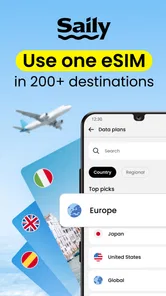
When I land somewhere unfamiliar, the first thing I want is a way to check directions or message the person waiting for me. Saily: An eSIM travel app is built for that practical moment: it lets me look for travel data plans in one place instead of relying entirely on roaming or hunting for a physical SIM after arrival. It is a free Travel & Local app from Nord Security, and its appeal is clearest for people who want to sort out mobile data before a trip rather than make connectivity their first errand.
What to expect from a travel eSIM
An eSIM is a digital SIM that can hold a mobile plan without a removable card. That means fewer small pieces of plastic to handle and no need to open the SIM tray just to add a travel option. It does not make every part of mobile service automatic, though: your phone needs to support eSIM, and you still need to choose a plan that suits the places you are visiting and the way you use data.
I would think of Saily as a way to browse and arrange travel data, not as a promise that every destination or device will work identically. Before buying, I check that my phone supports eSIM and is available for use with another plan, then compare the plan’s destination coverage and allowance with my itinerary. That small check can prevent a frustrating surprise when the trip has already started.
Getting from setup to useful travel data
First things first, let's talk about what makes this app so special. Saily taps into the power of eSIM technology, which allows you to download and activate a mobile plan from your phone without needing a physical SIM card. It's a breeze to set up and can save you from those excruciatingly long waits at airport kiosks trying to get a local SIM card.
Easy setup and interface
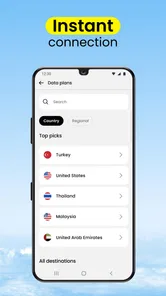
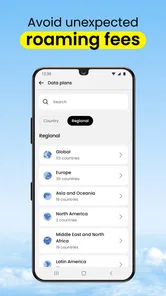
One of the things I appreciate the most about Saily is its user-friendly interface. Setting up your eSIM is straightforward. You simply select your destination, pick a plan that suits your needs, and you're good to go. The app guides you through every step with a clear and intuitive design, which is perfect if you're like me and prefer not to fuss with tech while traveling.
For a first-time user, I would do the browsing and plan selection while connected to reliable Wi-Fi at home. Read the plan details before confirming, and follow the on-screen installation and activation instructions rather than guessing at phone settings. I would also keep my regular SIM in place if I still need its number for calls or texts; a travel data plan and a home number can serve different purposes. Once the eSIM is installed, check the phone’s mobile-data settings and make sure the intended line is selected when it is time to use the travel connection.
A useful first success is not a speed test; it is completing a simple task after the plan is active, such as loading a map or sending a message over mobile data. If that works, I know the phone is using the travel connection and can focus on the journey. Doing this before leaving the airport is sensible, but I would keep directions or essential booking details accessible offline as a backup in case setup takes longer than expected.
More From Our News Desk

 Weather - By Xiaomi
Weather by Xiaomi Review: Clear at a Glance, Less Clear Up Close
Xiaomi’s weather app makes everyday forecasts quick to scan, but its calm surface can leave useful details and recovery paths harder to find than they should be.

 X
XX Under Pressure: Can It Recover When Posting Goes Wrong?
A resilience-focused review of X, examining setup, mistaken posts, interruptions, weak connections, and the gaps that matter when recovery needs to be dependable.

 Clash of Clans
Clash of Clans Is Won Between the Battles
Its raids are quick; its community is a long-term project of coordination, teaching, rivalry, and shared responsibility—with all the friction that entails.

 Android Auto
Android Auto Makes the Case for Quieter Car Software
The car interface is no longer judged by how much it can do, but by how quietly it helps. Android Auto shows what drivers now expect—and what still gets in the way.

 MobiOffice: Word, Sheets, PDF
MobiOffice: Transforming Mobile Productivity with Seamless Integration
MobiOffice: Word, Sheets, PDF is redefining mobile productivity with a surprising blend of functionality and innovation.

 EA SPORTS FC Soccer Mobile 26
EA SPORTS FC™ Mobile Soccer: Redefining Mobile Sports Gaming
Dive into EA SPORTS FC™ Mobile Soccer, where immersive gameplay and strategic depth transform mobile sports gaming.
Latest News



I would also make the first connection check deliberately small. Open a map or send one message, then close apps that could quietly use data before deciding whether the allowance suits your habits. This gives you a clearer sense of whether the eSIM is selected correctly without spending data on automatic updates, cloud backups, or a stream playing in the background. It is a simple travel habit, but it turns setup into a controlled test rather than a guess.
Choosing a plan for the actual itinerary
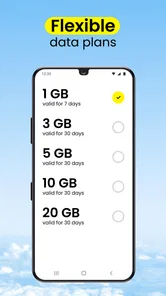
The app offers a wide range of plans to cater to different kinds of travelers. Whether you're a data-heavy user who needs to stream videos on the go, or someone who just wants to keep in touch with family and friends, Saily has got you covered. I found the flexibility in plan options quite impressive, as it allows you to tailor your connectivity to your travel habits.
Plan choice is where a little restraint helps. For a short city break, I would estimate how often I use maps, ride-hailing, messaging, and browsing, then avoid paying for far more data than I expect to need. Streaming and uploading lots of photos can consume data quickly, so a plan that suits a light user may feel tight for someone who works remotely or shares video throughout the day. If your trip crosses borders, check the plan’s destination terms against every stop rather than assuming one selection covers the whole itinerary.
That makes the app especially useful for a traveler who wants to compare options before departure, or for someone taking several trips and keen to avoid repeating the airport-SIM routine. It is less compelling if you mainly need voice calls and texts, already have an affordable roaming package, or prefer the simplicity of using one carrier plan you know well. A local SIM can also be a better fit for a long stay or when you need a local number; a travel eSIM is primarily a data convenience, not a universal replacement for every kind of mobile service.
For a multi-stop trip, I would write down the countries on the itinerary before opening the plan choices and check each one against the coverage details. A route that includes a weekend excursion across a border can be easy to overlook when the main destination dominates the planning. I would also consider how I will use data on travel days: navigation and messages matter most when moving between places, while hotel Wi-Fi may handle larger downloads once I arrive. That distinction can help me choose an allowance based on the trip rather than on a vague fear of running out.
Staying connected without wasting data
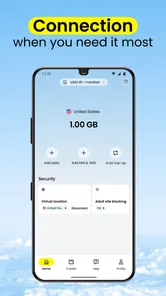
What truly sets Saily apart is the seamless connectivity it provides. The app partners with local carriers in various countries to ensure you get strong signal strength and fast data speeds. During my travels, I never once found myself struggling with poor connectivity, which is a huge relief when you're in a foreign land trying to navigate or translate languages on the fly.
In practice, I would treat reception as dependent on where I am, the local network, and the phone’s settings rather than assume every street or building will have the same signal. For example, after landing late, I might use data to message my accommodation and follow a map to the pickup point, then switch to Wi-Fi for a large download or video call. That is a more dependable way to manage a limited travel allowance than leaving data-heavy apps running in the background all day.
If mobile data does not work right away, I would first check that the travel eSIM is enabled and selected for data, then confirm the plan is active and that the phone has a usable signal. Restarting the phone can be a practical next check. I would avoid deleting the eSIM as an early troubleshooting step, since reinstalling it may require extra setup; following the app’s instructions or seeking its support is safer if the basic checks do not resolve the issue.
A useful detail to plan for is which line handles mobile data and which one remains available for your usual number. Phones that can manage more than one SIM may still need you to choose the data line in settings, and the labels can be easy to confuse when you are tired after a flight. I would give the travel line a clear label if the phone allows it, and check the selection again after landing. Keeping the home line for important calls or texts can be convenient, but I would review its roaming settings so it does not become an accidental source of charges.
Picture arriving in the evening, with a driver waiting at a pickup point and a hotel address saved in your email. The practical goal is not to use every feature immediately: activate the travel plan, confirm mobile data is routed through it, send the driver a short message, and follow the map. If any step fails, the saved address and offline directions give you a fallback while you check the settings. This is where preparing at home pays off most: the app can help arrange the plan, while a little preparation keeps a small technical delay from becoming a travel problem.
Costs, alternatives, and trade-offs
Now, I know what you're thinking – this all sounds great, but what about the cost? Well, Saily is surprisingly affordable. The app offers competitive pricing compared to traditional roaming fees and even local SIM cards. Plus, by eliminating the need for physical cards, you're also doing a tiny bit for the environment – a win-win in my book!
Because travel needs and plan options vary, I would compare the actual plan shown for my destination with the roaming terms from my usual carrier before deciding. The app itself is free, but the data plan is the purchase to consider; “free app” does not mean the connectivity is free. A familiar carrier may be the better choice when its roaming terms are clear and suit the trip, while Saily is attractive when I want to select travel data separately and avoid handling a physical card.
Compared with buying a local physical SIM after arrival, an eSIM avoids finding a shop, handling a card, and potentially changing the SIM in the phone. That convenience matters most on a short trip or when I need data as soon as I step outside the airport. The trade-off is that a physical SIM may suit a longer stay, a need for a local number, or someone whose phone does not support eSIM. Roaming can be even simpler if the existing carrier’s terms are already affordable and easy to understand, so I would compare rather than assume one option always wins.
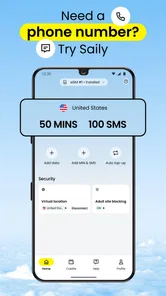
There is also a difference between having mobile data and having every service people associate with a phone plan. If calls to local numbers are important, I would check whether the travel setup meets that need before relying on it; messaging apps can cover some everyday communication, but they do not replace a local number in every situation. For work travel, I would likewise check whether the plan allowance fits video meetings and large file transfers, rather than treating a basic browsing plan as a dependable office connection.
Who will get the most from it
Saily has a 4.7 average from around 74,000 ratings, with over a million installs, which suggests plenty of travelers have tried it. It is rated for Everyone, and its current version is 3.24.0. I see it as a practical option for first-time eSIM users who are comfortable following setup prompts and want to prepare before departure; the app was released in March 2024, so it is also a relatively recent entrant in this travel category.
I would skip it if my phone could not use eSIM, if I needed a local phone number for calls, or if my existing carrier already offered a better-fitting arrangement. I would also choose a physical SIM or another familiar solution if I knew I would be uncomfortable changing mobile settings while away. A travel app can simplify the purchase, but it cannot remove the need to check device compatibility, plan coverage, and how much data the trip is likely to involve.
For someone who has never installed an eSIM, I would avoid leaving the entire process until the airport. Browse the destination options at home, make sure the phone is compatible, and read the instructions before starting. That way, the first time you have to switch a setting is not also the moment you are trying to find a taxi or meet a tour group. If you are helping a less confident traveler, walking through the setup together before departure can be more useful than simply sending them the app.
Frequent travelers who take short trips may appreciate having a repeatable routine: check the destination, compare the allowance, install while connected to Wi-Fi, and verify data with a small task after arrival. People who travel rarely and already have a clear roaming arrangement may see less reason to add a separate service. I would choose based on the trip in front of me, not on the idea that an eSIM must be cheaper or easier in every case.
Nord Security’s app has reached version 3.24.0, and I would still treat the on-screen instructions for the version installed on my own phone as the guide to follow. App interfaces and phone settings can evolve, so the safest approach is to read each prompt instead of relying on an old screenshot or someone else’s device. The overall idea remains approachable, but careful setup is what turns a convenient purchase into a connection that actually helps on the road.
My verdict after weighing the choices
In conclusion, Saily: An eSIM travel app is like having a digital Swiss Army knife in your pocket. It provides reliable, easy-to-use, and cost-effective mobile connectivity solutions for travelers. So whether you're planning a short getaway or an extended overseas adventure, Saily ensures you're just a tap away from staying connected. It's definitely worth checking out for your next trip!
My recommendation is strongest for travelers who want to arrange data before leaving, have an eSIM-compatible phone, and are happy to check a few settings. It is less suited to someone who needs a local number, expects heavy work use without checking the allowance, or would rather keep everything with a familiar carrier. For a first trip, I would treat it as a practical way to reduce arrival-day errands, not as a substitute for checking coverage and keeping essential information available offline.
Saily: eSIM + phone number Frequently Asked Questions
Is Saily free to download?
Saily is free to download, so you can install the app and explore its travel eSIM options without paying for the app itself. Keep in mind that downloading the app is separate from choosing a data plan for travel. Before purchasing a plan, review the destination and plan details shown in the app so you can decide whether they suit your trip.
What do I need to check before using Saily abroad?
Before relying on Saily during a trip, make sure your phone supports eSIM and that you can access its mobile network settings. It also helps to install the app and complete the setup while you still have a reliable internet connection. Once you choose a plan, read the activation instructions carefully and check your device’s selected line for mobile data.
Can I set up Saily before I leave home?
Yes, you can prepare your travel connection in advance by installing the app and choosing an eSIM plan for your destination. Having the eSIM ready before departure can make it easier to get online after arrival, rather than searching for connectivity at the airport. Check your device’s eSIM settings during setup and follow the app’s activation instructions.
What is Saily and how does it work?
Saily is an innovative eSIM travel app designed to simplify connectivity for travelers by eliminating the need for physical SIM cards. Users can download the app, purchase an eSIM plan for their destination, and activate it directly on their device. This allows travelers to enjoy seamless mobile data without the hassle of swapping SIM cards or dealing with local carriers.
Is my device compatible with Saily?
Before downloading Saily, ensure your smartphone supports eSIM functionality. Most modern devices from brands like Apple, Samsung, and Google support eSIM. You can typically find this information in your device's settings or user manual. Compatibility is crucial for using Saily as it directly impacts your ability to activate and use eSIM plans.
Pros
- Easy to activate eSIMs with a few taps
- Wide range of global destinations available
- Affordable pricing for international data
- No need to swap physical SIM cards
- Supports multiple eSIMs on one device
Cons
- Limited customer support options
- Some regions may have slower data speeds
- Not compatible with all devices
- Requires internet to download eSIM profiles
- May have hidden fees in some regions












