

Room Design AI: Home Decor
- 0.00
- 0.0
- Installs
- 50.00K
- Price
- Free

Screenshots
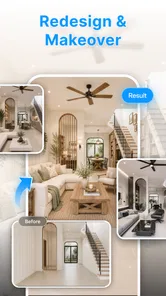

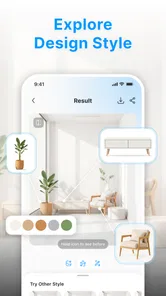

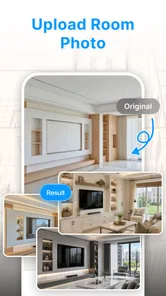

Analysis by Reviewed
I would approach Room Design AI: Home Decor as a way to explore a room’s visual possibilities, not as a replacement for a floor plan or a decorator. That distinction makes the app easier to judge: its appeal is in helping you picture a different look and get unstuck when a space feels tired, while the practical decisions—measurements, budgets, and whether a piece will actually fit—still need your attention. For a first-time user, the best result is a useful direction to consider, not a finished renovation plan.
A sensible first expectation
Before you begin, decide what kind of answer you want. This app is most promising when you need a visual nudge—say, whether your living room might feel calmer with a softer palette—not when you need a final specification. I would approach the first session as a quick design experiment: bring one question, look for a direction, and leave the exact purchases and dimensions for later.
That framing also helps you judge a result fairly. A generated room can be useful even if it is not a faithful rendering of your home, because it may show that you prefer brighter colors, less visual contrast, or a more open mood. If you expect a precise replica from the start, the gap between an attractive concept and a workable plan can become frustrating.
What to expect from an AI room-design app
This is an Art & Design app from AMST FINANCIAL LLC, listed as Room Design AI. Its central idea is to use AI-driven room design and editing tools to help create interior concepts. That puts it in a different lane from a conventional decorating catalog: instead of mainly browsing products or manually arranging every object, you come to it looking for visual inspiration and possible transformations.
The app is free, has more than 50,000 installs, and is rated for Everyone. It was released on August 1, 2026, and its current version is 1.0.2. Those details make it accessible to try, but they don’t tell you whether a design will match your exact room. I would treat the output as a prompt for your own taste rather than a promise that the space can be recreated exactly.
That mindset matters because AI design is most useful at the idea stage. If you know you want a calmer bedroom but cannot choose between warm neutrals and a darker palette, seeing a concept can help you react: perhaps you like the wall color but dislike the furniture mood. A visualization gives you something concrete to evaluate, even when it is not yet a shopping or construction plan.
Who is likely to enjoy it
I can see this working well for renters planning a refresh, homeowners collecting ideas before talking with a professional, or anyone who wants to compare broad interior directions without first learning a full design program. It is also a reasonable starting point if you have a room photo and a vague goal—“less cluttered,” “more inviting,” or “better for working from home”—but do not yet know what style choices might achieve it.
More From Our News Desk

 Gmail
GmailGmail in a Busy Inbox: Who Benefits Most?
From first account to crowded workday, Gmail earns its place through dependable search and flexible sorting—but its best fit depends on how much inbox maintenance you can tolerate.

 Prime Video
Switching to Prime Video: What Changes in Your Viewing Routine
Prime Video can make a compelling second home for streaming, but switching means learning a different catalog, rental layer, and route from browsing to playback.

 Universal TV Remote Control
Universal TV Remote Control Works Best as a Reliable Backup
A phone remote earns its place through quick setup and reliable habits. Here is how to get more from Universal TV Remote Control—and where its limits show.

 Weather - By Xiaomi
Weather by Xiaomi Review: Clear at a Glance, Less Clear Up Close
Xiaomi’s weather app makes everyday forecasts quick to scan, but its calm surface can leave useful details and recovery paths harder to find than they should be.

 X
XX Under Pressure: Can It Recover When Posting Goes Wrong?
A resilience-focused review of X, examining setup, mistaken posts, interruptions, weak connections, and the gaps that matter when recovery needs to be dependable.

 Clash of Clans
Clash of Clans Is Won Between the Battles
Its raids are quick; its community is a long-term project of coordination, teaching, rivalry, and shared responsibility—with all the friction that entails.
Latest News



It is less suited to someone who needs exact dimensions, a reliable furniture fit check, or a contractor-ready drawing. A generated visual can make proportions and placement feel persuasive without proving that a sofa clears a doorway or that a desk fits beside a radiator. For those decisions, a measuring tool, a floor-plan app, or a professional’s advice is the better companion.
Make the first setup easy to judge
On first opening the app, keep your goal narrow. Choose one room and one change you want to explore rather than trying to redesign an entire home in a single pass. This makes it easier to tell whether the result is useful: if you are testing a brighter living room, judge the lighting and overall mood first, not every decorative detail at once.
If you are working from a room image, take a moment to choose a clear view. A photo that shows the main walls and the furniture you want to keep gives you a more meaningful basis for comparing ideas than a close-up of a corner. Move loose items that obscure the space if it is convenient, and avoid judging a concept against a photo taken in very different lighting. These simple choices help you separate a design difference from a photography difference.
Before making edits, note what cannot change. A rental’s wall color may be fixed; a large wardrobe may need to stay; a family room may have to remain easy to clean. Keeping those constraints in mind is more valuable than chasing a perfect-looking image. It also gives you a practical test for every concept: does it solve the problem you actually have, or does it merely look attractive in isolation?
Your first useful result
For a first meaningful try, pick one visible priority—such as making a small sitting area feel less crowded—and compare the overall arrangement and atmosphere rather than asking the app to settle every detail. If an idea feels promising, write down the specific parts you like: the lighter palette, the more open feeling, or the contrast between a neutral room and one accent color. That short list can guide a real shopping search or a conversation with a decorator.
A practical example: imagine you are preparing a spare room to serve as both a guest room and a work area. You could use a design concept to explore whether a calmer color scheme and a clearer division between sleeping and working zones feel right. The useful outcome is not assuming the pictured furniture is the correct size; it is identifying a layout mood worth testing with a tape measure and the pieces you already own.
One helpful habit is to change only one design intention at a time. If you ask for a different style, a new color mood, and a different functional setup all together, it becomes difficult to tell which change improved the room. A focused comparison gives you better information and reduces the temptation to treat a visually dramatic result as automatically better.
What can be confusing at first
The most common source of disappointment with AI room design is expecting a precise copy of reality. A concept image may be inspiring while still differing from the room’s real scale, fixed features, or the exact objects you own. I would use it to decide what direction to explore, then verify any consequential choice in the actual space. That matters especially before buying furniture, repainting, or making a change that is costly to reverse.
Another potential snag is treating “style” as the whole problem. A room can look polished in a particular aesthetic and still fail your everyday needs. If you share the space with children, pets, or a frequent guest, practical questions such as durable surfaces, clear walking routes, and storage may matter more than a dramatic accent wall. Use the visual result as a conversation starter with yourself: what would make this room easier to live in on an ordinary weekday?
If an image does not feel right, avoid concluding immediately that the app is useless. First ask whether your starting view clearly shows the room and whether your goal was specific enough to guide a meaningful comparison. Then decide what to keep and what to ignore. An imperfect result can still reveal that you prefer a lighter room, fewer visual distractions, or a less formal furniture arrangement.
Turn a visual idea into a real-room test
Once you have a direction you like, translate it into a small, testable action. You might rearrange existing furniture before buying anything, gather paint samples, or measure a proposed table’s footprint with paper on the floor. This is where the app’s role should end and your real room should take over. The distinction protects you from spending money because a generated scene looks convincing without checking whether it suits your space.
I would also keep a simple record of what you are comparing: the room’s current problem, the idea you tried, and the detail that worked or did not. That is especially useful if you are planning gradually rather than making one large renovation. It prevents each new inspiration from sending you in a completely different direction and helps you make decisions around a consistent goal.
Compared with a mood-board app, Room Design AI is more appealing when you want to imagine a room transformation rather than just collect references. Compared with a manual interior-layout tool, it is a more approachable place to begin when you are seeking concepts, but a less dependable choice for exact placement and measurements. If you already know the dimensions and need to confirm a layout, a floor-plan tool is likely more useful. If you are still trying to discover your preferences, an AI-generated visual can be a quicker way to get a reaction.
A realistic way to use it between errands
Picture a familiar situation: you have a free half hour before guests arrive, and the living room feels darker and more cramped than you would like. Rather than shopping in a hurry, use that time to consider one visual question, such as whether a lighter overall mood would suit the space. If a concept gives you a direction, make a note of the two or three details that appeal to you, then test the easiest one by moving an existing lamp or clearing a surface. That keeps the exercise low-cost and turns inspiration into something you can assess in daily use.
This is also a useful way to avoid a common trap: treating the most dramatic image as the best answer. A bold makeover may catch your eye while being difficult to maintain or inconsistent with the rest of your home. I would favor the concept that helps solve the room’s actual annoyance, even if its changes are modest. For a household that uses the room every day, a clearer path or a calmer work corner may matter more than a striking new style.
Who should install it—and who should choose another tool
I would recommend giving it a try if you enjoy visual experimentation, have a room you want to refresh, and are comfortable treating generated ideas as drafts. The free entry point lowers the commitment, and an uncomplicated first goal—a new mood for one room—is enough to find out whether this approach suits you. The app’s minimum operating-system requirement is Android 7.0, so check that your device meets it before planning your first session.
I would skip it as your main solution if your priority is technical accuracy, a measured furniture plan, or guaranteed product matching. It is also not the right fit if you would rather make decisions from real material samples and exact dimensions than from visual concepts. In those cases, use a dedicated planning method or work with a design professional, and keep AI imagery as optional inspiration.
One practical question is whether a beginner needs to understand interior-design terminology before trying it. I would not let that stop you: start with plain-language goals tied to how you use the room, such as wanting a quieter-looking bedroom or a more welcoming entry. The clearer your everyday aim, the easier it is to judge whether a concept helps. If you already have a specific furniture purchase in mind, though, treat the app as a source of aesthetic ideas and confirm fit and finish elsewhere.
Another sensible question is whether the concepts are enough to make a purchase decision. In my view, no visual alone should settle a costly choice. Use it to narrow your preferences, then check product dimensions, material samples, delivery constraints, and the actual walking space in your room. That extra step is especially important in compact homes, where even a small change in furniture depth can affect how comfortable the room feels.
Overall, Room Design AI: Home Decor makes most sense as a low-pressure starting point for people who have a room problem but not yet a clear design answer. Go in with one specific question, use the first concept to identify what appeals to you, and check every practical decision against the real room. That approach gives the app a useful job without asking it to do more than a visual design tool should.
Room Design AI: Home Decor Frequently Asked Questions
What is Room Design AI: Home Decor?
Room Design AI: Home Decor is an interior-design app intended to help you explore ideas for a room without moving furniture or buying anything first. Depending on the version and features available on your device, you can use room photos or design prompts to generate visual concepts and experiment with styles, colors, and decor. Treat the results as inspiration: generated images may not reflect exact dimensions, product availability, or practical construction requirements.
How do I use the app to redesign a room?
A typical workflow is to provide a photo of the room, choose a design style or describe the look you want, and let the app create a redesigned image. For more useful results, take a clear, well-lit photo and include the full area you want to change. Available tools and steps can vary by app version, so check the on-screen instructions. Review each result carefully, as AI may alter room features or add objects that were not in the original space.
Is Room Design AI: Home Decor free to use?
The app may be available to download at no upfront cost, but that does not necessarily mean every feature or generation is free. Some versions of AI design apps limit the number of free results or offer paid plans, in-app purchases, or subscriptions for additional use. Check the current store listing and the purchase screen for pricing, renewal terms, and trial details before subscribing. Availability and charges can differ by platform and region.
Does the app require an internet connection, and what permissions might it need?
AI image generation commonly relies on online processing, so you may need an active internet connection to create or retrieve designs; some basic screens may still open offline. If you upload a room photo, the app will need access to selected images or your camera if you choose to take a picture directly. Review the requested permissions and the app’s privacy information before sharing photos, especially if they show people, personal belongings, or identifying details.
Can I rely on the designs for renovation or furniture purchases?
Use the app’s images as visual inspiration rather than technical plans. AI-generated layouts can look convincing while misrepresenting room measurements, clearances, lighting, materials, or whether a particular piece of furniture will fit. Measure your space independently, verify product dimensions, and consult a qualified professional for structural, electrical, plumbing, or other safety-sensitive work. The app can help you compare aesthetics, but it cannot replace accurate measurements or professional advice.
Pros
- Quickly generates decor ideas from a room photo.
- Useful for exploring different interior design styles.
- Can help visualize changes before buying furniture or paint.
- Simple workflow makes it approachable for design beginners.
- Offers inspiration for rooms that feel difficult to plan.
Cons
- AI results may misplace or distort furniture and room details.
- Generated designs may not match the room’s exact dimensions.
- Some features or design generations may require payment.
- Results can look polished but may be difficult to recreate in reality.
- Photo quality and lighting can affect the usefulness of suggestions.











