

Robinhood Banking
- 2.35K
- 4.9
- Installs
- 100.00K
- Price
- Free

Screenshots
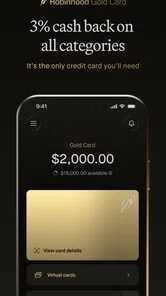
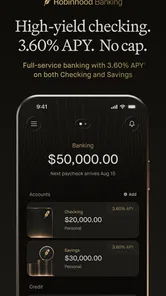
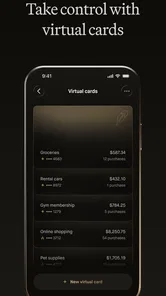
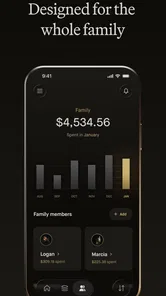

Analysis by Reviewed
I approached Robinhood Banking as a finance app that needs to prove more than a pleasant first impression. Banking tools can feel useful during the first few days because everything is new, but the real test is whether they still make everyday money management easier after the novelty disappears. In my experience, that is the right way to judge this app: not by how quickly it gets your attention, but by whether it becomes a dependable part of your routine.
The app comes from Robinhood and focuses on banking rather than presenting itself as a general-purpose entertainment or productivity tool. Its store summary describes it as “Credit Card & Banking,” while the short description identifies it as Robinhood Banking. It is free to install, carries an Everyone age rating, and supports devices running Android 7.0 or newer. Those details make it approachable for a broad range of users, although finance apps still deserve more careful consideration than their simple download process might suggest.
From a promising first week to a lasting money habit
During the first week, the strongest appeal is the feeling of having a focused place for banking tasks. I like finance apps that reduce the distance between noticing a money issue and doing something about it. If I am checking whether a purchase has cleared, reviewing available funds, or trying to keep an eye on regular spending, a banking-centered app can be more useful than a scattered collection of notes, browser tabs, and unrelated services.
That convenience matters most for people who already prefer handling routine tasks from a phone. A mobile banking app fits naturally into short moments: checking an account before paying a bill, reviewing activity after shopping, or confirming that a transfer-related task has been completed. The benefit is not dramatic on any single day. It is the reduction of small points of friction that otherwise make people postpone basic financial housekeeping.
I also found the app easier to understand when I treated it as a daily money checkpoint rather than as a complete financial strategy. That distinction is important. Robinhood Banking can be part of a broader system for managing money, but opening a banking app does not automatically create a budget, improve spending decisions, or replace careful planning. Its value depends on what I do with the information and actions available inside the experience.
The first-week question is therefore simple: does this app give me a reason to return? For someone who wants a straightforward mobile entry point for banking, the answer can be yes. The appeal is especially clear for users who dislike dealing with a traditional desktop banking portal or who want to check their financial activity without waiting until they are at a computer.
At the same time, I would not choose it merely because the download is free. Free access removes an initial barrier, but it does not remove the need to compare the app with the banking tools I already use. If my existing bank app handles deposits, payments, account history, alerts, and support in a way I already understand, moving to another service needs to offer a meaningful improvement rather than just a newer interface.
More From Our News Desk

 Instagram
Instagram’s Power Comes From Its Place in Your Phone
A close look at how Instagram turns Meta’s reach, recommendation systems and everyday camera habits into durable platform power—and what that costs users.

 Gmail
GmailGmail in a Busy Inbox: Who Benefits Most?
From first account to crowded workday, Gmail earns its place through dependable search and flexible sorting—but its best fit depends on how much inbox maintenance you can tolerate.

 Prime Video
Switching to Prime Video: What Changes in Your Viewing Routine
Prime Video can make a compelling second home for streaming, but switching means learning a different catalog, rental layer, and route from browsing to playback.

 Universal TV Remote Control
Universal TV Remote Control Works Best as a Reliable Backup
A phone remote earns its place through quick setup and reliable habits. Here is how to get more from Universal TV Remote Control—and where its limits show.

 Weather - By Xiaomi
Weather by Xiaomi Review: Clear at a Glance, Less Clear Up Close
Xiaomi’s weather app makes everyday forecasts quick to scan, but its calm surface can leave useful details and recovery paths harder to find than they should be.

 X
XX Under Pressure: Can It Recover When Posting Goes Wrong?
A resilience-focused review of X, examining setup, mistaken posts, interruptions, weak connections, and the gaps that matter when recovery needs to be dependable.
Latest News



What makes the early experience useful
One practical approach is to use the app alongside an existing financial routine instead of changing everything at once. I would begin by checking how clearly everyday activity is presented, how quickly I can find the action I need, and whether the app helps me notice information that I usually overlook. This trial is more revealing than simply browsing the opening screen, because a finance app earns its place through repeated small tasks.
A useful test is to open it at three different moments: before spending, after spending, and during a weekly review. Before spending, I want a quick sense of what is available. After spending, I want confidence that the activity is visible and understandable. During a weekly review, I want enough context to recognize patterns. If the app only feels useful for the first glance, it may not have enough lasting value for me.
Another non-obvious trade-off is the difference between visibility and action. Seeing financial activity can create a sense of control, but control improves only when the information leads to a decision. I would use the app to support decisions such as delaying a nonessential purchase, checking whether a recurring charge is expected, or confirming that a planned payment will not create a cash-flow problem. That workflow turns a passive banking check into a habit with a purpose.
Month-to-month value depends on repetition
After the first month, the excitement of trying a new finance app usually fades. That is when Robinhood Banking has to justify keeping a regular place on my phone. The recurring value comes from how consistently it supports ordinary banking rather than from occasional novelty. A useful app should still help when I am tired, busy, or only willing to spend a minute checking my finances.
For me, the most sensible recurring routine would be a short review at the end of each week. I would look at recent activity, compare it with what I expected, and note anything that needs attention. The point is not to inspect every transaction obsessively. It is to catch surprises while they are still easy to explain, rather than allowing several weeks of unexamined activity to build up.
This is also where the app’s category matters. A banking app is not the same thing as a dedicated budgeting app. Budgeting tools often focus on categories, targets, forecasts, or long-term planning, while a banking app is usually closer to the source of day-to-day account activity. If I want detailed financial planning, I may still need a separate tool. If I mainly want a convenient banking touchpoint, a dedicated banking experience can be the more practical choice.
I would also avoid measuring value by how often I open it. Frequent checking is not automatically healthy or useful. A good routine might mean opening the app only when there is a clear reason: reviewing activity, handling a banking task, or confirming a financial decision. This approach keeps the app from becoming a source of needless anxiety while preserving its practical role.
The app’s published reception suggests that many people have responded positively to it, with an average rating of 4.9 from around twenty-five thousand ratings and roughly 2.3 thousand written reviews. I regard that as encouraging, but not conclusive. Ratings tell me that the experience works well for a substantial group; they do not tell me whether it will suit someone who needs advanced budgeting, extensive account aggregation, or a particular support style.
Maintenance is light, but financial attention is not optional
The maintenance burden of a banking app has two separate parts. The first is technical: keeping the app current and making sure the device remains compatible. Robinhood Banking is listed at version 2.18.7 and supports Android 7.0 or newer, so users on older devices should check compatibility before relying on it as their main mobile banking route. Keeping software updated is sensible for any finance app, especially when account access is involved.
The second burden is personal, and it is more important. No banking app can maintain my financial life without regular attention. I still need to recognize legitimate transactions, review recurring obligations, protect access to the device, and respond when something looks wrong. The app may make those tasks more convenient, but convenience is not a substitute for responsibility.
I recommend creating a simple review rhythm instead of waiting for a problem. A weekly glance is enough for many people to stay familiar with recent activity, while a longer monthly check can be used to compare actual spending with the plan for the next few weeks. The exact schedule should match my situation, but the principle is consistent: the app works best when it supports a repeatable habit rather than an occasional panic check.
There is also a useful distinction between installing the app and making it the center of a financial setup. I would first learn its normal workflow, understand where important information appears, and confirm that it fits the way I already handle money. Only then would I consider relying on it more heavily. This gradual approach reduces the risk of discovering too late that a familiar banking task is less convenient in a new environment.
Because the developer is Robinhood, existing Robinhood users may find the app more appealing as part of the same broader financial relationship. That does not automatically make it the best choice for every customer. Someone who prefers a conventional bank with a long-established branch network, a single institution for all services, or a very specific support process may be more comfortable staying with a traditional alternative.
Where fatigue can appear over time
The main source of fatigue is not necessarily the number of screens or the visual design. It is the mental effort of repeatedly checking money without getting a clear decision from the process. If I open the app only to see a balance and then close it without learning anything or taking action, the habit can become empty. The solution is to give each visit a purpose, such as checking recent activity or preparing for an upcoming payment.
Another possible frustration is comparison. Users often expect a banking app to cover the same ground as a budgeting app, investment app, payment wallet, and full-service bank portal at once. That expectation can lead to disappointment. Robinhood Banking should be judged by how well it serves its banking role, not by whether it replaces every other financial tool I might use.
People who manage several accounts may also need to think carefully about workflow. If my financial life is spread across multiple institutions, I may still need a separate overview method to see the whole picture. A focused banking app can be excellent for the account it serves while remaining insufficient as a complete household dashboard. That is not a defect unique to this app; it is a practical boundary of choosing a focused tool.
I would also skip it if I am looking for entertainment, a detailed educational course, or a fully automated financial coach. The app belongs in a practical category, and its usefulness comes from handling banking-related activity. Users who want extensive planning guidance may be better served by combining their banking app with a budgeting solution that matches their financial goals.
For someone who dislikes changing established routines, the switching cost deserves attention. Even a free app takes time to learn, configure mentally, and incorporate into regular checks. The right question is not “Can I install it?” but “Will this improve the way I handle money often enough to justify changing what already works?” That question protects against adopting a new app simply because it looks appealing on day one.
A realistic everyday scenario
Imagine I am leaving work and planning to buy groceries before going home. I open Robinhood Banking to check my current position, then remember that a recurring payment is due soon. Instead of treating the visible balance as spending money, I account for that upcoming obligation and decide on a smaller purchase. Later, I check the recent activity to make sure the grocery transaction appears as expected. The app has not created a budget for me, but it has helped me make a better decision at the moment it mattered.
That scenario shows the app’s strongest realistic role: a quick source of current financial awareness. It is useful when I connect the information to a decision. It is less useful when I expect the software to interpret my entire financial life without my involvement.
A second workflow would be a monthly cleanup. I could review recent activity, identify charges I recognize, and write down questions about anything unfamiliar before contacting the appropriate support channel. This is more effective than scrolling randomly because it turns the app into a record-checking tool. It also helps me notice whether my spending routine has changed, even if I am not using a separate budgeting system.
Who should give it a place on the phone?
I think Robinhood Banking is a good fit for someone who wants a free, mobile-first banking experience and is willing to maintain a simple review habit. It is particularly appealing to people who prefer short, practical interactions instead of managing finances through a desktop browser. Existing Robinhood customers may also appreciate the familiarity of staying within the developer’s ecosystem.
I would be more cautious if I need advanced financial planning, a highly detailed household budget, or a single app that brings together every account and goal. In those cases, a dedicated budgeting platform or a traditional financial institution with broader services may be a better primary choice. The right alternative depends on whether my priority is banking access, planning depth, or institutional breadth.
The app has reached over one hundred thousand installs, which indicates a meaningful user base without making it a universal solution. Its Everyone rating makes it broadly accessible from an age-classification perspective, but financial suitability is still personal. A simple interface may be ideal for one user and feel limited to another who wants more control, context, or customization.
My long-term verdict
After the novelty fades, Robinhood Banking earns lasting space only when I use it as part of a deliberate routine. Its strongest quality is practical immediacy: it can make ordinary banking checks feel easier to fit into the day. The free price lowers the barrier to trying it, and the focused purpose keeps the experience more approachable than a sprawling financial dashboard can sometimes be.
My reservation is that convenience can be mistaken for completeness. I would not rely on any banking app as my entire financial plan, and I would not expect this one to eliminate the need for judgment. Users who want deep budgeting, broad account management, or a traditional all-in-one banking relationship should compare it carefully with those alternatives before making a switch.
For my own use, the deciding factor would be consistency. If I can open it for a clear reason, understand what I am seeing, and turn that information into a sensible action, it has recurring value. If I only return because I feel I should check something but gain no useful context, the habit will eventually become tiring. The lasting benefit comes from a repeatable money routine, not from the first-week impression.
Overall, I recommend Robinhood Banking to readers who want a straightforward mobile banking companion and who are comfortable pairing it with their own financial discipline. I would skip it as a sole solution if my needs extend into detailed planning or a fully consolidated financial workspace. For the right user, though, its free access, focused banking purpose, broad device reach, and strong user reception make it worth trying—and worth keeping only if it continues to make everyday decisions simpler.
Robinhood Banking Frequently Asked Questions
Is Robinhood Banking free to download, and what should I consider before installing it?
Robinhood Banking is free to download, so you can install the app without an upfront purchase. That does not necessarily mean every service or transaction available through it is free. Before using it, consider which features you need, whether you are eligible for them, and what terms or charges may apply. Review the relevant account disclosures before moving money or relying on the app for everyday finances.
Who develops Robinhood Banking, and what is the app intended for?
Robinhood Banking is a finance app developed by Robinhood. Its store summary is “Credit Card & Banking,” and its short description identifies it as Robinhood Banking. It brings a banking-focused experience into Robinhood’s wider financial-services platform. The specific features available to a user can depend on eligibility and location, so it is sensible to review the current product terms before deciding whether the app matches your needs.
Is Robinhood Banking available on my device?
Robinhood Banking is a finance app developed by Robinhood, with a free download and an Everyone age rating. The current version is 2.18.7 and it requires Android 7.0 or later on Android devices. Before downloading, check that your operating system meets that requirement and that the app is available for your device and region.
What is Robinhood Banking, and what services does it offer?
Robinhood Banking is the financial-services experience connected to the Robinhood platform, designed to let eligible customers manage cash and investing features from one app. Depending on your location and account eligibility, it may include a spending account, debit card, direct deposit, transfers, bill payments, and access to brokerage products. Available services can change, so review the current terms before signing up.
Is Robinhood Banking safe and FDIC insured?
Robinhood uses security measures such as encryption, account protections, identity verification, and two-factor authentication options. However, not every balance or product is protected in the same way. Eligible cash held through Robinhood’s banking program may receive FDIC insurance through partner banks, while investments are generally covered by SIPC rules rather than FDIC insurance. Check the applicable disclosures for your account.
Pros
- Commission-free stock
- ETF
- and options trading for eligible users.
- Clean interface makes portfolio tracking and order placement easy.
- Supports fractional shares for investing with smaller amounts.
- Recurring investments can help automate long-term contributions.
- Includes market news
- research tools
- and price alerts in one app.
Cons
- Availability and features vary by country and user eligibility.
- Options and margin trading can expose beginners to significant losses.
- Customer support is mainly digital and may not suit urgent issues.
- Some advanced trading tools are less extensive than specialist platforms.
- Cryptocurrency availability and transfer options may be limited by region.












