

Roaring Tiger Live Wallpaper
- 341.00
- 4.7
- Installs
- 1.00M
- Price
- Free

Screenshots

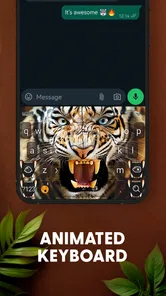
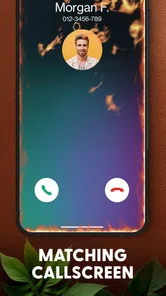
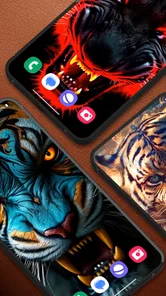
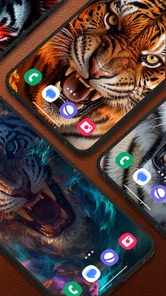

Analysis by Reviewed
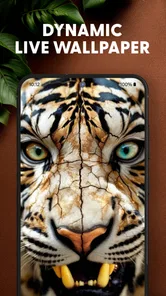
During the first few days, a dramatic tiger can make an ordinary home screen feel newly personal. I like the basic idea behind Roaring Tiger Live Wallpaper: instead of choosing another static picture, you get a moving design with a bold animal at its center. Its focus is specific, which is a strength if you want a striking, untamed look rather than a broad collection of themes. The appeal is immediate; whether it lasts depends on how much motion you enjoy seeing every time you check your phone.
What the first week feels like
The app is a free personalization app from Live Wallpapers and Emoji Keyboard Themes. It has a 4.7 average from around 80,000 ratings, and more than a million installs, so this is a well-established choice for people drawn to its tiger theme. I would consider it when I want one strong visual identity for my screen, not when I am browsing for a complete overhaul of icons, widgets, and layouts. A live background changes the backdrop, but it does not by itself reorganize the rest of the phone.
A useful first step is to live with the wallpaper through different parts of an ordinary day rather than deciding from the initial preview. Check whether the movement feels appealing when you unlock the phone repeatedly, and whether the image remains easy to look at behind your app icons. If you use a busy home screen, a detailed tiger scene may compete with labels and widgets; moving the wallpaper to a simpler screen can make the design easier to appreciate without giving up the look.
Choosing the right screen for it
One small decision can make a noticeable difference: consider whether you want the tiger behind your main page of apps or on a less crowded screen. If your first page is full of folders, shortcuts, and widgets, the animated subject may have to fight for attention with the very things you need to read. A page with fewer icons gives the design more room and can make quick checks feel calmer without changing the wallpaper itself.
I would also judge the picture at the brightness and viewing angle I normally use, not only while browsing a preview. A vivid scene can look different in a dim room than it does outdoors, and icon labels may stand out less over a detailed background. If you rely on a particular widget or need to spot an app quickly, test that combination early. A wallpaper should add character without making ordinary navigation feel like extra work.
The Roar of the Wild
Imagine this: every time you glance at your phone, a majestic tiger greets you with an animated roar. The Roaring Tiger Live Wallpaper brings this vision to life with stunning graphics and seamless animations. The tiger's movements are so lifelike, you'll almost expect it to leap off the screen! This isn't just a static image; it's an experience that transforms your phone into a window to the wild.
Customization Galore
One of the coolest things about this app is the level of customization it offers. You can tweak the settings to adjust the speed and intensity of the animation, making it as subtle or as dramatic as you like. Want the roar to coincide with your notifications? You got it. Or maybe you prefer a silent guardian watching over your apps? The choice is yours. The flexibility here means you can tailor the wallpaper to fit your mood or style effortlessly.
More From Our News Desk

 Gmail
GmailGmail in a Busy Inbox: Who Benefits Most?
From first account to crowded workday, Gmail earns its place through dependable search and flexible sorting—but its best fit depends on how much inbox maintenance you can tolerate.

 Prime Video
Switching to Prime Video: What Changes in Your Viewing Routine
Prime Video can make a compelling second home for streaming, but switching means learning a different catalog, rental layer, and route from browsing to playback.

 Universal TV Remote Control
Universal TV Remote Control Works Best as a Reliable Backup
A phone remote earns its place through quick setup and reliable habits. Here is how to get more from Universal TV Remote Control—and where its limits show.

 Weather - By Xiaomi
Weather by Xiaomi Review: Clear at a Glance, Less Clear Up Close
Xiaomi’s weather app makes everyday forecasts quick to scan, but its calm surface can leave useful details and recovery paths harder to find than they should be.

 X
XX Under Pressure: Can It Recover When Posting Goes Wrong?
A resilience-focused review of X, examining setup, mistaken posts, interruptions, weak connections, and the gaps that matter when recovery needs to be dependable.

 Clash of Clans
Clash of Clans Is Won Between the Battles
Its raids are quick; its community is a long-term project of coordination, teaching, rivalry, and shared responsibility—with all the friction that entails.
Latest News



How it fits into a daily routine
Picture checking your phone during a commute or while waiting for coffee: the animated tiger gives those brief unlock moments a distinct character, but it is still a background rather than something you actively use. That distinction matters. If you enjoy a visual detail that makes a familiar device feel less generic, this can be a pleasant recurring touch. If you rarely look at your home screen, or prefer a calm, distraction-free display, its central feature may not earn much space in your routine.
For example, imagine unlocking your phone while waiting for a drink, checking a message, then putting it away again. The wallpaper can make that brief interaction feel more distinctive, but it will not make the wait itself more productive or help organize the message. I see its value in those repeated, small moments rather than in long sessions. That is a useful way to set expectations: this is a visual accent for a device you already use, not a tool that changes what the phone can do.
Compared with a static nature photograph, a live wallpaper offers movement and more visual presence, while a general theme or launcher can change much more of the interface. I would choose this app over a still image when the animation itself is the point; I would choose a simpler wallpaper when readability and restraint matter more. A practical trade-off is to keep the rest of the home screen uncluttered, so the tiger does not have to compete with a wall of icons.
Who is likely to enjoy the look
This is a natural fit for someone who likes wildlife imagery, wants a recognizable subject instead of an abstract pattern, and is happy for the home screen to feel bold. It may also suit a person who keeps their phone interface fairly simple and wants one standout visual element without rebuilding the layout. If you enjoy changing backgrounds to match a mood, the focused tiger theme gives you a clear style to return to when you want something more energetic.
I would be more cautious about recommending it to someone who uses a phone mainly for quick, practical checks and wants no visual distraction. It is also not the best match if you are seeking a complete makeover: a launcher or full theme is better suited to changing icons, navigation, and overall layout together. Likewise, if you prefer landscapes, minimalist colors, or a wallpaper that stays visually quiet, a still background gives you more restraint than a moving tiger scene.
Performance and Battery Life
Now, I know what you're thinking: "Won't a live wallpaper drain my battery?" This was a concern of mine too, but I was pleasantly surprised. The developers have optimized the app to be light on resources, ensuring it doesn't gobble up your battery or slow down your device. I was able to enjoy the dynamic visuals without any noticeable performance hits, which is a huge win in my book.
For a sensible check, compare how your phone feels with the wallpaper enabled and with a still background during your usual routine. Battery use and smoothness can depend on the device and how it is used, so I would not assume every phone will behave identically. If you notice that the moving display is not worth the trade-off for you, switching back to a static image is the straightforward alternative. This is also a good choice for anyone who wants to try a more animated look without committing to a full interface makeover.
Simple ways to test whether it earns its place
Rather than deciding based on a single glance, I would give the wallpaper a few ordinary days and pay attention to two things: whether the animation still catches my eye in a pleasant way, and whether it ever gets in the way of finding an app. This is more useful than repeatedly opening the settings to fine-tune every detail. If the look feels too intense, trying a less dramatic animation setting is a reasonable first adjustment; if it still distracts, the issue may be the moving style itself rather than the setting.
It can also help to keep a static image you already like in mind as a comparison. Use the tiger background during a typical stretch of phone use, then switch to the still image and notice what changes: visual interest, legibility, and how often you notice the background at all. That simple comparison helps separate novelty from lasting preference. A live wallpaper does not need to be constantly entertaining to be worthwhile, but it should make the screen feel better to you rather than merely busier.
Usability and Accessibility
Installing and setting up the Roaring Tiger Live Wallpaper is a breeze. With a user-friendly interface, even those who aren't tech-savvy will find it easy to navigate through the options and set their desired preferences. Plus, it's available for both Android and iOS, so no matter what device you're rocking, you can join in on the fun.
The app is rated Teen, and its current version is 5.28.7; it requires Android 5.0 or later. If you are choosing a wallpaper for someone else, those details are worth checking alongside whether they actually like animated animal imagery. The key question for everyday use is not just how impressive the first look is, but whether you still want that same bold scene after the novelty settles. A restrained animation or a quieter alternative may suit someone who changes their style often or prefers a low-key lock screen.
What maintenance really means here
This is the kind of personalization I would expect to revisit occasionally, not manage every day. Once the wallpaper is set to a level of movement that feels comfortable, the ongoing effort is mostly deciding whether it still suits the way I use the phone. If I change my icon arrangement or add more widgets, I would check again that the tiger remains visible and that labels are still easy to scan. The design itself is simple to live with when the screen around it stays reasonably tidy.
For someone who enjoys frequent visual changes, a useful habit is to treat this as one option in a small rotation rather than expecting it to stay exciting indefinitely. When the tiger stops drawing attention, that does not mean the wallpaper has stopped working; it may simply have become familiar. I would only keep it if the background still contributes a look I like. If it becomes visual clutter, returning to a photograph or a plain color is an easy way to make the phone feel calmer again.
When the novelty fades
A single strong subject can be easier to live with than a screen crowded with competing effects, but it can also become familiar quickly. I would treat this as a look to revisit when I want a more energetic home screen, rather than expecting it to provide a new experience every day. If I find myself no longer noticing the movement, that is a sign the wallpaper has become background in the literal sense—not necessarily a failure, but a reason to decide whether its visual character still matters to me.
The tiger’s fixed theme is both the main draw and the main limit. Someone who loves this particular image and animal can find the consistency appealing; someone who wants new scenes or a broad library of moods may tire of a narrowly focused design. A general wallpaper collection gives more variety, while a static image can be more restful and easier to read behind icons. I would not keep a moving background just because it looked impressive on day one. Its place on a phone should depend on whether I still like seeing it during routine checks.
Does it keep its place month to month?
In the longer run, the wallpaper’s value is less about spectacle than fit. If I unlock my phone often and enjoy the same bold visual each time, the tiger can become a familiar part of the device rather than a novelty that demands attention. If I rarely see the home screen, or tend to change my style as soon as it feels familiar, the initial appeal may be enough. There is no need to force a permanent choice: a wallpaper can be something I use for a while and replace when my preferences shift.
My practical test is simple: after the first burst of interest, do I still like the screen when I am tired, in a hurry, or trying to read small labels? If yes, the animation is serving my taste without asking much from me. If not, that is a clear sign that a static nature image or a less detailed background would be a better everyday fit. The best choice is the one that makes ordinary phone use feel comfortable, not the one that looks most dramatic in a preview.
In conclusion, if you're looking to add a bit of roar to your daily routine, this app is definitely worth checking out. It's not just a wallpaper; it's a statement. The combination of stunning visuals, customization options, and efficient performance makes it a standout choice for anyone looking to spice up their phone. Trust me, once you go wild, there's no turning back!
My long-term verdict
I would recommend it to someone who genuinely likes tiger imagery and wants a distinctive animated backdrop, especially if a small visual change is enough to make their phone feel more personal. I would skip it in favor of a static photograph or a broader theming option if I wanted less motion, more control over the whole interface, or a look that changes frequently. For me, the lasting value comes down to whether the tiger remains enjoyable after the first-week surprise. If it does, it gives the home screen a clear identity; if not, a still image is an easy, sensible alternative.
A final practical note
Before settling on it, I would think about where I want the wallpaper to show and what I expect it to do for me. It is most convincing as a focused visual choice, not as a replacement for broader personalization or a way to make the phone easier to use. The app is free, so trying the tiger theme is a low-commitment way to see whether animated imagery suits your habits. Just give yourself permission to switch away if your preference changes; keeping a home screen comfortable matters more than staying loyal to a striking first impression.
Roaring Tiger Live Wallpaper Frequently Asked Questions
Will a moving tiger wallpaper make my home screen harder to read?
A live wallpaper sits behind your home-screen icons and widgets, so a detailed tiger image may compete visually with them, depending on your layout and chosen background. Roaring Tiger Live Wallpaper is described as bringing smooth 3D depth to a home screen. If you prefer a clean, minimal look, consider how the imagery will sit behind your icons before applying it.
Can I use Roaring Tiger Live Wallpaper on my lock screen as well as my home screen?
Whether a live wallpaper can appear on the lock screen depends on the device and its operating system, as support varies between phones. Check the wallpaper options shown on your own device when applying Roaring Tiger Live Wallpaper. That way, you can see which screen choices are available and decide where you want the tiger imagery to appear.
Does Roaring Tiger Live Wallpaper need an internet connection to work?
A live wallpaper is meant to display on your device after it has been set, but downloading the app and its wallpaper content requires an internet connection. Your connection may also affect the initial download experience. If you plan to install it while away from Wi-Fi, check your mobile data settings first so you can manage how much data the download uses.
How do I set Roaring Tiger Live Wallpaper after installing it?
After installing the app, open it and follow the available wallpaper setup steps to preview and apply the tiger design. You may also be able to choose the wallpaper through your device’s wallpaper settings, depending on your Android version and manufacturer. Before confirming, check the preview on your home screen so the image and depth effect suit your icons.
Is Roaring Tiger Live Wallpaper suitable for children?
The app has a Teen content rating, which is worth considering before installing it for a child or young teenager. Parents can review the rating and the app’s presentation together with the child, and use their device’s family or parental controls where appropriate. The app is a personalization tool centered on tiger-themed live wallpapers.
Pros
- Stunning high-definition graphics.
- Smooth animations without lag.
- Customizable tiger designs.
- Battery-efficient performance.
- Compatible with most devices.
Cons
- May consume data for updates.
- Not suitable for static wallpaper lovers.
- Limited free version features.
- Requires Android 5.0 or higher.
- Ads in the free version.












