

3D Fish Tank Live Wallpaper
- 895.00
- 4.5
- Installs
- 10.00M
- Price
- Free
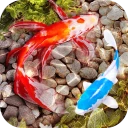
Screenshots
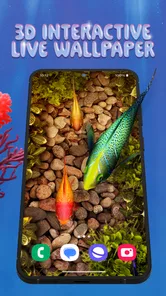
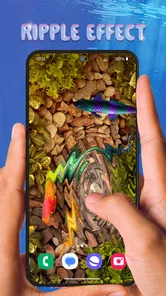
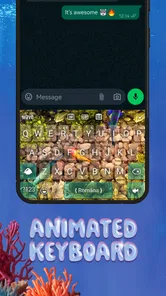
Analysis by Reviewed
I like the idea behind 3D Fish Tank Live Wallpaper: it turns the phone’s background into a small, animated aquarium rather than asking me to open a separate game or browse a gallery. That makes its appeal very specific. If you enjoy seeing a changing underwater scene whenever you check your screen, the effect is immediate; if you mainly want a still image that keeps icons easy to read, a regular wallpaper may suit you better.
What the moving aquarium adds
The main draw is the sense of depth. Fish moving across the screen give the wallpaper more life than a static ocean photo, while the tank remains part of the phone’s everyday interface. I see this as a decorative choice, not a substitute for an aquarium or a fish-care app: it offers an underwater mood without the practical responsibilities of keeping animals.
The app is a free personalization app from Live Wallpapers and Emoji Keyboard Themes. It has a 4.5 average from around 211,000 ratings and has been installed over 10 million times. It is rated Teen, runs on Android 5.0 or later, and its current version is 5.29.0. Those details make it easy to understand the audience: people looking for a visual phone customization, rather than a tool with a productivity purpose.
Making the scene fit your phone
The useful choice here is to treat the tank as a background you tune to your routine, not just a scene you set once and forget. I’d start with a calmer look, then check whether the fish and colors compete with app icons or make the home screen harder to scan. A striking setup can look lovely on an uncluttered screen but feel busy when notifications and widgets fill the same space.
The customization is also a reason to keep expectations grounded. Changing the aquarium’s look can make it feel more personal, but it does not mean the app replaces a full theme manager or gives every part of the phone a matching design. If I want a coordinated set of icons, menus, and lock-screen elements, I’d compare it with a broader personalization option. This app’s strongest identity is the animated fish tank itself.
Where it works best—and where it may not
I can picture using it on a phone I check during short breaks: a glance at the screen gives me a softer scene than a photo-heavy wallpaper, without requiring a long session. It may also suit someone who likes aquarium visuals but does not have the room, time, or interest to maintain a real tank. For a child or shared device, I’d still keep the Teen content rating in mind and review the app together before making it the everyday background.
Live animation is a trade-off, even when it looks appealing. I would pay attention to whether it feels smooth on my particular phone and whether the extra visual movement distracts me or makes text less legible. Battery impact can vary across devices and settings, so I would not assume every phone will behave identically. If battery conservation, a very clean home screen, or maximum readability matters most, a still wallpaper is the safer choice.
More From Our News Desk

 Gmail
GmailGmail in a Busy Inbox: Who Benefits Most?
From first account to crowded workday, Gmail earns its place through dependable search and flexible sorting—but its best fit depends on how much inbox maintenance you can tolerate.

 Prime Video
Switching to Prime Video: What Changes in Your Viewing Routine
Prime Video can make a compelling second home for streaming, but switching means learning a different catalog, rental layer, and route from browsing to playback.

 Universal TV Remote Control
Universal TV Remote Control Works Best as a Reliable Backup
A phone remote earns its place through quick setup and reliable habits. Here is how to get more from Universal TV Remote Control—and where its limits show.

 Weather - By Xiaomi
Weather by Xiaomi Review: Clear at a Glance, Less Clear Up Close
Xiaomi’s weather app makes everyday forecasts quick to scan, but its calm surface can leave useful details and recovery paths harder to find than they should be.

 X
XX Under Pressure: Can It Recover When Posting Goes Wrong?
A resilience-focused review of X, examining setup, mistaken posts, interruptions, weak connections, and the gaps that matter when recovery needs to be dependable.

 Clash of Clans
Clash of Clans Is Won Between the Battles
Its raids are quick; its community is a long-term project of coordination, teaching, rivalry, and shared responsibility—with all the friction that entails.
Latest News



Immersive Underwater Experience
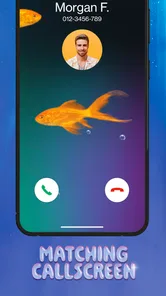
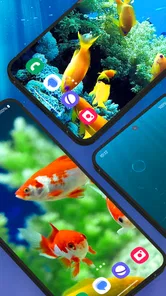
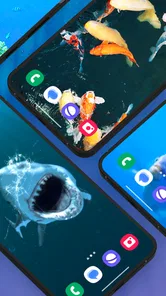
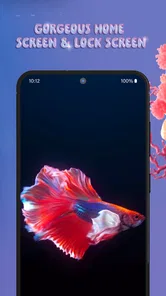
Once you install 3D Fish Tank Live Wallpaper, get ready to dive into a mesmerizing underwater world. The application boasts stunning 3D graphics that make the fish look like they're swimming right under your screen. It's like having a tiny piece of the ocean in your pocket, minus the saltwater mess. The best part? You can customize the tank with different fish species, backgrounds, and even adjust the lighting to match your mood.
Customization Galore
One of the coolest features of this app is the level of customization it offers. Want a clownfish to remind you of "Finding Nemo"? You got it! Prefer a serene setting with gentle bubbles floating around? Done and done. The app lets you adjust almost everything, creating a personalized aquarium experience. It's like having your own little slice of paradise, tailored just for you.
To get more from those choices, I’d make one change at a time and live with it through a normal day. That makes it easier to tell whether a background, fish selection, or lighting adjustment improves the scene or simply adds more visual activity. For instance, a subdued tank can work better behind a calendar and several app icons, while a brighter setup may be more enjoyable on a simpler home screen. This small trial-and-check approach is more useful than chasing the busiest combination.
Battery Friendly? You Bet!
Now, I know what you're thinking: "All this animation must be a battery drainer, right?" Surprisingly, no! The developers have done a fantastic job optimizing the app to ensure it doesn’t eat up your battery life. So, you can enjoy the aquatic beauty without worrying about your phone dying on you. It's like the fish are energy-efficient swimmers!
I’d treat battery life as something to verify in my own routine rather than a promise that applies equally to every device. If I notice a difference, the practical response is to switch back to a static background when I need to stretch a charge, then return to the tank when battery life is less of a concern. That flexibility is one advantage of wallpaper customization: there is little reason to keep an animated scene enabled if it stops being enjoyable.
A Quirky, but Relaxing Addition
Let's be honest, life can be stressful, and sometimes all you need is a little peace and tranquility. And that's exactly what this app offers. It's not just a wallpaper; it's a mood lifter. Every time you unlock your phone, you're greeted with a soothing underwater scene that takes your mind off the daily grind. It’s like having a spa day without leaving your couch.
For me, the best fit is someone who wants a distinctive visual touch and enjoys aquatic imagery enough to see it repeatedly. Someone who changes wallpapers often may appreciate having a themed option to return to, while a person who values a quiet, practical screen may find the movement gets old. I’d also skip it if I expect a detailed aquarium simulator or extensive phone-wide theming; its appeal is the fish-filled backdrop, not managing a virtual habitat or redesigning every interface element.
A simple way to judge the fit
I’d give the tank a fair trial across more than one kind of screen use. Check it behind your usual home-screen layout, then notice how it looks when you open the phone to read a message or find an app quickly. A wallpaper can be attractive in a preview but less comfortable when it sits under the icons you tap dozens of times a day. If the movement keeps pulling your attention away from those tasks, that is a useful sign that a still background will serve you better.
It also helps to think about where you tend to use your phone. Someone who mostly checks it briefly may enjoy the aquarium as a small visual pause; someone who spends long stretches reading or working from the home screen may prefer a quieter backdrop. I would not choose the most elaborate-looking arrangement just because the customization invites experimentation. The most successful setup is the one that stays pleasant after the novelty wears off and leaves your everyday shortcuts easy to recognize.
How it compares with wallpaper alternatives
Compared with a standard aquarium photo, the live tank is less predictable in a good way: the screen has movement rather than one fixed composition. The trade-off is that a still image is easier to keep visually calm and can be selected precisely to leave open space behind icons. If I wanted a particular color palette or a clean layout above all else, I would choose a static image. If the point is to make unlocking the phone feel more vivid, this app has a clearer reason to exist.
It also occupies a narrower space than a full theme package. A theme can coordinate several parts of the interface, while this app’s appeal is concentrated on the wallpaper and the aquarium effect. That focus is a plus if I want a quick change without redesigning the whole phone, but a limitation if I want icons and other visual elements to match. I’d decide based on whether I’m trying to add one animated focal point or give the device a complete new look.
Everyday use without the novelty trap
A realistic routine might be checking the phone during a work break, seeing the fish move for a moment, and then getting on with the day. That brief glance is where a live wallpaper makes the most sense; it adds a little atmosphere without demanding a session or a goal. I would not expect it to function as a meditation tool or a substitute for aquarium care. It is simply a decorative detail that may make frequent phone checks feel less sterile.
To avoid tiring of it, I’d keep the rest of the screen reasonably simple and use the customization selectively. A busy widget arrangement plus vivid motion can compete for attention, whereas fewer visual elements let the tank read as a background. This is a practical, non-obvious trade-off: adding more choices to the scene does not always make it feel more personal. Often, a restrained combination is easier to live with than the most colorful one.
Who will appreciate the aquarium most
I’d recommend trying it if you enjoy underwater imagery, like personalizing your phone, and are comfortable with the wallpaper itself being the main attraction. It is especially suited to someone who wants a distinctive animated scene but does not need a virtual pet routine or a broader set of interface changes. The fact that it is free makes it easy to consider as a visual experiment, though I would still judge it by how it behaves on my own device and how well it fits my daily screen habits.
On the other hand, I would pass if I find motion distracting, rely on a highly legible and uncluttered home screen, or want a predictable image that never changes. It is also not the right pick for someone expecting a realistic aquarium-management experience: the enjoyment is in looking at the tank, not caring for fish or progressing through a simulation. Keeping that distinction clear makes the choice straightforward and avoids expecting the app to be something it is not.
In conclusion, if you're looking for an app that combines beauty, customization, and relaxation, the 3D Fish Tank Live Wallpaper is your go-to choice. It’s a delightful blend of technology and nature, offering a unique escape from the ordinary. So, go ahead, dive in, and let the calming waves wash over you. Your virtual fish friends await!
3D Fish Tank Live Wallpaper Frequently Asked Questions
Is 3D Fish Tank Live Wallpaper free to download?
Yes. 3D Fish Tank Live Wallpaper is free to download, so you can try its aquarium-style wallpaper and personalization features without paying upfront. The app is designed around 3D fish tank live wallpapers, themes, and keyboard customization. As with any app, review the available options during setup so you understand what features are included in your experience.
What should I know about the app before installing it?
3D Fish Tank Live Wallpaper is a Personalization app from Live Wallpapers and Emoji Keyboard Themes. Its main appeal is bringing an aquarium look to your phone, while its broader focus also includes themes and keyboard customization. It is aimed at Android users, and checking your device’s compatibility and the Teen content rating can help you decide whether it suits your needs.
Is 3D Fish Tank Live Wallpaper suitable for a teenager’s phone?
The app has a Teen content rating and belongs to the Personalization category, so it is intended for users comfortable with that age classification. Its focus is on aquarium-style live wallpapers, themes, and keyboard customization. If you manage a younger user’s device, check the applicable family settings and age guidance before installing.
What is 3D Fish Tank Live Wallpaper and how does it work?
3D Fish Tank Live Wallpaper is an interactive and visually stunning live wallpaper app designed for Android devices. It transforms your phone's background into a vibrant, lifelike aquarium with realistic fish swimming around. The app uses 3D graphics technology to create a mesmerizing underwater experience, offering users the ability to customize their tank with different fish species, backgrounds, and other aquatic elements.
Does 3D Fish Tank Live Wallpaper drain the phone's battery quickly?
While live wallpapers can consume more battery than static images, 3D Fish Tank Live Wallpaper is optimized to minimize battery usage. The app includes settings that allow users to adjust frame rates and graphical intensity, helping to balance performance and battery life. However, users should be aware that, like any live wallpaper, it will still use more power than a standard wallpaper.
Pros
- Stunning 3D graphics create a realistic aquarium feel.
- Customizable fish and tank decorations.
- Smooth performance without draining battery.
- Wide variety of fish species to choose from.
- Easy to set up and use on any device.
Cons
- Limited free features
- many require purchase.
- Occasional glitches in fish animations.
- Ads can be intrusive at times.
- No sound effects for a more immersive experience.
- May not work on older device models.












