Ringtones for Android™
- 20.37K
- 4.2
- Installs
- 50.00M
- Price
- Free

Screenshots


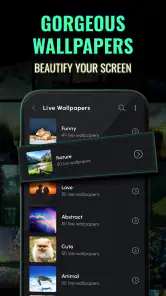
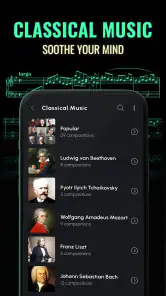


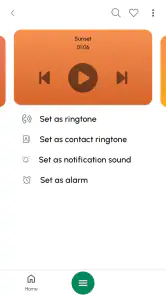
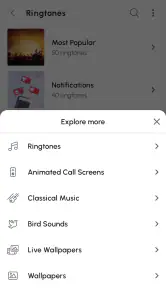
Analysis by Reviewed
I judge a ringtone app less by how many sounds it promises than by whether it helps me find one I’ll still enjoy hearing after a week. Ringtones for Android™ is built around that everyday choice: browse sounds, preview them, and use a favorite to give calls or alerts a more personal feel. It is a free music and audio app from Peaksel Ringtones Apps, and its long presence in the category makes it an easy option to consider if you want to change your phone’s sound without starting with a paid download.
What free access means here
The app is free to install, but that does not mean every part of the experience is necessarily free: it offers in-app purchases, with listed items ranging from $0.49 to $79.99. I would treat those as optional spending rather than assume they are needed for basic use. If you are only looking to browse and try out sounds, the no-cost starting point is the relevant advantage; before buying anything, check what the specific item offers and whether it solves a need you actually have.
That distinction matters if you are comparing it with buying a single ringtone elsewhere or using a sound already saved on your phone. The free entry point makes experimentation easy to justify, but the range of optional purchase prices makes it sensible to pause before spending. I would first see whether the available no-cost choices give me a sound I want to keep. If they do, there is no reason to buy anything just because the app offers purchases; if they do not, I would compare the specific paid option with the simple alternative of using an existing audio file.
Choosing a sound that works in real life
A ringtone is useful only if it suits the places you spend time. A dramatic or unusually loud sound might be fun at home but distracting in a quiet office or on public transport. I’d preview a few candidates at the volume I normally use, then choose something distinct enough to recognize without making every incoming call an interruption. For notifications, a shorter, less attention-grabbing sound is often the more practical choice.
One small workflow makes a difference: decide first whether you want a sound for calls, messages, or an alarm, then listen with that use in mind. A tune that works as a ringtone may feel irritating when it repeats for every notification; a gentle alarm can be pleasant in the morning but too subtle if you need a strong wake-up cue. Keeping those jobs separate helps personalization feel useful instead of merely novel.
Who is likely to get value
I can see this working well for someone who is tired of the phone’s standard sounds and wants a straightforward way to browse alternatives. It may also suit people who use different tones to distinguish calls from alerts, or who like changing their phone’s personality with the season or their mood. The app has a Teen content rating, so it is worth keeping that audience classification in mind when deciding whether it is appropriate for a younger user.
If you already have a specific audio file you want to use, your phone’s built-in sound settings or a file-management workflow may be more direct than browsing a ringtone library. Likewise, anyone who prefers a completely quiet phone, relies on vibration, or wants a minimalist setup may get little benefit from adding more sounds. This is best approached as a choice for people who enjoy selecting and switching tones, not as a necessary phone utility.
More From Our News Desk

Clash of Clans Is Won Between the Battles

Android Auto Makes the Case for Quieter Car Software

MobiOffice: Transforming Mobile Productivity with Seamless Integration

EA SPORTS FC™ Mobile Soccer: Redefining Mobile Sports Gaming

How Microsoft OneDrive Became a Mobile Productivity Giant

How Google Translate Breaks Language Barriers Effortlessly
Discovering the Sounds
The first time I launched Ringtones for Android™, I was pleasantly surprised by the sheer variety of ringtones available. The app boasts an extensive library, from classic tunes to the latest hits, ensuring there's something for everyone. Whether you're into pop, rock, or even nature sounds, this app has got you covered.
Easy Navigation
One of the standout features of this app is its user-friendly interface. It's straightforward to navigate, with categories clearly laid out, making it easy to find the perfect sound. You can search by genre, popularity, or even user ratings. Plus, the preview feature is a lifesaver, allowing you to listen before committing to a download.
For me, previewing is more than a convenience; it is the step that prevents an impulse choice from becoming an annoying daily sound. I’d listen to a candidate more than once and imagine hearing it in the setting where it will actually play. A tone that feels entertaining while browsing can be jarring when it interrupts a conversation, while a subtle one may disappear into background noise. Comparing a small shortlist is more useful than sampling sounds endlessly without a particular purpose.
There is also a practical reason to decide on the sound’s job before searching. If I need a ringtone that cuts through a busy day, I would favor a clear, recognizable tone; if I am choosing a message alert, I would prioritize brevity and restraint. The same sound does not have to serve every purpose. Treating calls, notifications, and alarms as separate choices helps avoid the common mistake of making the phone louder and busier when the real aim is simply to identify what needs attention.
Customization at Its Best
Now, we all know the struggle of wanting to personalize our devices, and Ringtones for Android™ makes it a breeze. Not only can you set ringtones, but you can also customize notification sounds and alarms. Imagine waking up to the sound of a gentle ocean wave or your favorite song—it definitely beats the traditional alarm blare!
Additionally, the app lets you assign different ringtones to specific contacts. So, you can always know who's calling without even looking at your phone. It's these little custom touches that really elevate the user experience.
I would keep contact assignments deliberately selective. Start with the people whose calls are time-sensitive or whose names I most need to recognize before reaching for the phone. If I assign a unique tone to every contact, the system becomes a memory test rather than a useful cue. A few clear distinctions are easier to learn and maintain, and they leave the default ringtone meaningful for everyone else.
Another useful habit is to review those choices after a change in routine. A sound that helps distinguish a family call at home may be too conspicuous in a shared workspace. I would keep a less intrusive general tone for everyday use and reserve a distinctive contact sound for the situations where quick recognition is genuinely useful. That approach gets more from personalization without making every call compete for attention.
Quality and Performance
When it comes to quality, this app doesn't disappoint. The sound quality is top-notch, with no annoying distortions or volume issues. Even better, the app is lightweight and doesn't hog your phone's resources, which is a blessing for those of us with older devices.
Performance-wise, I experienced no crashes or lags during my time with the app. It's smooth sailing all the way, ensuring a hassle-free experience.
Using it alongside your phone’s built-in options
The practical difference from the usual alternative is convenience: built-in sound settings are often enough if you already have a file, while a dedicated ringtone app is more appealing when you want to browse and compare before choosing. I’d use the preview step to narrow the field first, then assign only a few distinct sounds. That avoids turning a useful contact cue into a collection of tones I never remember or recognize.
On Android, setting a tone can involve choosing its role and confirming the change in the device’s sound controls. If a selection does not behave as expected, I’d check the relevant ringtone, notification, or alarm setting rather than assume the audio itself is faulty. Contact-specific tones are most useful for a small group of people whose calls I genuinely want to identify immediately; assigning one to everyone takes longer and can make the differences hard to remember.
This is where the app’s browsing approach has a clear trade-off against a built-in settings screen. The phone’s own controls are the quicker route when I already know which file I want, while a dedicated library is more useful when I am undecided and want to hear alternatives before choosing. If a tone seems not to take effect, I would check which sound role I changed and whether the phone is set to use that category. That is a more sensible first troubleshooting step than repeatedly selecting the same audio.
I would also avoid changing several sound roles at once. Set a call tone, test it with an ordinary incoming call, then move on to alerts or alarms if needed. This makes it easier to spot whether a sound is assigned to the wrong purpose and easier to reverse a choice that does not suit daily use. For someone who wants only one replacement tone, this simple, gradual approach keeps customization from becoming a longer project than it needs to be.
Scale, compatibility, and expectations
The app has an average rating of 4.2 from around 619,000 ratings, and it has been installed over 50 million times. Those figures suggest it has reached a broad audience, though they cannot tell me whether a particular sound will fit your taste or phone. It was released in 2013, and version 15.12.1 is listed for Android 7.0 and later, so I’d check the operating-system requirement before trying it on an older device.
Its reach is reassuring as a sign that many people have tried it, but popularity is not a substitute for checking whether the app suits your own habits. A person who enjoys browsing for a new tone has a reason to explore it; someone who changes a ringtone once and never revisits the choice may find the phone’s own controls sufficient. The minimum Android requirement is also worth checking before you spend time exploring, especially if you keep an older device in service.
For a realistic routine, imagine arriving at work and wanting to recognize an important call without having every message announce itself. I’d choose one clear incoming-call tone, keep notifications more restrained, and use a contact-specific sound only for the few people where that distinction matters. The key trade-off is attention: a distinctive tone can help you notice the right call, but frequent loud or familiar sounds can become distracting quickly.
The same principle applies outside work. If I am expecting a delivery or coordinating a pickup, a recognizable call sound could help me notice an incoming call while my phone is nearby but out of sight. I would not make every alert equally distinctive, though; otherwise the useful signal gets lost among routine notifications. A sound setup works best when it reflects what I need to notice, rather than treating every ping as equally important.
Final Thoughts
In a world where personalizing our devices is as essential as choosing what we wear, Ringtones for Android™ offers a fantastic solution. It's easy to use, packed with features, and best of all, it delivers high-quality sound without any fuss. Whether you're looking to refresh your ringtone collection or just want to add a personal touch to your device, this app is definitely worth checking out. So, why not give it a try and let your phone make a statement?
My verdict is to try it if browsing for a new sound is part of the fun and the free starting point meets your needs. I’d skip it if you want to use one file you already own, avoid ringtone changes altogether, or expect every optional purchase to be essential. With a Teen rating and optional in-app spending, it also makes sense to review purchase choices with younger users. For me, its value comes from making selection and personalization approachable; whether that is worth paying extra for depends on what each optional item adds to your own setup.
Making the choice without overcomplicating it
A question I would ask before installing is whether I want a sound library or simply need to change a setting. If I am curious about alternatives, want to compare options by listening, or plan to give a few contacts distinct call cues, the app has a practical role. If I already know the exact file and just need to assign it, I would start with Android’s sound controls instead. That difference is the clearest way to decide between this app and the usual built-in option.
Another question is whether free access is enough for my needs. Since the app can be installed without paying and also offers in-app purchases, I would explore the no-cost experience first and make any purchase only after checking the individual item and its price. The available purchase range is broad, so it would be a mistake to assume that a higher-priced option is automatically necessary or better for a simple ringtone change. If the free selection already gives me a sound I like, I would stop there.
I would skip it if my main priority is silence, minimal screen time, or a one-and-done change that my phone’s settings can handle. I would also be cautious about letting a younger user make purchases without checking them together, given the Teen content rating and the presence of optional spending. For everyone else, the most satisfying use is modest: find a sound that is easy to recognize, test it in the context where it will play, and resist adding so many custom cues that none stands out.
Ringtones for Android™ Frequently Asked Questions
Can I use Ringtones for Android™ to personalize alarms and notifications as well as calls?
The app is presented as a ringtone collection, and its features include notification sounds and alarm tones as well as call ringtones. That can be useful if you want to make several kinds of alerts easier to recognize. You can browse the available sounds and choose options that suit your preferences; your phone may ask for permission before applying a selection.
Does Ringtones for Android™ include wallpapers, or is it only for sounds?
Ringtones for Android™ is primarily a music and audio app, but its store summary also describes wallpapers alongside ringtones. This may appeal if you are looking to personalize both the sound and appearance of your phone in one app. Browse the available options after installing to see which sounds and wallpapers match what you want.
Do I need to pay before I can download Ringtones for Android™?
Ringtones for Android™ is free to download, so you can install it without paying an upfront price. In-app purchases are also available, with prices ranging from about 49 cents to around 80 dollars per item. Review each purchase prompt before confirming it, especially if you share your device or payment method with someone else.
Will Ringtones for Android™ work on my phone?
Ringtones for Android™ is an Android app, so it is intended for Android devices rather than iPhones. It requires Android 7.0 or later. Before downloading, check your phone’s Android version in its settings; if your device meets that minimum, you can try the app and explore its ringtone and wallpaper offerings.
Who develops Ringtones for Android™, and is it still maintained?
Ringtones for Android™ is developed by Peaksel Ringtones Apps. Its current version is 15.12.1, and the app has been available since October 27, 2013. Those details may help you identify the app and its publisher when you browse the Play Store. As with any app, check the version shown on the store page before installing to make sure you are choosing the intended listing.
Pros
- Vast collection of free ringtones.
- Easy-to-navigate user interface.
- Regular updates with new ringtones.
- High-quality sound options.
- Customizable ringtone features.
Cons
- Contains ads in free version.
- Limited options without internet.
- Occasional crashes reported.
- No option for custom uploads.
- Some ringtones are repetitive.

- Category
- Music & Audio
- Version
- 15.12.1