

Phone Ringtones
- 3.59K
- 4.4
- Installs
- 50.00M
- Price
- Free

Screenshots

Analysis by Reviewed
I think the best way to judge a ringtone app is to try it during an ordinary week, not just browse sounds for a few minutes. A ringtone has to be easy to recognize, comfortable to hear in public, and simple to change when your tastes shift. Phone Ringtones is aimed at that everyday job: it is a free music and audio app from Peaksel Ringtones Apps, and its focus is choosing sounds for calls rather than turning your phone into a full music-editing studio.
Start with a sound you can actually live with
My practical approach is to preview a few candidates at the volume and in the places where I usually notice calls. A dramatic clip can sound fun through a speaker but become distracting in a quiet room; a very soft one may disappear into street noise. I would shortlist a sound that has a clear opening and does not rely on a long build-up. That small test matters more than finding the most unusual option in the catalog.
The app has been around since October 2013, and it has a 4.5 average from around 216,000 ratings. Those figures suggest it has reached a broad audience, but they do not tell me whether a particular sound suits your phone or routine. I would still preview before setting anything, then give the choice a day or two before deciding it is a keeper.
Make the setup deliberate
Once you settle on a tone, consider where it will be heard. A sound that works as a general ringtone may be too noticeable for a workday, while a quieter choice can be hard to catch when the phone is in a bag. If you use individual contact tones, keep the most recognizable ones for people whose calls you genuinely want to identify without looking. That makes personalization useful instead of turning every incoming call into a guessing game.
Phone settings also matter: the same audio can feel very different depending on ring volume and vibration. I would check those together after choosing a tone, rather than repeatedly swapping sounds to solve a volume problem. If you share a space, a short, restrained clip is often kinder than a loud or prolonged one.
Discovering a World of Sounds
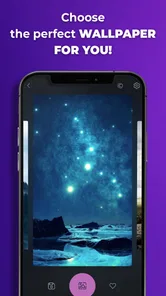
So, I downloaded Phone Ringtones because I was tired of hearing the same old tune every time someone called me. The installation was smooth, and once I opened it, I was pleasantly surprised by the layout. It’s super user-friendly, which is great if you're like me and not a tech wizard. Navigating through the app feels like a breeze, and the design is pretty appealing too.
A Symphony of Choices
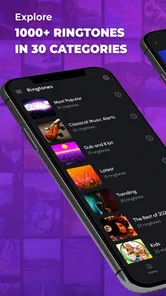
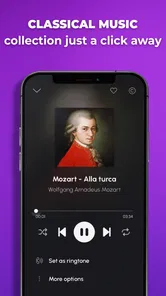
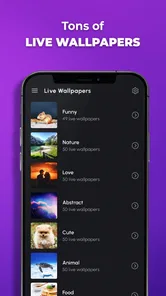
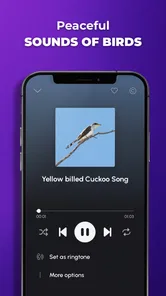
One of the first things that caught my eye was the extensive variety of ringtones available. You can literally spend hours browsing through different categories. Whether you're into classical, pop, or even nature sounds, this app has got you covered. I particularly loved how you can sample each ringtone before deciding to set it as your default. It’s like a mini concert on your phone!
More From Our News Desk

 Gmail
GmailGmail in a Busy Inbox: Who Benefits Most?
From first account to crowded workday, Gmail earns its place through dependable search and flexible sorting—but its best fit depends on how much inbox maintenance you can tolerate.

 Prime Video
Switching to Prime Video: What Changes in Your Viewing Routine
Prime Video can make a compelling second home for streaming, but switching means learning a different catalog, rental layer, and route from browsing to playback.

 Universal TV Remote Control
Universal TV Remote Control Works Best as a Reliable Backup
A phone remote earns its place through quick setup and reliable habits. Here is how to get more from Universal TV Remote Control—and where its limits show.

 Weather - By Xiaomi
Weather by Xiaomi Review: Clear at a Glance, Less Clear Up Close
Xiaomi’s weather app makes everyday forecasts quick to scan, but its calm surface can leave useful details and recovery paths harder to find than they should be.

 X
XX Under Pressure: Can It Recover When Posting Goes Wrong?
A resilience-focused review of X, examining setup, mistaken posts, interruptions, weak connections, and the gaps that matter when recovery needs to be dependable.

 Clash of Clans
Clash of Clans Is Won Between the Battles
Its raids are quick; its community is a long-term project of coordination, teaching, rivalry, and shared responsibility—with all the friction that entails.
Latest News



Another cool feature is the ability to assign different ringtones to different contacts. It’s like personalizing a tiny piece of your digital life, and honestly, it makes identifying calls a lot more fun. Imagine hearing a jazzy tune and knowing instantly that it’s your best friend calling. Pretty neat, right?
Turn a choice into a repeatable habit
A realistic routine is to choose one general ringtone first, use it through a full day, and only then add a contact-specific sound if it solves a real problem. For example, if I am expecting a call from a family member while cooking, a distinct contact tone can help me recognize it without touching the phone. If that difference is not useful in practice, I would keep the setup simpler.
When browsing, I would also avoid treating every preview as a candidate. Save a mental shortlist of two or three contrasting styles—one clear and neutral, one more personal—and compare them back-to-back. This makes the decision less tiring and helps prevent a novelty sound from winning simply because it was the last one heard.
Customization, with realistic expectations
I also appreciate how Phone Ringtones allows for customization. You can trim and edit ringtones to your liking, which is perfect for those who want a specific part of a song. The app even lets you create your own ringtones from scratch, giving you the freedom to express your musical creativity.
There is a trade-off between customization and convenience. If you only want a dependable call sound, browsing and previewing may be enough; editing is worthwhile when you already know what section you want and are willing to spend time refining it. I would not choose this app expecting the controls or workflow of a dedicated audio editor. For detailed production work, a specialist editor is the better fit, while the phone’s built-in sound settings may be enough if you only need a basic change.
Know what the free option means
The app is free to install, though in-app purchases range from $0.99 to $59.99 per item. I would start with the free experience and only consider paying if I found a specific extra I wanted; there is no reason to assume every useful ringtone requires a purchase. The app is rated Teen, so it is sensible to keep that age guidance in mind when deciding whether it is appropriate for a younger user.
Ads are another practical consideration. The published experience describes some advertising, so I would expect occasional interruptions rather than assume every browsing session is uninterrupted. If you are sensitive to ads, try a short session first and see whether the browsing rhythm works for you before spending money. A paid option may suit someone who values extra content or fewer interruptions, but it is not automatically worthwhile for a person who only wants one new tone.
Where it fits among ringtone options
Phone Ringtones has more appeal than simply picking one of the sounds already on a device when you want to browse alternatives and preview them in one place. Compared with building a sound from a personal audio file, its appeal is convenience and choice; the more hands-on route can be better if you want exact control over source material. I would choose this app for quick discovery and straightforward personalization, not as a replacement for a music library or a full editing tool.
It has more than 50 million installs, and the current version is 15.8.3.3, with Android 7.0 as the minimum operating system requirement. I would check that requirement before installing on an older device. The large audience makes it a familiar option in its niche, but the right test is still whether the catalog and setup suit your own phone and hearing habits.
Choosing tones for different parts of the day
One useful way to avoid changing sounds on impulse is to think about the places where calls matter most. If I spend the day in a shared office or classroom, I would favor a tone that is distinct but not startling. At home, where the phone may be across the room, a clearer sound can be more practical. The goal is not to find a single perfect tone for every situation; it is to choose a default that behaves well in the situations I encounter most often.
That also helps answer whether contact-specific sounds are worth setting up. They are useful when a caller’s identity changes what I do next—for example, stepping away from a noisy task to take an important call. They add little if I check the screen before answering every time. I would keep the number of personalized contacts small, since too many similar tones are harder to remember and maintain than a simple default.
What to check before settling in
On Android, assigning a tone can involve both the app and the phone’s own sound controls, so I would pay attention to which setting is being changed. After applying a sound, place a test call if that is convenient, or wait for a normal incoming call before assuming everything is configured as intended. This is a practical check rather than a judgment about the app: system settings and the way a person uses contacts can affect the final result.
If the sound does not behave as expected, I would first check the ringtone selection and ring volume in the phone settings instead of immediately browsing for another clip. That simple sequence can save time: confirm the selected tone, check the volume and vibration, then reconsider the sound only if the setup is correct but still unsuitable. It is especially helpful for anyone who has several sound controls and is not sure which one caused the change.
When a catalog is better than making your own
For someone who wants a fast change, a browsable ringtone collection is easier than sourcing an audio file, trimming it elsewhere, and transferring it to the phone. Previewing choices in context can also make it easier to find a sound with a useful opening. On the other hand, people who already know the exact recording or musical moment they want may prefer working from their own file in a dedicated editor. That route offers more direct control over the source, even if it takes more steps.
I would also separate ringtone discovery from music listening. A clip that is enjoyable as a full song may not work well when it starts unexpectedly and repeats during a call. A good alert needs to be recognizable quickly and tolerable after hearing it many times. That is why a short preview and a day of real use are more informative than choosing purely by genre or novelty.
Wrapping Up
In conclusion, if you're on the hunt for an app that spices up your ringtone game, Phone Ringtones is definitely worth a try. It’s easy to use, offers a vast array of sounds, and gives you the power to get creative with your ringtones. Whether you’re a music enthusiast or just someone who wants a change from their mundane ringtone, this app is a fantastic choice. Give it a go, and who knows, you might just find your new favorite tune!
So go ahead, download it, and let your phone sing a different tune every time it rings. You’ll thank me later!
My verdict after weighing the trade-offs
I would recommend it most to someone who wants a more personal ringtone without spending an afternoon learning editing software. It is also a useful fit for people who benefit from recognizing a few important callers by sound. I would skip it if I rarely take calls, prefer a silent phone, or already have a precise audio-editing workflow that gives me all the control I need.
The useful outcome is not having the biggest collection; it is finding one sound that is easy to recognize and pleasant enough to hear repeatedly. Start with a general tone, test it in your normal surroundings, and add contact personalization only where it makes daily life easier. That is the point at which this app feels less like endless browsing and more like a practical change to how your phone handles calls.
Who will get the most from it
I see the strongest fit for people who receive enough calls for ringtone choice to matter and who enjoy a little personalization without making phone setup a hobby. It also suits someone who has just moved to a new device and wants a recognizable sound rather than settling for whichever tone is selected by default. If you mostly communicate through messages, keep your phone muted, or need a highly controlled sound environment, the benefit will be smaller; the built-in settings or a silent mode may already do the job better.
For a busy day, I would make the first setup once, then leave it alone long enough to judge it fairly. A parent waiting for a school call, for instance, might use one distinct contact tone for that caller and keep everything else on a calm general sound. That is more practical than assigning a different clip to every person and trying to memorize a whole private sound code.
Keep the routine simple after setup
Experienced users get more value from a repeatable routine than from constantly hunting for a newer sound. I would note which tone is the default, reserve only a few contact tones for genuinely useful distinctions, and revisit the setup when my daily circumstances change. If a sound becomes irritating, switching it is easy in principle, but changing volume or vibration may solve the problem without sacrificing a tone I otherwise like.
There is also a small courtesy benefit to choosing thoughtfully. A ringtone that is clear to me can still be intrusive to people nearby, so I would test it at the volume I actually use and consider whether vibration is enough in quiet settings. This app can help with the sound choice, but good judgment about when the phone should ring remains part of the setup.
Final perspective
What I like most is the straightforward purpose: finding and applying a call sound is the central task, rather than one feature buried inside a broader music product. The balance is less compelling if I want extensive audio production, precise control over a personal recording, or an uninterrupted browsing experience. In those cases, an editor, a file-based workflow, or the phone’s own sound menu may be a better match.
For anyone curious, the sensible approach is to begin with a free browse, preview a small number of options, and test one choice through an ordinary day before investing time in extra customization. That gives a clear answer to the question that matters: does this sound help me notice calls without becoming a nuisance? If it does, the app has earned a place in my routine; if not, returning to a simple built-in tone is a perfectly reasonable outcome.
Phone Ringtones Frequently Asked Questions
Can I preview a sound before choosing it?
Previewing a sound before setting it can help you decide whether it suits your calls or notifications. Phone Ringtones is centered on discovering sounds and ringtones, so browsing and listening are useful parts of choosing a tone. Once you find one you like, consider whether it will be easy to recognize in the situations where you plan to use it.
How much storage space does Phone Ringtones need?
The space an app uses can matter if your phone is already close to its storage limit. Phone Ringtones is a music and audio app, and ringtone files you choose to download may also take up space on your device. If storage is a concern, you can review your available space before installing and keep only the sounds you want to use.
Can I use Phone Ringtones for notification sounds as well as calls?
Phone Ringtones is focused on sounds and ringtones, so it may appeal to people who want more than a standard calling tone. You can explore its sound collection and decide which options work for the alerts you want to personalize. The available controls and choices can depend on your device, so check the app’s options and your phone’s sound settings when setting a tone.
Do I need special permissions to set a ringtone?
Apps that help manage sounds may need permission to access relevant audio or device settings so you can apply a tone. When installing or using Phone Ringtones, review any permission requests and consider whether they make sense for the feature you are trying to use. You can also check your phone’s settings to manage app permissions and sound preferences.
Can I use Phone Ringtones without making purchases?
Phone Ringtones is free to download, and you can explore whether its available sounds meet your needs before deciding to spend anything. Optional in-app purchases are available, so pay attention to purchase prompts and confirm the details before completing a transaction. You can also check your device’s purchase controls if you want to prevent accidental spending.
Pros
- Wide variety of ringtones available.
- Easy to set ringtones for contacts.
- User-friendly interface design.
- Supports custom ringtone creation.
- Regularly updated with new tones.
Cons
- Contains ads that can be intrusive.
- Some ringtones require in-app purchases.
- Limited free options available.
- No option to set ringtone for apps.
- Occasional app crashes reported.













