

Old Telephone Ringtones
- 8.74K
- 4.5
- Installs
- 10.00M
- Price
- Free

Screenshots
Analysis by Reviewed
Have you ever found yourself yearning for the good ol’ days when phone ringtones were simple, yet so distinctive? If you’re anything like me, you’ve probably spent countless hours searching for the perfect tone that stands out from the modern, somewhat generic options. Allow me to introduce you to Old Telephone Ringtones, an app that takes you back to the classic charm of vintage ringtones. Whether you're a fan of the iconic rotary dial sounds or the nostalgic chime of a bygone era, this app has got you covered.
A quick choice for a more distinctive ring
I find this kind of ringtone app most useful when I want my phone to sound different without building a whole new setup. A familiar telephone-style ring is easy to recognize across a room, and it can make a personal phone feel less like every other device nearby. It suits people who enjoy retro sounds, want a clear incoming-call cue, or simply prefer a recognizable ring to a song excerpt.
There is a practical trade-off, though: a classic ring is designed to be noticeable. In a quiet office, waiting room, or shared home, that can be more attention-grabbing than a soft modern tone. I’d preview options at a comfortable volume and think about where the phone usually rings before settling on one. If you need a subtle alert, a gentle system tone or vibration may be a better everyday choice.
Exploring the Nostalgia
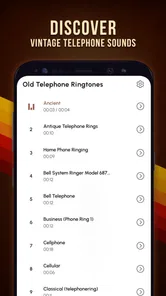
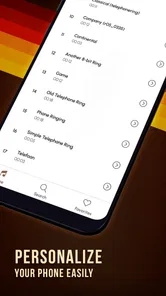
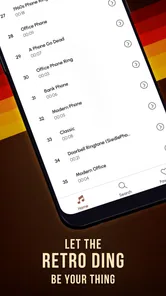
First off, let’s dive into what makes Old Telephone Ringtones such a delightful trip down memory lane. Upon installing the app, you’re greeted with a simple, user-friendly interface that’s incredibly easy to navigate. No need to be a tech guru here, folks! The app offers a wide selection of classic ringtones that are sure to bring back fond memories. From the traditional bell rings to the quirky sounds of old rotary phones, the variety is both vast and entertaining.
How I’d choose and use a tone
My first step would be to listen through several previews back-to-back rather than picking the first nostalgic sound. Small differences in rhythm and pitch matter once a tone repeats during a call. I’d choose one that remains recognizable after a few rings without becoming irritating, then use it for several days before deciding whether it works in daily life. A sound that feels amusing in a preview can feel much louder when it interrupts a conversation.
For a realistic use case, imagine leaving your phone in a bag while making dinner. A crisp old-fashioned ring is easier to distinguish from kitchen noise than a quiet chime, so you can notice a call without checking the screen constantly. On the other hand, if you take calls in meetings or use your phone in a shared space, I’d keep a quieter alternative ready in the phone’s sound settings and switch when needed. The ringtone is a personal cue, not a substitute for checking the environment.
Features That Stand Out
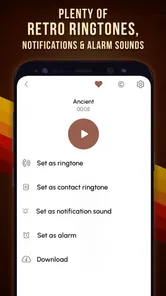
One of the standout features of this app is its ability to let you customize your ringtone to match your personal taste. With just a few taps, you can set a ringtone for specific contacts, ensuring you know who’s calling even before you pick up the phone. Another cool feature is the ability to preview each tone before making it your own. This way, you can be sure you've found the one that truly resonates with you.
More From Our News Desk

 Gmail
GmailGmail in a Busy Inbox: Who Benefits Most?
From first account to crowded workday, Gmail earns its place through dependable search and flexible sorting—but its best fit depends on how much inbox maintenance you can tolerate.

 Prime Video
Switching to Prime Video: What Changes in Your Viewing Routine
Prime Video can make a compelling second home for streaming, but switching means learning a different catalog, rental layer, and route from browsing to playback.

 Universal TV Remote Control
Universal TV Remote Control Works Best as a Reliable Backup
A phone remote earns its place through quick setup and reliable habits. Here is how to get more from Universal TV Remote Control—and where its limits show.

 Weather - By Xiaomi
Weather by Xiaomi Review: Clear at a Glance, Less Clear Up Close
Xiaomi’s weather app makes everyday forecasts quick to scan, but its calm surface can leave useful details and recovery paths harder to find than they should be.

 X
XX Under Pressure: Can It Recover When Posting Goes Wrong?
A resilience-focused review of X, examining setup, mistaken posts, interruptions, weak connections, and the gaps that matter when recovery needs to be dependable.

 Clash of Clans
Clash of Clans Is Won Between the Battles
Its raids are quick; its community is a long-term project of coordination, teaching, rivalry, and shared responsibility—with all the friction that entails.
Latest News



Contact-specific tones can be especially handy when you keep your phone out of sight: assigning a distinctive ring to a close family member, for example, gives you a quick audible clue about who is calling. I’d use that sparingly, rather than assigning a different sound to everyone. Too many unique tones are hard to remember, while a small number of meaningful distinctions can be useful. As with any ringtone change, the final setup depends on the options available in your phone’s own settings.
What’s more, the app is available on both Android and iOS, making it accessible to a wide range of users. And for those worried about storage, you’ll be pleased to know that it’s quite lightweight, so it won’t be hogging your precious device space.
Where it fits among ringtone alternatives
Compared with choosing one of the standard tones already on a phone, this app is aimed at a much narrower taste: the familiar, old telephone character. That focus is its appeal if you want a distinct retro sound, but it is not the best route for someone looking for songs, elaborate sound effects, or a broad sound-editing toolkit. A music or audio editor gives more creative control, while built-in system tones are simpler if you only need a quiet notification and do not care about a vintage style.
The app is free to start with, while optional in-app purchases range from $0.99 to $9.49 per item. I’d begin by checking whether the free choices already give you the sound you want before paying for anything. The listing identifies Peaksel Ringtones Apps as the developer, and the app is rated Teen. That age label is worth bearing in mind if you are choosing apps for a younger user, even though the basic idea here is ringtone selection.
Why You’ll Love It
Now, let’s talk about why you’ll absolutely love this app. For starters, it’s like having a slice of history right in your pocket. The authenticity of the sounds is impeccable, bringing a smile to your face every time your phone rings. It’s perfect for those who appreciate a touch of nostalgia or anyone looking to add a bit of retro flair to their modern device.
Its reach suggests that the idea has found a sizeable audience: it has more than 10 million installs and an average rating of 4.6 from around 156,000 ratings. I treat those figures as context rather than a guarantee that every sound will suit my taste. The current version is 13.4.0, and the app first appeared on October 27, 2013. That long-running presence and current version tell me it has continued to be maintained, but they do not by themselves tell me what has changed between releases. For an existing user, the sensible approach is to check the current version on their device and keep a preferred ringtone in mind in case an update or phone setting changes how it is applied.
Moreover, it’s a great conversation starter. Trust me, when your phone rings with a vintage chime, it’s bound to catch some attention and spark curiosity among friends and colleagues.
Who should choose something else
I wouldn’t recommend this as the first choice for someone who wants a completely silent or discreet phone, needs a large catalogue of contemporary music clips, or expects detailed editing controls. It is also worth remembering that a ringtone’s usefulness depends on the phone being set to ring: silent mode, vibration settings, and operating-system controls can affect what you hear. If a chosen sound does not play as expected, I’d first check the phone’s ringtone and volume settings rather than assume the tone itself is unsuitable.
Android users should have a minimum operating system version of 7.0 to use the listed release. If you are on an older device, check compatibility before planning to rely on it. For anyone on a supported device who mainly wants an unmistakable old-style ring, the focused purpose is a strength; for someone who wants a complete replacement for their phone’s sound controls, it is better to look elsewhere.
Choosing a ring for different routines
I would also think about the sound in terms of routine rather than nostalgia alone. If you spend much of the day outdoors or move between noisy places, a bright, steady pattern can be more useful than a delicate tone. If you work at a desk beside other people, the same volume and repetition may become intrusive. Trying a selected sound during an ordinary day is a better test than listening once in a quiet room; the right choice is the one you can identify without wishing it would stop.
There is a useful compromise for people who like the retro character but do not want it everywhere. Keep a classic ring for calls and use a restrained built-in sound for messages and other alerts, where the phone’s settings allow that separation. This prevents every notification from competing with the distinctive call tone. It also makes the old-style ring more meaningful: when it sounds, you know it is a call rather than another routine alert.
What to check before committing
One practical question is whether selecting a sound inside the app is the same as making it the active ringtone. I would follow the final confirmation carefully and then place a test call if possible, because the phone’s own sound controls determine what happens afterward. If the system asks for a choice or permission during setup, read it rather than tapping through; the important result is knowing which tone is currently assigned and how to change it back.
Another point is whether you want one general ring or separate contact sounds. A single choice is simpler and less likely to confuse you, while a small number of contact-specific assignments can be worthwhile for people whose calls have different levels of urgency. I would not build a complicated scheme unless I could remember it without checking a note. The benefit comes from quick recognition, not from customizing every entry in an address book.
How the app has evolved—and what that means
There is a difference between knowing that an app has a current release and knowing exactly what changed along the way. This one has been around since October 27, 2013, and its current version is 13.4.0, which tells me it has not remained frozen at its original release. It does not tell me which sounds or controls were added or revised, so I would not judge an update by version number alone. Existing users should check whether their chosen tone still appears and remains selected after updating, then adjust the phone’s ringtone setting if needed.
For someone installing it now, the practical question is more immediate: does the available selection include a ring you will still enjoy after the novelty wears off? The preview is useful precisely because a nostalgic sound can be charming in isolation but tiring when repeated. I would compare a few candidates at a realistic listening volume and choose the one that stays clear without sounding harsh. That small bit of patience is more valuable than picking the most theatrical option.
Who gets the most from its narrow focus
This app makes the most sense for someone who wants a recognizable old telephone sound and is happy to keep the rest of the phone’s audio setup simple. It can also suit a person who often misses calls because their usual tone blends into background noise, provided that a louder ring is appropriate for their surroundings. The focused selection is a benefit when you know what style you want; it is a limitation if you are still browsing for many unrelated kinds of audio.
I would skip it if the main goal is to use a favorite song, edit clips, or build a carefully layered sound profile. In those cases, a dedicated audio tool or the phone’s built-in options are a more direct fit. Likewise, anyone who relies on vibration or silent mode most of the time may get little practical value from installing a ringtone-focused app. The best reason to try it is a clear preference for this particular sound, not a general desire to customize everything.
A sensible way to decide whether to keep it
I’d treat installation as a short trial rather than a commitment to a whole new phone setup. Listen to the previews, apply one candidate, and notice how it feels in the places where calls usually arrive. If it is too sharp, distracting, or easy to mistake for someone else’s phone, switch back to a built-in tone. If it remains easy to recognize and makes you smile without disrupting the room, it has earned its place.
That approach also answers the cost question without guesswork: start with the free experience and only consider an optional purchase if you have already decided that the app fits your habits. The available in-app items cost between $0.99 and $9.49 each, so I would avoid paying just because a sound seems amusing at first listen. A ringtone is heard repeatedly; value depends on whether it stays useful over time, not on how novel it feels during setup.
Final Thoughts
In conclusion, if you’re on the hunt for an app that offers a unique and nostalgic twist to your smartphone experience, Old Telephone Ringtones is a must-try. It’s easy to use, doesn’t take up much space, and adds a delightful personal touch to your device. So, why not take a step back in time and let these charming ringtones bring a little vintage joy to your everyday life? You won’t regret it!
My recommendation is more measured: try it if the old telephone sound is genuinely your style, preview carefully, and choose a tone that fits the places you use your phone. The focused collection makes it more appealing than generic system options for that specific purpose, while built-in tones remain the better no-fuss option for people who do not want another app. For me, its best use is a recognizable ring with a bit of personality, not a sound that has to suit every situation.
Old Telephone Ringtones Frequently Asked Questions
Does Old Telephone Ringtones focus on classic telephone sounds or include other kinds of audio?
Old Telephone Ringtones is aimed at people who want the familiar sound of a traditional telephone ring. Its store summary describes classic phone ringtones for lovers of retro phones, so the main appeal is nostalgia rather than a broad music or sound-effects collection. If you are looking specifically for an old-fashioned ring to personalize your phone, that focus should be easy to understand before downloading.
Is Old Telephone Ringtones free, and are there optional costs?
The app is free to download, and optional in-app purchases are available. Individual purchase prices range from $0.99 to $9.49, so check the price shown for an item before confirming a purchase. That gives you a chance to decide whether the free experience suits you or whether you want to pay for anything offered inside the app.
Who makes Old Telephone Ringtones, and what kind of app is it?
Old Telephone Ringtones is a Music & Audio app from Peaksel Ringtones Apps. It focuses on classic phone sounds for people who enjoy a retro ring instead of a more modern ringtone. The app’s central idea is simple: browse old-fashioned telephone-style tones and choose one that suits your phone. Its content rating is Teen, so it is worth checking that rating before downloading.
What is the Old Telephone Ringtones app?
The Old Telephone Ringtones app is a mobile application that provides users with a collection of classic and vintage phone ringtones. These ringtones mimic the sounds of traditional landline telephones, offering a nostalgic touch for those who miss the simplicity of old-school phone rings. The app is available for both Android and iOS devices.
How do I set a ringtone from the Old Telephone Ringtones app?
Once you download and install the Old Telephone Ringtones app, you can browse through the collection of available ringtones. Simply tap on the desired ringtone to listen to a preview, and if you like it, you can set it as your default ringtone, notification sound, or alarm directly from the app's interface. The app provides easy-to-follow instructions for both Android and iOS users.
Pros
- Nostalgic sound brings back memories.
- Wide variety of classic tones available.
- Easy to set custom ringtones quickly.
- Lightweight app
- doesn't consume much space.
- Free to download and use with no ads.
Cons
- Limited to old-fashioned ringtone styles.
- No option for modern ringtone selection.
- Interface feels a bit outdated.
- Occasional bugs when setting tones.
- Doesn't support all smartphone models.













