LogMeIn Rescue Customer
- 788.00
- 4.1
- Installs
- 1.00M
- Price
- Free

Screenshots


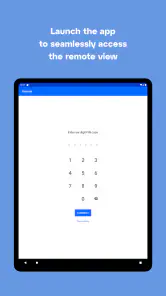
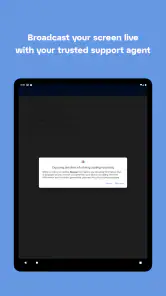
Analysis by Reviewed
I’d approach Rescue + Mobile as a way to let a trusted support technician help with a problem on your phone, not as a general-purpose remote-control app. That distinction matters: it’s most useful when a real support person has asked you to install it and is ready to guide the session. If you’re simply looking for an app to explore or a routine device-cleanup tool, this isn’t the right fit.
Before you install, know who is helping
Because a support session can involve remote access to your device, I’d confirm who contacted you and why before opening the app. Use it only with a technician you already trust, such as a support person you reached through an organisation’s normal help channel. If an unexpected caller or message pressures you to install it, stop and verify the request independently. The app is a connection point for help, not proof that the person on the other end is legitimate.
That makes the experience different from searching the web for a fix or using a standard chat app. A search gives you instructions to try yourself; chat lets you describe the issue; Rescue is intended to help a technician work with you on the device. I’d choose the least involved option that can solve the problem. For a simple settings question, clear written steps may be enough. For a confusing issue that’s hard to explain, a guided support session may save time.
A first session that feels manageable
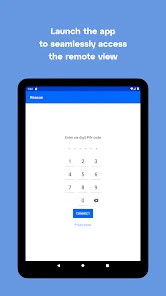
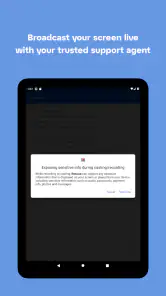
When you’re ready, install the app at the technician’s direction and follow the steps they provide to connect. Keep the conversation open so you can ask what they are doing and why. Read each permission prompt rather than tapping through automatically, and grant only what is needed for the session you agreed to. If a prompt or request doesn’t match the support task, pause and ask the technician to explain before continuing.
A practical first success could be getting help with an app that keeps failing when you need it for work. Instead of trying to describe every screen from memory, you can tell the technician what happens, follow their guidance, and check whether the original task works again before ending the session. I’d also make a note of the steps that solved it; that can help you handle the same issue yourself next time without repeating a remote session.
What it’s like to use for business support
LogMeIn Rescue Customer is a free business support app from GoTo Group, Inc. It has a 4.1 average from around 4,800 ratings, and it has been installed over a million times. The app is rated for Everyone, with a current version of 8.9.1-36 and an Android minimum of 7.0. Those details make it a familiar option for people whose workplace or service provider already uses Rescue, but they don’t mean you should start a session without knowing who requested it.
For a first-time user, the key question is usually whether the technician can see or control the phone. The safe way to think about it is that remote support may give the technician access needed to diagnose the issue, so stay present and treat the session as something you actively supervise. Ask them to describe any action that feels unexpected. If you want to stop, say so and end the session rather than leaving access open while you do something else.
You May Like

Clash of Clans Is Won Between the Battles

Android Auto Makes the Case for Quieter Car Software

MobiOffice: Transforming Mobile Productivity with Seamless Integration

EA SPORTS FC™ Mobile Soccer: Redefining Mobile Sports Gaming

How Microsoft OneDrive Became a Mobile Productivity Giant

How Google Translate Breaks Language Barriers Effortlessly
Who benefits, and where it can feel awkward
This is best for someone who has a specific problem and a known support team ready to help, especially when describing the issue over the phone would be frustrating. It can also suit a small business employee who needs assistance with a work-related mobile problem and has been told to use this support channel. It’s less suitable if you want independent troubleshooting, dislike sharing your screen or device access, or don’t have a trusted technician to connect with. In those cases, written instructions or an in-person support route may feel more comfortable.
There is a trade-off: remote help can make a hard-to-explain problem easier to inspect, but it asks you to rely on the technician and stay alert during the session. A useful habit is to close private material you don’t need for the task and avoid opening unrelated apps while support is connected. That keeps the session focused and makes it easier for you to follow what is happening.
A useful fit for a specific problem, not routine phone care
I’d separate Rescue from the tools people usually reach for first. A help page, a phone call, or a message exchange is often better when the issue can be explained in a sentence and the fix is a short instruction. A remote support session earns its place when the technician needs to understand what is happening on the device and a back-and-forth description would be slow or confusing. That makes the app particularly relevant to organisations that already use this support route, rather than to someone shopping for general Android utilities.
For example, imagine you’re preparing to use a work app before a meeting and it repeatedly fails at the same point. You can contact your known support team through the usual channel, explain what you were doing, and follow the technician’s connection instructions. Keep the affected app and the task in focus, ask before any step that surprises you, then test the work task again while the technician is still available. A clear result—either the app now works or the same failure remains—gives both of you a useful stopping point.
That last check is easy to overlook. A session can feel productive because someone has changed a setting or walked you through several screens, but the measure that matters is whether your original task now succeeds. I’d avoid ending with only “it seems better.” Try the exact action that failed, and if it still fails, explain what changed rather than restarting the story from the beginning. This keeps the support conversation grounded in the problem you actually need solved.
Small habits that make support smoother
Before you connect, make a short note of the app or task involved, the last time it worked, and the action that triggers the problem. If there is an error message, keep its wording available so you can relay it accurately. This is not about preparing a technical report; it simply helps you avoid guessing while someone is waiting on the other end. For a recurring issue, noting whether it happens every time or only under a particular circumstance can also make the troubleshooting more focused.
During the session, narrate what you see in plain language if the technician asks you to reproduce the issue. If something private appears, say so and pause rather than feeling obliged to continue. I’d also ask for a brief explanation of any fix that changes how you normally use the phone. A remote session is most useful when it resolves the immediate snag and leaves you with enough understanding to recognize the same issue later.
One practical boundary is to keep the session tied to the problem you contacted support about. If the conversation drifts to unrelated settings or requests that don’t make sense for the issue, ask how they relate before proceeding. A legitimate support interaction should be understandable to you, even if the underlying technical cause is not. You remain the person using the device, so it’s reasonable to pause, ask questions, or stop.
When another route is the better choice
If you’re comfortable following written instructions and the problem is straightforward, self-service help is usually less involved than remote access. If the phone needs physical repair, or the issue is outside the support team’s remit, a remote session cannot replace the appropriate in-person service. And if the person asking you to install the app is not someone you can verify independently, don’t use the app to test whether they are trustworthy. Verify first through a contact method you already know.
I’d also skip a session when you cannot give it your attention. Remote assistance works best when you can watch, listen, and respond; it is not a hands-off process to start and then leave running while you do something else. If you’re in a public place or handling private information, wait until you can take part comfortably, or ask the support team whether another support method is available.
Alright, folks, let me take you on a little journey through the world of Rescue + Mobile. If you’ve ever found yourself in a pinch with your mobile device, this app might just be your new best friend. Designed primarily for Android users, it promises to be the knight in shining armor for all your device troubleshooting needs.
The Lifesaver for Your Device
First off, let’s talk about what Rescue + Mobile does. This nifty app is all about providing remote support to help fix issues on your Android device. Imagine having a tech support team right in your pocket. Whether it’s a pesky software glitch or a stubborn app that refuses to cooperate, Rescue + Mobile allows support agents to connect remotely to your device to diagnose and fix problems. Pretty cool, right?
Installation and Setup
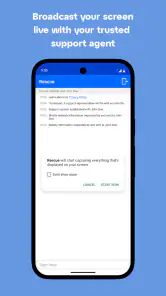
Getting started with Rescue + Mobile is as easy as pie. You just head over to the Google Play Store, download the app, and follow a few simple steps. The user interface is straightforward, and even if you’re not the most tech-savvy person out there, you’ll find it pretty intuitive. Once the app is installed, you’ll need to grant permission for remote access, which is a small trade-off for the convenience it brings.
Features That Stand Out
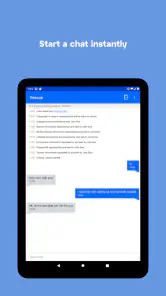
One of the things I love about Rescue + Mobile is its versatility. It’s not just about fixing issues; it’s about making your life easier. The app supports a wide range of devices and operating systems, so compatibility is rarely an issue. Plus, it comes with real-time chat features, so you can communicate with support agents while they work their magic. This means you’re never left in the dark about what’s happening on your device.
Another standout feature is the ability to transfer files during a support session. This is super handy if you need to share screenshots or logs with the support team. And let’s not forget about the security measures in place. All sessions are encrypted, ensuring your data remains safe and sound.
Real-World Applications
Imagine this scenario: you’re traveling, and suddenly your phone decides to throw a tantrum. Maybe it’s crashing apps or a sluggish performance that’s driving you up the wall. With Rescue + Mobile, help is just a few taps away. The app can connect you with a support agent who can remotely access your device, diagnose the problem, and get you back on track. It’s like having a tech support team on speed dial, no matter where you are.
Final Thoughts
All in all, Rescue + Mobile is a solid choice for anyone looking to streamline their tech support needs. It’s user-friendly, efficient, and offers peace of mind knowing that help is always at hand. Whether you’re a tech novice or just someone who doesn’t want to deal with the hassle of troubleshooting on their own, this app is worth checking out. So, if you’re in need of a digital lifeline, give Rescue + Mobile a try. You might just find it becomes an indispensable part of your mobile toolkit.
Make the next session more useful
Before connecting, I’d write down the exact problem, when it began, and what you already tried. That small bit of preparation helps keep a session focused and avoids spending time reproducing details from memory. If the issue appears only after a particular action, describe that sequence rather than simply saying the phone is “acting up.” For a work device, check your organisation’s normal support process first so the technician can handle the issue through the right channel.
It’s also worth asking what you should do after the immediate fix. A technician may be able to show you a setting or a repeatable step, but the value of the session is greater if you understand how to recognize the problem again and what to try safely on your own. I wouldn’t treat remote access as a substitute for learning the basics or as permission to let someone browse unrelated parts of the phone.
My recommendation for a first-time user
The app’s strongest case is a specific support request from a trusted person who can explain the session and stay in conversation while you follow along. Its weaker case is an unscheduled download prompted by a stranger, or a situation where a simple self-service guide would resolve the issue with less access. If you’re uncertain, verify the technician through a separate, familiar contact route before proceeding. That extra pause is sensible, not overcautious.
For the right situation, I find the basic idea reassuring: you don’t have to translate every technical detail into a long explanation when someone qualified can help inspect the problem with you. Keep the session limited to the task, ask questions as you go, and make sure you know when the support interaction is finished. Used that way, Rescue + Mobile is a practical bridge between a phone problem and a person who can help—not something you need running for everyday use.
LogMeIn Rescue Customer Frequently Asked Questions
Who should install LogMeIn Rescue Customer?
LogMeIn Rescue Customer is intended for people who have been asked by a support professional to join a remote assistance session. It is a business support app, not a general-purpose tool for browsing or managing a device. Install it when you have a support need and can confirm that the technician or organization contacting you is trusted.
What should I check before connecting with a technician?
Before starting a session, make sure you know who is providing support and why they need access to your device. Rescue is a secure support app, but it should only be used with a trusted technician. Be cautious if an unexpected caller or message asks you to install it, and do not share access with someone whose identity or reason for helping you is unclear.
What is Rescue + Mobile and how does it work?
Rescue + Mobile is an app designed to provide remote support and troubleshooting for your Android device. It allows technicians to access your device remotely to diagnose and fix issues, ensuring your device runs smoothly. The app requires user consent before any remote session begins, ensuring your privacy and security are maintained throughout the process.
Is Rescue + Mobile safe to use on my Android device?
Yes, Rescue + Mobile is safe to use when you are working with a trusted technician. The app prioritizes user security by requiring explicit permission before any remote access is granted. It uses encrypted connections to ensure your data remains private and secure during remote sessions. Additionally, you can terminate sessions at any time, giving you full control over your device.
What kind of issues can Rescue + Mobile help resolve?
Rescue + Mobile can assist with a wide range of issues, including software glitches, app crashes, connectivity problems, and device settings configurations. It is particularly useful for resolving complex issues that might require expert intervention, providing a convenient solution for users who need technical support without visiting a service center.
Pros
- User-friendly interface for easy navigation.
- Real-time alerts for emergency situations.
- Comprehensive tracking of emergency contacts.
- Quick access to emergency services numbers.
- Offline capabilities for unreliable connections.
Cons
- Limited features in free version.
- Requires constant GPS for accurate tracking.
- Battery drains quickly with continuous use.
- Subscription needed for premium features.
- Not compatible with older Android versions.

- Category
- Business
- Version
- 8.9.1-36












