GoTo
- 2.40K
- 4.8
- Installs
- 5.00M
- Price
- Free

Screenshots


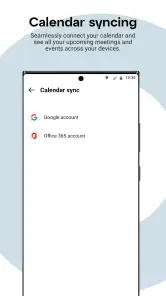
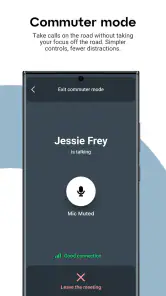
Analysis by Reviewed
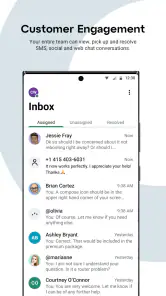
I’d first clear up an important point before deciding whether to install GoTo: this is a business communication app, not a task manager. Its focus is calling, messaging, and meetings, so it won’t replace a to-do list or help organize reminders in the way a dedicated productivity planner would. I find that distinction useful because it sets realistic expectations: GoTo is worth considering when work conversations need a mobile home, not when the main problem is remembering errands.
What the free price does—and doesn’t—tell you
The Android app is free to download, which makes trying it a low-commitment first step. That fact tells me the app itself has no purchase price at the point of download; it does not, by itself, establish what service access, plans, or paid options may apply in a particular workplace. If your company already uses GoTo, ask whoever manages your account how mobile access fits into your organization’s setup before relying on it for important calls.
That distinction matters more than it might with a standalone personal utility. A communication app is useful when the people you need to reach can actually use the same workplace system. If your team has already settled on another calling and meeting platform, a free install alone is not a reason to move everyone. I’d treat the no-cost download as a way to check whether the app suits your existing work arrangement, rather than as proof that every part of using it is free.
Articles Related to GoTo
Clash of Clans Is Won Between the Battles
Its raids are quick; its community is a long-term project of coordination, teaching, rivalry, and shared responsibility—with all the friction that entails.
Android Auto Makes the Case for Quieter Car Software
The car interface is no longer judged by how much it can do, but by how quietly it helps. Android Auto shows what drivers now expect—and what still gets in the way.
MobiOffice: Transforming Mobile Productivity with Seamless Integration
MobiOffice: Word, Sheets, PDF is redefining mobile productivity with a surprising blend of functionality and innovation.
EA SPORTS FC™ Mobile Soccer: Redefining Mobile Sports Gaming
Dive into EA SPORTS FC™ Mobile Soccer, where immersive gameplay and strategic depth transform mobile sports gaming.
Where its value comes from in a working day
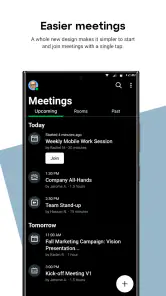
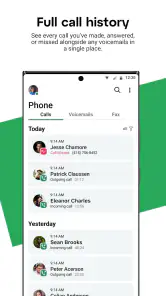
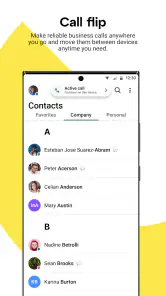
The practical value here is having several familiar work interactions—voice conversations, written messages, and meetings—available through one mobile app. That can be handy when I’m away from my desk and need to respond without switching among unrelated tools. It also gives a team a more coherent option when it wants business conversations to happen through a shared service instead of scattering calls and messages across personal apps.
Picture a simple day: I leave my desk to handle an errand, then a colleague needs a quick answer before a meeting. A mobile communication app is valuable if I can use the channel my workplace already relies on, answer in context, and get back to what I was doing without asking everyone to change tools. GoTo’s stated calling, messaging, and meeting focus makes that kind of use relevant, though the exact setup and available access depend on the work account behind it.
The tradeoffs I would check before depending on it
The main tradeoff is that GoTo’s usefulness is tied to workplace adoption. If coworkers, clients, or collaborators expect you to use a different service, adding another app may create one more inbox to monitor instead of simplifying communication. I’d check which channels my team actually uses and whether I’m expected to be reachable outside the office before making it part of my daily routine.
There is also a practical difference between having a mobile app and having a complete replacement for a desk setup. Calls and meetings on a phone can be convenient while travelling or moving between tasks, but a small screen and a noisy environment may not suit a long meeting or work that requires close attention. I’d keep a computer or another suitable option available for sessions where viewing shared material or concentrating for a sustained stretch matters more than mobility.
You May Like

How Microsoft OneDrive Became a Mobile Productivity Giant

How Google Translate Breaks Language Barriers Effortlessly

Why Google Sheets Is the Ultimate Mobile Productivity Tool

Unveiling the Dynamic World of My Talking Tom Friends

Free Fire MAX: Dominating the Battle Royale Arena

Free Fire: Winterlands – The Ultimate Winter Gaming Adventure
Who is most likely to get value
I’d consider GoTo if my employer or clients already use GoTo and I need a mobile way to stay involved in business calls, messages, and meetings. It is less compelling for someone who wants a personal planner, a general-purpose chat app for friends, or a new workplace platform to introduce without team agreement. The best fit is not simply “anyone who wants productivity”; it is someone whose day already includes communication through this service.
For a small team choosing between a single communication app and a collection of separate tools, the useful question is whether bringing these interactions together would reduce friction in its actual workflow. GoTo’s focus may suit a group that wants calling, messaging, and meetings under one business-oriented umbrella. A team already comfortable with its current combination may gain little from switching, especially if doing so means retraining people or splitting conversations during a transition.
What is GoTo All About?
At first glance, GoTo might look like another task manager app. But don't be fooled by its understated interface. This app is designed to seamlessly integrate into your daily routine, helping you organize tasks, set reminders, and even collaborate with others. The magic lies in its ability to adapt to your personal workflow, whether you're managing a team or just trying to remember to walk the dog.
Features That Stand Out
One of my favorite features of GoTo is its cross-platform compatibility. Whether you're an Android enthusiast or an iOS devotee, GoTo has you covered. The app syncs effortlessly across devices, ensuring that your tasks and reminders are up-to-date, no matter where you are or what device you're using.
Another standout feature is its collaborative capabilities. You can easily share tasks and projects with colleagues, making it a breeze to work together, even if you're miles apart. It's like having a virtual office space where everyone is on the same page, literally!
User Experience: As Smooth As Butter
The user experience with GoTo is nothing short of delightful. The app is intuitive and easy to navigate, with a clean design that doesn't overwhelm you with unnecessary frills. It's like the app knows exactly what you need and delivers it without any fuss.
Setting up tasks and reminders is a breeze, and the app’s notifications are timely without being intrusive. It's like having a personal assistant who's always one step ahead, ensuring you never miss a beat.
Why You'll Love It
If you're someone who juggles multiple projects or simply needs a bit of help staying organized, GoTo is your new best friend. It's perfect for anyone looking to boost their productivity without the steep learning curve that often comes with other task management apps. Plus, the app is regularly updated with new features and improvements, so it only gets better with time.
In a world where we're constantly bombarded with information and distractions, having an app like GoTo can make all the difference. It's not just about getting things done; it's about doing them efficiently and effectively. So, if you're ready to take control of your schedule and streamline your workflow, give GoTo a try. You won't regret it!
A sensible way to evaluate it
GoTo Mobile is published by GoTo Group, Inc. and is listed in the business category. The app is free to install, has an Everyone content rating, and its current version is 2025.11.1; it requires Android 9 or later. Those details make it accessible to many users, but the requirement still gives older-device owners a concrete first check: confirm the phone’s Android version before planning to use it for work.
Its audience figures suggest that it is an established option rather than an obscure experiment: it has more than five million installs, around 141,000 ratings, and an average score of 4.8, alongside about 2,400 written reviews. I wouldn’t treat a high rating as a guarantee that it fits every company, though. Business communication depends on whether your organization uses the service and how it has configured access, so a strong public score cannot answer those workplace-specific questions for you.
Small workflow choices that prevent friction
Before taking GoTo on the road, I’d make a simple habit of checking which conversation needs an immediate reply and which can wait. Keeping work messages distinct from personal chats helps avoid the common trap of feeling permanently on call just because a business app is on a phone. If your workplace expects after-hours availability, agree on that expectation with your team rather than letting notifications silently define it.
For meetings, I’d also decide in advance when mobile is genuinely useful. A short check-in while between locations is a good reason to use a phone; a meeting where I need to follow several people, review detailed material, and take careful notes is usually easier at a desk. This is not a weakness unique to GoTo so much as a real tradeoff of mobile meetings, but it affects whether the app makes the workday smoother or merely moves a demanding task onto a smaller screen.
When a conversation turns into a decision that others will need later, I’d make sure the outcome is captured in the team’s agreed work process instead of assuming that a call or message will serve as a permanent record everyone can find. That small step helps prevent a mobile exchange from becoming an isolated answer that colleagues miss. It is especially useful when one person is responding away from the office and others are still working through the shared project.
How it compares with familiar alternatives
Compared with using separate apps for calls, chat, and online meetings, a unified business communication option can reduce the number of places I have to check. The benefit depends on whether GoTo is already part of the team’s routine: if it is, using one mobile destination is more coherent than asking colleagues to hunt through personal messaging apps. If it is not, adding it alongside an established workplace suite can have the opposite effect and divide attention.
Personal messaging apps can feel more natural for informal exchanges, but they are not automatically a better choice for work. A business-focused service makes more sense when a company wants its work conversations to happen through an agreed channel. Conversely, if a team’s existing platform already handles its calls, messages, and meetings reliably, staying with that platform may be the sensible option. I would compare actual team habits, not just feature labels, before recommending a switch.
GoTo is also not a substitute for a task manager, shared project board, or calendar simply because it helps people coordinate. Communication can move work forward, but it does not necessarily give you a structured place to assign, track, and review every task. I’d pair it with the planning tools the team already uses if work requires clear owners, deadlines, or a record of progress rather than trying to force conversations to carry that load.
Questions I would settle before making it a habit
If you are wondering whether you can use it without a company, the most practical answer is to check what access you already have or need through your workplace. It is designed for business communication, so I would not assume that installing it alone creates a useful calling or meeting setup. Ask your administrator or team lead how mobile access works in your organization before scheduling work around it.
If your main concern is whether it can keep a team coordinated, look at the specific channels your colleagues use and agree where important updates belong. The app’s calling, messaging, and meeting focus covers several types of interaction, but a team still needs clear habits: which issues call for a meeting, what belongs in a message, and where decisions should be recorded. Those conventions will matter as much as the app itself.
For someone choosing between a phone and a computer, I’d use mobile for availability and quick participation, then move to a larger screen when the meeting requires sustained attention or detailed work. And if you are comparing it with another service, test the fit against your real routine: whether your contacts are there, whether you need all three communication modes, and whether another app would simply duplicate what your team already does.
My buy-or-skip verdict
My recommendation is conditional but straightforward: try GoTo Mobile if your workplace already uses GoTo and you want its business conversations available on your phone. The free install makes that initial check easy, while the Android requirement and your organization’s access arrangements are worth confirming first. Its strongest case is convenience within an existing team workflow, not a promise to solve every kind of productivity problem.
I’d skip it if you are looking for a personal organizer, if your colleagues communicate elsewhere, or if another workplace app already covers your needs without friction. I would also avoid treating the high rating as a reason to move a whole team before discussing the change. For the right workplace, GoTo can be a practical mobile companion; for everyone else, installing another communication app may add noise rather than value.
GoTo Frequently Asked Questions
Can I use GoTo for work communication while away from my desk?
GoTo Mobile is a calling, messaging, and meetings solution, so it is intended to help users stay connected through a mobile device. It may be useful when you need to handle work conversations away from your desk, provided your organization’s GoTo service and account support the activities you want to use. Consider how your team communicates before installing it.
Which organization or account do I need to use GoTo?
GoTo is a business communication app, so its usefulness depends on having access to the GoTo service used for your work or organization. Before downloading, check whether your organization has given you an account or instructions for signing in. Having the app installed is not necessarily the same as having access to every calling, messaging, or meeting option.
Is GoTo free to download, and what should I know about its cost?
GoTo is free to download, which makes it easy to try the app before deciding whether it suits your communication needs. The app is a business tool for calling, messaging, and meetings. Downloading it does not by itself tell you what options may be available for an organization’s service, so check the plan details relevant to your account before relying on particular features.
What is GoTo and what are its main features?
GoTo is a comprehensive productivity app designed to streamline communication and collaboration for teams. It offers features such as video conferencing, screen sharing, messaging, and project management tools. The app aims to facilitate seamless remote work by allowing team members to connect and collaborate efficiently from anywhere, on any device.
Is GoTo compatible with both Android and iOS devices?
Yes, GoTo is compatible with both Android and iOS devices. The app is available for download on the Google Play Store for Android users and the Apple App Store for iOS users, ensuring that teams can stay connected and productive regardless of their preferred mobile platform. On Android, it requires version 9 or later, so check your device’s operating system before downloading.
Pros
- User-friendly interface
- easy navigation.
- Supports multiple platforms for meetings.
- High-quality audio and video calls.
- Efficient screen sharing features.
- Reliable customer support and service.
Cons
- Limited free version features.
- Occasional connectivity issues.
- Mobile app lacks some desktop features.
- Can be resource-intensive on older devices.
- Requires stable internet for optimal use.

- Category
- Business
- Version
- 2025.11.1












