

Renovate AI : House Design
- 94.00
- 4.6
- Installs
- 100.00K
- Price
- Free

Screenshots




Analysis by Reviewed
I tried Renovate AI: House Design with a practical question in mind: is it useful beyond the first burst of excitement, or is it mainly a quick way to make attractive room images? That distinction matters with home-design apps. A few impressive previews can be fun, but lasting value comes from helping me make better decisions when I am choosing colors, furniture, layouts, or a renovation direction.
This free House & Home app from Trial & Error AI focuses on AI-assisted interior design, home decor, room planning, and renovation ideas. It is aimed at people who want visual guidance without immediately hiring a designer or learning complicated professional software. My overall impression is positive, but conditional: it works best as an idea generator and comparison tool, not as a complete replacement for measurements, material samples, or a human professional.
From the first week of experimenting to everyday usefulness
I found the first week most useful when I treated each session as a small experiment rather than a search for a perfect room. Starting with one question—such as whether a quieter palette would make a workspace feel less busy—gave the images a purpose and made it easier to judge what was genuinely helpful. The next section looks at how that habit can stay practical once the initial novelty wears off.
Why the first sessions feel so appealing
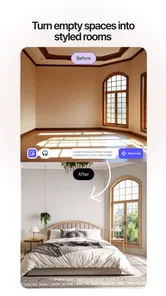
The strongest part of the experience is the speed of visual exploration. Instead of staring at a blank room and trying to imagine how a different style might look, I can use the app to move quickly through possible directions. That is especially helpful when I know a room feels wrong but cannot explain why. Seeing alternative treatments gives me something concrete to react to.
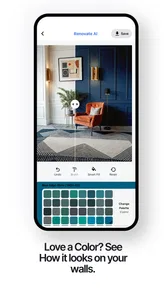
I found this more useful than browsing isolated furniture photographs. A product image can look excellent on its own and still feel unsuitable in my room. A room-focused AI design app puts the emphasis on the overall atmosphere: the relationship between wall color, furniture, lighting, decoration, and available space. Even when a generated result is not realistic enough to follow literally, it can reveal a combination I would not have considered.
The first-week appeal also comes from low commitment. I can explore a warmer living room, a calmer bedroom, or a more organized workspace without moving furniture or buying paint. That makes the app approachable for renters, first-time decorators, and anyone who wants to test an idea before discussing it with someone else.
Its audience is broad. Someone preparing to refresh one room can use it for direction, while a homeowner planning a larger update can use it to compare moods before narrowing down materials. I would also recommend it to people who struggle to communicate visual preferences. Showing a generated concept to a partner or contractor can be easier than saying, “I want something modern but not cold.”
More From Our News Desk

 Instagram
Instagram’s Power Comes From Its Place in Your Phone
A close look at how Instagram turns Meta’s reach, recommendation systems and everyday camera habits into durable platform power—and what that costs users.

 Gmail
GmailGmail in a Busy Inbox: Who Benefits Most?
From first account to crowded workday, Gmail earns its place through dependable search and flexible sorting—but its best fit depends on how much inbox maintenance you can tolerate.

 Prime Video
Switching to Prime Video: What Changes in Your Viewing Routine
Prime Video can make a compelling second home for streaming, but switching means learning a different catalog, rental layer, and route from browsing to playback.

 Universal TV Remote Control
Universal TV Remote Control Works Best as a Reliable Backup
A phone remote earns its place through quick setup and reliable habits. Here is how to get more from Universal TV Remote Control—and where its limits show.

 Weather - By Xiaomi
Weather by Xiaomi Review: Clear at a Glance, Less Clear Up Close
Xiaomi’s weather app makes everyday forecasts quick to scan, but its calm surface can leave useful details and recovery paths harder to find than they should be.

 X
XX Under Pressure: Can It Recover When Posting Goes Wrong?
A resilience-focused review of X, examining setup, mistaken posts, interruptions, weak connections, and the gaps that matter when recovery needs to be dependable.
Latest News



How I would use it before spending money
My preferred workflow is deliberately cautious. I start with the room as it currently exists, then decide what must remain: the sofa, flooring, cabinets, work desk, or a particular architectural feature. After that, I compare only a few broad styles rather than generating endless variations. The goal is not to collect attractive pictures. It is to identify recurring choices that appear useful across several versions.
A practical example is a small home office that feels cluttered and visually tiring. I would use the app to compare lighter and darker wall treatments, different levels of decoration, and arrangements that make the desk the focal point. The valuable result is not necessarily one perfect image. It may be the discovery that the room looks better with fewer competing colors and a clearer storage zone.
There is an important trade-off here: AI imagery can make a room look more spacious, more polished, or more coherent than it will be in real life. I treat every result as a direction, not a promise. Before purchasing anything, I check the actual dimensions, walking paths, door swings, window positions, daylight, and the visual effect of existing items that the app may simplify or reinterpret.
What makes it different from ordinary inspiration browsing
Traditional alternatives such as image boards, furniture catalogs, and general web searches are excellent for collecting references, but they often leave the user to assemble the references mentally. This app is more direct because the room itself becomes the starting point. That makes it particularly useful when the challenge is not finding a style but imagining that style inside a specific space.
Professional design software remains better for exact floor plans, precise dimensions, construction planning, and detailed product specification. A human interior designer is also better at understanding lifestyle constraints, building limitations, budget priorities, and the emotional reasons behind a choice. Renovate AI sits between those options: faster and simpler than professional tools, but less dependable for final decisions.
That middle position explains both its appeal and its limits. I would not open it to calculate whether a large cabinet physically fits through a hallway. I would open it to decide whether the room should move toward a soft, natural palette or a sharper contemporary one before I spend time researching real products.
The questions that appear after the novelty
One question many users will have is whether the app is suitable for complete beginners. In my view, yes, provided they understand that visual confidence is not the same as technical accuracy. You do not need design vocabulary to benefit from it, but you do need to verify the practical details yourself.
Another question is whether it replaces a designer. For a small cosmetic refresh, it may reduce the need for outside help by giving you a clearer starting point. For structural changes, complex lighting, custom cabinetry, accessibility needs, or a whole-home project, I would use it as preparation for a professional conversation rather than as the final authority.
The app is free to install, which makes experimentation easy. It also includes in-app purchases ranging from $4.99 to $99.99 per item, so I would pay attention to the point at which casual exploration turns into a paid commitment. The right value depends on how often I am actively planning a room. If I only want occasional inspiration, the free experience may be enough; if I am repeatedly comparing renovation directions, paid options may become more relevant.
Keeping value after the first month
After the first month, I would judge the app by whether it helps me make clearer decisions, not by how many new concepts I can produce. Returning when a real household need changes can reveal whether earlier choices still fit, while a short record of what worked helps prevent attractive but conflicting ideas from taking over. That longer view also makes it easier to decide when the app has done its job.
Where recurring use can make sense
Home design is rarely a one-session problem. A room changes as furniture arrives, storage needs grow, children or pets affect the layout, and seasonal light reveals weaknesses that were not obvious at first. An app like this can remain useful when I return with a specific decision to make rather than browsing without a project.
For example, I might use it once before repainting, return when replacing a sofa, and revisit it when trying to make the same room work as both a guest area and a workspace. Those separate visits can help maintain a consistent direction. Instead of making isolated purchases, I can ask whether a new idea supports the atmosphere I have already chosen.
The recurring value is strongest for people who enjoy gradual improvements. A homeowner may use it to test a new arrangement before rearranging heavy furniture. A renter may explore reversible changes such as textiles, lighting mood, and decoration. Someone moving into a new apartment can use it to reduce the uncertainty of buying items for several unfamiliar rooms.
I also see value in using it as a conversation aid. When two people disagree about a room, abstract arguments can become repetitive. A few visual alternatives can reveal the real disagreement: perhaps one person wants more color while the other wants less clutter, or one prefers open space while the other needs additional storage. The images do not solve the disagreement, but they can make it more specific.
A better habit than endless generation
The easiest way to lose value is to treat the app like a slot machine for room styles. More variations do not automatically produce a better decision. I recommend saving a small set of directions and writing down what each one teaches you. One may have the best color balance, another the most practical furniture arrangement, and a third the right feeling but unrealistic materials.
This comparison habit is one of the less obvious ways to get more from the app. I look for repeated patterns rather than isolated details. If several different concepts work better when the walls are lighter, that is a stronger clue than one dramatic image with an unusual accent color. If every appealing version removes an item I need in daily life, the issue may be the room’s storage plan rather than its decoration.
I would also separate inspiration from purchasing. First decide on the room’s function, traffic flow, and essential pieces. Only afterward should you search for products. This prevents a common problem with visual design tools: falling in love with an attractive look and then forcing the room to accommodate it.
Who gets the most lasting benefit
The app earns repeat visits from users who make decisions in stages. That includes people renovating one room at a time, landlords preparing a property’s visual direction, and homeowners who want to coordinate changes without committing to a full redesign. It is also useful for anyone who needs help turning vague taste into a shortlist of actionable choices.
It is less compelling for someone who already has a precise plan, exact measurements, and a trusted professional workflow. In that situation, the app may add visual alternatives when what the user really needs is documentation and execution. It is also not the best fit for a person who wants a product database with guaranteed availability, exact finishes, or direct purchasing guidance.
The age rating is Everyone, which matches the app’s general purpose and makes it approachable for ordinary household planning. Still, younger users and casual browsers should remember that attractive concepts can encourage unnecessary spending. I would use the app to clarify needs, not to justify buying every item that makes a generated room look complete.
What maintenance actually involves
The maintenance burden is not mainly technical; it is decision fatigue. Keeping the app useful means returning with a defined question, keeping a realistic sense of the room’s constraints, and resisting the temptation to restart the entire design every time a new style looks appealing. The more disciplined the workflow, the more valuable the output becomes.
There is also a practical maintenance step after every promising result: compare it with the real room in daylight, at night, and from the main entry point. AI concepts can hide awkward corners or make lighting appear more even than it is. I would check whether the proposed feel still works beside existing flooring, neighboring rooms, and objects that cannot be replaced.
That extra checking is easy to skip because the visual result feels finished. Yet it is the difference between using the app as a thoughtful planning aid and using it as decoration entertainment. The app can shorten the imagination phase, but it cannot remove the work of living with a decision.
Where fatigue begins
My main concern is that repeated experimentation can blur the original goal. After enough attractive room concepts, they may begin to feel interchangeable. This is a familiar weakness of AI design tools: novelty is abundant, while prioritization remains the user’s responsibility.
Another source of fatigue is the gap between visual polish and practical confidence. If a generated arrangement ignores a radiator, misjudges scale, or changes a room feature that must stay, I have to mentally correct it. That correction becomes tiring when I am comparing many versions. For a serious renovation, manual planning or professional advice may be less exciting but more efficient.
There is also a cost-awareness issue. The app is free at entry, but the presence of paid items means I would not assume every useful path is included without checking the purchase screen carefully. The broad range from $4.99 to $99.99 per item makes it especially important to decide what outcome I want before paying. A beautiful preview is not automatically worth a high expense if it does not change my real-world plan.
The current version is 5.2.7, and the app supports Android devices running at least version 7.0. That makes it accessible to many Android users, but I would still consider the age of my device before expecting a smooth creative workflow. Design experimentation is more enjoyable when images load and comparisons feel comfortable; an older phone can make a visually intensive process feel slower and less inviting.
How it fits into a responsible renovation process
I would place this app near the beginning of a project, between identifying a problem and selecting real materials. First I would photograph or describe the room honestly, including the pieces that must remain. Then I would explore a limited number of directions, note the common elements, and translate those elements into a practical checklist: colors to sample, furniture dimensions to verify, storage needs to solve, and lighting conditions to test.
After that, I would move to physical samples and measurements. Paint cards, fabric swatches, flooring samples, and taped floor outlines tell me things an AI image cannot. If the project involves walls, wiring, plumbing, structural work, or safety concerns, I would seek appropriate professional advice. This app can help me explain what I want, but it should not be treated as an engineering or building approval tool.
That workflow also answers whether the app is worth keeping installed. If it helps me make a shortlist, communicate with another decision-maker, or avoid an unsuitable purchase, it has earned its place. If I only open it to scroll through increasingly dramatic rooms without taking action, the novelty has probably already faded.
My long-term verdict
After looking past the initial visual appeal, I think Renovate AI: House Design has genuine staying power for a particular kind of user: someone who is actively making home decisions but needs help imagining possibilities. Its free entry, accessible presentation, and AI-centered approach make it easier to begin than professional design software. Its best contribution is not a flawless final room; it is helping me move from uncertainty to a clearer direction.
The app has attracted over 100 thousand installs and holds a 4.6 average from around 4.5 thousand ratings, which fits my impression that the concept connects with a broad audience. I would not use those figures as proof that every result will suit every room, but they do suggest that the app has found a useful place among approachable home-planning tools.
Trial & Error AI has built something I would recommend with boundaries. Use it before shopping, before repainting, and before asking a partner or professional to react to an idea. Do not use it as a substitute for measuring, sampling, budgeting, or checking whether a design can actually be built and maintained.
My recommendation is simple: keep it if you have an active room project and use it with a short, disciplined workflow. Skip it if you need exact technical plans, verified product specifications, or a complete renovation service. For everyone in between, Renovate AI: House Design is a worthwhile visual thinking tool whose long-term value depends less on generating more images and more on turning the right images into sensible decisions.
Renovate AI : House Design Frequently Asked Questions
What devices and operating systems can run Renovate AI: House Design?
Renovate AI: House Design is an app for mobile devices, and its listed minimum operating-system requirement is version 7.0. Check your device’s software version before downloading, since an older system may not support the app. Keeping your device’s operating system up to date can also help you use current app features and maintain general compatibility.
Who makes Renovate AI: House Design, and is it suitable for all ages?
Renovate AI: House Design is developed by Trial & Error AI and is categorized in House & Home. It has an Everyone content rating, so it is presented as suitable for a broad audience. Its focus is AI-powered home design, interior design, home decor, and room design, making it relevant to people exploring ideas for their living spaces.
What is Renovate AI: House Design, and what can it do?
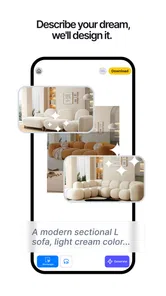
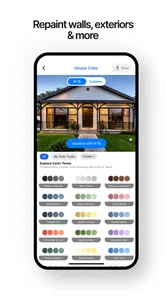
Renovate AI: House Design is an interior and exterior design app that uses artificial intelligence to visualize renovation ideas. You can upload a photo of a room, house facade, or outdoor area and experiment with different styles, colors, materials, furniture arrangements, and landscaping concepts. It is useful for inspiration and planning, although the generated images should be treated as creative previews rather than exact construction plans.
Is Renovate AI: House Design free to download and use?
The app can generally be downloaded for free, but some features, design styles, image generations, or higher-quality results may require in-app purchases or a subscription. Before starting a trial, check the pricing page carefully, including the renewal terms and cancellation instructions. Free access may be enough for testing the basic experience, while frequent users may need a paid plan.
How do I create a renovation design with the app?
After opening Renovate AI: House Design, you typically select the type of space you want to redesign, upload or capture a suitable photo, and choose a preferred style or renovation category. The AI then creates one or more visual concepts. Clear, well-lit photos with the room or building fully visible usually produce more useful results than dark, cluttered, or heavily angled images.
Pros
- Generates quick room redesign concepts from photos.
- Offers multiple interior styles for design inspiration.
- Useful for visualizing renovations before contacting a professional.
- Simple interface suitable for users without design experience.
- Can help compare color palettes
- layouts
- and decor directions.
Cons
- AI results may distort furniture
- windows
- or architectural details.
- Some styles and features may require a paid subscription.
- Generated designs may not reflect realistic renovation costs.
- Photo quality and lighting strongly affect the final results.
- Limited control over exact furniture placement and measurements.







