Recovery Photo - File Restore
- 242.00
- 4.3
- Installs
- 1.00M
- Price
- Free

Screenshots





Analysis by Reviewed
I approached Recovery Photo - File Restore as the kind of productivity app most people install only after a mistake: a photo disappears, an important file is removed, and the usual search through folders comes up empty. That makes its first impression easy to understand. The promise is immediate, practical, and more valuable than another app that simply adds a new place to store things.
After spending time with it, my opinion is more measured. This is a focused recovery tool from AbCdE, available for free and rated for Everyone. It can be useful when a recently deleted image or file still has a recoverable copy somewhere on the device, but it should not be treated as a guarantee against every kind of data loss. The most important detail is timing: recovery tools are strongest before new data has had time to overwrite old storage space.
What the first week feels like
The first week is when this app makes the strongest case for itself. The purpose is clear from the moment I think about using it: look for deleted photos or files, inspect what can be found, and restore the items that are still available. That narrow focus is welcome. I do not need a full cloud service, a social layer, or a complicated editing suite when I am trying to recover one missing picture.
Its store summary presents it as a way to restore deleted photos and files easily, while the short description identifies it as “Recovery Photo.” In practice, I would set expectations slightly lower than the wording suggests. “Easily” depends on how the file was deleted, how much the phone has been used since then, and whether the item remains visible to the recovery process. The app is a sensible first attempt, not a substitute for a backup system.
A realistic everyday situation is easy to imagine. I might clean up a crowded gallery while commuting, select several screenshots, and then realize later that one of them contained a receipt or an address I needed. The first response should be to stop downloading, recording video, and taking more photos. I would then open the recovery app, run its search, and review the results carefully rather than restoring everything in one sweep.
That last step matters because recovery results can be less tidy than a normal gallery. A useful workflow is to identify the original image by its visual content, approximate time, and file type before selecting it. If several similar thumbnails appear, I would restore only the most likely copy and open it immediately in a normal gallery or file viewer. This avoids turning one accidental deletion into a second problem involving duplicates and clutter.
The app is also a reasonable fit for someone who wants a simple emergency utility without paying upfront. It belongs to the productivity category, and its free price removes the hesitation that often prevents people from keeping a recovery tool available. It has passed the early adoption stage too, with over one million installs and an average rating of 4.2 from around 6.8 thousand ratings. Those figures suggest that many people find the basic idea useful, although they do not tell me whether every recovery attempt succeeds.
More From Our News Desk

Weather by Xiaomi Review: Clear at a Glance, Less Clear Up Close

X Under Pressure: Can It Recover When Posting Goes Wrong?

Clash of Clans Is Won Between the Battles

Android Auto Makes the Case for Quieter Car Software

MobiOffice: Transforming Mobile Productivity with Seamless Integration

EA SPORTS FC™ Mobile Soccer: Redefining Mobile Sports Gaming
I would not install it expecting a dramatic technical rescue every time. Deleted files are not always recoverable, particularly after storage has been reused or after a more complete cleanup. The app can search for recoverable remnants, but it cannot recreate information that has genuinely been replaced. That limitation is not a flaw unique to this product; it is the central trade-off of mobile recovery tools.
How I would use it after an accidental deletion
My first rule would be to stop changing the phone. New photos, app downloads, system updates, and large messages can all increase storage activity. Even if the app itself is the right tool, installing and running anything after the deletion introduces another step into the process. If the missing item is important, I would avoid experimenting with several unrelated cleaners or file managers at the same time.
Next, I would search with a specific goal. If I lost one camera photo, I would look for that image rather than trying to recover every picture ever removed. If I deleted a document, I would check the likely file category and inspect names or previews where available. This makes the review stage faster and reduces the chance that I restore a damaged or unrelated file simply because its thumbnail looks familiar.
I would also save the recovered item to a clearly named folder and make a second copy somewhere separate. Recovery is not complete just because an item appears again. A restored file may be readable but still sit in a temporary or easily overlooked location. Moving it into an ordinary folder and backing it up immediately turns a fragile rescue into something more permanent.
One non-obvious habit is to test the recovered file before deleting any remaining copies. For a photo, I would zoom in, check whether it opens consistently, and share or copy it to another location. For a document, I would open it in the appropriate app and confirm that the pages or contents are intact. A visible thumbnail is not the same as a fully usable file.
Where the month-to-month value comes from
Recovery apps rarely provide daily entertainment, and I do not think this one needs to. Its recurring value comes from being available before an accident happens. If I regularly sort photos, move files between folders, or use a phone with limited storage, keeping a recovery utility installed can make an accidental deletion less stressful.
That value is conditional, though. The app is most useful when I remember that it exists and act quickly. It is not a background replacement for cloud backup, computer backup, or careful file organization. I would describe it as a safety net for mistakes, not as a complete maintenance plan for personal data.
The best long-term use is therefore occasional and deliberate. I might keep it installed during a period when I am reorganizing a large gallery, changing phones, or cleaning old downloads. After recovering something important, I would review my backup habits rather than assuming the problem is solved forever. The app earns its space when it supports that habit instead of encouraging careless deletion.
There is also a practical distinction between photos and general files. Photos are often easier to recognize visually, so a recovery result can be judged quickly. Files may have vague names, missing extensions, or several similar versions. For documents, I would spend more time checking the recovered content and less time relying on the filename alone. That difference affects how much effort the app saves in real use.
For people who frequently receive images through messaging apps, the tool may be worth keeping as an emergency option because the same picture can exist in more than one location or form. However, that can also create confusion. A recovered copy may not be the original camera file, and it may have different quality or metadata. If the original matters for printing, editing, or evidence, I would compare the recovered version with any remaining copies before treating it as definitive.
The maintenance burden is small, but not zero
One advantage of a focused utility is that it does not demand a daily routine. I would not want to open it every morning or manage another complicated library. Its maintenance burden is mainly about remembering its role, keeping enough free storage for recovered items, and checking that the app remains compatible with the phone.
The current version is 1.7, and it runs on Android 7.0 or later. That broad operating-system reach makes it relevant to people using older Android phones, not only recent devices. At the same time, older hardware may make scanning feel slower or less comfortable, especially when storage is nearly full. I would leave room for the recovered files rather than beginning a scan with a completely crowded device.
After a successful recovery, I would remove duplicate results and organize the restored items immediately. This is where many recovery utilities lose their practical value: they solve the emergency but leave behind a confusing pile of copies. A few minutes of cleanup after each recovery keeps the app from becoming part of the clutter it was meant to fix.
I would also avoid using it as a reason to postpone backups. A monthly backup to a computer or trusted storage location is more dependable than hoping a deleted file remains recoverable. The app can help with a mistake that has already happened; a backup protects against a wider range of problems, including device damage and loss.
What creates fatigue over time
The main source of fatigue is uncertainty. When I use a calculator, I know whether the answer is available. With deleted-file recovery, the result depends on conditions outside the app’s control. A scan may find something that looks promising but turns out to be incomplete, duplicated, or unrelated. Repeating searches without changing the underlying situation can quickly become frustrating.
Another source of friction is the emotional context. People usually open this kind of app when they are already annoyed or worried. A long list of possible results, unclear filenames, or a recovery process that needs several checks can feel harder than it would during a calm test. I would rather see a smaller, clearly organized set of likely results than a huge collection that forces me to inspect everything.
There is also a trade-off between convenience and control. A simple recovery flow is friendly to beginners, but experienced users may want more detail about locations, file types, or the condition of each result. If my work depended on recovering a particular document, I would compare this app with a desktop recovery solution or a professional backup workflow instead of relying on a phone utility alone.
Privacy is another reason to think before installing any recovery tool. Deleted photos and files can be personal, and I would review the app’s permission prompts and behavior on my own device before scanning sensitive material. I would also avoid recovering private files into a shared folder. The app’s Everyone age rating makes it broadly accessible, but that does not remove the need for adults to supervise use on a family phone.
I would skip this app entirely if I already had a reliable backup process and never delete files locally without checking them first. In that situation, the extra utility may not justify the storage space or occasional attention. I would also choose a different option if I needed forensic-grade recovery, extensive control over storage locations, or guaranteed restoration of files removed long ago.
How it compares with ordinary alternatives
The usual alternative is the phone’s own gallery or file manager. Those tools are better for finding items that were moved, hidden, or placed in a trash folder, because they already understand the device’s normal organization. I would check those locations first. A dedicated recovery app becomes more interesting when the item is no longer visible through ordinary browsing.
Cloud backup is a stronger choice for prevention. It can preserve a copy before deletion and can help after a phone is lost or damaged, not just after a mistaken tap. Its weakness is that it must have been configured and allowed to complete beforehand. Recovery Photo - File Restore is more useful after the mistake, while backup is more valuable before it.
Desktop recovery software can offer deeper inspection and more control, particularly when the missing file is important. The cost is extra equipment, more technical steps, and less convenience. For a casual photo deletion on an Android phone, I would try this app first because it is free and immediate. For irreplaceable work files, I would not let that convenience become my only plan.
File-cleaning apps are a poor substitute. Their purpose is to remove clutter, not rescue it, and using one immediately after an accidental deletion could make recovery harder. I would keep the roles separate: use a cleaner only when I am certain about what can go, and use a recovery tool when I am trying to undo a mistake.
Who should keep it installed
I think this app makes the most sense for Android users who often manage photos and downloads directly on their phone, especially people who have accidentally deleted files before. It is also suitable for someone who wants a free emergency option and understands that success depends on acting quickly. The Everyone rating makes it approachable for a broad audience, but younger users should still be guided when dealing with private images or documents.
I would recommend it less strongly to photographers, students handling important assignments, or professionals who cannot risk losing original files. Those users should build a backup routine first and treat this app as a secondary attempt. A recovery tool is reassuring, but reassurance is not the same as redundancy.
My practical recommendation is to install it before you need it, but do not use its presence as permission to be careless. Learn where recovered files are saved, keep some free storage available, and decide in advance where an important restored item will be copied. That preparation turns a rushed emergency into a short, controlled procedure.
My long-term verdict
After the novelty fades, Recovery Photo - File Restore remains useful only if I view it as an emergency instrument rather than a daily productivity companion. Its free access, focused purpose, broad Android compatibility, and established user base make it easy to justify keeping available. The developer is AbCdE, and the app has a 4.2 average rating with over one million installs, which gives it a reasonable level of visibility among recovery utilities.
Still, the lasting value comes from disciplined use. I would check the phone’s normal trash and backup locations first, stop writing new data after a deletion, scan for a specific item, inspect the recovered copy, and back it up immediately. Those steps matter as much as the app itself. Without them, a promising result can become another source of clutter or false confidence.
My final view is positive but cautious. I would keep it on an Android phone where accidental deletion is a realistic risk, particularly during a large cleanup. I would not depend on it for irreplaceable data, and I would choose a stronger backup or desktop recovery workflow when the stakes are high. It earns lasting space as a first-response tool, not as a replacement for prevention.
Recovery Photo - File Restore Frequently Asked Questions
Is Recovery Photo - File Restore compatible with my Android device?
Recovery Photo - File Restore is an Android app, and its minimum operating system requirement is Android 7.0. If your device runs that version or a newer one, you can check its app page and your phone’s available storage before downloading. The app is free, and its content rating is Everyone, making it suitable for a general audience.
What is Recovery Photo - File Restore used for?
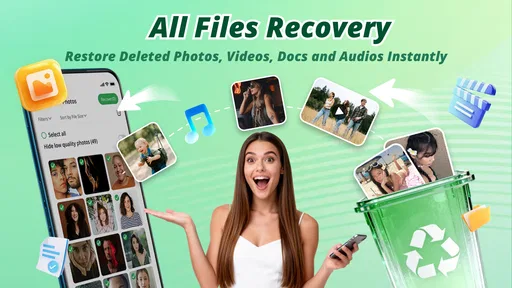
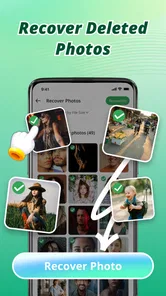
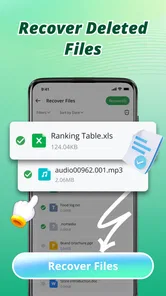
Recovery Photo - File Restore is designed to help users search for and recover deleted photos and other potentially recoverable files from an Android device. It typically scans available storage for remnants of deleted media and presents matching items for review. Results can vary considerably depending on the device, storage type, time since deletion, and whether new data has overwritten the original files.
Can Recovery Photo - File Restore recover every deleted photo or file?
No recovery application can guarantee that every deleted photo or file will be restored. Recovery is more likely when deletion happened recently and the storage space has not been reused. Files may be damaged, incomplete, or impossible to find, particularly on newer devices using encryption, restricted storage access, cloud-only backups, or modern file systems that remove deleted data quickly.
Does the app require root access to scan my device?
The exact level of access depends on your Android version and the recovery features being used. Basic scans may work without root access, but deeper searches can be limited by Android storage permissions and sandboxing. Before installing, review the permissions requested and the app’s current instructions. Avoid rooting your phone solely for recovery unless you understand the security and warranty risks.
Is Recovery Photo - File Restore safe to use and does it upload my files?
You should check the application’s privacy policy and permission screen before starting a scan. A trustworthy recovery tool should clearly explain whether files are processed locally or sent to an online service. Grant only the access required for scanning, and be cautious if the app requests unrelated permissions. Do not recover sensitive media to an unfamiliar cloud location without understanding how it is handled.
Pros
- Recovers photos
- videos
- and files from internal storage.
- Simple interface makes scanning easy for nontechnical users.
- Preview files before choosing which items to restore.
- Useful for finding recently deleted media by mistake.
- Works without requiring a computer or additional recovery hardware.
Cons
- Recovery results can vary greatly by device and storage condition.
- Deep scans may take considerable time and use extra battery.
- Some recovered files may be incomplete or have reduced quality.
- Free features may be limited by ads or in-app purchases.
- Deleted files can be permanently lost if storage space is overwritten.











