REALTOR.ca Real Estate & Homes
- 46.00
- 4.5
- Installs
- 1.00M
- Price
- Free

Screenshots






Analysis by Reviewed
When I’m weighing a home-search app, I start with a simple question: can I use it without paying, and does it make the search more useful? REALTOR.ca Real Estate & Homes is free, so browsing does not require a purchase. That makes it easy to try while you’re deciding whether to buy, rent, or simply get a feel for the Canadian market. The Canadian Real Estate Association develops it, and its 4.5 average from around 20,000 ratings suggests many users find it worthwhile.
What free access gets you
For me, the value is less about replacing every step of a real-estate transaction and more about making early research convenient. The app brings Canadian property listings into one place, so I can compare areas and possibilities before deciding which questions to take to an agent. It has passed over a million installs, is rated for everyone, and its current version is 4.47.0. Those details establish the app’s basic scope, but the real test is whether it fits the way you search.
I’d treat it as a research companion, not as a promise that every listing will suit my needs or that browsing alone is enough to make a purchase decision. A free starting point is especially useful when I’m still figuring out my priorities: location, property type, and a workable budget. I can explore without committing money just to see what is available.
Browsing and Discovering Homes
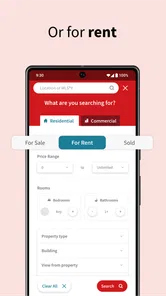
The first thing I noticed about the REALTOR.ca Real Estate & Homes app was how user-friendly it is. The interface is clean and intuitive, making navigation a breeze. You can easily browse through thousands of listings across Canada, thanks to its powerful search feature. Whether you’re looking for a cozy cottage in the countryside or a chic condo in the city, the app lets you filter your search by location, price, property type, and more.
One of the standout features is the map search. It’s like Google Maps met real estate! You can see all the available listings plotted on a map, which is perfect if you want to explore a specific neighborhood. Plus, the app provides detailed property descriptions, high-quality photos, and even virtual tours. It’s like having an open house right in your pocket!
Making a search more useful
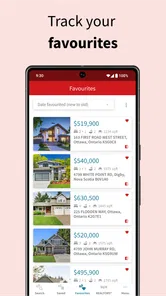
I get the most out of map browsing when I use it to compare areas rather than fixate on a single listing. A home can look appealing in photos, but its location may change whether it works for daily life. I’d scan the surrounding area, save the promising options to revisit, and then compare the practical details side by side. That workflow helps me notice trade-offs before I arrange a viewing.
Filters are useful, but I wouldn’t make them too narrow at the start. If I’m unsure what my budget can buy in a particular neighborhood, I’d first search broadly, look at the range of properties, and only then adjust the price or property-type filters. This avoids ruling out an option before I understand the local market. For renters, the same approach can help separate a realistic shortlist from an idealized one.
More From Our News Desk

 Instagram
’s Power Comes From Its Place in Your Phone
A close look at how Instagram turns Meta’s reach, recommendation systems and everyday camera habits into durable platform power—and what that costs users.

 Gmail
Gmail in a Busy Inbox: Who Benefits Most?
From first account to crowded workday, Gmail earns its place through dependable search and flexible sorting—but its best fit depends on how much inbox maintenance you can tolerate.

 Prime Video
Switching to Prime Video: What Changes in Your Viewing Routine
Prime Video can make a compelling second home for streaming, but switching means learning a different catalog, rental layer, and route from browsing to playback.

 Universal TV Remote Control
 Works Best as a Reliable Backup
A phone remote earns its place through quick setup and reliable habits. Here is how to get more from Universal TV Remote Control—and where its limits show.

 Weather - By Xiaomi
Weather by Xiaomi Review: Clear at a Glance, Less Clear Up Close
Xiaomi’s weather app makes everyday forecasts quick to scan, but its calm surface can leave useful details and recovery paths harder to find than they should be.

 X
X Under Pressure: Can It Recover When Posting Goes Wrong?
A resilience-focused review of X, examining setup, mistaken posts, interruptions, weak connections, and the gaps that matter when recovery needs to be dependable.
Latest News



Compared with general classified-ad apps, a real-estate-focused search is more convenient when I want to browse homes across Canada and use property-oriented details. A local brokerage site may be better when I already know which agent or neighborhood I’m focused on, while a map app can help with orientation but is not a substitute for property listings. I’d use REALTOR.ca as the broad discovery layer, then verify details and arrange next steps through the listing contact.
Connecting with Real Estate Agents
Another great aspect of the app is how it connects you with professional real estate agents. Once you find a property that piques your interest, you can easily contact the listing agent directly through the app. This feature saves you the hassle of searching for contact details separately, making the process of buying or renting a home much more streamlined.
That direct contact is handy when I have a specific question about a listing or want to ask about arranging a viewing. I’d make my message precise: identify the property and ask one or two concrete questions, rather than sending a vague expression of interest. It makes the next step clearer for both sides. For a major decision, though, I’d still read the listing carefully and discuss the details with the appropriate professional rather than treating a short app description as a complete assessment.
If you’re a bit of a real estate novice, no worries! The app provides tons of resources and articles that can help guide you through the home buying process. It’s like having a real estate expert at your fingertips!
Keeping track without rushing
The real estate market is always changing, and staying updated can be a challenge. But with this app, you can receive notifications on new listings, price changes, and market trends. It’s like having a personal assistant who keeps you informed about everything happening in the real estate world. How cool is that?
Notifications can be useful if I’m actively searching, but I’d keep them focused on the locations and kinds of homes I genuinely want to consider. Otherwise, every new listing can become noise rather than help. A practical routine is to check changes at a set time, compare them with saved candidates, and decide which ones deserve follow-up. If I’m only casually curious, frequent alerts may be more distracting than valuable.
Moreover, the app offers a mortgage calculator that helps you get a better understanding of your financial commitments. This feature is particularly handy if you’re planning your budget and want to see how different properties fit into your financial plans.
I’d use that calculator for rough comparisons, not as a final affordability answer. A quick estimate can help me see how a different asking price might affect the picture, but a real budget needs more than a single calculation. Someone not ready to buy can still browse and learn what homes cost in different places; someone preparing an offer should use the app as one research tool alongside careful financial planning.
Putting listings into a real-world routine
A useful way to test whether a listing deserves attention is to turn a casual browse into a short, repeatable review. I’d first scan the map for areas that could work, then open a small number of listings and note the details that matter to my day: room for household needs, likely travel routes, and whether the asking price belongs in the range I’m considering. The app can help me gather those observations in one place, but it cannot decide which compromises I’m comfortable making.
For example, imagine I’m renting now and considering a move closer to work, but I’m not ready to book viewings. On a weekend, I could use the map to look at a couple of neighborhoods, compare the types of homes appearing there, and save a few candidates. Later, I could check for price changes and write down questions about availability or viewing arrangements. That gives me a more grounded conversation with an agent than simply saying I want somewhere “nearby” at a certain price.
There’s also value in looking at what does not match. If the homes in a preferred area consistently stretch the budget, broadening the map or adjusting the property type can show whether the compromise is distance, space, or price. I wouldn’t interpret a handful of listings as a definitive market survey, but they can reveal which preference is doing the most to narrow the search. That is a practical insight to carry into the next round of browsing.
Where the experience has limits
Search results are a starting point, not a guarantee that a home is available, accurately represented in every respect, or suitable after an in-person visit. Photos and descriptions help me decide what to investigate, but they can’t replace checking the property and confirming important details with the listing contact. I’d avoid making a decision based on a photo tour alone, particularly when condition, noise, layout, or the surrounding street could change how a place feels.
The map is most helpful when location is a real priority, but it can also encourage overconfidence: a pin tells me where a listing is, not what living there will be like. I’d use it to create questions, such as whether the route to work is practical or whether the area fits my routine, and then research those questions separately. If I already have a firm list of properties from an agent, the app’s broad discovery role may be less useful than a direct conversation about those specific homes.
Another trade-off is that alerts reward frequent attention. That can suit someone actively tracking a move, but it may make casual browsing feel like a constant stream of decisions. I’d turn the search into a deliberate check-in rather than treating each notification as urgent. The app helps me notice possibilities; it does not make every new listing a good opportunity, and the final judgment still takes time.
Who will get the most from it
This app makes the most sense for people exploring Canadian homes, whether they’re comparing neighborhoods, planning a move, or watching listings while they prepare to rent or buy. Imagine checking the map during a lunch break after hearing that your commute may change: you can look at a few areas, compare available homes, and save questions for later instead of trying to remember scattered search results. That small, repeatable routine is where a free app can earn its place.
It is less compelling if you are not interested in Canadian property, already have a tightly managed search through an agent, or expect an app to make the decision for you. It can surface options and support research, but the user still has to judge location, condition, affordability, and whether a listing is right for their circumstances. I’d skip it as a primary tool if what you really need is a specialized rental workflow or advice tailored to your finances.
It is also a better fit for people who are comfortable doing some of their own comparison work. A first-time buyer may appreciate being able to explore listings and use the calculator as an initial budgeting prompt, but should not mistake either for personalized mortgage advice. A renter can use it to see what is on offer and prepare focused questions, though someone who needs a process built around rental applications, lease management, or tenant services may prefer a dedicated rental tool.
If you are relocating from another country, the Canada-wide scope is a useful way to orient yourself before narrowing down a city or region. I would still pair browsing with local research, since a map and listing details do not explain every neighborhood’s day-to-day character. Conversely, if you already know the exact building or have a local professional handling a short list, a direct source for that particular search may be quicker than starting again with a broad app.
My verdict on its value
For a free way to explore Canadian listings, contact an agent, and get a first sense of possible costs, I think REALTOR.ca offers a practical amount of value. Its strongest role is helping me move from vague curiosity to a more informed shortlist. It is not a substitute for professional guidance or a complete financial plan, and the alerts and broad browsing can take attention if I don’t keep my search focused. Still, if you’re considering a home in Canada, I’d give it a try; if your search is elsewhere or you need a highly specialized service, a more targeted option may suit you better.
My buying-or-skipping advice is straightforward: I wouldn’t pay for access when the app itself is free, and I’d try it if I wanted to browse Canadian homes without making a commitment. The value comes from the listings, map-based comparison, contact route, and basic planning tools—not from expecting an app to settle a high-stakes housing choice. For an early search, that is a sensible exchange: little financial risk, useful material to investigate, and a clear point at which professional advice or a more specialized service should take over.
In conclusion, the REALTOR.ca Real Estate & Homes app is a must-have for anyone interested in the Canadian real estate market. Its ease of use, comprehensive listings, and handy features make it stand out from the crowd. Whether you’re actively looking to buy or just enjoy browsing through homes, this app offers a seamless and enjoyable experience. So why not give it a try and see what dream properties you can discover today?
REALTOR.ca Real Estate & Homes Frequently Asked Questions
Can I browse listings across Canada, or is REALTOR.ca limited to a particular area?
REALTOR.ca is intended for browsing MLS® real estate listings and homes for sale or rent across Canada. That makes it useful if you are searching in your current community, considering a move to another part of the country, or simply comparing options in different areas. You can explore listings and review the details that matter to you before deciding which properties to follow up on.
What devices and age groups is REALTOR.ca suitable for?
REALTOR.ca Real Estate & Homes is rated Everyone, making it suitable for a broad audience interested in browsing homes and real estate listings. It is available for Android and iOS devices, and the listed minimum operating-system requirement is version 10. Before downloading, check your device’s operating-system version so you know it meets that requirement.
Is REALTOR.ca Real Estate & Homes free to download, and who is it for?
REALTOR.ca Real Estate & Homes is a free app in the House & Home category, developed by the Canadian Real Estate Association. It is intended for people exploring real estate listings and homes for sale or rent across Canada. Its age rating is Everyone, so it can be suitable for a broad audience, though people should still consider their own needs when choosing a property-search app.
What features does the REALTOR.ca Real Estate & Homes app offer?
The REALTOR.ca Real Estate & Homes app provides an extensive range of features for users looking to buy, sell, or rent properties. Key features include property search with advanced filters, detailed property listings with high-quality images and virtual tours, mortgage calculators, and the ability to connect with local real estate agents. It also offers personalized alerts and favorites to keep track of properties you're interested in.
Is the REALTOR.ca app available for both Android and iOS devices?
Yes, the REALTOR.ca Real Estate & Homes app is available for download on both Android and iOS platforms. Users can easily find the app on the Google Play Store for Android devices and the Apple App Store for iOS devices. It is designed to provide a seamless experience across different devices, ensuring users can access the app's features anytime, anywhere. Before downloading, check that your device runs a compatible operating system; the listed minimum requirement is version 10.
Pros
- Comprehensive property listings.
- User-friendly interface.
- Advanced search filters.
- Integrated mortgage calculator.
- Access to local realtors.
Cons
- Limited international listings.
- Occasional app crashes.
- Requires stable internet.
- Limited personalization options.
- No dark mode available.