Real Madrid
- 3.94K
- 4.8
- Installs
- 10.00M
- Price
- Free

Screenshots
Analysis by Reviewed
When it comes to football clubs, few names resonate quite like Real Madrid. Whether you're a die-hard football fan or just a casual observer, the club's legacy is something that captures attention. Imagine having a piece of that legacy right in your pocket. That's exactly what the Real Madrid app offers, a virtual gateway to all things related to one of the most successful football clubs in history.
What to expect as a first-time user
I’d treat this as a club-focused companion rather than a replacement for every football source on your phone. It is a free sports app from Real Madrid C.F., aimed at keeping supporters close to the team through news and match coverage. The audience response is strong, with a 4.8 average from around 192,000 ratings and over 10 million installs. It is rated for Everyone, so it can suit a family device as well as a dedicated supporter’s phone.
The main trade-off is focus: its value is greatest when you care about Real Madrid. If you follow several clubs equally, a general football news app may be a better daily hub; this one makes more sense as the place you check for the club’s own perspective and material.
All-In-One Football Experience
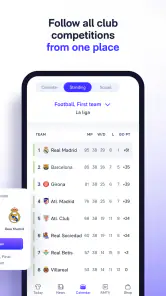
The Real Madrid app is an absolute must-have for fans. From the moment you open it, you're greeted with a sleek and user-friendly interface that screams sophistication. You can tell that a lot of thought went into making sure the app not only looks good but also functions seamlessly. It's like having the Santiago Bernabéu stadium at your fingertips.
Set up around the way you follow the club
On a first visit, I’d start by deciding whether I want quick match-day checks or a fuller stream of club news. The app’s customization options are useful because they can help separate the updates I care about from stories I would otherwise scroll past. I’d keep alerts selective: match reminders can be helpful, while every breaking-news notification can interrupt work or family time. If you prefer a quiet phone, you can still open the app when you choose rather than making notifications part of the experience.
For a smoother start, I’d give myself a minute to look through the main areas before changing anything. That helps distinguish the content I can browse on demand from updates I might choose to receive automatically. I would not switch on every alert during setup just to see what happens; beginning with the essentials makes it easier to tell which notifications are genuinely useful, then I can widen the selection if I find myself checking the app too late.
It is also worth thinking about when you normally follow football. Someone who checks results at lunch may want a very different notification setup from a supporter who watches every match and reads club news during the day. I’d tailor the app to that routine instead of treating customization as a one-time technical chore. If the phone starts buzzing at awkward moments, the first fix is to narrow the alerts, not to abandon the app’s on-demand coverage.
You May Like

Clash of Clans Is Won Between the Battles

Android Auto Makes the Case for Quieter Car Software

MobiOffice: Transforming Mobile Productivity with Seamless Integration

EA SPORTS FC™ Mobile Soccer: Redefining Mobile Sports Gaming

How Microsoft OneDrive Became a Mobile Productivity Giant

How Google Translate Breaks Language Barriers Effortlessly
Stay Updated with the Latest News
If you're anything like me, staying updated with the latest news and updates about your favorite team is crucial. The app provides a comprehensive news section that covers everything from player injuries to match previews and post-match analyses. It's like having a personal sports journalist dedicated to bringing you all the happenings from the heart of Madrid.
For a useful first check, I’d open the news area before a match and scan the preview, then return afterward for the club’s account of what happened. That simple routine gives the app a clear purpose without requiring me to browse every section. I also like that club news and independent reporting serve different needs: for a broader debate or competing viewpoints, I’d compare coverage with a general sports outlet rather than treating one club’s channel as the whole story.
That distinction matters most when a story is developing. The club’s own coverage is a natural place to see what it chooses to emphasize, while an independent outlet is better for contrasting interpretations and wider context. I’d use both when I want to understand a transfer rumour, selection decision, or result beyond the immediate club perspective. For a quick update about Madrid itself, though, opening a dedicated club feed can be less distracting than sorting through a broad stream of football headlines.
A helpful habit is to separate “what happened?” from “what should I make of it?” The app’s club-centred news can help with the first question, while comparison with wider reporting can help with the second. That keeps the experience useful without expecting an official source to act as an impartial commentator. It also gives a new supporter a simple route into following the club: read a preview, check what the team reports after the match, and then seek outside analysis if the story deserves a deeper look.
Live Match Coverage
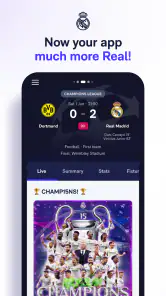
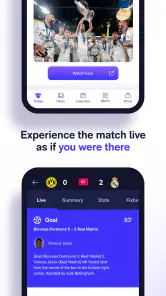
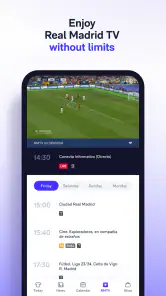
One of the standout features is the live match coverage. Whether you can't make it to the game or it's just not being broadcasted in your area, the app has you covered. With play-by-play commentary, live stats, and even fan polls, it feels like you're right there in the stands, cheering on Los Blancos.
A realistic use is checking the match while commuting or taking a short break when watching video is not practical. I’d use the live view for the score and developments, then save deeper reading for later; it is a handy companion, not the same as watching the game unfold. If you are relying on it for a key moment, open it before kick-off and make sure your connection is working, rather than waiting until you are already trying to catch up.
For instance, if I’m stepping out during a match, I can check the live coverage during a safe pause instead of trying to keep a video stream running. When I return, I can use the match information to understand the broad shape of what I missed, then decide whether I want to read the recap. This is a small but useful workflow: the app works best as a check-in point, not something that needs to occupy my attention continuously.
Live information and watching a match are different experiences, and it helps to decide which one you actually need before opening the app. If seeing the action is the priority, a broadcaster is the better choice. If you need a discreet way to follow developments while away from a screen, live coverage can fill that gap. I’d also avoid treating any one live feed as a reason to stop paying attention to the situation around me, especially when checking during travel or work.
Fans who enjoy comparing reactions may find the polls a lighter way to engage than reading a long stream of commentary. I’d treat them as an optional extra rather than evidence of what every supporter thinks. The most practical value remains the ability to follow the match’s progress and return to it when time allows. That makes the live section useful even for someone who cannot devote the whole match to their phone.
Exclusive Content and Behind-the-Scenes Access
For those who crave more than just the matches, the app offers exclusive content that you won't find anywhere else. We're talking behind-the-scenes videos, player interviews, and even training session clips. It's like a backstage pass to all the action, giving fans a glimpse into the lives of their favorite players off the pitch.
This is where I see the clearest difference from a standard scoreboard or broad news feed: those tools are efficient for scores across many teams, while the club app is more appealing when I want material centered on Madrid. A practical approach is to use a score service for a quick check across competitions and come here when I have time for club-specific stories or video. That avoids expecting one app to do both jobs equally well.
Video is best approached as something to enjoy when you have a moment, rather than the fastest way to get an update. If I’m waiting for an appointment or relaxing at home, an interview or training clip can add a more personal dimension to following the team. If I’m on a tight schedule, I’d stick to text and match information, then return to the longer-form material later. This small choice makes the app easier to fit into a day without turning every visit into a lengthy scroll.
There is a clear trade-off in choosing club-produced material: it gives supporters a closer look at the team, but it naturally remains centered on the club’s presentation of itself. That is not a flaw if the goal is access to Madrid-focused content; it simply means I would not use these videos as a substitute for outside analysis or reporting. For a fan who wants to feel closer to training and player conversations, the format has a different appeal from a scoreboard, and that is precisely where the dedicated app earns its place.
Customizable Experience
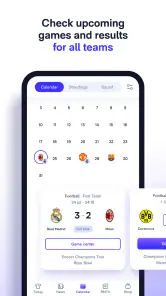
Another aspect I truly appreciate is the customizable experience. You can tailor the app to suit your preferences, whether that's focusing on specific players, receiving notifications about upcoming matches, or getting alerts for breaking news. It's all about making sure you get the content you care about most.
If an alert feels noisy, I’d adjust the choices rather than uninstalling immediately; selective notifications are a better fit for someone who wants match reminders but not a steady stream of updates. The app has been available since February 2011, and version 10.4.8 requires Android 7.0 or later. I’d keep it updated through the usual app store route so the installed version stays current.
The app’s age also makes it feel like an established part of the club’s digital presence rather than a temporary match-day add-on. That does not mean every first-time user needs to explore every option at once. I’d make one small change, use the app for a few days, and then decide whether another alert or content preference would improve my routine. This gradual approach is more reliable than setting everything up in one sitting and later forgetting why the phone is sending so many notifications.
If you are deciding whether to install it on an older Android device, the minimum requirement is Android 7.0. On a supported phone, I’d judge the experience by whether the news and match sections are easy to reach when I need them, rather than by how many settings I can alter. The current version is 10.4.8, and keeping an app current is a sensible way to use the latest version available through the store.
One question first-time users often have is whether they need to be a lifelong supporter to get value from it. I don’t think so: a newer fan can use the match previews and club news as an entry point, then follow the parts that catch their interest. But if your main aim is to learn about football across many leagues or clubs, this focused approach may feel narrow. The right choice depends on whether Madrid is the subject you want to follow, not how long you have supported the team.
Who will get the most from it
I’d recommend it first to Madrid supporters who want one place for club news, match-day checking, and related content. It also makes sense for a newer fan who wants an easy starting point: begin with a preview, follow the live coverage when a match is on, and browse interviews or other material afterward. If you mainly want neutral coverage of many teams, live video, or a single compact score widget, a general sports app or broadcaster may suit you better.
It is especially useful for someone whose interest comes in short bursts: a quick look at a preview before leaving home, a score check during a break, and a longer interview when the day is quieter. That pattern takes advantage of the app’s different kinds of club content without demanding that you keep it open. A supporter who wants a full football dashboard for multiple teams may still prefer a broader sports app and use this one only when Madrid is the focus.
For a household with more than one kind of football fan, the app can be a specific destination rather than the shared source for every result. One person may want the club’s news and interviews, while another simply wants scores from across the sport. I’d avoid trying to make this app serve both needs equally; pairing a dedicated club app with a general source is often a more comfortable arrangement than expecting one feed to cover everything.
Likewise, I would skip it if I rarely follow Real Madrid and only need occasional scores. A general score service is likely to be quicker for that narrow purpose, while a broadcaster is the more suitable choice when live video matters most. The value here comes from returning to the club’s own stream of news and content, so it makes sense to install it when that connection is something you will actually use.
The Real Madrid app isn't just an app; it's a community. It brings together fans from all over the world, uniting them in their passion for the club. Whether you're a long-time supporter or new to the world of football, this app offers something for everyone. So, if you haven't already, give it a try and join the white wave. Hala Madrid!
Real Madrid Frequently Asked Questions
Can I use the Real Madrid app even if I mainly follow the club for news?
Yes. The app is designed to keep fans connected with Real Madrid, and its store summary highlights live games and exclusive news. If you mainly want club updates rather than a broad range of sports coverage, its focus may suit you. You can install it for free and explore its available content to see what best matches your interests.
Does the Real Madrid app focus on Real Madrid or cover other teams too?
The app is developed by Real Madrid C.F. and is centered on the club, so it is most relevant to people who want to follow Real Madrid. It brings club-related information and content together rather than serving as a general sports destination. Fans looking for updates about other teams may prefer to use additional apps alongside it.
Is the Real Madrid app suitable for younger fans?
The Real Madrid app is rated Everyone, so its stated age rating makes it suitable for a broad audience, including younger fans. It is a sports app from Real Madrid C.F. that brings club-related updates and content together in one place. As with any app, parents may want to review its features and guide younger users through any interactive or purchase-related options.
Which devices can run the Real Madrid app?
The app is available for Android and iOS devices, making it accessible to fans using either major mobile platform. On Android, it requires version 7.0 or later, so it is worth checking your device’s operating system before downloading. The app is free to install, and keeping your device’s software and the app updated can help ensure a smoother experience.
What are the key features of the Real Madrid app?
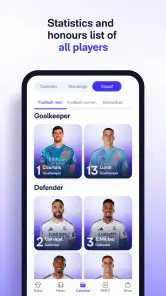
The Real Madrid app offers an immersive experience for fans, allowing them to access live match updates, exclusive videos, player stats, and news directly from the club. It also features interactive content such as quizzes and polls, a fan community section, and ticket purchasing options for upcoming matches. With its user-friendly interface, the app ensures that fans stay connected with their favorite club from anywhere in the world.
Pros
- High-quality video streaming.
- Exclusive behind-the-scenes content.
- Regular match highlights and updates.
- User-friendly interface with easy navigation.
- Real-time match notifications.
Cons
- Requires subscription for full access.
- Occasional streaming lags.
- Limited content for non-subscribers.
- Large app size may impact device storage.
- In-app ads can be intrusive.

- Category
- Sports
- Version
- 10.4.8