Raiders + Allegiant Stadium
- 1.89K
- 4.2
- Installs
- 500.00K
- Price
- Free

Screenshots

Analysis by Reviewed
I spent time with Raiders + Allegiant Stadium as a sports app built around the Las Vegas Raiders and their home venue. It is a focused companion for fans who want the team and stadium experience in one place, rather than a broad sports service trying to cover every league. That narrow purpose is also its main appeal: if the Raiders are already part of your routine, the app feels more relevant than a general scores or news platform.
The app is free, which makes the decision to try it straightforward. It is listed in the Sports category, comes from Raiders Football Club, LLC, and is suitable for Everyone. Its current version is 2.2.7, with a minimum operating system requirement of 10. In everyday use, those details matter less than whether you want a dedicated Raiders space on your phone, but they do make the app approachable for a wide range of users.
What the app is really for
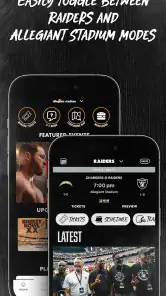
The central idea is expressed through its Team and Stadium modes. One side keeps attention on the Raiders as a team; the other connects the experience to Allegiant Stadium. I found that split useful because it reflects two different kinds of fan interest. Sometimes I want a quick team-focused check-in, while at other times the venue itself is the reason I am opening the app.
That makes this a different proposition from a standard sports scoreboard. A general sports app is usually better when I want several teams, multiple competitions, fantasy information, or a wide selection of live results. This app makes more sense when the Raiders are the subject, not merely one entry among hundreds.
The app has been available since April 30, 2015, and it has built a sizeable audience over time. It has passed 500 thousand installs, with an average rating of 4.2 from about 8.4 thousand ratings and roughly 1.9 thousand written reviews. Those figures suggest that it has found a stable audience, although they do not change the basic question every potential user should ask: do you want a dedicated Raiders and Allegiant Stadium experience, or would a broader sports tool serve you better?
How I approached the two modes
I treated Team mode as the place to begin when my interest was the club itself. It gives the app a clear identity and avoids the feeling of opening a generic sports product with a team logo placed on top. Stadium mode, meanwhile, is more relevant when the physical venue is part of the occasion, especially if I am preparing for a visit or thinking about the atmosphere around a game day.
The practical tip here is to choose the mode based on your immediate reason for opening the app instead of browsing randomly. If you are checking in as a remote fan, start with the team side. If you are attending an event or simply exploring the home of the Raiders, begin with the stadium side. This small habit makes the app feel less like a collection of sections and more like a tool with a purpose.
More From Our News Desk

Clash of Clans Is Won Between the Battles

Android Auto Makes the Case for Quieter Car Software

MobiOffice: Transforming Mobile Productivity with Seamless Integration

EA SPORTS FC™ Mobile Soccer: Redefining Mobile Sports Gaming

How Microsoft OneDrive Became a Mobile Productivity Giant

How Google Translate Breaks Language Barriers Effortlessly
I also think the two-mode design gives the app a useful advantage over a normal team news feed. Allegiant Stadium is not treated as an afterthought in the concept. For a supporter who cares about the place as much as the roster, that distinction is meaningful. For someone who only wants scores, it may feel like extra material rather than a benefit.
What free access means here
There is no purchase decision attached to downloading the app: it is free. That makes it easy to keep installed for occasional use, even if you do not follow the Raiders every day. I would not describe it as a paid replacement for a broader sports subscription, because its value comes from access to a specific team-and-stadium experience rather than from a large package of unrelated coverage.
Free access also changes how I judge its limitations. I am more willing to accept a focused scope when there is no stated purchase price to recover. The fair question is not whether it replaces every sports service, but whether it gives a Raiders fan enough convenience and identity to justify a place on the phone. For the right user, the answer is yes; for a neutral sports follower, the same free download may still be unnecessary.
I would be careful about assuming that a free app automatically contains every feature a fan might expect from a premium sports product. The sensible approach is to install it for the team and venue connection, then keep another service for broader sports needs if those matter to you. That combination is more realistic than expecting one specialized app to handle every kind of sports information.
Where the app delivers genuine value
The strongest value is concentration. Instead of moving through a general sports app to find the Raiders, I can open a space designed around them. That saves mental effort, especially for a supporter who does not need daily updates from other teams. The stadium focus adds another layer that many team-centered alternatives do not emphasize as clearly.
A realistic use case is a game-day routine. Before leaving home, I would open the app with the Team mode in mind for a quick connection to the club, then switch attention to Allegiant Stadium when planning the venue part of the day. I would not rely on it as my only source for every travel or event decision, but it can act as the Raiders-specific starting point before I turn to broader tools for transport, weather, or general navigation.
Another useful scenario is the occasional fan who does not want a full sports-news habit. Perhaps I follow the Raiders closely during the season but do not want notifications and headlines from an entire sports ecosystem. A dedicated app can be easier to understand and less distracting than a multi-league alternative. The value comes from reducing irrelevant content, not from offering the largest possible amount of content.
For people who have visited or plan to visit Allegiant Stadium, the venue mode gives the app a different kind of relevance. It helps connect the team to a physical place, which is important because attending a game is not the same experience as watching from home. Even if my main interest remains the Raiders, having the stadium represented separately makes the app feel more connected to the fan journey.
Small habits that improve the experience
My first recommendation is to use the app with a specific question in mind. “I want the Raiders” is broad; “I want the team side” or “I want the stadium side” is more useful. Starting with that distinction reduces aimless tapping and makes the limited scope feel intentional.
My second recommendation is to treat it as a companion rather than a complete sports command center. I would use it for the Raiders and Allegiant Stadium, while keeping a general sports app available for leagues, teams, fixtures, or wider score coverage. This is not a criticism of the app; it is the natural trade-off of choosing a specialist tool.
A third insight is that the app can suit shared fan routines. If one person in a household follows the Raiders and another mainly cares about the venue experience, the two modes provide an obvious way to divide attention without searching through unrelated sports pages. That makes it more practical for game-day preparation than a generic app where both interests are buried in the same feed.
There is also value in the app’s identity. A general sports product may be technically efficient but emotionally flat. This one is built for a specific community, and that focus can make opening it feel more natural for a Raiders supporter. I would not measure that benefit only in features; the feeling of entering a dedicated team space is part of why a fan app exists.
The trade-offs I noticed
The biggest limitation is scope. If I want information about several teams, many leagues, or a broad schedule of sports, this app is not the efficient choice. It is centered on the Raiders and Allegiant Stadium, so its specialization becomes a weakness as soon as my interests move beyond that boundary.
There is also a difference between being team-specific and being a complete information source. A fan may still need a general service for wider scores, a calendar tool for personal planning, or separate travel resources for getting to a venue. I would not install this expecting it to replace all of those categories. Its job is narrower, and the best experience comes from accepting that rather than fighting it.
The stadium emphasis may be less useful if I never plan to attend an event and mainly want team updates. In that case, part of the app’s identity may feel like extra navigation. Conversely, someone interested in the venue but only casually aware of the Raiders may find the team side more prominent than necessary. The two modes make the product distinctive, but they also mean that not every section will matter equally to every user.
Another trade-off is attention. A dedicated team app can encourage me to check in more often, which is helpful when I want a close connection but unnecessary when I am trying to reduce sports notifications and screen time. I would decide whether to keep it active based on my habits, not only on the fact that it is free. Free installation does not mean it costs nothing in attention.
The age rating of Everyone makes it broadly approachable, but that does not make it equally valuable for every age group or every kind of fan. A child, a lifelong supporter, a visitor to Allegiant Stadium, and a neutral sports reader may all open the same app with different expectations. The product works best when those expectations match its focused Raiders-and-venue purpose.
How it compares with usual alternatives
Compared with a broad sports app, this one wins on identity and loses on range. A general alternative is usually the better choice when I want to compare teams, follow several competitions, or receive a single overview of the sports world. Raiders + Allegiant Stadium is the better fit when I want to avoid that breadth and go directly to one club and its home.
Compared with a browser search, the app offers a more deliberate destination. Searching the web can be faster for one isolated fact, but it does not create the same dedicated fan space. I would use search for a question outside the app’s focus and use this app when I want a Raiders-centered check-in.
Compared with social media, the app should feel more purposeful. Social platforms mix fan discussion, unrelated posts, and changing algorithms. A team-specific app is easier to approach when I want the subject itself rather than a stream of reactions. The trade-off is that social media may offer more conversation, while this app’s strength is its official team-and-stadium framing.
Compared with a paid sports service, the free price is attractive for a fan who only needs this narrow connection. A paid service may justify its cost through wider coverage or deeper tools, but I would not pay for that wider package if my real interest is simply staying close to the Raiders and Allegiant Stadium. On the other hand, someone already paying for comprehensive sports coverage may see this app as optional rather than essential.
Who should install it
I would recommend it first to Raiders supporters who want a dedicated mobile home for the team. It is especially suitable for people who appreciate the connection between the club and Allegiant Stadium, rather than treating the venue as background scenery. The free access lowers the risk, so even an occasional fan can try it without turning the decision into a financial commitment.
It is also a sensible choice for someone preparing for a Raiders-related visit. I would use it as one part of the preparation process: begin with the team or stadium mode, then use separate practical tools for transport, timing, and personal plans. That workflow keeps the app in the role it handles best while avoiding unrealistic expectations.
Families and groups of friends may find the split between Team and Stadium modes convenient because it supports two kinds of interest around the same event. One person can focus on the club while another thinks about the venue. That is a more specific benefit than simply saying the app is “for fans”; it can fit naturally into the way people organize a shared game-day experience.
I would skip it if I mainly follow many sports or need a single dashboard for a large collection of teams. I would also skip it if my only requirement is an isolated score or a quick fact that can be found faster elsewhere. The app becomes worthwhile when the Raiders are a recurring interest, not when they are a one-time search.
Finally, I would not choose it as my only sports app if I need comprehensive coverage. Keeping a broader alternative alongside it is the sensible option for multi-sport users. The specialist app can handle the Raiders identity and stadium connection, while the general service covers everything outside that circle.
My verdict on the free download
After using it, I see Raiders + Allegiant Stadium as a focused fan companion rather than a universal sports utility. Its free access is a real advantage because it lets Raiders supporters explore the team and venue experience without a purchase barrier. The Team and Stadium modes give it a clear personality and make it more distinctive than a plain score-checking tool.
Its value depends heavily on relevance. If I regularly follow the Raiders or care about Allegiant Stadium, the app earns its place through focus and convenience. If I want broad sports coverage, deep comparison across teams, or one app for every competition, a general sports alternative is the better choice. That is the key trade-off, and understanding it prevents disappointment.
My recommendation is to install it if the Raiders are part of your regular sports life, especially around game-day planning or a visit to the stadium. I would keep expectations centered on that purpose, use the two modes intentionally, and pair it with broader tools when necessary. For a dedicated fan, the strongest reason to keep it is not breadth but a direct, free connection to one team and its home.
Raiders + Allegiant Stadium Frequently Asked Questions
Is the Raiders + Allegiant Stadium app suitable for first-time visitors?
Yes. The app can help first-time visitors prepare by bringing stadium information, event details, maps, entry guidance, parking information, and visitor policies together. Looking over those details before leaving can make it easier to plan where to go and what to expect. Its stadium-focused tools are useful whether you are attending a Raiders game or another event at Allegiant Stadium.
What kind of Raiders content can I follow in the app?
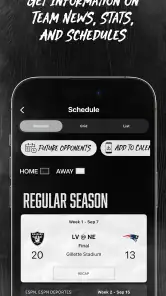
The app is built around the Raiders as well as Allegiant Stadium, so it is useful for following team news and schedules alongside event information. It offers a single place to check relevant updates and plan around games or stadium visits. If you are mainly interested in the team, the sports focus makes it a convenient companion; if you are visiting the venue, its stadium features add practical value.
What is Raiders + Allegiant Stadium, and what can I use it for?
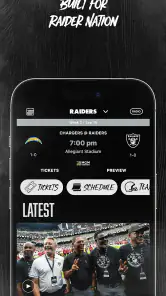
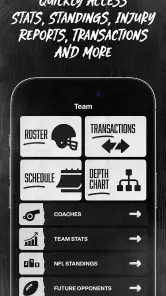
Raiders + Allegiant Stadium is the official mobile app for staying connected with the Las Vegas Raiders and events at Allegiant Stadium. After exploring it, I found that it brings together team news, schedules, tickets, stadium information, event details, maps, and selected fan services in one place. It is especially useful when preparing for a game or attending an event.
Can I buy, access, and manage my Raiders or Allegiant Stadium tickets in the app?
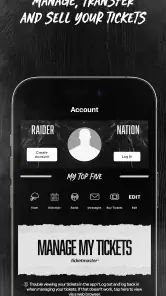
Yes, the app is designed to support digital ticket management for eligible Raiders games and Allegiant Stadium events. Depending on the event and ticket provider, you may be able to view mobile tickets, access entry barcodes, transfer tickets, or manage tickets connected to your account. Before attending, sign in early and make sure your tickets are loaded, since venue connectivity can become busy on event days.
Does the app provide stadium maps, directions, parking, and venue information?
The app includes practical information intended to make a stadium visit easier, such as venue details, seating guidance, maps, parking information, entry points, and policies. The exact features can vary by event, but the app is helpful for checking where to enter, finding amenities, and reviewing important visitor rules before arriving at Allegiant Stadium.
Pros
- Official Raiders and Allegiant Stadium information in one app.
- Useful alerts for upcoming games
- events
- and venue updates.
- Mobile ticket access can make entry more convenient.
- Stadium maps help locate gates
- sections
- and facilities.
- Provides team-related content for dedicated Raiders fans.
Cons
- Some features may require location
- Bluetooth
- or notification permissions.
- Ticket functions may depend on compatible events and account access.
- Content can feel limited outside the football season.
- Heavy media and live updates may consume mobile data.
- Performance may vary during busy game days or crowded events.
- Category
- Sports
- Version
- 2.2.7





