Quran Player Audio Offline
- 7.00
- 4.5
- Installs
- 500.00K
- Price
- Free

Screenshots
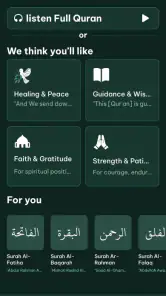
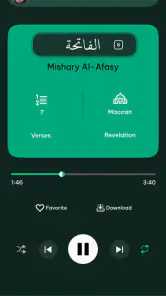

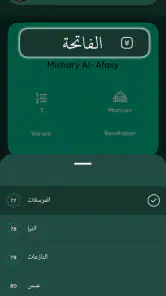
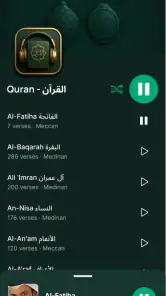
Analysis by Reviewed
I approached Quran Player Audio Offline as a practical listening tool rather than just another audio app. Its purpose is straightforward: help me listen to Quran recitation with clear sound and continue when an internet connection is unavailable. That simplicity is the main attraction, but it also means the quality of the experience depends heavily on how carefully the first setup is handled.
The app comes from Rydea GO. It is free to start, carries an Everyone age rating, and belongs to the Events category on Android. Its store summary focuses on offline playback and high-quality recitation, while the short description simply calls it Quran Player. I found that the most important question is not whether the app has a long list of extras, but whether it fits the way you actually listen during prayer preparation, travel, study, or quiet time.
Getting past the first points of friction
The first place many people can get stuck is the difference between opening an audio player and preparing one for offline use. A player may appear ready immediately, while offline listening still depends on the required audio being available on the device. I would not leave this preparation until the moment I need it. I would open the app while connected, explore the available listening controls, and make sure the material I intend to use is ready before leaving home.
That small habit matters because a weak connection can make a normal online session feel like an app problem. Audio may pause, loading may take longer, or a selection may not behave as expected while the network is switching between Wi-Fi and mobile data. Testing the intended listening routine in advance gives me a much clearer answer: is the issue the app, the connection, or an incomplete offline setup?
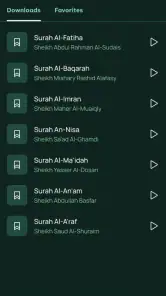
The app’s strongest practical idea is offline Quran listening. I see that being useful on a commute, during a flight, in a building with unreliable reception, or in a quiet room where I prefer not to depend on streaming. Offline playback also avoids the distraction of repeatedly checking whether the signal has dropped. For someone who listens regularly, that reliability can be more valuable than a crowded interface full of unrelated tools.
On the other hand, this focused approach may not satisfy users who expect a complete Quran study suite. If your priority is extensive translation work, detailed annotation, broad educational content, or a large collection of unrelated religious resources, a more comprehensive Quran platform may be a better match. I would choose this app for listening first, not as a replacement for every other kind of Quran reference.
A sensible setup routine
My recommended starting routine is simple. I would use a stable connection, open the player, identify the recitation I want, and test playback before relying on it away from home. I would also listen briefly with the phone’s usual volume level rather than assuming that a successful tap means the whole session is ready. This catches basic problems early, especially if the device is connected to headphones, a car system, or another Bluetooth accessory.
Clear audio is one of the reasons to try the app, but “clear” does not mean every phone will sound identical. The speaker, headphones, equalizer settings, and surrounding noise all affect the result. I found it more useful to judge the recitation in the environment where I will normally listen. A sound that feels comfortable through headphones may seem too quiet from a small phone speaker, while a loud setting can make certain devices sound harsh.
The free entry point makes experimentation easy. I can install it, test the listening flow, and decide whether it suits my habits without paying before I understand the basics. There are in-app purchases ranging from $9.99 to $50.00 per item, so I would pay attention to any purchase screen and make sure I understand what I am selecting. For a listening app, the key decision is whether the free experience already covers my routine and whether any optional purchase genuinely adds value for me.
I would also keep enough device storage available for offline audio. I am not assigning a specific storage requirement because that can vary with the content selected and the device itself, but the general principle is important: offline convenience requires local space. If a download or preparation step appears incomplete, checking available storage is more sensible than repeatedly tapping the same control.
Recovering a session when playback stops
When playback stops, I work through the least disruptive checks first. I look at the phone’s volume, confirm that the correct audio output is active, and check whether another app has taken control of the sound. Bluetooth is a common source of confusion: the phone may still be connected to earbuds that are in a case, out of range, or switched to another device. In that situation, Quran Player Audio Offline may be working while the sound is simply going somewhere else.
If I am online, I check whether the connection is stable. If I am offline, I confirm that the selected material was actually prepared for offline use rather than assuming that seeing it in the interface means the audio is stored locally. I then close and reopen the player only after those basic checks. Restarting can clear a temporary playback state, but it should not be the first answer to every problem.
A useful recovery habit is to change only one thing at a time. If I switch networks, reconnect headphones, clear the app state, and change audio settings all at once, I lose the ability to identify the real cause. Testing the same selection after each adjustment provides a more reliable diagnosis and avoids unnecessary changes to a setup that was otherwise working.
There is also a difference between a missing selection and a failed player. If the audio I want is not available in the expected offline workflow, I would not treat that automatically as a sound-quality fault. I would return to the connected setup, check the selection again, and allow the preparation process to finish. The app is most useful when I treat offline listening as something to prepare, not something that happens magically the first time I press play.
When the phone or connection is the real problem
Some frustrations have little to do with the application itself. Battery-saving modes can restrict background activity or interrupt audio behavior. A nearly full storage drive can prevent local content from being saved. Aggressive device-cleaning tools may remove files that an offline player needs. These are phone-level conditions, so I would check them before deciding that the app is unreliable.
Operating-system compatibility is also worth checking before installation. The Android listing supports devices running version 7.0 or later, which covers a broad range of phones but does not mean every older device will behave identically. Older hardware may have slower storage, weaker speakers, or more restrictive background management. If playback is fine on one device and inconsistent on another, comparing the device settings is more useful than assuming the recitation itself is at fault.
Network changes can create misleading symptoms. Moving from a home connection to mobile data may interrupt loading, while entering a poor-signal area can make online playback appear broken. This is exactly where the offline purpose becomes valuable: prepare the content in a reliable place, then test it with connectivity disabled or unavailable. That test tells me whether the app can serve my real use case instead of merely working under ideal network conditions.
Headphones introduce another layer. Some models pause audio when they detect removal, and some phones route sound differently depending on whether an accessory is connected before or after playback begins. I would test the player with the phone speaker, wired headphones if available, and the wireless setup I normally use. This is not busywork; it separates an app issue from an accessory issue quickly.
Everyday situations where it makes sense
I can imagine using the app before a long journey. At home, I would prepare the listening material while connected, check the volume through my preferred headphones, and then start the trip knowing I am not depending on a changing signal. If the phone later loses reception, the value of the app becomes obvious because the listening routine can continue without searching for a stronger connection.
Another good use is a regular evening routine. Someone who listens at the same time each day may appreciate having a focused player that opens around one central activity. The absence of a complicated workflow can be a strength here. I do not need to turn a short listening session into a research project, and I can keep the phone’s attention on the recitation rather than on unrelated feeds.
It can also suit a learner who wants repeated listening in a quiet environment. Clear audio makes pronunciation and pacing easier to follow, although I would still use a dedicated learning resource if I needed explanations, word-by-word study, or structured lessons. The app can support repetition, but it should not be mistaken for a full teaching system simply because the audio is easy to access.
For families, the Everyone rating makes the app broadly approachable. I would still set up the device according to the listener’s needs and explain the offline routine clearly, especially to someone who is not comfortable distinguishing between online content and locally available audio. The simpler the explanation, the less likely the user is to assume that every selection will work without preparation.
How it compares with common alternatives
The usual alternative is a general streaming service. Streaming can offer enormous choice and may be convenient when the connection is strong, but it brings buffering, data use, and dependence on network quality. Quran Player Audio Offline has a narrower purpose, and that narrowness is precisely why I would choose it for dependable listening away from a signal.
Another alternative is a broad Quran application that combines audio with translations, tafsir, bookmarks, reading tools, prayer utilities, and other resources. That kind of app can be better for study or for users who want one comprehensive religious reference. The trade-off is a busier experience. I prefer this player when I want to open an audio-focused tool and begin listening without navigating through many unrelated sections.
Local audio files are another option. They offer direct control over storage and playback, but they require users to find, organize, and maintain the files themselves. A dedicated player can reduce that organizational burden, provided its preparation workflow matches the listener’s expectations. If you already have a carefully arranged personal library and need advanced file management, a standard audio player may remain more flexible.
My choice would therefore depend on the task. For uncomplicated recitation listening with offline convenience, this app makes sense. For deep textual study, extensive customization, or managing audio from many sources, I would look elsewhere. Neither choice is universally better; they solve different problems.
What the current release tells me about ownership
The current version is 2.2.4, and the app has reached over 500 thousand installs with an average rating of 4.5 from around ten thousand ratings. Those figures suggest that the concept has found a substantial audience, but I would still judge it by my own listening routine. A popular app can remain unsuitable if its workflow does not match the way I prepare audio, use headphones, or move between networks.
The release date shown for this version history is January 13, 2026. That makes it especially sensible to keep the app updated through the normal store process and to retest offline playback after a major update. My practical rule is not to update immediately before travel or an important listening session. I would update earlier, open the app, and verify the exact routine I depend on.
Because the app is free with optional purchases, I would also keep expectations realistic about what is included without spending. I would explore the core listening experience first rather than purchasing simply because a locked option appears. If an optional item is relevant, I would consider whether it improves a repeated, everyday need instead of treating every extra as essential.
Who should choose it, and who should skip it
I would recommend Quran Player Audio Offline to someone who wants a focused Quran audio player, values clear recitation, and regularly faces weak or unavailable internet access. It is particularly suitable for listeners who prefer preparing content once and then keeping the listening routine simple. The free starting point also makes it easy to test without committing to a paid tool.
I would be more cautious about recommending it to someone seeking a complete learning environment. If your daily work depends on detailed translations, searchable commentary, extensive notes, or advanced study organization, a broader Quran app will probably serve you better. I would also skip it if you do not want to manage any offline preparation at all and prefer a service that automatically streams whatever you select whenever you open it.
My final impression is positive, but practical rather than enthusiastic for its own sake. The app does one important job well: it puts Quran recitation at the center and makes offline listening the reason to use it. The main friction comes from the preparation step and from problems that can actually originate in storage, connectivity, battery controls, or audio accessories. Once those details are handled, the experience becomes pleasantly direct.
My practical verdict: choose it when dependable, focused audio matters more than a large collection of study features. Prepare the content on a stable connection, test it with your real headphones or speaker, and verify offline playback before you need it. With that routine, Quran Player Audio Offline is a sensible free option for everyday listening; without it, the same simplicity may feel limited compared with a broader Quran platform.
Pros
- Works without internet after audio files are downloaded
- Simple controls make playback easy for all users
- Supports focused listening during travel or daily routines
- Useful for revising and memorizing selected Quran chapters
- Offline access helps reduce mobile data usage
Cons
- Audio downloads may require considerable storage space
- Available reciters and translations can be limited
- Some features may depend on the app version or device
- No internet means newly added content may not appear immediately
- Playback options may feel basic for advanced listeners

- Category
- Events
- Version
- 2.2.4