

Quilt Creator
- 81.00
- 1.4
- Installs
- 10.00K
- Price
- Free
Screenshots
Analysis by Reviewed
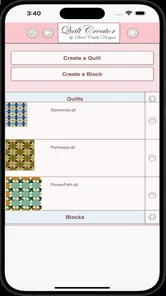
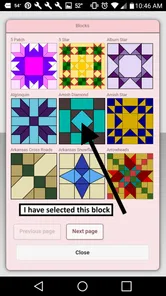
I approached Quilt Creator as a planning tool rather than a replacement for fabric, rulers, templates, or sewing practice. It is a free Art & Design app from Crochet Designs, built around a library of more than two hundred quilt blocks that you can browse while developing an idea. That simple focus makes it easy to understand: instead of beginning with a blank page, I can start by looking at block possibilities and thinking about how they might work together.
My overall reaction is mixed. The concept is useful for someone who wants quick visual inspiration, especially before buying fabric or committing to a layout. At the same time, the app feels better suited to casual exploration than to a complete quilt-design workflow. Its average rating is 1.4 from roughly 164 ratings, so I would not ignore the warning signs. I would treat it as a small idea generator and test it patiently, rather than expecting the polish of a modern specialist design package.
How the layout supports reading and navigation
The most important strength is the size of the block collection. Having over 200 choices in one place gives a beginner somewhere to start when names such as star, log cabin, or flying geese feel abstract. I found this kind of visual browsing more approachable than opening a blank drawing app and trying to construct a block from scratch. The app’s purpose is immediately recognizable, which helps keep the first session from becoming confusing.
That said, a large collection can also become a navigation problem. When an app presents many designs, the user needs a clear way to compare, remember, and narrow them down. I would approach the library with a specific question, such as “Which block will work for a two-color beginner quilt?” rather than scrolling without a plan. Making a short note of promising block names or screenshots outside the app can prevent a second search from becoming frustrating.
For readers who need larger visual targets, the block-based format has one natural advantage: the designs are more meaningful than long text menus. A person who finds dense written instructions tiring may understand a block image faster than a paragraph of terminology. However, visual simplicity should not be confused with full readability. Small labels, low contrast, or crowded controls can still make browsing difficult, and the experience may vary with the phone’s display and system settings.
I also recommend using the app in short sessions at first. Browse a manageable group, identify a few candidates, and then pause to compare them with the fabric and skill level you actually have. This is more effective than treating the whole library as a checklist. The app works best when it reduces the intimidating first step of quilt planning, not when it becomes another catalog to organize.
Making the block library useful
A practical workflow is to begin with the finished quilt’s purpose. For a baby quilt, wall hanging, lap quilt, or gift, decide whether you want a calm repeating pattern or a design with a strong central shape. Then use the library to collect several visually different blocks. This gives you a comparison set instead of encouraging you to choose the first attractive image.
More From Our News Desk

 Gmail
GmailGmail in a Busy Inbox: Who Benefits Most?
From first account to crowded workday, Gmail earns its place through dependable search and flexible sorting—but its best fit depends on how much inbox maintenance you can tolerate.

 Prime Video
Switching to Prime Video: What Changes in Your Viewing Routine
Prime Video can make a compelling second home for streaming, but switching means learning a different catalog, rental layer, and route from browsing to playback.

 Universal TV Remote Control
Universal TV Remote Control Works Best as a Reliable Backup
A phone remote earns its place through quick setup and reliable habits. Here is how to get more from Universal TV Remote Control—and where its limits show.

 Weather - By Xiaomi
Weather by Xiaomi Review: Clear at a Glance, Less Clear Up Close
Xiaomi’s weather app makes everyday forecasts quick to scan, but its calm surface can leave useful details and recovery paths harder to find than they should be.

 X
XX Under Pressure: Can It Recover When Posting Goes Wrong?
A resilience-focused review of X, examining setup, mistaken posts, interruptions, weak connections, and the gaps that matter when recovery needs to be dependable.

 Clash of Clans
Clash of Clans Is Won Between the Battles
Its raids are quick; its community is a long-term project of coordination, teaching, rivalry, and shared responsibility—with all the friction that entails.
Latest News



Another useful habit is to check whether a block’s apparent complexity matches your real sewing conditions. A design can look simple on a screen but require careful cutting, repeated points, or many small pieces. Quilt Creator can help with the idea stage, but I would still verify construction details with a trusted pattern or quilting reference before cutting fabric. That distinction is important: the app can inspire a layout without automatically becoming a complete set of sewing instructions.
For someone with dyslexia, limited working memory, or difficulty holding several visual choices in mind, I would keep the process deliberately narrow. Choose three blocks, write down what attracts you about each one, and compare them one at a time. The app’s value increases when the user supplies a simple decision method. Without one, a big image collection can create choice overload rather than confidence.
Motor, sensory, and situational considerations
Quilt design is often done while sitting at a table with fabric, rulers, and scraps nearby, so phone interaction matters. A person with reduced finger precision may find small touch targets or repeated scrolling tiring. I would use the app with the phone supported on a stand instead of holding it continuously, especially during a longer planning session. That does not change the interface, but it reduces the physical effort of checking a block while working with materials.
People with tremors or limited reach may also benefit from planning before opening the app. Decide what kind of block you want to investigate, then search or browse only for that purpose. Frequent swiping through a large collection can be more demanding than a focused visit. If the interface requires repeated taps to move between designs, this focused approach becomes even more valuable.
Sensory needs deserve equal attention. Quilt blocks are visual objects, and that makes the app appealing to people who communicate more comfortably through shapes and patterns than through written explanations. On the other hand, a screen full of contrasting geometric forms can be tiring for users sensitive to visual clutter. Lowering screen brightness, enlarging system text where supported, and taking breaks may make the experience more comfortable, although these adjustments cannot fix an interface that uses tiny controls or unclear grouping.
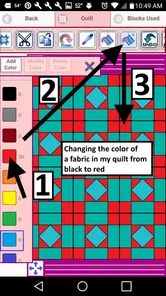
Color perception is another practical issue. A block’s structure should remain understandable even when the displayed colors are not ideal for the viewer. I would test a promising design in more than one color combination and compare it with actual fabric under normal room lighting. This is a useful step for anyone, but especially for users with color-vision differences: rely on value, shape, and seam direction rather than assuming two screen colors will translate accurately to cloth.
The app can fit several everyday contexts. A beginner might use it on a bus ride to gather ideas, then make a final choice at home with fabric samples. A quilting group could pass a phone around to discuss which block feels manageable for a shared project. Someone who is recovering from hand fatigue could browse without sewing, turning a low-effort period into useful preparation. In each case, the app is most helpful as a portable visual reference, not as the only tool in the process.
Where it fits beside other quilting tools
Compared with a general drawing app, Quilt Creator gives me a more relevant starting point. I do not need to draw every line before considering a traditional block. Compared with printed books, it is lighter to carry and easier to consult when I want a quick burst of inspiration. A book may still be better for readers who prefer stable pages, larger print, or detailed construction explanations.
Dedicated quilt-design software is usually the stronger choice when I need exact measurements, fabric-color testing, repeat layouts, or a reliable record of a finished plan. A general image board may offer broader inspiration, but it can also lead to designs that are beautiful without being practical to sew. Quilt Creator sits between these options: more focused than a blank canvas, but less comprehensive than a full planning system.
That middle position affects accessibility too. A specialist program may offer more controls and therefore more ways to work, but additional controls can make it harder to learn. Quilt Creator’s narrower purpose may feel less intimidating for a new quilter or for someone who becomes overwhelmed by complex menus. Conversely, a user who needs strong customization, precise zooming, or a carefully documented workflow may quickly outgrow it.
Practical barriers before committing to a project
The clearest limitation is that inspiration does not automatically answer the questions that arise at the cutting table. Before choosing a block, I would want to know its finished size, seam requirements, fabric quantities, cutting dimensions, and difficulty. I would not assume that browsing a design supplies those details. If the app does not give enough guidance for your project, pair it with a pattern book, a teacher, or a trusted tutorial rather than improvising expensive fabric cuts.
There is also a financial point worth noticing. The app is free to install, but in-app purchases are listed at $2.99 per item. That means casual browsing can begin without payment, while deeper use may involve deciding whether individual extras are worthwhile. I would explore the free experience first and only pay after confirming that the additional material addresses a specific need. For a person on a strict budget, printed library resources or free instruction from a local quilting group may offer better overall value.
The current version is 26.2.3, and it supports devices running Android 5.1 or later. That broad operating-system range may help people using an older phone, but compatibility alone does not guarantee a comfortable experience on every screen size. Older devices can also make image browsing feel less pleasant if loading or touch response is slow. I would check the app on the actual device intended for quilting rather than assuming that a newer phone is required or that an older one will feel identical.
The age rating is Everyone, which makes the subject matter suitable for a wide household audience. That is useful when a child, older adult, or family member wants to explore patterns together. Still, an Everyone rating says nothing about whether the controls are easy for every ability level. A child may understand the shapes but need help making a final selection, while an older user may appreciate the visual ideas but struggle with small interface elements.
One additional barrier is the app’s reputation in the store. With an average rating of 1.4 and about 81 written reviews, I would install it with modest expectations and evaluate it quickly. A low rating does not tell me which problem matters most to my own use, but it does suggest that reliability or usability may not satisfy everyone. I would avoid building an urgent project around it until I had personally confirmed that browsing and saving ideas fit my routine.
Who will get the most from it
I think the best match is a beginner who wants to understand the visual language of quilt blocks before learning advanced construction. It can also suit a casual crafter who needs a prompt for a weekend project, a teacher looking for shapes to discuss with students, or an experienced quilter who wants a compact source of traditional-style ideas. The app is particularly sensible when the question is “What could I make?” rather than “How do I calculate every part of this quilt?”
I would skip it as a primary tool if you need exact digital drafting, automated fabric calculations, detailed step-by-step instructions, or a polished archive of projects. It is also not the right choice for someone who finds visual browsing stressful and prefers structured written lessons. In those situations, a dedicated quilt planner, a well-organized book, or an accessible instructional course will probably provide a clearer path.
For users with different abilities, my recommendation is conditional. People who benefit from visual examples may find the block library inviting, while those who need large controls, strong contrast, keyboard access, screen-reader-friendly descriptions, or highly predictable navigation should test the app carefully before relying on it. I would not describe it as universally accessible; I would describe it as potentially useful when its visual approach matches the user and the phone setup.
My inclusive verdict after using it as a planning companion
The fairest way to judge Quilt Creator is as a visual starting point, not a complete quilting assistant. Its collection gives beginners a concrete place to explore, and its focused Art & Design purpose is less intimidating than opening a professional drafting program. I like the possibility of browsing ideas during a spare moment, then carrying the best candidates into a more careful fabric and measurement workflow.
Its limitations are equally important. A large choice of blocks can become tiring without a personal sorting method, and visual inspiration does not replace construction information. Small controls, color-dependent designs, and uncertain comfort on different devices may create barriers for users with motor, sensory, or reading needs. The low average rating also makes a cautious trial sensible, while the $2.99-per-item purchases mean I would not assume that every useful resource is included at no cost.
My advice is to install it only if you want a lightweight way to spark quilt ideas. Start with a small goal, compare a few blocks, check the design against real fabric, and use another source for measurements and sewing instructions. If that workflow feels comfortable, the app can earn a place beside your quilting supplies. If you need precision, accessibility controls, or a fully documented project from beginning to end, choose a more specialized alternative instead.
In short, Crochet Designs has created something approachable in concept, but the experience is best for patient, exploratory use. I would recommend it to a friend who is curious about block patterns and willing to supplement the app with other resources. I would not recommend depending on it alone for an important quilt, a tightly scheduled project, or a user who cannot comfortably navigate a visual mobile interface.
Quilt Creator Frequently Asked Questions
Can I use Quilt Creator offline, or do I need an internet connection?
Quilt Creator is intended for designing quilt layouts on a mobile device, so it may suit planning ideas at home or while visiting a fabric shop. Whether every feature works without an internet connection can depend on the device and app version. If offline access matters to your workflow, try the features you plan to use before relying on them away from a connection.
Which devices can run Quilt Creator?
Quilt Creator is an Art & Design app from Crochet Designs, and its listed minimum operating system is Android 5.1. Check your device’s operating-system version and the app’s current store page before installing, since compatibility can vary by platform. The app is free to download, with in-app purchases available, so review the purchase options that appear for your device.
What is Quilt Creator and what can I use it for?
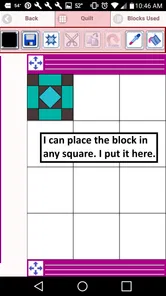
Quilt Creator is a design-focused app for planning and creating quilt patterns on a mobile device. It can help you experiment with block layouts, colors, fabrics, and repeating arrangements before cutting any material. It is useful for beginners who need visual guidance as well as experienced quilters who want to test ideas, organize a project, or save inspiration for later. Its selection includes over 200 quilt blocks to choose from, giving you a range of starting points for a design.
Is Quilt Creator suitable for beginners without quilting experience?
Yes, Quilt Creator can be useful for beginners because it lets you explore quilt designs visually instead of relying only on sketches or imagination. You can try different layouts and color combinations before starting a physical project, which may reduce mistakes and wasted fabric. However, the app does not replace learning basic quilting techniques, measurements, sewing methods, or fabric preparation.
Can I customize quilt patterns, colors, and fabric arrangements?
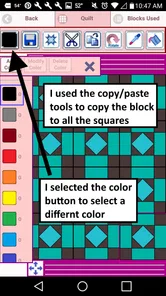
The main appeal of Quilt Creator is the ability to personalize a design rather than simply choosing a fixed template. Depending on the available tools and your device version, you can adjust block arrangements, experiment with colors, and preview how different combinations work together. This makes it helpful for comparing several concepts before deciding on a final quilt design.
Pros
- Intuitive tools make designing quilt blocks easy for beginners.
- Supports creative experimentation with colors
- patterns
- and layouts.
- Useful for planning designs before cutting fabric.
- Lightweight app that is simple to navigate.
- Helpful for visualizing repeated blocks and overall quilt balance.
Cons
- Advanced quilting measurements and construction details may be limited.
- Small screens can make detailed block editing less comfortable.
- The learning process may take time for users new to quilt design.
- Some designs may require manual adjustments for precise results.
- Export and sharing options may not meet professional workflow needs.











