Quillbot: AI Writing Assistant
- 244.00
- 4.5
- Installs
- 5.00M
- Price
- Free

Screenshots
Analysis by Reviewed
I use writing tools when I already know what I want to say but cannot find the clearest way to say it. That is where Quillbot: AI Writing Assistant makes the strongest impression. Rather than treating it as a magic button for producing finished work, I see it as a practical editing partner: I give it an awkward sentence, a rough paragraph, or an idea written too quickly, and it helps me explore a cleaner version.
That distinction matters. The app is not most useful when I ask it to replace my thinking. It is most useful when I use its rewriting and language tools to remove friction from my own writing. The result can be more natural, more concise, or easier to understand, but I still need to decide whether the wording sounds like me and whether the meaning survived the change.
QuillBot is a free productivity app from QuillBot, with optional in-app purchases ranging from $19.95 to $99.95 per item. It is rated for Everyone and runs on Android 7.0 or later. The Android release arrived on October 20, 2023, and the current version is 4.11.0. Its 4.5 average from around 22 thousand ratings and more than 5 million installs suggest that it has found a sizeable audience among students, professionals, and everyday writers.
Where QuillBot’s rewriting actually helps
I find paraphrasing most useful when I’m trying to preserve an idea but change how it lands. In this section, I look at the moments when QuillBot’s alternatives can help me notice a clearer structure or a more suitable tone, and where I still need to protect the meaning before moving on to the app’s wider writing workflow.
Paraphrasing is the central experience
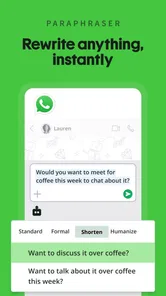
The capability I kept returning to is paraphrasing. I can paste in a sentence or paragraph, then use the rewritten version as a starting point instead of staring at the original and trying to repair it word by word. This is especially helpful when the grammar is technically understandable but the rhythm feels stiff, repetitive, or too close to spoken notes.
The useful part is not simply receiving different vocabulary. A good rewrite changes the structure enough to show another way of expressing the same thought. That can expose a problem in my original wording: perhaps the subject is buried, the sentence contains two ideas that should be separated, or the conclusion arrives before the explanation. I often learn more from comparing the two versions than from accepting the alternative immediately.
Still, paraphrasing has a clear boundary. A sentence can be grammatically smoother while becoming less precise. Technical terms may need to remain exactly as written, and a carefully chosen qualification can disappear when a paragraph is made more direct. I therefore treat every result as an editorial suggestion. The app improves the route to a better sentence, but I remain responsible for the destination.
More From Our News Desk

Weather by Xiaomi Review: Clear at a Glance, Less Clear Up Close

X Under Pressure: Can It Recover When Posting Goes Wrong?

Clash of Clans Is Won Between the Battles

Android Auto Makes the Case for Quieter Car Software

MobiOffice: Transforming Mobile Productivity with Seamless Integration

EA SPORTS FC™ Mobile Soccer: Redefining Mobile Sports Gaming
Why context matters more than vocabulary
Many rewriting tools are good at swapping words. QuillBot is more valuable when I use it to rethink the relationship between sentences. For example, if I write a long explanation about an app feature, the alternative wording may make the sequence easier to follow: first the problem, then the action, then the result. That kind of restructuring is more useful than replacing ordinary words with unusual ones.
This is also why I would not use a paraphrased passage without reading it carefully. A casual message, a university explanation, and a customer-support reply all need different levels of formality. A version that sounds polished in one setting may feel cold or overly formal in another. I usually choose the clearest option, then edit it again so the tone matches the person who will read it.
For people writing in a second language, this comparison process can be particularly valuable. Instead of copying a sentence blindly, I can look at the original and the revised structure, notice how transitions work, and gradually build a better sense of natural phrasing. That makes the app more than a correction button; it becomes a way to inspect writing decisions.
The supporting tools have a practical role
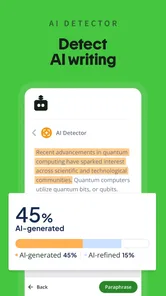
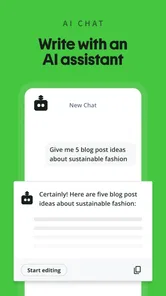
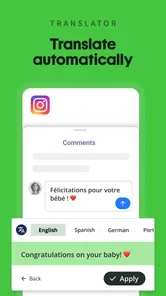
Paraphrasing is supported by grammar checking, translation, AI chat, and an AI detector. I would not describe these as separate reasons to install the app for everyone, but together they make the writing workflow less fragmented. I can move from a rough sentence to a grammar check, test a different phrasing, and use translation when I need to understand or prepare text in another language.
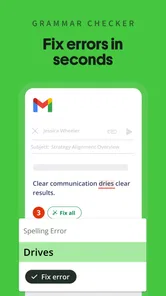
The grammar checker is most useful after I have finished a first draft. Checking every sentence while I am still thinking interrupts the flow and encourages me to polish fragments before the main idea is complete. My better routine is to write freely, use paraphrasing only where I am stuck, and then run a final language check once the structure is stable.
AI chat can be helpful when I need to ask for an explanation of a phrase or generate possible directions for a paragraph. I would keep its role narrow for important work. It can suggest a starting point, but it should not be treated as an authority on facts, tone, or the requirements of a particular assignment. Translation is similarly useful as a bridge, while a human review remains important when a small change in meaning could matter.
A realistic everyday workflow
Imagine I need to send a message to a landlord about a repair. My first draft might contain all the relevant details but sound abrupt because I wrote it quickly between other tasks. I can use the app to make the wording clearer, then check that the date, location, and request are still accurate. I might shorten the opening, keep the specific problem unchanged, and finish with a direct question.
In that situation, the value is not that the app writes the message for me. The value is that it helps me move from hurried notes to a respectful, readable request without spending twenty minutes debating every sentence. I still remove anything that sounds unlike me. A polished message that hides urgency or changes the practical details would be worse than my rough original.
Where it fits beside ordinary alternatives
Compared with a standard phone keyboard correction tool, QuillBot works at a broader level. Keyboard suggestions usually address spelling or a small grammatical issue while I type. QuillBot is better suited to a complete sentence or paragraph that already exists and needs a different shape. If I only want quick autocorrection in chat, the keyboard is faster and less distracting.
Compared with a traditional grammar checker, QuillBot offers more active rewriting. A conventional checker may point out a problem and let me fix it manually; this app can give me an alternative expression to evaluate. That saves time when the issue is not a clear error but an awkward construction. The trade-off is that an alternative can introduce a new problem, so the more ambitious the rewrite, the more carefully I need to review it.
Compared with a full desktop writing suite, the mobile app is more convenient for short edits, messages, notes, and text copied from another application. I would still prefer a larger screen for a long report, detailed formatting, or line-by-line comparison across several pages. The phone is excellent for removing a small writing obstacle; it is not automatically the best environment for managing a large document.
What the app changes in the best scenario
The best scenario is a writer who has a clear idea but gets blocked by expression. I see the greatest benefit when the draft is already mine and the app is used to test options. It can help me make a paragraph less repetitive, turn a complicated explanation into a more approachable one, or find a calmer tone for a message that I wrote while frustrated.
It is also useful for people who regularly switch between informal and formal writing. A quick note to a colleague, a cover-letter paragraph, and a study explanation may all describe the same skill in different voices. QuillBot can provide a direction for that shift, but I still choose the final level of warmth and confidence. The app gives me a comparison point, which is often enough to reveal what feels wrong in my first attempt.
One less obvious use is reverse editing. If a generated alternative sounds too formal, I can use it to identify the exact features that caused the problem: long openings, abstract nouns, or unnecessary transitions. I then rewrite the sentence myself. In other words, even an unsuitable result can be useful if I treat it as evidence about tone rather than as a final answer.
Trade-offs that become visible during regular use
The first trade-off is speed versus ownership. Accepting a suggested rewrite is quick, but editing it manually usually produces a more personal result. If I am writing a low-stakes message, that shortcut is reasonable. If I am preparing an application, an academic explanation, or anything that represents my professional judgment, I spend more time checking every change.
The second is clarity versus nuance. A shorter sentence often reads better, but some subjects need careful limits and exceptions. An editing tool may make a claim sound more confident than I intended. I pay special attention to words such as “always,” “only,” and “proves,” because a smoother sentence can quietly become a stronger claim.
The third is convenience versus subscription pressure. The app is free to install and use as a productivity tool, while optional purchases are available. That makes it easy to try without committing immediately, but anyone who depends on advanced usage should examine the available plan details inside the app before assuming that every workflow will remain equally convenient without payment.
There is also a privacy and judgment consideration that applies whenever I place personal writing into an AI-based editor. I avoid pasting sensitive information, confidential work material, private conversations, or identifying details unless I have a clear reason to do so. This is not a complaint unique to QuillBot; it is simply a sensible habit for any online writing assistant.
How I avoid the most common paraphrasing mistake
I never compare only individual words. I compare the claim, the emphasis, and the implied responsibility. If my original sentence says that a change “may help,” the revised sentence should not suggest that it “will solve” the problem. If I mention a personal experience, the app should not turn it into a general fact. Reading the paragraph aloud is a quick way to catch these shifts.
For study notes, I keep the source and my own interpretation separate. A paraphrase can make an idea easier to understand, but it should not blur the difference between another person’s argument and my explanation of it. I also avoid using a rewritten passage as a substitute for proper citation or original analysis. The tool can help with language; it does not settle questions of authorship or academic responsibility.
A useful advanced habit is to ask whether the paragraph needs paraphrasing at all. Sometimes the real problem is organization. I may have written three short sentences that belong together, or one long sentence that contains a list. In those cases, I first rearrange the ideas myself, then use QuillBot to polish the new structure. This produces a more reliable result than asking the app to rescue a disorganized block of text.
Who will get the most from it
Students can benefit when they use the app to understand sentence structure, improve clarity, and check their own drafts. The strongest learning comes from comparing versions and deciding why one works better. It is less suitable for someone looking for a way to submit untouched generated writing, because that approach removes the useful thinking and can leave errors hidden behind fluent language.
Professionals who write many short messages may also appreciate it. Customer replies, internal updates, project explanations, and status notes often need a quick change of tone rather than a completely new document. The mobile format suits those moments when I have the text in front of me but need help making it more direct or less awkward.
Multilingual writers are another good match. Translation and paraphrasing can work together as a drafting aid, especially when the writer understands the idea but is unsure how to express it naturally in English. I would still ask a fluent colleague or specialist to review high-stakes material, particularly when legal, medical, financial, or technical meaning is involved.
On the other hand, I would skip QuillBot if my main need is advanced document layout, citation management, collaborative editing, or a complete long-form writing environment. A desktop editor is more comfortable for those jobs. I would also skip it if I dislike reviewing AI suggestions, because the app’s real strength depends on human judgment rather than blind acceptance.
My final view after using it as an editor
QuillBot works best when I approach it as a second pair of eyes for language. Its paraphrasing capability can turn a stuck sentence into several possible routes, and the grammar, translation, AI chat, and detector tools broaden that workflow without changing its central purpose. The app is especially convincing for short, mobile writing where I need help now rather than a full desktop setup.
I would recommend it to a friend who writes frequently, switches between tones, or wants to improve clarity without starting every sentence from scratch. I would explain the important condition first: read every suggestion, protect the original meaning, and keep your own voice in control. With that discipline, the free app is a useful addition to a productivity routine. Without it, fluent rewrites can create a false sense of accuracy.
For me, the deciding question is simple: do I need a tool that thinks for me, or one that helps me see my writing differently? QuillBot is much better at the second job. That makes it a worthwhile choice for thoughtful editing, while people seeking automatic, final-ready writing or heavyweight document management will probably be happier with a different kind of tool.
Quillbot: AI Writing Assistant Frequently Asked Questions
What does QuillBot: AI Writing Assistant do with my text after I enter it?
QuillBot provides writing tools such as paraphrasing, grammar checking, AI chat, translation, and AI detection. If you plan to use it for private or sensitive writing, take a moment to consider what you are entering and review the app’s privacy policy and data practices. Avoid submitting confidential details unless you are comfortable with how the service handles them.
What should I know about QuillBot’s paid options before downloading?
QuillBot is free to download and includes in-app purchases. The app’s listed purchase range is from $19.95 to $99.95 per item, so check the purchase screen carefully before confirming anything. Review what a particular option includes and whether it suits your needs; downloading the app does not require you to buy an upgrade.
What languages does QuillBot: AI Writing Assistant support?
QuillBot includes translation among its writing tools, which can help when working with text in different languages. Translation quality can vary with the language, context, and wording, so review the result carefully before relying on it. For important messages or documents, check names, specialized terms, tone, and intended meaning rather than assuming a translated passage is ready to use.
What features are included in QuillBot: AI Writing Assistant?
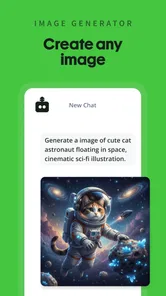
QuillBot brings together AI writing tools for paraphrasing, grammar checking, AI chat, translation, and AI detection. It is designed as a productivity app for people who want help polishing or reworking text from a mobile device. The usefulness of each tool depends on the task, and suggestions are best treated as a starting point that you can review and adapt.
What is QuillBot: AI Writing Assistant used for?
QuillBot is an AI-powered writing and paraphrasing tool designed to help users rewrite text, improve grammar, adjust tone, summarize content, and generate citations. It can be useful for students, professionals, and content creators who want to make their writing clearer or more polished. However, it should be treated as an editing aid rather than a replacement for personal research, original ideas, or careful proofreading.
Pros
- Paraphrasing modes help adjust wording for different writing goals.
- Built-in grammar checking catches common spelling and sentence errors.
- Citation generator can save time when formatting academic sources.
- Synonym suggestions offer more control over tone and word choice.
- Works across mobile devices for convenient editing on the go.
Cons
- Advanced paraphrasing modes require a paid subscription.
- Output can occasionally sound unnatural or change the intended meaning.
- Free usage limits may be restrictive for frequent writers.
- Some features require an internet connection to process text.
- Sensitive documents may raise privacy concerns when uploaded for analysis.











