

QuickMD - Online Healthcare
- 1.26K
- 4.8
- Installs
- 100.00K
- Price
- Free

Screenshots

Analysis by Reviewed
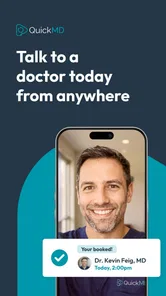
When I need medical advice but do not want to spend hours arranging an in-person visit, QuickMD - Online Healthcare is the kind of app I would keep ready on my phone. It is a free medical app from QuickMD - A Telemedicine Urgent Care Service, built around telehealth visits seven days a week. I see it as a practical bridge between waiting for a regular appointment and deciding that an urgent-care center is the only option.
My first impression is that the app makes the most sense when I treat it as a tool for a specific problem, not as a replacement for every part of healthcare. A video or telehealth consultation can be convenient for common, non-emergency concerns, follow-up questions, and situations where getting to a clinic is difficult. It is much less suitable when a clinician needs to examine me physically, perform a procedure, run an immediate test, or respond to a life-threatening emergency.
The app has been available since October 25, 2019, and its current version is 24.1263.232547. It is intended for Everyone and works on Android 9 or later. That broad compatibility matters because telehealth is often most useful on an ordinary phone rather than on a new device. QuickMD has also built a substantial user base, with over 100 thousand installs, a 4.8 average from around 4.5 thousand ratings, and about 1.3 thousand written reviews.
How I would use QuickMD from the first symptom to the visit
I would treat the first symptom as a cue to make a short, useful timeline rather than trying to diagnose myself: when it began, what has changed, and what I have already tried. Before starting a visit, I would check that my contact details are current and gather my medication and allergy notes. That preparation gives the conversation a clearer starting point and makes it easier to focus on the next decision.
Start with a clear reason for opening the app
The smoothest experience begins before I launch QuickMD. Instead of opening it with a vague feeling that I should “talk to someone,” I first write down the main issue, when it began, whether it is getting better or worse, and what I have already tried. That small preparation makes a remote consultation more focused and helps me avoid forgetting an important detail once the visit starts.
I would also keep a current list of medicines, allergies, and relevant medical conditions nearby. This is especially useful when I am speaking from home and do not have access to the records a regular clinic might already have. A note on paper is often faster than switching between apps during a consultation.
QuickMD is most appealing for problems that can reasonably be discussed remotely. A person with a new but familiar minor concern, a question about symptoms, or a need to speak with a healthcare professional outside the rhythm of a normal office appointment may find the seven-day availability useful. The benefit is not simply avoiding travel; it is reducing the number of steps between realizing that advice is needed and actually asking for it.
More From Our News Desk

 Instagram
Instagram’s Power Comes From Its Place in Your Phone
A close look at how Instagram turns Meta’s reach, recommendation systems and everyday camera habits into durable platform power—and what that costs users.

 Gmail
GmailGmail in a Busy Inbox: Who Benefits Most?
From first account to crowded workday, Gmail earns its place through dependable search and flexible sorting—but its best fit depends on how much inbox maintenance you can tolerate.

 Prime Video
Switching to Prime Video: What Changes in Your Viewing Routine
Prime Video can make a compelling second home for streaming, but switching means learning a different catalog, rental layer, and route from browsing to playback.

 Universal TV Remote Control
Universal TV Remote Control Works Best as a Reliable Backup
A phone remote earns its place through quick setup and reliable habits. Here is how to get more from Universal TV Remote Control—and where its limits show.

 Weather - By Xiaomi
Weather by Xiaomi Review: Clear at a Glance, Less Clear Up Close
Xiaomi’s weather app makes everyday forecasts quick to scan, but its calm surface can leave useful details and recovery paths harder to find than they should be.

 X
XX Under Pressure: Can It Recover When Posting Goes Wrong?
A resilience-focused review of X, examining setup, mistaken posts, interruptions, weak connections, and the gaps that matter when recovery needs to be dependable.
Latest News



A realistic everyday scenario
Imagine I wake up on a weekend with a bothersome illness and need professional guidance, but my usual doctor's office is closed. I can use the app to organize the basic facts, check that my phone is ready, and request a telehealth visit rather than immediately driving somewhere. If the clinician decides that remote care is appropriate, I have saved time and avoided an unnecessary waiting-room visit. If the situation requires an examination or testing, the consultation can still help clarify what kind of in-person care makes sense next.
That last point is important. I would not use a telehealth app to delay emergency help. Severe breathing trouble, chest pain, signs of a stroke, major bleeding, loss of consciousness, or another immediately dangerous situation calls for emergency services, not an app queue. QuickMD can support access to care, but it cannot turn a phone camera into a physical examination room.
What the consultation format changes
A remote visit rewards precise communication. Lighting, camera position, and a quiet room make it easier to discuss visible symptoms or show a general area of concern, although I would never assume that a camera view can replace an examination. I would also avoid multitasking. Having other apps open, moving around the house, or trying to remember the timeline while speaking can make a short consultation feel much less productive.
One useful habit is to prepare two or three direct questions. For example, I might ask what warning signs should prompt in-person care, what I should monitor over the next day, and what information I should bring if a clinic visit becomes necessary. Those questions turn the visit into a decision-making session rather than a rushed description of symptoms.
Settings and preparation that are genuinely worth checking
There is no advantage in discovering a microphone or camera problem at the moment a visit begins. Before relying on QuickMD, I would check that the app can use the phone's basic audio and video functions, that the device has enough battery, and that the internet connection is stable in the place where I plan to speak. A headset can help in a noisy home, while a well-lit front-facing camera makes communication easier.
I would also review the account details carefully and keep contact information current. Telehealth depends on receiving timely instructions and being reachable, so an old phone number or an email address I rarely check can create avoidable friction. The practical lesson is simple: prepare the access details before you are feeling unwell, not during the most uncomfortable part of the day.
Privacy deserves a deliberate check as well. I prefer a private room, headphones when other people are nearby, and a stable surface for the phone. A telehealth appointment can involve sensitive information, and speaking from a public place or an open living room may make me hold back details. The app may be convenient, but the quality of the setting still depends on the user.
How I make repeat visits less stressful
For recurring health questions, I would keep a small personal log with dates, symptoms, temperature readings when relevant, and any changes after treatment. I am not suggesting that the app automatically builds this record; I would maintain it myself so that each conversation starts with useful context. This is one of the most effective habits for telehealth because the clinician cannot observe the progression in person between visits.
I would also save the questions that came up after a previous consultation. People often remember the important question after the call ends. A running note lets me bring that concern into the next interaction instead of relying on memory. This approach is particularly helpful for follow-up conversations, where the difference between “still not right” and a clear timeline can affect the next recommendation.
Where QuickMD fits beside ordinary alternatives
Compared with a traditional primary-care appointment, QuickMD can be faster to access for an issue that does not require a physical examination. It is also more flexible for someone who is traveling, working unusual hours, caring for a child, or trying to avoid a waiting room. The trade-off is that a regular doctor may already know the patient's history and can coordinate examinations, laboratory work, referrals, and long-term treatment in one place.
Compared with a walk-in urgent-care center, the app removes travel and much of the waiting-room burden. That is valuable when the problem is suitable for remote care. The clinic has the opposite advantage: staff can check vital signs, examine the body directly, perform certain tests, and provide hands-on treatment. I would choose the physical clinic when the uncertainty is high or when the likely next step involves equipment.
Compared with a general symptom-search website, a telehealth visit offers the possibility of speaking with a healthcare professional rather than trying to interpret a list of alarming possibilities alone. Still, I would not use QuickMD as a substitute for emergency services or as a reason to ignore instructions from my established medical team. Its best role is focused access to professional guidance, not self-diagnosis by app.
Faster patterns experienced users can build
The quickest reliable workflow is repeatable: identify the main concern, collect the timeline, prepare medicines and allergies, test the phone, choose a private location, and write down the follow-up questions. None of these steps is flashy, but together they reduce the common causes of a poor remote visit. I would use the same checklist every time rather than improvising when sick.
Another useful pattern is separating urgent symptoms from administrative preparation. If I am worried about a dangerous change, I seek immediate appropriate care first. If the issue is stable enough for telehealth, I then gather the details needed for a productive consultation. Mixing those two decisions can lead to dangerous delays or unnecessary panic.
I also recommend keeping the app available before it is needed. Since QuickMD is free, there is little reason to wait until a weekend illness or a travel problem to discover whether the device is compatible and the account is ready. The app's Everyone age rating makes it broadly accessible, but accessibility does not remove the need for a parent or guardian to use good judgment when arranging care for a child.
Important limits that should shape expectations
The central limitation is the nature of telehealth itself. A clinician may be able to ask useful questions and assess what I describe, but the app cannot provide every physical measurement or procedure through a phone. A camera can show some visible information, yet it cannot reliably answer every question that an in-person examination would answer.
There is also a communication limit. A short remote encounter may not be the right setting for a complicated, long-term condition involving several specialists, changing medicines, or a detailed treatment plan. In those cases, I would use QuickMD as a supplementary point of contact only if it fits the advice of my regular healthcare team, not as an automatic replacement for coordinated care.
Connectivity and environment are practical limits too. A weak connection, poor lighting, background noise, or a nearly empty battery can interrupt the visit at exactly the wrong moment. Someone without a private space or dependable phone access may find an in-person service more predictable. Convenience is real, but it is not universal.
I would also avoid assuming that every concern can be resolved in one conversation. A responsible telehealth visit may end with a recommendation to seek testing, examination, or follow-up elsewhere. That is not necessarily a failure of the app; sometimes the safest result is a clear next step rather than a remote answer that pretends to be certain.
Who will benefit most from this app
QuickMD is a strong match for adults who value access outside the standard office routine, people who have difficulty traveling, and users who can describe their symptoms clearly in a remote setting. It is also useful for someone who wants professional direction before deciding whether an in-person visit is necessary. The seven-day schedule is particularly relevant for weekends and other times when a normal clinic is inconvenient.
I would be more cautious recommending it as the only healthcare option for someone with complex medical needs, rapidly changing symptoms, or a problem likely to require examination and testing. It is also not the right first choice for an emergency. In those situations, a physical facility or emergency service is better equipped to respond.
My opinion is strongest when the user approaches the app with realistic expectations. QuickMD can reduce friction, but it cannot eliminate medical uncertainty. The best results come from combining the app with good preparation, honest symptom descriptions, and a willingness to follow through with in-person care when advised.
My final assessment after looking at the whole workflow
QuickMD - Online Healthcare earns its place as a practical telehealth option because it focuses on access rather than trying to imitate a complete clinic. I like the idea of having a free way to seek a visit seven days a week, especially when the alternative is postponing a question until a regular appointment becomes available. Its strong 4.8 average and growing install base also suggest that many users find the approach worthwhile.
The app is not magic, and I would not recommend it for emergencies, hands-on treatment, or every complicated health problem. Its value depends on matching the symptom to the format. When the issue can reasonably be discussed remotely, the convenience is meaningful. When the issue demands examination, testing, or immediate intervention, the usual alternatives are safer and more complete.
If I were recommending it to a friend, I would say this: set it up before you need it, keep your medical notes organized, use a quiet and private space, and enter the visit with specific questions. Used that way, QuickMD is more than a shortcut around a waiting room. It becomes a structured first step for getting professional guidance while still recognizing when remote care has reached its limit.
QuickMD - Online Healthcare Frequently Asked Questions
Is QuickMD free to download, and what devices can run it?
QuickMD is free to download and is listed for users of all ages. Before installing, check that your device meets the app’s operating-system requirement; compatibility can affect whether you can install and use it. Downloading the app does not necessarily mean that a healthcare visit or any treatment will be free, so review the cost shown for a service before confirming a consultation.
Who develops QuickMD, and what do users think of the app?
QuickMD is developed by QuickMD - A Telemedicine Urgent Care Service and is in the medical category. It has an average rating of 4.8 from around 4,500 ratings, with roughly 1,300 written reviews and over 100,000 installs. Ratings can offer a helpful snapshot of other users’ experiences, but your own visit may depend on your needs, location, and provider availability.
What is QuickMD - Online Healthcare, and how does it work?
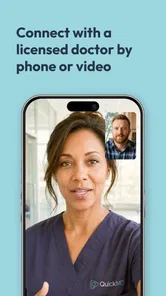
QuickMD is a telehealth service that allows users to connect with licensed healthcare providers through a smartphone or other compatible device. After creating an account, you generally select the type of care you need, provide information about your symptoms and medical history, and communicate with a provider by video or messaging, depending on availability and the service requested.
Can I get a prescription through QuickMD?
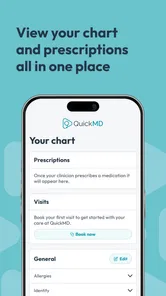
A QuickMD provider may prescribe medication when it is medically appropriate after reviewing your symptoms, health history, and current treatments. However, prescriptions are not guaranteed, and certain controlled substances or conditions may require an in-person examination. Medication availability, pharmacy rules, and telehealth regulations can also vary depending on your location.
What health conditions can QuickMD help with?
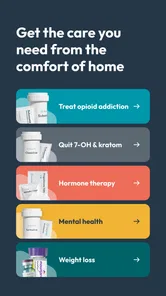
QuickMD may be useful for many common, non-emergency concerns, such as minor infections, allergies, skin problems, respiratory symptoms, urinary issues, and other routine healthcare needs. The exact services depend on your state, provider availability, and the consultation type. It is not intended to replace emergency care or manage every complex medical condition.
Pros
- Connects you with licensed providers without an in-person visit.
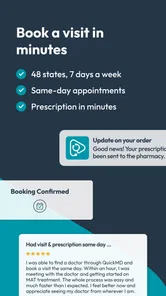
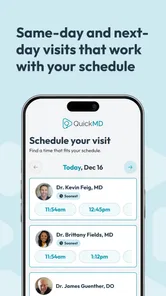
- Same-day appointments are available in many supported locations.
- Prescription requests can be handled during eligible consultations.
- The interface is simple enough for first-time telehealth users.
- Useful for routine
- non-emergency medical questions and follow-ups.
Cons
- Availability and services vary considerably by state and location.
- Not suitable for emergencies or conditions needing a physical examination.
- Insurance coverage and consultation costs may differ by provider.
- Some prescriptions may be restricted or unavailable through telehealth.
- Video visits require a reliable internet connection and compatible device.











