QuickBend: Conduit Bending
- 185.00
- 4.3
- Installs
- 50.00K
- Price
- $6.99

Screenshots
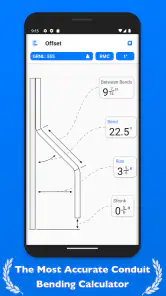
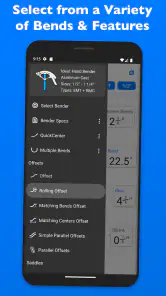

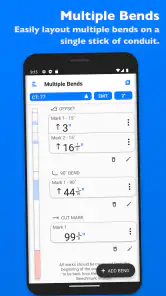
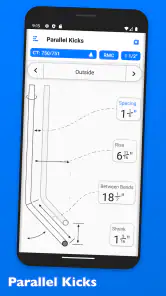
Analysis by Reviewed
Before I started using a bending calculator, I’d work through conduit measurements on paper, then double-check them at the bender. That approach can be fine for a one-off bend, but it gets cumbersome when a job has several offsets or a change in the route. QuickBend: Conduit Bending gives those calculations a dedicated place, which is useful when I want to spend less time reworking arithmetic and more time checking the actual setup.
A more dependable start to a bend
QuickBend is a paid productivity app by Bret H. Hardman, aimed at the practical calculations behind conduit work. It costs $6.99, has a 4.3 average from around 366 ratings, and has been installed over 50,000 times. It is rated for Everyone, with version 5.1.1 and a minimum OS requirement of 9. Those details make it worth checking compatibility before buying, especially if you plan to use it on an older device.
The value is not simply having numbers on a screen. A calculator can return an answer, but a bending workflow also depends on translating that answer into marks and actions at the bender. The app’s bend guidance is most useful when I treat it as a planning aid: work out the calculation before handling the conduit, then verify the conduit type, measurements, and intended route before making a bend.
Planning a route before reaching for the bender
The best time to open a bending calculator is often before I start cutting or marking material. I first look at the route, note the obstacle or change in direction, and decide what the finished conduit needs to clear. Then I can use the relevant bend calculation and compare the result with the space I actually have. This order matters: an accurate calculation for the wrong starting point or an outdated measurement can still lead to a poor fit.
For example, imagine I am fitting conduit around a pipe in a utility area. Rather than making a quick guess and trying to correct the bend afterward, I can pause, measure the obstruction and the available clearance, and plan the bend before touching the conduit. If the route changes when I get to the wall, I would recalculate from the new measurements instead of treating the first answer as something I must preserve. That habit is more useful than rushing through a calculation simply because the app makes it easy to obtain one.
This is also where a dedicated tool differs from a general calculator. A basic calculator can handle arithmetic, but it does not put conduit bend planning in context. A paper reference can explain a method, but I may have to search through it each time I need a different bend. QuickBend brings the calculation and guidance closer to the work, while leaving the physical measurements and final judgement with me. I see that as a practical middle ground, not a replacement for learning the craft.
Keeping jobs organized in the moment
Saving bends can help when a project contains repeated or similar runs. Rather than reconstructing a calculation from memory, I can return to an earlier one and use it as a reference. I would still label or otherwise keep track of which saved result belongs to which run outside the calculation itself; a saved bend is not a substitute for a clear job plan, particularly when several measurements look alike.
More From Our News Desk

Clash of Clans Is Won Between the Battles

Android Auto Makes the Case for Quieter Car Software

MobiOffice: Transforming Mobile Productivity with Seamless Integration

EA SPORTS FC™ Mobile Soccer: Redefining Mobile Sports Gaming

How Microsoft OneDrive Became a Mobile Productivity Giant

How Google Translate Breaks Language Barriers Effortlessly
A realistic use is arriving at a work area with multiple conduit runs to complete. I can calculate a bend, make and check it, then keep the next calculation separate instead of scribbling figures on scraps that are easy to mix up. That small separation between planning and bending is a practical way to reduce avoidable confusion. For recurring work, the app can support a repeatable routine: calculate, mark, bend, inspect, and only then move to the next run.
One useful discipline is to record the context alongside any result I expect to revisit: which run it belongs to, what the measurement was taken from, and whether the route changed after the calculation. The app can keep a bend available as a reference, but the surrounding job notes prevent a similar-looking result from being mistaken for the right one. This is especially worthwhile when several pieces are being prepared in sequence or when someone else may need to understand the plan.
I would also treat a saved calculation as a starting point for repeat work, not as proof that a new piece is identical. A small difference in the location of an obstruction, the path around it, or the available space can change what the conduit needs to do. Reusing a prior result is efficient when the conditions match; checking the new run is the safer choice when they do not. That modest pause can prevent a familiar number from creating a new problem.
Where it fits—and where it doesn’t
The app covers offsets, saddles, and 90-degree bends, and it adapts calculations for EMT, IMC, and PVC. That makes it more focused than a general calculator, which leaves the user to supply the bending know-how and interpret the result. It is also more convenient than repeatedly looking up a method elsewhere when a calculation is needed at the job. Still, it should not replace practical judgement: unusual layouts, obstructions, or a measurement that does not match the real space call for a careful check, not blind trust in a result.
For someone who bends conduit regularly, especially across different conduit types or several projects, the price may be reasonable for a specialized tool that keeps calculations close at hand. A homeowner handling a simple, occasional task may be better served by learning the required bend and checking it with a basic calculator or trusted reference. The app is less compelling if you rarely bend conduit, prefer paper records, or need a broader electrical-work organizer rather than a calculator centered on bends.
It is a particularly sensible fit for an electrician or apprentice who already understands the basics but wants to reduce the mental load of working through common bend calculations. For a learner, the guidance can provide a useful structure, but I would pair it with hands-on instruction or a reliable explanation of why each mark is placed where it is. The important distinction is that the app can help with the calculation; it cannot assess the quality of a bend, the condition of the material, or whether the full installation is appropriate.
If I were deciding whether to pay for it, I would ask how often I bend conduit and how much time I spend checking calculations or switching between references. Someone who reaches for a bending calculator on many jobs may get practical value from having a purpose-built option ready. If conduit work is a rare DIY task, the purchase is harder to justify: a careful one-off plan and a trusted reference may be enough. The choice depends less on enthusiasm for apps than on whether this particular calculation work is a recurring bottleneck.
Using QuickBend with care
One limitation of any mobile bending tool is the setting: a phone can be awkward to consult when hands are occupied, gloves are on, or the work area is dusty. I’d do the calculation before starting a bend and keep the device somewhere accessible rather than repeatedly handling it mid-task. A low battery or poor visibility can also disrupt that workflow, so a paper note for essential measurements is sensible on a longer job.
There is a useful trade-off here. Keeping all calculations on the phone makes them easy to revisit, while writing down the measurements needed for the immediate bend means I am not dependent on the screen at every step. I prefer a light combination: use the app to work out the bend, note the key result and what it refers to, then put the phone aside while handling the material. That is less distracting and makes it easier to keep the work area orderly.
Another failure point is entering a measurement that was taken from the wrong reference point or copying a number to the wrong run. The app cannot spot that kind of mix-up for me. Before bending, I would compare the input with the physical layout and read the result once more against the run I intend to make. If the result seems inconsistent with the space, I would stop and remeasure rather than trying to force the conduit to match an answer I do not trust.
The app’s clear graphics and step-by-step guidance can make it approachable for a learner, but they do not remove the need to understand what the bend must accomplish in the installation. I would use it to learn a repeatable process, not to skip checking clearances, alignment, or fit. Its strongest role is reducing calculation friction; the person doing the work still has to confirm that the planned conduit route makes sense.
When it comes to electrical work, precision is key. That's where QuickBend: Conduit Bending comes in. As someone who's dabbled in a bit of DIY and knows the struggle of getting those conduit bends just right, I have to say, this app is a game-changer. Let me take you through my experience with it.
Getting Started with QuickBend
Okay, so first things first, downloading and setting up QuickBend was a breeze. Available on both Android and iOS, it’s just a couple of taps away from being your new best friend on the job site. Once installed, the interface is clean and intuitive, which is perfect because nobody has time to fiddle with complicated apps when you're in the middle of a project.
Features That Make a Difference
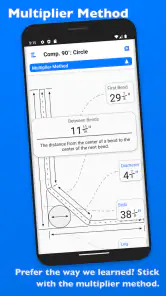
What really struck me about QuickBend is how it simplifies the bending process. The app provides detailed instructions and calculations for various bends like offsets, saddles, and even 90-degree bends. It’s like having a seasoned pro guiding you through each step, ensuring you don’t waste materials or time.
One feature I found particularly helpful is the app's ability to save your bends. Imagine being able to revisit previous calculations or adjustments without having to start from scratch. It’s a lifesaver, especially if you’re juggling multiple projects.
Ease of Use
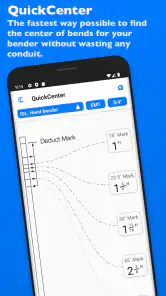
Let’s talk user experience. QuickBend has clearly been designed with the user in mind. The app's layout is straightforward, making navigation a walk in the park. Even if you're new to conduit bending, the app makes it easy to understand with its clear graphics and step-by-step guidance.
Another aspect worth mentioning is the app’s adaptability. Whether you’re working with EMT, IMC, or PVC conduits, QuickBend adjusts its calculations accordingly. This flexibility means you can tackle a variety of tasks without switching tools or apps.
Final Thoughts
All in all, QuickBend: Conduit Bending is a must-have for anyone involved in electrical work, from seasoned electricians to DIY enthusiasts. It streamlines the bending process, saves precious time, and reduces material waste. Plus, with its easy-to-use interface and comprehensive features, it's hard not to appreciate the value it brings to the table.
If you’re on the fence about trying it out, I’d say give it a go. Worst case, you end up with a handy tool that might just make your next project a whole lot easier. And honestly, who wouldn’t want that?
QuickBend: Conduit Bending Frequently Asked Questions
What does QuickBend cost, and what should I know before downloading it?
QuickBend: Conduit Bending is a paid productivity app priced at $6.99. It is intended for people who want conduit-bending calculations on a mobile device, particularly electricians and others working with conduit. Before downloading, check that your device meets the app’s operating-system requirement. The app is rated for Everyone, so its age rating is not limited to adult users.
What is QuickBend: Conduit Bending and how does it work?
QuickBend: Conduit Bending is a mobile application designed to assist electricians and professionals in the field with precise conduit bending calculations. The app simplifies the process by providing accurate measurements and detailed instructions for various types of bends, including offset, saddle, and parallel bends. Users can input their conduit type and size, and the app generates step-by-step instructions and diagrams, making the task more efficient and reducing material waste.
Is QuickBend suitable for both novice and experienced users?
Yes, QuickBend is designed to accommodate both novice and experienced users. For beginners, the app offers a user-friendly interface with easy-to-follow guides and tutorials that simplify the conduit bending process. Experienced users benefit from the app's advanced features, such as customizable settings and precise calculation tools, which enhance accuracy and efficiency on more complex projects. The app's versatility makes it a valuable tool for users at any skill level.
What kind of conduit types can I work with using QuickBend?
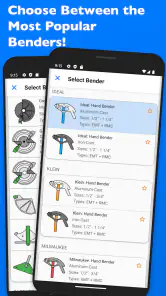
QuickBend supports a wide range of conduit types, making it a versatile tool for any electrician. The app is compatible with EMT (Electrical Metallic Tubing), IMC (Intermediate Metal Conduit), RMC (Rigid Metal Conduit), and PVC (Polyvinyl Chloride) conduits. Users can select their specific conduit type and size within the app, ensuring that calculations and instructions are tailored to their particular requirements, enhancing the accuracy of each project.
Does QuickBend require an internet connection to function?
No, QuickBend does not require an internet connection to operate. Once downloaded, the app functions entirely offline, allowing users to access all features and tools anytime, anywhere, without the need for Wi-Fi or mobile data. This is particularly beneficial for professionals working in remote locations or areas with limited connectivity, ensuring uninterrupted access to conduit bending calculations and instructions.
Pros
- Intuitive interface for quick learning
- Supports multiple conduit types
- Includes detailed bending charts
- Offers offline functionality
- Frequent updates with new features
Cons
- Limited to conduit bending tasks
- Requires in-app purchases for full features
- No cloud backup for projects
- Not available on all devices
- Lacks integration with CAD tools
- Category
- Productivity
- Version
- 5.1.1











