

Qatar Airways
- 1.17K
- 4.3
- Installs
- 10.00M
- Price
- Free

Screenshots


Analysis by Reviewed
When I rely on my phone to keep a trip moving, the biggest question is not how many buttons an airline app has; it is what happens when the connection is patchy. Qatar Airways’ app is most useful when I can get online to check or manage the details around a flight. I would treat it as a handy companion to my own travel documents, not as the only place I keep essential information.
Where a connection makes the difference
Flight searches, booking changes, and current travel updates are the kinds of tasks where a live connection matters. Before leaving home, I’d use the app to review the itinerary and check that the details I need are easy to find. At the airport, I’d open it while I still have dependable service rather than waiting until I’m rushing toward a gate. That small habit can make a last-minute check less stressful.
For a connecting journey, the app can be especially helpful as a quick reference for the next leg. I’d still pay attention to airport screens and announcements: gate and timing information can change, and a phone notification should not be the only signal I trust. This is a practical distinction between an airline’s own app and a general travel planner: the airline app is a natural place to manage that carrier’s trip, while an airport display remains useful for immediate, shared updates.
Useful in different mobile situations
On a regular day, I might use the app at home to plan a route, then open it again in a taxi to check the booking before reaching the terminal. At the airport, a phone makes it convenient to look up trip details without juggling printed pages. If I’m travelling with someone else, I’d make sure both of us know where the itinerary is, rather than assuming one person’s phone will always be available.
A useful routine is to check the flight details before setting off and again after arriving at the airport. I’d also keep any key confirmation information somewhere I can reach independently, such as in my email or travel documents. That is not a criticism unique to this app; it is sensible preparation whenever travel plans depend on a phone and a network.
What to do when service is unreliable
Mobile reception can be inconsistent in crowded terminals, underground areas, or while moving between buildings. If a page takes too long to load, I would avoid repeatedly tapping through several screens; first check whether the phone has a connection, then retry when service improves. For urgent flight information, airport displays and staff are sensible alternatives, especially when the timing is tight.
This also explains why I wouldn’t use the app as my sole backup for a complicated itinerary. Keep the booking confirmation accessible outside the app, and note the key connection details before a long travel day. The app can make airline-specific tasks more convenient, but a second way to retrieve essential information is a better plan than expecting any phone service to be flawless.
More From Our News Desk

 Prime Video
Switching to Prime Video: What Changes in Your Viewing Routine
Prime Video can make a compelling second home for streaming, but switching means learning a different catalog, rental layer, and route from browsing to playback.

 Universal TV Remote Control
Universal TV Remote Control Works Best as a Reliable Backup
A phone remote earns its place through quick setup and reliable habits. Here is how to get more from Universal TV Remote Control—and where its limits show.

 Weather - By Xiaomi
Weather by Xiaomi Review: Clear at a Glance, Less Clear Up Close
Xiaomi’s weather app makes everyday forecasts quick to scan, but its calm surface can leave useful details and recovery paths harder to find than they should be.

 X
XX Under Pressure: Can It Recover When Posting Goes Wrong?
A resilience-focused review of X, examining setup, mistaken posts, interruptions, weak connections, and the gaps that matter when recovery needs to be dependable.

 Clash of Clans
Clash of Clans Is Won Between the Battles
Its raids are quick; its community is a long-term project of coordination, teaching, rivalry, and shared responsibility—with all the friction that entails.

 Android Auto
Android Auto Makes the Case for Quieter Car Software
The car interface is no longer judged by how much it can do, but by how quietly it helps. Android Auto shows what drivers now expect—and what still gets in the way.
Latest News



Data use and a sensible workflow
For travellers watching mobile data, I’d reserve app checks for useful moments instead of refreshing flight status constantly. Review the itinerary before leaving, then check again when you have a reason, such as arriving at the airport or preparing for a connection. That keeps phone use purposeful and helps avoid wasting attention as much as data.
Compared with a general travel app, Qatar Airways’ own app is the more direct choice when the trip involves this airline and you want airline-related booking and journey information in one place. A broader trip planner may suit someone coordinating several airlines, transport modes, and reservations. I’d use each for the job it handles best rather than expecting one app to replace every travel tool.
Qatar Airways is a free Travel & Local app from Qatar Airways, rated for Everyone, and its current version is 25.17. It has an average rating of 4.3 from around 65,000 ratings, with over 10 million installs. Those figures suggest it is widely used, but my choice would still depend on whether I fly with the airline often enough to benefit from a dedicated companion.
Who gets the most from a dedicated airline app
I’d recommend installing it when a Qatar Airways flight is already part of your plans, especially if you expect to check the itinerary more than once or need to handle airline-specific tasks. Keeping the carrier’s own app available can reduce the back-and-forth of searching email for a confirmation while you are moving through a terminal. It is less compelling if you rarely fly with the airline and already have a preferred way to organize every reservation; in that case, a general trip planner may be enough for keeping the whole journey visible.
There is also a practical difference between planning a trip and managing one. A multi-airline organizer can give you a broad view of hotels, ground transport, and flights from different carriers, while the airline’s own app is the more focused place to start for details tied to its service. I wouldn’t force a choice between them: use a planner for the full itinerary and the airline app for the parts that concern this flight.
A realistic airport routine
Imagine I’m heading to the airport after work, with a connection later in the journey. Before leaving, I would review the booking at home, then keep the confirmation available in email as a backup. In the taxi, I’d check that I am looking at the right trip rather than trying to sort out details at the curb. Once inside, I’d compare what I see on the phone with the airport’s shared displays and listen for announcements before making decisions about where to go.
That sequence is useful because it separates calm preparation from urgent checking. A phone is excellent for bringing personal trip information close at hand, but a gate display is designed for everyone in the terminal and may be the better reference when conditions change. If I’m travelling with a companion, I’d share the key itinerary details before we split up to buy food or find a seat; relying on one person’s battery and reception creates an avoidable single point of failure.
Small habits that make checks more useful
My main tip is to open the relevant trip before the busiest part of travel, while there is time to notice if the connection is slow or the booking is not immediately where I expect it. I would avoid treating repeated refreshes as a strategy. If information is not loading, check the phone’s connection, try again when service is steadier, and use airport staff or displays for anything time-sensitive.
For a journey with several legs, I’d make a compact note of the next departure and connection details in a place I can access separately. This is not a substitute for current information; it simply helps me remember what I am checking if the app takes time to respond. It is especially useful when I’m tired, carrying bags, or trying to follow a companion through a busy terminal.
The app is free, which makes trying it before a Qatar Airways trip a low-commitment choice. Still, I would not install it expecting it to replace all travel planning or guarantee that every update reaches me at the perfect moment. I’d keep notifications as a helpful extra rather than the only way I learn about a change, and I’d make sure I know where to get assistance if a booking question cannot be resolved on the phone.
Where convenience has limits
The main trade-off is focus: an airline app is naturally centered on that airline, while a traveller’s day may involve other carriers, a hotel, rail, or a ride across town. Keeping everything in one place may call for another organizer, and switching between tools can be mildly inconvenient. I also prefer not to make a phone the sole source of truth when a battery can run low or a network can falter. Those are ordinary travel constraints, but they matter most when a connection is tight and there is little time to troubleshoot.
If you mainly want broad destination ideas or a single overview of unrelated bookings, I’d start with a general travel service and add this app when you have a Qatar Airways itinerary to manage. If you fly with the airline and want a direct route to its flight and booking information, the dedicated app makes more sense. My recommendation is therefore conditional rather than universal: it earns a place on the phone for the relevant trip, not necessarily as a permanent hub for every traveller.
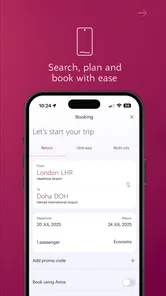
Let me take you on a journey with Qatar Airways, an app that promises to transform your travel experience from the very moment you book your flight. I decided to give it a whirl and here's my take on it.
Booking with Ease
First things first, let's talk about the booking process. Navigating through the Qatar Airways app is as smooth as silk. The user interface is intuitive, making it super easy to search for flights, compare prices, and make bookings. Whether you're looking for a one-way ticket or planning a multi-city adventure, the app's functionality has you covered. The best part? You can manage your entire trip from the palm of your hand.
In-flight Experience at Your Fingertips
One of the standout features of the app is its ability to enhance your in-flight experience. With a few taps, you can select your preferred seat, choose your meal, and even browse the in-flight entertainment options ahead of time. It's like having a personal concierge, ensuring that your journey is as comfortable as possible.
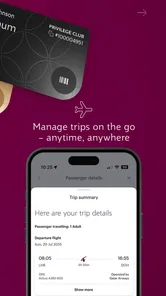
And if you're anything like me, who sometimes struggles with layovers, the app provides detailed information about your connecting flights, including gate numbers and boarding times. This is a game-changer for frequent travelers!
Loyalty Program Perks
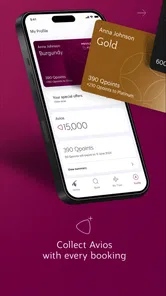
For the frequent flyers out there, you'll appreciate the integration of the Privilege Club. The app keeps track of your Qmiles and Qpoints, making it easy to monitor your status and benefits. Plus, the app frequently updates with exclusive offers and promotions that are hard to resist for those who love a good deal.
The Qatar Airways app also allows you to redeem your Qmiles for a variety of rewards, from flight upgrades to hotel stays. It's a seamless way to make the most of your loyalty points without any fuss.
Travel Alerts and Updates
In today's world, staying informed about travel updates is crucial. The app sends real-time notifications about flight status changes, boarding announcements, and even baggage carousel information. It's like having a travel assistant in your pocket, keeping you updated so you can relax and enjoy your journey.
Overall, the Qatar Airways app is a must-have for anyone flying with the airline. Its comprehensive features and user-friendly design truly enhance the travel experience. So, if you're planning a trip with Qatar Airways, downloading this app is a no-brainer. Happy travels!
Qatar Airways Frequently Asked Questions
Who is the Qatar Airways app intended for, and what can I use it for?
Qatar Airways is a Travel & Local app for people who want to access the airline’s travel services from a mobile device. Its store summary, “Fly, travel, shop, live,” points to a broader travel focus, while the app’s features bring together tools for booking and managing journeys, checking flight updates, and accessing boarding passes. It can be useful both while planning and as your trip approaches.
Does the Qatar Airways app support Privilege Club members?
Yes. The app lets users manage a Privilege Club account directly from their phone, alongside flight booking and other travel tools. This makes it convenient for members who want to keep account access and trip management in one place. If you are considering downloading it mainly for your membership, the app’s broader travel features may also be useful for checking bookings and staying informed about your journey.
Is the Qatar Airways app free to download, and what devices can run it?
The Qatar Airways app is free to download and is designed for Android and iOS users. Before installing, check that your device meets the applicable operating-system requirements; the Android version requires Android 10 or later. Once installed, the app brings Qatar Airways travel tools together on your phone, so you can use it to plan and manage your journey while on the go.
What features does the Qatar Airways app offer to enhance the travel experience?
The Qatar Airways app provides a seamless travel experience with features like easy flight booking and management, real-time flight status updates, mobile boarding passes, and personalized travel notifications. Additionally, users can access exclusive offers and manage their Privilege Club account directly from the app, ensuring all travel needs are met efficiently. Its broad travel focus is reflected in the tagline, “Fly, travel, shop, live,” making it useful beyond checking a single booking.
How can I manage my bookings using the Qatar Airways app?
Managing bookings through the Qatar Airways app is straightforward. Users can easily view and modify their flight details, select seats, and add special services. The app also allows passengers to check-in online and download their boarding passes directly to their smartphones, making the travel process more convenient and time-saving. Keeping the app installed gives you a convenient place to revisit these trip details and use its travel tools when plans need attention.
Pros
- User-friendly interface with intuitive navigation.
- Extensive flight options and destinations.
- Real-time flight status updates.
- Integration with loyalty programs for rewards.
- Easy booking and check-in process.
Cons
- Occasional app crashes reported by users.
- Limited offline functionality.
- Some features require internet connection.
- Customer service response can be slow.
- Minor bugs in flight search feature.











