

Pumply - Pumplog Tracker
- 334.00
- 4.7
- Installs
- 50.00K
- Price
- Free
Screenshots
Analysis by Reviewed
Exclusive pumping turns a simple routine into a surprisingly detailed record-keeping job. I found myself wanting to remember more than whether a session happened: when I pumped, how much I collected, how the day was progressing, and whether a change in timing actually made a difference. Pumply - Pumplog Tracker is built for that specific situation. It is a free parenting app from Northlight Studio that keeps pumping information in one place instead of leaving it scattered across notes, memory, or a general-purpose tracker.
After using it as a focused log, my impression is that its value comes from reducing mental effort. It does not try to become a complete baby-care platform. Its purpose is narrower and, for someone who exclusively pumps, that focus matters. The app is available to everyone, runs on Android 8.0 or later, and has reached over 50 thousand installs. A 4.7 average from around 1.7 thousand ratings suggests that its straightforward approach is connecting with the people who need this kind of tool.
How I Decided Whether Pumply Was the Right Fit
I judged the app by a few practical questions rather than by the number of screens it offers. First, can I record a session quickly when I am tired or holding a baby? Second, does the information help me understand my routine instead of merely storing isolated entries? Third, can I use it without turning pumping into another source of pressure? Finally, does it suit my particular feeding method, or would a broader parenting app be more useful?
Those questions are important because pumping logs serve different purposes. One parent may need a simple memory aid for the last session. Another may want a running view of daily totals. Someone adjusting a schedule may care about patterns over several days. A parent combining nursing, formula, and pumping may need a wider feeding record than a dedicated pumping tool can provide.
For me, the strongest reason to choose this app is clarity. A dedicated log makes it easier to separate pumping information from diaper changes, sleep, medication reminders, and other baby-care details. When the only thing I need to enter is a pumping session, I am less likely to postpone it and reconstruct the day later.
What the focused design does well
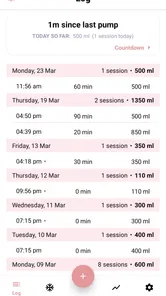
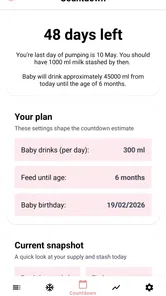
The central workflow is easy to understand: record pumping sessions, note volumes, and use the accumulated information to see totals. That sounds modest, but it addresses a real problem. During a busy day, the difference between a useful log and an abandoned one is often a few seconds of friction. I appreciated that the app’s identity stays tied to pumping rather than asking me to configure an entire family dashboard first.
A useful habit is to enter a session immediately after finishing, while the details are still fresh. If I waited until evening, small uncertainties appeared: Was that session before lunch or after it? Did I already record the smaller bottle? Pumply works best when treated as a quick running journal, not as a retrospective report.
More From Our News Desk

 Gmail
GmailGmail in a Busy Inbox: Who Benefits Most?
From first account to crowded workday, Gmail earns its place through dependable search and flexible sorting—but its best fit depends on how much inbox maintenance you can tolerate.

 Prime Video
Switching to Prime Video: What Changes in Your Viewing Routine
Prime Video can make a compelling second home for streaming, but switching means learning a different catalog, rental layer, and route from browsing to playback.

 Universal TV Remote Control
Universal TV Remote Control Works Best as a Reliable Backup
A phone remote earns its place through quick setup and reliable habits. Here is how to get more from Universal TV Remote Control—and where its limits show.

 Weather - By Xiaomi
Weather by Xiaomi Review: Clear at a Glance, Less Clear Up Close
Xiaomi’s weather app makes everyday forecasts quick to scan, but its calm surface can leave useful details and recovery paths harder to find than they should be.

 X
XX Under Pressure: Can It Recover When Posting Goes Wrong?
A resilience-focused review of X, examining setup, mistaken posts, interruptions, weak connections, and the gaps that matter when recovery needs to be dependable.

 Clash of Clans
Clash of Clans Is Won Between the Battles
Its raids are quick; its community is a long-term project of coordination, teaching, rivalry, and shared responsibility—with all the friction that entails.
Latest News



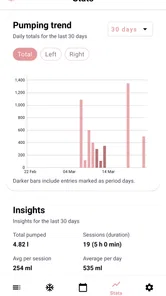
The totals are also more useful when I view them as context rather than a score. A daily amount can help me notice a broad trend, but a single session should not become a judgment about my effort or supply. The app can organize the numbers; it cannot explain every change. Sleep, stress, hydration, equipment, timing, and many other factors can affect pumping, so I would avoid making health decisions from the log alone.
Three practical ways I would use it
My first workflow would be a “last session” check. Before starting a new session, I could look back at the recent entry rather than relying on memory. That is especially helpful when the day has been interrupted repeatedly. It gives me a reliable starting point without requiring a separate paper note or message to myself.
My second workflow would be a schedule experiment. If I changed the spacing between sessions, I would keep the rest of my routine as consistent as possible and use the log to compare the resulting pattern over several days. The important insight is not simply the highest individual volume. I would look at whether the routine feels sustainable and whether the overall day remains manageable.
My third workflow would be preparing for a conversation with a lactation professional or healthcare provider. Instead of trying to describe an entire week from memory, I could bring an organized record of sessions and volumes. The app does not replace professional advice, but a clearer record can make that conversation more concrete and less dependent on guesswork.
A realistic day with the app
Imagine a parent who begins pumping early, then has a rushed morning with a baby who needs attention. A mid-morning session is shorter than planned, and another session happens later than usual. With a paper notebook, it is easy to write down one number and forget the time, or to leave the entry until the end of the day. With Pumply, the parent can record each session as it happens, then review the day’s total without reconstructing every interruption.
That scenario highlights the app’s real strength: it supports imperfect routines. Exclusive pumping is rarely a perfectly spaced series of identical sessions. A useful tracker should help capture what actually happened, not make the user feel that a disrupted day is a failed one. I found the app most valuable when I used it as a neutral record rather than as a demand to meet a particular target.
Small details that affect everyday usefulness
The app is free to start, which makes it easier to test without committing money immediately. There are in-app purchases ranging from $5.99 to $24.99 per item, so I would still check the purchase screen carefully before confirming anything. The free entry point is a genuine advantage for a new parent who is unsure whether a dedicated tracker will become part of the daily routine.
Its current version is 5.6, and the app has been available since July 24, 2020. Those details do not tell me whether every future device or workflow will feel equally smooth, but they do make the product feel more established than a brand-new experiment. I would keep the app updated through the normal app-store process, particularly if I rely on it for a long-running record.
The Everyone content rating is reassuring for a parenting utility, although the rating does not change the need to handle personal information thoughtfully. I would avoid treating any health-related notes as casual data. If I share a phone with someone else, I would also consider whether the app’s visible history is appropriate for that arrangement before entering especially sensitive notes.
Where Pumply Wins, and Where Another Category May Be Better
I look at this section as a question of fit, not a contest where one kind of tracker has to win. Pumply makes the most sense when pumping is the routine I need to keep clear; a broader tool may be more practical when several caregivers or care tasks need to stay connected. The key trade-off is whether a focused log makes daily recording easier or simply adds another place to check.
Why it beats memory and paper for many parents
The obvious alternative is remembering sessions or writing them in a notebook. Paper has one advantage: it works without learning an interface and can be placed beside a pump. However, paper makes totals and pattern recognition more laborious. Memory is even less dependable when sleep is interrupted. Pumply earns its place by turning repeated entries into a more usable record.
A general notes app is flexible, but that flexibility becomes work. I would need to invent a format, keep it consistent, calculate totals myself, and decide how to interpret old entries. A dedicated pumping log starts with a clearer purpose. That is a meaningful distinction for someone who does not want to design a spreadsheet while recovering from birth and caring for a newborn.
When a full parenting tracker may fit better
A broader parenting app may be the better choice for a family that wants one place for feeding, sleep, diapers, medication, growth, and shared caregiving. If pumping is only a small part of the day, installing a specialized tracker could create another account or another routine to maintain. In that case, the convenience of one wider system may outweigh the focused design of Pumply.
The trade-off is depth versus coverage. A dedicated pumping app can keep the main task uncluttered, while an all-in-one app can show relationships between several parts of a baby’s day. I would choose Pumply when pumping itself is the main record I need. I would choose a broader alternative when the family’s priority is coordination across many care tasks.
When a spreadsheet or custom log is the stronger option
A spreadsheet is better for someone who wants complete control over columns, formulas, labels, and long-term analysis. For example, a parent who already tracks equipment changes, storage details, or additional personal observations may prefer a custom structure. The price of that control is setup time and maintenance. Pumply is more appealing when I want a ready-made routine rather than a project.
I would also skip it if I know I will abandon any tracker that asks me to enter every session. No app can make detailed logging effortless when the user dislikes the habit itself. In that situation, a very simple note, a paper card, or a broader tool already used by the household may be more realistic. The best record is the one that survives difficult days.
The cost of switching later
Moving from a notebook or notes app to Pumply should be easy conceptually, but the historical record is part of the decision. If I already have months of carefully organized entries elsewhere, I would not switch solely because a dedicated interface sounds appealing. I would first decide whether I need future convenience more than continuity with the old record.
Likewise, if I begin with Pumply and later move to a full parenting platform, I would preserve any important history before changing systems. I would not assume that every app handles old entries in the same way. A practical approach is to keep a personal summary of meaningful trends or medical discussion points rather than depending entirely on any single tracker.
The in-app purchase range also belongs in this switching calculation. The free version gives a low-risk way to see whether the workflow suits me, but I would not pay for extras until I had used the basic routine through both calm and chaotic days. A feature is worth paying for only if it saves enough time or confusion to justify becoming part of the household’s ongoing system.
Questions I would ask before installing
Can I use it on my device? The minimum requirement is Android 8.0, so I would check the phone’s operating-system version before downloading. Is it suitable for a child? Its Everyone rating fits a family-oriented utility, but the actual user is usually the parent or caregiver managing the log.
Is it only for exclusive pumping? The app is clearly aimed at that routine, so I would not choose it as my only record if I need detailed nursing, formula, sleep, or diaper tracking as well. Can it replace medical guidance? No. Its role is organization and reflection; concerns about supply, pain, feeding, or infant health belong in a conversation with an appropriate professional.
Will it help if several caregivers share the work? It can provide a central record on the device where it is used, but I would consider the household workflow before relying on it for handoffs. If multiple people need simultaneous access or a broad shared care plan, a family-oriented alternative may be more convenient.
My recommendation for different users
I recommend Pumply most strongly to a parent who is exclusively pumping, wants a focused record, and is willing to enter sessions consistently. It is especially sensible for someone replacing scattered notes with a clearer view of timing, volumes, and totals. The free starting point makes the decision easier: use it through a normal week, including the messy days, and judge whether it reduces mental load.
I would recommend looking elsewhere if pumping is only one small part of a much larger care routine, if customized analysis is essential, or if shared multi-caregiver coordination is the main goal. A general parenting tracker, spreadsheet, or even a simpler manual method may serve those needs better. Choosing a specialized app just because it has a high rating would miss the more important question: does its narrow focus match the way you actually feed and organize care?
Overall, I see Pumply as a practical specialist rather than an all-purpose parenting command center. Its best quality is restraint. It gives exclusive pumping its own place, encourages timely entries, and turns a tiring sequence of sessions into information I can review without much extra work. The limitation is the same as the strength: anyone wanting a complete family record may outgrow that narrow purpose.
For the right user, the most valuable feature is not collecting more numbers but making the routine easier to understand. I would start with the free version, record sessions as soon as possible, review trends over several days instead of reacting to one result, and keep professional advice separate from the app’s record. On that basis, I think it is a worthwhile download for exclusive pumpers who want less guesswork and a more dependable daily log.
Pumply - Pumplog Tracker Frequently Asked Questions
Who develops Pumply - Pumplog Tracker, and what devices can run it?
Pumply - Pumplog Tracker is a parenting app from Northlight Studio. It is available for Android and iOS, with Android compatibility starting at version 8.0. Before downloading, check that your device’s operating system meets the requirement and that you are choosing the version intended for your platform. The app focuses on making exclusive pumping easier to track.
What is Pumply - Pumplog Tracker used for?
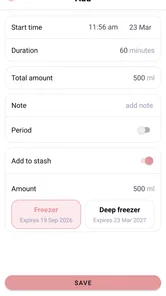
Pumply - Pumplog Tracker is designed to help users record and monitor pumping sessions in an organized way. You can typically use it to log details such as the date, time, duration, side used, and amount collected. Keeping this information in one place can make daily routines easier to review and may help you identify patterns in your pumping schedule over time.
Is Pumply - Pumplog Tracker suitable for breastfeeding and breast-pumping routines?
Yes, the app is aimed at people who want to track breast-pumping activity and related routine details. It can be useful for maintaining a personal record during the postpartum period, especially when sessions happen at different times throughout the day. However, it should be treated as a tracking tool rather than medical advice, and concerns about milk supply, feeding, or infant health should be discussed with a qualified healthcare professional.
Does Pumply - Pumplog Tracker require an internet connection?
The basic logging experience may be available without a constant internet connection, which is convenient when you are pumping at home, traveling, or in places with limited service. Some features, such as synchronization, backups, advertisements, account services, or updates, may depend on connectivity. Before relying on the app as your only record, check how your device stores data and whether the current version offers backup or export options.
Can I customize pumping records and reminders in Pumply - Pumplog Tracker?
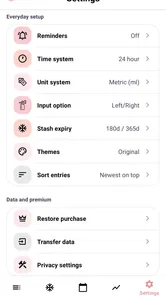
Pumply - Pumplog Tracker is intended to make session tracking more flexible than writing notes manually. Depending on the version and device, users may be able to record session-specific information, review previous entries, and configure reminders or routine preferences. Available customization can vary between Android and iOS releases, so it is worth checking the app listing and settings after installation to confirm which options are included.
Pros
- Quickly logs sets
- reps
- weight
- and rest times during workouts.
- Progress charts make strength improvements easy to monitor over time.
- Custom exercises help tailor routines to different training styles.
- Workout history provides useful reference for planning future sessions.
- Clean interface keeps tracking focused without unnecessary distractions.
Cons
- Some advanced insights may require a paid subscription.
- Entering detailed workouts can feel repetitive during fast-paced sessions.
- Exercise databases may not include every variation or specialized movement.
- Limited social features may disappoint users seeking community motivation.
- Battery or notification settings may affect rest-timer reliability.











