

Propps: Digital Business Card
- 4.00
- 4.2
- Installs
- 10.00K
- Price
- Free

Screenshots
Analysis by Reviewed
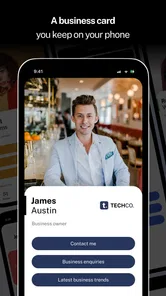
When I first tried Propps: Digital Business Card, I approached it as a simple replacement for the paper cards I usually forget in a drawer. That expectation is important, because the app is most useful when treated as a quick connection tool rather than a complete customer relationship system. Its central idea is easy to understand: keep your professional identity ready on a phone and make sharing it less awkward than typing contact details during a conversation.
That focus gives the app a clear place in the business category. Propps is developed by Propps, and its store summary, “Connect, share, and grow!”, captures the intended experience without explaining every practical detail. In my use, the real value came from reducing the small delays around introductions: finding the right details, spelling a name, and deciding what to send after meeting someone. It is a free app to start with, although optional purchases range from $1.99 to $134.99 per item, so I would look carefully at the purchase screen before committing to anything beyond the basic experience.
How Propps fits real mobile networking
The app makes the most sense in situations where your phone is already part of the conversation. Think of a quick introduction at a business event, a meeting in a shared workspace, or a follow-up after someone asks how to reach you. Instead of relying on a physical card or manually composing a message from memory, I can use the digital-card approach as a single point of reference.
That sounds small, but small friction matters. A paper card can be misplaced, while a manually typed contact message can contain an old title, a missing digit, or a link that is difficult to copy. A digital business card is easier to keep current in principle because the information is maintained in one place. I would still review the card whenever my role, phone number, email address, or preferred contact channel changes. The convenience disappears quickly if the shared details are outdated.
The first practical question is how smoothly the app behaves when connectivity is available. A digital card normally depends on a handoff between people: one person opens the app, another receives or views the information, and both may continue the conversation elsewhere. That makes network quality part of the experience. On a strong connection, the process feels natural. In a crowded venue with overloaded mobile service, the same interaction can become slower and less confident.
I would therefore prepare before entering a place where I expect to network. Opening the app in advance, checking that the profile information is correct, and keeping the phone charged are simple habits, but they prevent the most embarrassing kind of digital introduction: promising to send details and then struggling to do it. Propps is at its best when it supports a conversation, not when the conversation has to pause while I troubleshoot my phone.
The moments when a network connection matters most
Connectivity affects more than the first launch. If the sharing flow requires current access to the service, a weak signal can interrupt the exchange at exactly the wrong time. I would be especially cautious in conference halls, underground venues, older buildings, elevators, and busy public gatherings. These are places where a phone may show a connection icon while still taking too long to complete a web-based action.
More From Our News Desk

 Gmail
GmailGmail in a Busy Inbox: Who Benefits Most?
From first account to crowded workday, Gmail earns its place through dependable search and flexible sorting—but its best fit depends on how much inbox maintenance you can tolerate.

 Prime Video
Switching to Prime Video: What Changes in Your Viewing Routine
Prime Video can make a compelling second home for streaming, but switching means learning a different catalog, rental layer, and route from browsing to playback.

 Universal TV Remote Control
Universal TV Remote Control Works Best as a Reliable Backup
A phone remote earns its place through quick setup and reliable habits. Here is how to get more from Universal TV Remote Control—and where its limits show.

 Weather - By Xiaomi
Weather by Xiaomi Review: Clear at a Glance, Less Clear Up Close
Xiaomi’s weather app makes everyday forecasts quick to scan, but its calm surface can leave useful details and recovery paths harder to find than they should be.

 X
XX Under Pressure: Can It Recover When Posting Goes Wrong?
A resilience-focused review of X, examining setup, mistaken posts, interruptions, weak connections, and the gaps that matter when recovery needs to be dependable.

 Clash of Clans
Clash of Clans Is Won Between the Battles
Its raids are quick; its community is a long-term project of coordination, teaching, rivalry, and shared responsibility—with all the friction that entails.
Latest News



That does not make the app unsuitable for events. It simply changes how I would use it. Before walking into a crowded room, I would open the relevant screen and make sure I know where the sharing controls are. I would also keep a short spoken version of my contact details ready. This is not a criticism unique to Propps; it is a general trade-off of replacing a physical card with a connected digital tool. The benefit is flexibility, while the cost is dependence on a working device and a usable connection.
A useful workflow is to treat the digital card as the beginning of the relationship rather than the whole relationship. After sharing it, I would make a brief note about where I met the person and what we discussed. The app may help with the exchange itself, but it should not be mistaken for a full sales pipeline or a substitute for thoughtful follow-up. For a freelancer, consultant, recruiter, or small-business owner, that distinction keeps expectations realistic.
Another subtle point is attention. Pulling out a phone can make an introduction feel more formal or distracted than handing over a card. I get better results when I explain what I am doing in one sentence and then return my attention to the other person. The technology should shorten the exchange, not turn it into a demonstration. Propps works best for people who want a compact professional identity on their phone and are comfortable making the handoff part of a normal conversation.
Using it while moving between meetings
Mobile context is where this kind of app earns its place. I may be leaving a meeting, walking between appointments, or speaking with someone when I do not have a laptop open. A phone-based card is more practical than searching through old email signatures or opening a document stored somewhere else. The smaller screen also encourages me to keep the shared information focused instead of overwhelming a new contact with a long biography.
For a self-employed professional, the strongest use case is consistency. I can present the same professional identity whether I am meeting a potential client, a supplier, or another freelancer. For someone with several roles, however, that strength can become a limitation. If I need separate identities for different businesses, I would first check how comfortably the app handles that kind of organization before making it the center of my networking routine. A single card is convenient only when one profile represents me well.
I also would not use a digital card as the only method for urgent communication. If a new contact needs an immediate response, a direct message or email exchange may be clearer. The card can provide the details, but a person still has to choose the right channel and follow through. This is one reason I see Propps as a bridge between an introduction and a real conversation, not as an automatic networking engine.
On a phone, clarity matters more than decoration. I would keep the profile concise, put the most important contact route where it is easy to recognize, and remove details that invite confusion. A potential client should not have to guess whether a number is for calls, messaging, or something else. This editing discipline is an important part of getting value from the app, even though it happens outside the excitement of the initial share.
What to do when the exchange does not go smoothly
Every connected app needs a recovery plan, and this one is no exception. If the other person cannot open the shared information immediately, I would not keep retrying without explanation. I would switch to a simple fallback: say my name clearly, offer the most important contact detail verbally, or ask for the person’s preferred channel and follow up later. A digital card should make recovery easier, not leave me without an alternative.
Before an important event, I would test the complete journey with a trusted contact. I would check not only whether my own profile opens, but also whether the recipient can understand what to do next. This catches practical problems such as an unclear profile, a missing detail, or a sharing step that feels obvious to the owner but not to a first-time viewer. Testing also helps me learn the app well enough that I am not staring at the screen during a live introduction.
If the app appears slow, I would first separate connection trouble from profile trouble. A weak network can make a correct card seem broken, while an incorrect profile can make a successful share useless. Reopening the app, moving to a better signal, and checking the profile details are sensible first steps. I would avoid changing several things at once, because that makes it harder to know what actually fixed the problem.
There is also a social recovery technique that costs nothing: continue the conversation. If the technology fails, I can say that I will send my details afterward and ask for the person’s name and preferred contact method. That approach is often better than forcing an unreliable exchange. The app is a tool for making contact easier, but confidence and courtesy matter more than completing a particular digital gesture.
For people who travel between areas with inconsistent service, I would keep a plain text version of my essential details in a secure, easy-to-reach place on the phone. I would not treat that as a replacement for the app, and I would avoid storing sensitive information casually. It is simply a sensible backup for a network-dependent moment. This is one of the clearest trade-offs between a digital card and a printed card: the digital version can be updated, but the printed one does not wait for a signal.
Keeping the experience data-conscious
Using a connected business app responsibly means thinking about what I share, with whom, and when. A professional card should contain enough information to start a useful conversation, not every detail about my personal life. I would separate public-facing business information from private contact data and choose the details that genuinely help a new connection identify or reach me.
I would also be selective about when to open or share the card. In a familiar meeting, a direct exchange may be more appropriate than presenting a profile immediately. In a larger networking setting, the digital format can save time. The right choice depends on the relationship and the context, not just on whether the app is available.
Data-conscious use also means checking the profile periodically. An old job title or abandoned email address can create more confusion than a missing card ever did. I would schedule a quick review whenever I change roles or contact channels. That habit is particularly important because digital information can look authoritative even when it is no longer accurate.
The free entry point makes experimenting less intimidating, but the in-app purchase range deserves attention from anyone managing a budget. I would begin with the basic experience, understand what I actually need, and only then consider an optional purchase. A person who wants a simple way to share professional details may never need to spend anything. Someone seeking broader capabilities should compare the value of those purchases with familiar alternatives such as a messaging app, an email signature, a personal website, or a conventional printed card.
Privacy expectations should be equally practical. I would avoid putting confidential client information, private addresses, or unnecessary personal identifiers into a card intended for broad sharing. The more widely a card travels, the more important it becomes to keep the contents limited to information I am comfortable giving to a new professional contact.
Who will benefit and who should choose another tool
I can recommend Propps to independent professionals, people attending occasional business events, and anyone who repeatedly types the same introduction into messages. It is also a reasonable fit for a small operator who wants a more consistent presentation than a collection of separate social profiles. Its appeal comes from having a dedicated business identity rather than mixing professional details into personal communication.
I would be more cautious if I needed detailed lead tracking, team administration, automated follow-ups, document sharing, or a complete customer database. A digital business card is not automatically a customer relationship manager. In those situations, a dedicated business platform would likely be a better primary tool, with Propps used only for the first exchange if it fits the workflow.
It may also be the wrong choice for someone whose contacts strongly prefer paper, who works in places with unreliable service, or who rarely meets people outside an established organization. A printed card remains faster in some settings because it needs no battery, account access, or network. An email signature is often better for formal remote communication, while a messaging app can be more direct when both people already use the same service.
My overall impression is shaped by that balance. Propps is not valuable because a digital card is automatically more impressive than a paper one. It is valuable when keeping professional details current and ready to share solves a real recurring annoyance. If that annoyance is not part of your routine, the app may feel like one more place to maintain information.
My connectivity verdict after using the app
Propps presents a focused answer to a familiar business problem: how to move from a quick introduction to a usable professional contact without carrying a stack of cards. Its connected nature is both its advantage and its main condition. When the phone, app, and network cooperate, the exchange feels tidy and modern. When any part fails, I need a backup plan and a willingness to continue manually.
The app has a 4.2 average from around 29 ratings, with over 10 thousand installs, which suggests a modest but real audience rather than a tool I would assume everyone already uses. It is rated for Everyone, and the current version is 2.6.2, with support beginning at Android 7.0. Those details make it accessible to many Android users, while the relatively small rating sample encourages me to judge it against my own networking habits instead of treating the average as a final verdict.
For me, the best approach is to set it up before I need it, keep the profile short, test the sharing flow, and prepare a simple offline fallback without assuming the app itself provides one. I would also review any optional purchase carefully rather than paying simply because the app is useful. The key trade-off is straightforward: Propps can make professional sharing more flexible, but it cannot remove the practical risks of a phone, battery, or connection.
I would recommend giving it a try if you regularly meet new professional contacts and want one dedicated place for your business identity. I would skip it as a primary solution if your work depends on structured lead management, constant offline access, or highly specialized contact workflows. Used within its natural limits, Propps is a practical mobile networking companion: not a replacement for follow-up, judgment, or a reliable backup, but a convenient way to make the first exchange less cumbersome.
Propps: Digital Business Card Frequently Asked Questions
What devices can run Propps: Digital Business Card?
Propps is a business app for creating and sharing a digital professional profile. Its listed minimum operating system is version 7.0, so check your device’s software version before downloading. The app is free to install, and its content rating is Everyone. Keeping your device’s operating system up to date can also help you get the best experience with the app.
Who develops Propps, and is the app actively available?
Propps: Digital Business Card is developed by Propps and is available as an app for people who want to connect, share, and grow through a digital business profile. It was released on October 18, 2022, and its current version is 2.6.2. The app has more than 10,000 installs, giving prospective users a sense of its reach among people exploring digital networking tools.
What is Propps: Digital Business Card and how does it work?
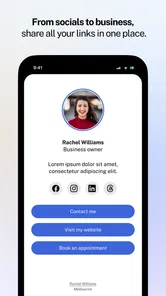
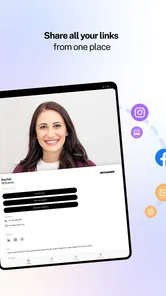
Propps: Digital Business Card lets you create and share a professional digital profile instead of relying only on printed business cards. You can add contact information, social links, business details, photos, and other relevant information, then share your profile through a link or compatible sharing method. It is designed to make networking faster, easier to update, and more environmentally friendly.
Can I customize my Propps digital business card?
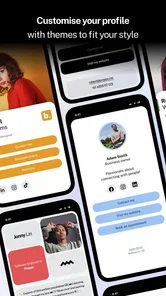
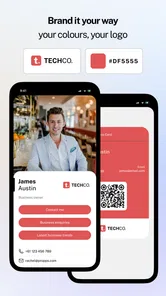
Yes, Propps is built around personalizing your digital business card so it reflects your professional identity. Depending on the available plan and app version, you may be able to edit your name, job title, company information, profile image, contact details, social media links, colors, and other profile elements. It is worth reviewing the available customization options before publishing your card.
How do I share a Propps digital business card with someone else?
A Propps card can generally be shared digitally through a profile link or other supported sharing options, making it convenient during meetings, events, and casual introductions. The recipient may be able to open the card in a web browser without installing the application. You should still check that your profile is complete and that the shared information is correct before distributing it.
Pros
- Creates a professional digital card without printing or carrying paper.
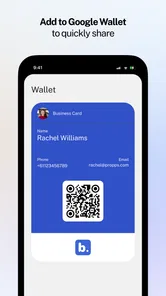
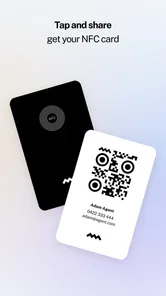
- Lets you share contact details instantly through a link or QR code.
- Easy to update information without reprinting your business cards.
- Supports a modern
- eco-friendly alternative to traditional cards.
- Useful for networking
- freelancers
- teams
- and small businesses.
Cons
- Some advanced branding options may require a paid plan.
- Recipients may need internet access to view the shared card.
- Not everyone is familiar with digital business cards yet.
- A weak profile design can make your card look less professional.
- Privacy may be a concern when sharing contact details online.











