

PRO Landscape Contractor
- 25.00
- 1.8
- Installs
- 10.00K
- Price
- Free

Screenshots
Analysis by Reviewed
I approached PRO Landscape Contractor as a working tool rather than a casual design app. Its purpose is clear: help landscape professionals turn a property idea into a visual proposal and use that proposal while bidding for work. That makes it interesting for contractors who need to explain an outdoor project quickly, but it also raises a practical question: can a visual presentation tool earn enough trust to become part of a real sales workflow?
My answer is cautious. The app has a focused business use, and the ability to show a customer a possible result can be more persuasive than a verbal description. At the same time, its low average rating of 1.8 from 58 ratings deserves attention before anyone builds an important process around it. I would test it with a small project first, especially because a contractor needs dependable tools when a client is waiting for a quote or design revision.
How the app fits a contractor’s working day
The app comes from Drafix Software, Inc. and is listed as a free business app for Everyone. It has passed the early novelty stage, having been released on March 5, 2015, and its current version is 3.0. That history gives it a more established feel than a brand-new experiment, but it also means I would not assume that its workflow matches modern design software without testing it on the exact phone or tablet used in the field.
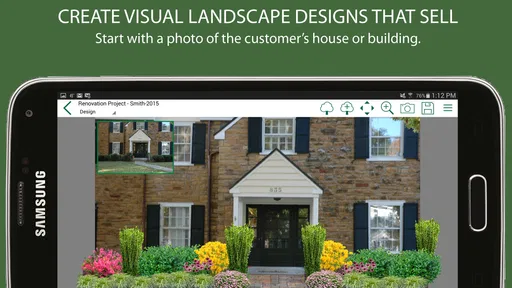
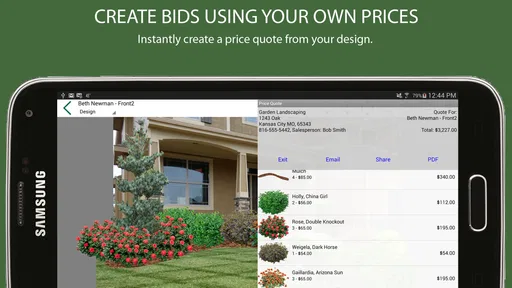
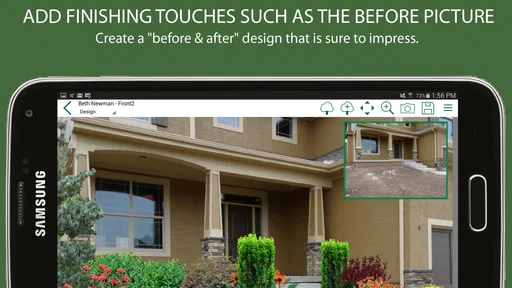
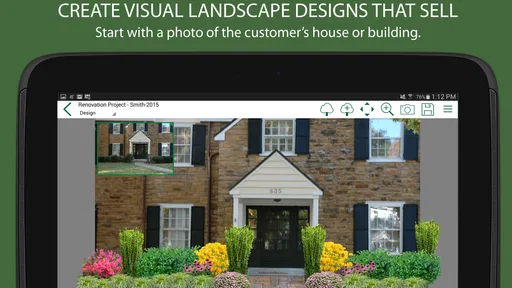
The central idea is easy to understand. A contractor can use a property image or a visual plan to help a homeowner imagine changes such as planting, hardscape, lawn areas, or other landscape elements. The value is not simply making a picture look attractive. The useful part is connecting that picture to a proposal conversation: what the customer wants, what the contractor can build, and what the likely scope of work might include.
In a normal sales visit, this can change the conversation. Instead of saying that a planting bed will soften a driveway, I can point to a visual arrangement and ask whether the balance feels right. Instead of discussing a patio only by size and material, I can use the image to talk about placement, access, and how the space relates to the rest of the yard. That kind of shared reference can reduce misunderstandings before a formal estimate is accepted.
A realistic use case for a small landscaping business
Imagine a contractor visiting a homeowner who wants to replace a tired front lawn. The customer likes the idea of low-maintenance planting but cannot picture how much of the grass should disappear. I would use the app to prepare a few visual directions: a restrained border, a larger planting area, and a version that gives more space to a walkway. The important step is not producing three decorative images. It is using the alternatives to discover which priorities matter most to the customer.
That workflow can also make the follow-up call more useful. Rather than asking, “Have you decided?”, I can discuss a specific choice: whether the client prefers the wider path or the larger planting bed. A visual decision point is easier to answer than a broad request for feedback. For a contractor, that may help move a vague inquiry toward a defined scope.
More From Our News Desk

 Gmail
GmailGmail in a Busy Inbox: Who Benefits Most?
From first account to crowded workday, Gmail earns its place through dependable search and flexible sorting—but its best fit depends on how much inbox maintenance you can tolerate.

 Prime Video
Switching to Prime Video: What Changes in Your Viewing Routine
Prime Video can make a compelling second home for streaming, but switching means learning a different catalog, rental layer, and route from browsing to playback.

 Universal TV Remote Control
Universal TV Remote Control Works Best as a Reliable Backup
A phone remote earns its place through quick setup and reliable habits. Here is how to get more from Universal TV Remote Control—and where its limits show.

 Weather - By Xiaomi
Weather by Xiaomi Review: Clear at a Glance, Less Clear Up Close
Xiaomi’s weather app makes everyday forecasts quick to scan, but its calm surface can leave useful details and recovery paths harder to find than they should be.

 X
XX Under Pressure: Can It Recover When Posting Goes Wrong?
A resilience-focused review of X, examining setup, mistaken posts, interruptions, weak connections, and the gaps that matter when recovery needs to be dependable.

 Clash of Clans
Clash of Clans Is Won Between the Battles
Its raids are quick; its community is a long-term project of coordination, teaching, rivalry, and shared responsibility—with all the friction that entails.
Latest News



I would still keep the image clearly separate from the final construction promise. A visual concept can communicate intent, but it should not replace measurements, drainage checks, plant suitability, grading decisions, or a written estimate. The strongest use of the app is as a sales and communication layer, not as proof that every detail has already been engineered.
What makes it different from ordinary alternatives
The usual alternative is a printed portfolio, a gallery on a phone, or a general-purpose presentation tool. Those options are often faster when I only need to show completed work. They are less helpful when the customer wants to see a change to their own property. A portfolio answers, “What have you built before?” A visual design workflow can help answer, “What might this particular yard become?”
A second alternative is a general drawing or photo-editing app. That may provide more freedom for someone who already knows how to create a convincing composite, but it can also put too much of the process on the user. A contractor who needs a repeatable sales aid may prefer a focused landscape application, provided its available tools fit the type of work being sold.
There is also a professional design platform on the other end of the spectrum. A more advanced desktop system may be better for detailed plans, technical documentation, larger teams, and consistent production standards. I would choose that route when the output must support construction coordination or a complex design package. I see this app as more suitable for the early and middle stages of a sales conversation, where speed and visual clarity matter more than a full technical drawing set.
Trust starts with what the user can actually verify
Because this is a business app, I would judge it by more than its visual promise. A contractor may use it around customer photos, property details, design preferences, and pricing discussions. Those moments make trust important. I looked for clear, visible choices in the way I would evaluate any field tool: what the app asks me to do, what information I choose to enter, whether I can control the material I use, and whether the workflow makes it obvious when something is being shared or saved.
I would not treat the app’s category, age rating, or free download status as proof of a particular privacy standard. Those labels describe the product at a broad level, not the full handling of project information. The sensible habit is to use only the information needed for the immediate design task and to avoid placing sensitive customer details into notes or file names unless the workflow clearly requires them.
The app has over 10K installs, which suggests that it has reached a real group of users, but that number alone does not tell me whether it is dependable for every contractor or device. The rating is a stronger warning sign than the install count is a recommendation. I would read recent user feedback before committing a team to it, then run a complete test from importing an image through presenting a concept and preserving the final work.
One practical trust check is to create a sample project using a non-sensitive property image. I would see whether the app makes it easy to start over, remove the image, and distinguish a draft from a finished proposal. I would also check how comfortable the workflow feels when switching between customer meetings. If project separation is awkward, the risk is not necessarily a hidden security problem; it is the very ordinary possibility of showing the wrong draft to the wrong person.
Controls and choices I would verify before regular use
The app is free to download, but in-app purchases range from $0.99 to $39.99 per item. That makes the purchase path worth checking before handing the device to an employee or using it during a customer meeting. I would identify which actions are available without payment, which tools require a purchase, and whether the app presents an upgrade prompt at a moment when speed matters.
This is also why I would not judge the product only from the first few minutes. A free starting point can be useful for testing, but a contractor needs to know the cost of the complete workflow. I would build one representative project, attempt a revision, prepare the kind of presentation I would actually show a client, and then note which step triggers a purchase. That gives a more honest picture than simply installing the app and deciding that “free” means no budget is needed.
Account handling is another area I would inspect directly. Before using customer material, I would look for whether the app asks me to create an account, whether sign-in can be avoided, and what control I have over saved projects. I would not assume that a business app automatically provides team accounts, role-based access, or an easy handoff between devices. If several people need to work on the same proposals, I would test that collaboration scenario rather than relying on the app’s professional label.
The same caution applies to sharing. A contractor may want to show a design on the device, send it to a customer, or include it in a proposal. I would verify the exact export and sharing steps in practice, including whether the result remains clearly labeled as a concept. If a customer can mistake a visualization for a final specification, I would add my own note to the proposal and keep the contractual scope in a separate document.
Data-sensitive moments in a visual design workflow
Property photographs can contain more than landscaping. They may show house numbers, vehicles, neighboring homes, children’s belongings, or other details that a customer did not intend to circulate. Before importing an image, I would crop it to the area needed for the design. This is a simple but valuable habit: the less irrelevant material inside a project, the less there is to manage later.
I would also avoid using customer names as the only project identifier. A neutral job code or internal reference can make it easier to separate drafts while reducing unnecessary exposure if the device is viewed by someone else. That is not a claim about how the app stores information; it is a user-side control that keeps the working material more organized and less revealing.
Another sensitive moment arrives when a design is revised after a customer meeting. I would keep the original image and the edited concept distinguishable, then record which version was discussed. This matters for trust as much as privacy. If a client later remembers a different planting layout, a clear version trail can prevent a disagreement about what was shown.
For teams, device sharing deserves a deliberate routine. I would sign out of any account the app requires, close the active project, and confirm that the next user cannot immediately open the previous customer’s work. These are ordinary controls, but they are especially important for a field tablet that moves between estimates, installations, and office staff.
Where the app can save time, and where it cannot
The strongest time-saving opportunity is early clarification. A customer may describe a broad wish such as “make the entrance look more finished.” A visual proposal lets me turn that phrase into choices about shape, planting density, circulation, and emphasis. That can reduce repeated explanations and help the contractor decide whether the request is within the company’s normal scope.
A less obvious benefit is using the design as a question framework. I would not show one image and ask for approval immediately. I would use the visual to ask targeted questions: Is the path wide enough? Should the planting frame the door or the driveway? Does the client want a formal or relaxed feeling? This makes the app useful even when the first concept is not close to the final answer.
It can also help qualify leads. If a potential customer cannot agree on the basic direction after seeing a few clear options, the contractor may learn that the project is not ready for a firm bid. That is useful information before spending hours on a detailed estimate. The app therefore has value not only in winning work but also in deciding where to invest design time.
Its limits are just as important. I would not use a visual result to calculate quantities, confirm local plant performance, prove drainage capacity, or replace a site survey. I would also be careful with color and scale. A customer may read a bright, polished image as a promise about mature plants or exact material appearance. The contractor has to explain what is illustrative and what is committed.
Device fit, learning curve, and purchase discipline
The minimum operating system is Android 6.0 or later. That makes the compatibility requirement relatively broad, but compatibility is not the same as a good field experience. I would test the app on the actual device used outdoors, paying attention to screen size, image handling, responsiveness, and how easily I can show a design while standing beside a client.
A phone may be convenient for taking a quick reference image, but a larger screen is usually more comfortable when comparing layout options with another person. If the app’s controls feel crowded on a phone, I would use the phone for documentation and a tablet for presentation. That two-device workflow can be sensible, but only if moving or presenting the project is straightforward.
I would train staff around a small repeatable process rather than asking them to explore during a customer appointment. Start with a prepared sample image, create one simple concept, make a revision, save it under a neutral project label, and present it without exposing unrelated work. This test reveals more than a feature tour because it reflects the pressure of an actual sales visit.
The purchase range also argues for a written internal rule. If the app offers optional items, decide in advance who can approve them and whether the expense belongs to a single project or the business generally. That avoids an awkward moment where a contractor discovers a needed tool in front of a client and has to make a rushed payment decision.
Who I would recommend it to
I would recommend testing it to an independent landscape contractor, a small design-build company, or a salesperson who often needs to make outdoor ideas understandable on site. It is especially promising for projects where the customer struggles to imagine change from words alone and where a quick concept can determine whether the conversation moves forward.
I would also consider it for a contractor who already has strong technical knowledge but lacks a convenient presentation method. The app does not need to replace that expertise. Used properly, it can give the expertise a visual form that a homeowner can react to.
I would skip it, or at least postpone adoption, if the business needs detailed construction documents, dependable multi-user project management, advanced estimating, or a formal record of revisions. In those situations, a dedicated professional design or estimating system is likely a better foundation. I would also avoid making it the only sales tool when the low rating raises concerns about reliability until the app has been tested on real devices and representative jobs.
My cautious verdict after weighing the workflow
My impression is that this is a specialized visual aid with a sensible place in landscape sales, not an all-purpose business platform. It can help a contractor ask better questions, show a homeowner what a change might feel like, and turn an uncertain discussion into a more concrete design direction. Those are meaningful benefits when used early in the project.
Trust, however, has to come from the user’s own checks. I would keep customer images tightly cropped, use neutral project labels, test account and sharing behavior, separate drafts from commitments, and confirm the cost of any in-app tools before regular use. I would also treat the rating of 1.8 as a reason for a controlled trial rather than an automatic rejection.
The app is free to start and carries an Everyone age rating, but business suitability depends on more than those labels. My recommendation is to install it on the device you actually use for estimates, run one complete sample project, and compare the result with your current portfolio or presentation method. If it makes client conversations clearer without creating friction around purchases, file handling, or revisions, it may earn a place in the sales kit. If it feels unstable or too limited for your documentation needs, keep it as an experiment and choose a more comprehensive professional tool instead.
In short, PRO Landscape Contractor is worth a careful trial for visual selling, but I would not make it the backbone of a contractor’s business until its controls, workflow, and reliability have been proven in the field. My strongest advice is simple: use it to support a clear conversation, never to replace measurements, written scope, or careful handling of customer information.
PRO Landscape Contractor Frequently Asked Questions
Who develops PRO Landscape Contractor, and what kind of app is it?
PRO Landscape Contractor is a business app developed by Drafix Software, Inc. It is intended for professionals who want to present landscape ideas and support the selling and bidding process for landscaping jobs. Its focus is on visual design and contractor work, so it is more relevant to landscape businesses than to people looking for a general-purpose gardening guide.
What devices and operating systems can run PRO Landscape Contractor?
The app is available for Android, and its stated minimum Android requirement is version 6.0. Check your device’s operating system before downloading to make sure it meets that requirement. Compatibility can also depend on the device itself, so it is sensible to review the app’s store page on the phone or tablet you plan to use.
What is PRO Landscape Contractor used for?
PRO Landscape Contractor is designed to help landscaping professionals manage projects, create and present landscape designs, and communicate more clearly with customers. It can be useful for preparing proposals, organizing client information, showing visual concepts, and supporting sales conversations. Before downloading, users should understand that it is primarily a professional business tool rather than a general gardening app for casual homeowners.
Is PRO Landscape Contractor suitable for beginners or only professional landscapers?
The app is mainly aimed at landscape contractors, designers, and other outdoor-service professionals, so some features may feel more advanced than those found in basic garden-planning applications. New users can generally learn the workflow with practice, but getting the most from the software may require familiarity with landscape design, measurements, proposals, and customer management. It is best suited to users who need a structured professional solution.
Can I create realistic landscape designs and show them to clients?
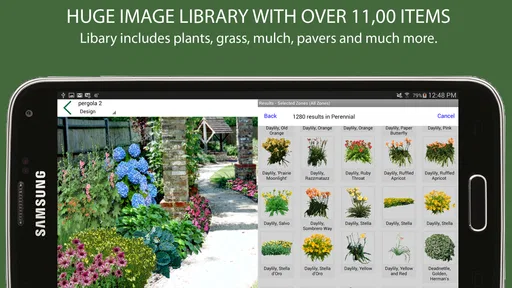
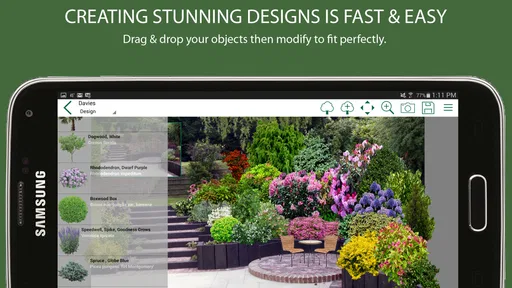
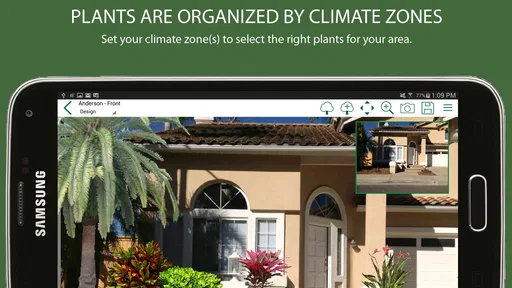
One of the main reasons to use PRO Landscape Contractor is to help present landscape ideas in a more visual and convincing way. Depending on the available tools and your device, you may be able to work with photos, design elements, and project presentations to illustrate possible improvements. The final quality depends on the source images, your design skills, and the accuracy of the information entered.
Pros
- Detailed landscape design tools help visualize projects before work begins.
- Supports professional estimates
- proposals
- and client presentations.
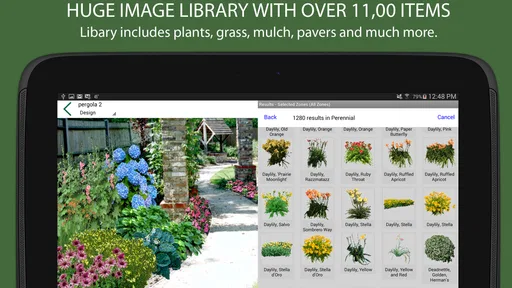
- Useful plant and material libraries speed up project planning.
- Project information can be organized for easier team collaboration.
- Helps contractors maintain a more consistent and professional workflow.
Cons
- The feature set may feel excessive for occasional or residential users.
- Learning the interface can take time without prior design software experience.
- Advanced tools may require a paid subscription or additional purchases.
- Large projects can demand considerable device storage and processing power.
- Some workflows may be less convenient on smaller phone screens.











