

Prisma Health GO
- 54.00
- 4.3
- Installs
- 100.00K
- Price
- Free

Screenshots
Analysis by Reviewed
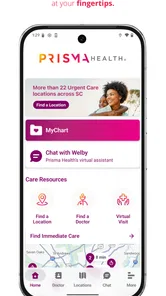
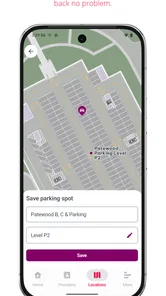
Finding your way around a hospital is stressful even when you arrive early and know the building. Prisma Health GO is designed for that specific problem: it is a medical navigation app from Prisma Health that helps visitors follow step-by-step directions inside participating hospital locations. I see its main value in reducing the mental load of a visit, especially when you are already thinking about an appointment, a family member, parking, or a department you have never visited before.
What makes this app worth considering is its narrow focus. It is not trying to replace a general maps app, a patient portal, or a medical reference tool. Instead, it concentrates on the confusing part that ordinary map apps handle poorly: moving through a large healthcare building once you are inside. That focus makes it potentially useful, but it also means the experience depends heavily on whether your destination is covered and whether you are using a compatible device.
How Prisma Health GO feels when you need directions quickly
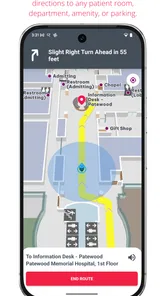
In a hospital, speed is less about racing through screens and more about reaching useful instructions without hesitation. The app’s purpose is straightforward: select or identify a hospital destination and follow directions one step at a time. That is a better mental model for a medical visit than trying to interpret a broad map full of roads, entrances, and unrelated landmarks.
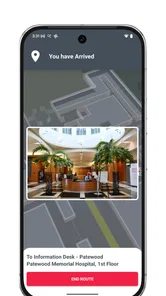
I particularly like the idea of receiving directions in stages. A visitor may need to find the correct entrance first, then understand where to go after passing reception, and finally locate a department or room area. Breaking the route into manageable steps can be easier than staring at a complex floor plan while carrying a bag, pushing a wheelchair, or accompanying someone who is unwell.
The app is free, which removes the most obvious barrier to trying it before an appointment. It is also listed for Everyone, so its intended audience is broad: patients, relatives, caregivers, and visitors rather than a specialist medical audience. Prisma Health is the developer, and that connection matters because a hospital-specific navigation tool needs to reflect the organization’s own locations rather than rely only on generic public mapping information.
Still, I would not treat it as something to open for the first time while already late. A better routine is to install it before leaving home, look for the relevant facility, and become familiar with the basic flow. That small preparation can make the difference between using the app calmly and fumbling with it in a crowded lobby.
The practical advantage over ordinary map apps
Google Maps and Apple Maps are excellent for getting to a hospital campus, but they are not always the best tools for navigating the interior. They can usually help with roads, entrances, parking areas, and nearby businesses. They are much less useful when the real challenge is finding imaging, registration, a clinic wing, or a particular floor after you have entered the building.
More From Our News Desk

 Instagram
Instagram’s Power Comes From Its Place in Your Phone
A close look at how Instagram turns Meta’s reach, recommendation systems and everyday camera habits into durable platform power—and what that costs users.

 Gmail
GmailGmail in a Busy Inbox: Who Benefits Most?
From first account to crowded workday, Gmail earns its place through dependable search and flexible sorting—but its best fit depends on how much inbox maintenance you can tolerate.

 Prime Video
Switching to Prime Video: What Changes in Your Viewing Routine
Prime Video can make a compelling second home for streaming, but switching means learning a different catalog, rental layer, and route from browsing to playback.

 Universal TV Remote Control
Universal TV Remote Control Works Best as a Reliable Backup
A phone remote earns its place through quick setup and reliable habits. Here is how to get more from Universal TV Remote Control—and where its limits show.

 Weather - By Xiaomi
Weather by Xiaomi Review: Clear at a Glance, Less Clear Up Close
Xiaomi’s weather app makes everyday forecasts quick to scan, but its calm surface can leave useful details and recovery paths harder to find than they should be.

 X
XX Under Pressure: Can It Recover When Posting Goes Wrong?
A resilience-focused review of X, examining setup, mistaken posts, interruptions, weak connections, and the gaps that matter when recovery needs to be dependable.
Latest News



Prisma Health GO is more specialized. Its value is not that it replaces turn-by-turn driving directions; its value is that it addresses the final, often overlooked part of the journey. I would use a regular map app for the trip to the facility, then use this app for the indoor portion if the location is supported.
That division of labor is important. Someone expecting one application to handle every part of a journey may find the experience incomplete. Someone who understands that hospital navigation is a separate task will probably appreciate the more focused approach.
What happens during a busy hospital visit
The most realistic use case is a first-time outpatient appointment. Imagine arriving with only a few minutes to spare, entering through a busy lobby, and needing to reach a department on another level. In that situation, a written appointment message may tell you where to go, but it may not explain the route clearly enough. A dedicated navigation tool can turn the destination into a sequence of decisions instead of leaving you to ask several people for help.
A second useful scenario involves a caregiver. If I were accompanying an older relative, I would want to spend less time walking in circles and more time helping with check-in, mobility, or paperwork. The app could be useful before entering the building, allowing me to understand the route and plan where to pause. That is a subtle benefit: navigation is not only about distance, but also about reducing unnecessary movement for someone who may be tired or uncomfortable.
There is also value after an appointment. Hospitals can feel familiar on the way out but confusing when returning for a different service. Saving the general route in my memory is not always enough because the next visit may use another entrance or department. A hospital-focused app gives me a reason to verify the destination again rather than relying on assumptions from a previous visit.
Speed during heavy-use moments
Performance matters most when the lobby is crowded, the appointment time is close, or several family members are asking questions at once. In those moments, I would judge Prisma Health GO by how quickly it gets me from opening the app to a usable route, not by how many extra options it offers. A clean, purpose-built flow is more valuable here than a feature-packed interface.
There is a trade-off, though. Indoor navigation can involve more context than a normal street route. The app may need to identify a facility, interpret a destination, and present directions that make sense inside a particular building. If the starting point is unclear, I would expect to spend a little time confirming where I am before following the route. That is not necessarily a flaw, but it is why opening the app before walking into a crowded corridor is sensible.
For heavy use, I would also keep a backup plan. Note the department name, appointment location, and likely entrance in advance. If the app takes longer than expected to load or the route is not immediately clear, those details give you something useful to show a staff member. A navigation app should reduce uncertainty, but it should not be the only information you carry into an important medical visit.
Reliability, recovery, and the limits of indoor directions
When I rely on indoor directions, I treat the route as a helpful plan rather than a promise that every corridor will match the screen. I’d check nearby signs as I go and pause if my starting point or surroundings don’t make sense. That approach matters most when a hospital visit is already stressful, and it leads to a broader question: what can I do if the route stops helping?
Where reliability matters most
A hospital navigation app earns trust by being dependable at the exact moment a visitor needs reassurance. The important question is not simply whether it opens, but whether it helps a person recover after a wrong turn. In a large building, people may miss a hallway, take an elevator to the wrong level, or enter through a different doorway than expected. A useful navigation experience should make it possible to regain the route without starting the entire process from scratch.
That is one reason I prefer step-by-step guidance to a static image. A static map can be informative, but it requires the user to interpret the whole building at once. Sequential instructions are easier to revisit after a distraction. If I stopped to answer a phone call or help a family member, I would want to return to the current direction rather than reconstruct the route mentally.
At the same time, no digital route should override signs or staff instructions inside a medical facility. Hospitals change, departments move, corridors close, and temporary arrangements can affect how people walk through a building. If a nurse, receptionist, or security worker directs me another way, I would follow that advice and use the app as a reference rather than an authority.
Recovery after a wrong turn
My practical tip is to pause instead of continuing to walk while uncertain. Check the current instruction, look for recognizable landmarks, and compare the direction with the signs around you. This is especially useful in hospitals because continuing in the wrong direction can create a much longer return trip than stopping for a few seconds.
I would also avoid assuming that the shortest-looking corridor is the correct one. A route can be designed around a particular entrance, elevator, or access point, while a visitor may begin somewhere else. If the first instruction seems strange, restarting from the actual entrance may be more effective than forcing the route to fit your position.
These details reveal the app’s main strength and its main limitation. It can organize a hospital journey, but it cannot remove the physical complexity of a hospital. Users still need to pay attention to signs, accessibility needs, temporary barriers, and staff directions. The app is best seen as a guide that lowers confusion, not as a guarantee that every visit will feel effortless.
Device and operating-system considerations
The current version is 3.9.0, and the app requires at least operating system version 10. That requirement is reasonable for many modern phones, but it matters if you are using an older device or one that has not been updated in a long time. I would check compatibility before the appointment rather than discovering the limitation at the hospital entrance.
Device constraints are not only about age. A phone with a nearly empty battery, a damaged screen, or limited free space can make any navigation task more frustrating. For a medical visit, I would charge the phone beforehand and keep the display readable. If another person is attending with me, I might also make sure they know the destination in case my device becomes unavailable.
Because this is an indoor navigation tool, I would not assume that it should be treated exactly like a driving app. The phone may need to determine where I am within a building or present location-specific directions, and the experience may be less useful if I begin far from the supported facility. The safest workflow is to open it near the relevant hospital, confirm the correct location, and then follow the instructions carefully.
Resource demands are best judged by the task rather than by expecting the app to behave like a full mapping platform. It has a focused job, so I would not install it expecting a broad travel planner or a general-purpose map replacement. Its appeal is that it can devote its interface to hospital movement. The trade-off is that its usefulness is tied to that narrow setting.
Who should use it and who may prefer something else
I would recommend Prisma Health GO to patients visiting a Prisma Health facility for the first time, relatives accompanying someone else, and anyone who finds large medical campuses difficult to navigate. It is also a sensible option for people who prefer visual or sequential guidance over asking for directions at every junction.
I would be more cautious about recommending it to someone who only needs driving directions, has a very old phone below the required operating-system level, or is visiting a location that is not represented in the app’s navigation experience. In those cases, a regular maps application, a hospital website, printed appointment instructions, or direct help from reception may be more practical.
It is also not a medical-management app in the usual sense. If your priority is viewing test results, managing prescriptions, messaging a care team, or organizing appointments, you should look for the appropriate patient-service tool instead. This app’s job is physical wayfinding, and judging it by another category would lead to the wrong expectations.
How the app fits into a complete visit plan
I would use it as one part of a simple preparation checklist. First, confirm the hospital and department from the appointment information. Next, plan the trip to the campus with a conventional map or the instructions provided by the healthcare organization. Then open Prisma Health GO before entering, identify the destination, and keep the appointment details available separately.
That workflow addresses a common hidden problem: people often confuse reaching the hospital with reaching the appointment. A road map can get you to the right campus while leaving you with the hardest few minutes still ahead. This app is most valuable when used specifically for that final indoor segment.
If I were helping a family member, I would take a screenshot or write down the department name as a backup, without relying on that alone for the route. I would also agree on a meeting point in case we become separated. Those habits do not diminish the app; they make its use more resilient in a busy, unfamiliar environment.
My performance verdict after looking at the whole experience
Prisma Health GO has a clear purpose and a useful place alongside ordinary map apps. Its strongest quality is specialization: it focuses on the confusing indoor part of a hospital visit instead of trying to become another general navigation service. The free price makes it easy to try, and its Everyone age classification reflects the fact that it is meant for everyday visitors rather than a narrow professional audience.
The app’s perceived speed should be good enough when the route is prepared in advance and the correct facility is selected, but I would not depend on any navigation tool as an emergency solution when I am already late. The best results come from opening it before the visit, checking the destination calmly, and keeping essential appointment information available outside the app.
Its stability is most meaningful when it helps users recover from confusion. Step-by-step directions can be easier to resume than a complicated map, but hospital signs and staff guidance remain important because physical buildings can change. The app reduces cognitive effort; it does not eliminate the need to observe the environment.
The operating-system requirement also gives older-device users a clear reason to check compatibility early. For supported phones, the focused design should be less demanding mentally than switching between a general map, a hospital directory, and handwritten notes. For unsupported or unsuitable devices, a conventional map plus reception assistance may be the better combination.
Prisma Health GO has an average rating of 4.3 from around 182 ratings, with over 100 thousand installs, which suggests that many people have found the concept useful enough to try. I would interpret those figures as encouraging rather than conclusive: indoor navigation is highly dependent on the hospital, the destination, the user’s starting point, and the urgency of the visit.
Overall, I would recommend it when the problem is “How do I get from this hospital entrance to the right department?” I would skip it when the problem is only driving to the campus or managing a care account. Its real strength is turning an intimidating hospital interior into a sequence of smaller decisions. Used with a little preparation and common sense, that is a practical improvement for patients and caregivers who would rather spend their attention on the visit itself.
For a free medical navigation app released on Apr 12, 2019, the continuing usefulness of the idea is easy to understand. The current version keeps the product relevant for people who need location guidance rather than another layer of healthcare administration. I would install Prisma Health GO before a first visit to a Prisma Health hospital, test the route while I still have time, and keep a human backup in mind. That combination offers the most reliable and least stressful way to use it.
Prisma Health GO Frequently Asked Questions
Does Prisma Health GO provide directions inside Prisma Health hospitals?
Prisma Health GO is a medical app with the stated purpose of helping users navigate hospitals step by step. It may be useful when you need help finding your way around a Prisma Health facility. Before relying on it for a visit, check that you can access the app and its navigation features, and follow any directions or assistance provided by hospital staff.
What devices and operating systems can run Prisma Health GO?
Prisma Health GO is available for mobile devices, and the minimum operating-system requirement is version 10. Check your device’s operating-system version before downloading, and install any available system updates if needed. Keeping both your device software and the app up to date can help avoid compatibility problems and make it easier to use the app when navigating a hospital.
What is Prisma Health GO used for?
Prisma Health GO is designed to help eligible Prisma Health employees and affiliated users access work-related information and services from a mobile device. Depending on your account and organization, it may provide access to internal resources, employee tools, communications, schedules, benefits information, or other workplace features. The exact options available can vary according to your role and Prisma Health access permissions.
Who can use Prisma Health GO, and do I need an account?
The app is primarily intended for authorized Prisma Health employees, team members, and other approved users rather than the general public. You will generally need valid Prisma Health login credentials, and some features may require additional verification or enrollment. If you are a patient looking for appointments, test results, or medical records, a separate patient-focused Prisma Health service may be more appropriate.
Is Prisma Health GO free to download?
Prisma Health GO is free to download, although access to its features depends on your relationship with Prisma Health and your account permissions. The app itself should not normally require a subscription, but mobile data charges may apply when using it over cellular networks. It is rated for Everyone and has had over 100,000 installs, making it a broadly available option for people who need its navigation or workplace features.
Pros
- Easy access to Prisma Health services from one mobile app.
- Appointment scheduling and management are convenient for existing patients.
- Secure messaging helps users communicate with their care team.
- Digital access to health records reduces paperwork and phone calls.
- Useful tools for checking locations
- providers
- and available services.
Cons
- Many features require an existing Prisma Health patient account.
- Some functions may vary depending on the user’s insurance or care team.
- The app is most useful to patients within the Prisma Health network.
- Notifications and messages may not always appear immediately.
- Certain appointments or services may still require a phone call.











