

Pregnancy Tracker, Maternity
- 92.00
- 4.6
- Installs
- 5.00M
- Price
- Free

Screenshots




Analysis by Reviewed
I tend to judge a pregnancy app by what happens on an ordinary, slightly distracted day: can I quickly find the information or tool I came for, and can I use it without treating it as a substitute for medical advice? Pregnancy Tracker, Maternity is a free parenting app from duff hl studio that brings pregnancy tracking together with tools such as a kick counter and contraction timer. It is rated for Everyone and has attracted over five million installs, so it is clearly an option many families have tried. My impression is that it is most useful as a personal companion for keeping track of the pregnancy, rather than as a medical record or a source of urgent guidance.
Choosing what you want from a tracker
Before installing any pregnancy app, I’d ask what job I actually want it to do. If I want a convenient place to follow the pregnancy and use a counter or timer when appropriate, this app is aimed at that sort of everyday support. If I need appointment management, a complete clinical record, or a direct way to consult a care professional, I’d choose those tools or services separately rather than expect a general tracker to cover them.
That distinction also helps set expectations around the heart-rate tools named in the app’s description. I would treat them as features to approach cautiously, not as a way to check whether a pregnancy is healthy. A phone-based tool cannot replace a clinician’s assessment, and any worrying symptom deserves attention from your care team rather than repeated app checks. For me, the most useful parts of a pregnancy tracker are the ones that help me organize information without claiming to interpret it.
Getting started and finding your way around
I find it helpful to start by deciding what I want this tracker to do for me: keep pregnancy information close at hand, or help organize a specific observation with a counter or timer. I’d check the timeline setup first, then take a quick look around so I know where to return when I’m in a hurry. That small orientation step makes the rest of the experience feel less like searching and more like using a focused pregnancy companion.
Where people can get stuck
A tracker is only helpful when its timing and information make sense for your own pregnancy. Before relying on week-by-week material, check that the app’s pregnancy timeline is set correctly and that the date you entered matches the estimate you use with your care team. If a week or stage looks unexpected, I would check the setup first rather than assume the app is showing a medical change. Small date-entry differences can make a general timeline feel out of sync.
The app’s current version is 1.26.0 and it requires Android 6.0 or later. It has a 4.6 average from around 17,000 ratings, and in-app purchases range from $4.99 to $29.99 per item. The basic app is free, but I’d look at any purchase details before paying so you know what is included and whether it adds something you personally need. That matters if you only want a simple counter rather than a wider set of pregnancy tools.
Setup checks that save frustration
When I set up a tracker, I take a moment to confirm the date information, then look around the main screens before entering anything I expect to revisit. That makes it easier to tell the difference between a setup issue and a feature I simply have not found yet. If a screen does not load or an entry does not appear as expected, I would first close and reopen the app, check that the phone has a working connection if the screen needs one, and make sure the installed version is current. These are sensible first checks, not a guarantee that every issue is caused by the phone.
More From Our News Desk

 Weather - By Xiaomi
Weather by Xiaomi Review: Clear at a Glance, Less Clear Up Close
Xiaomi’s weather app makes everyday forecasts quick to scan, but its calm surface can leave useful details and recovery paths harder to find than they should be.

 X
XX Under Pressure: Can It Recover When Posting Goes Wrong?
A resilience-focused review of X, examining setup, mistaken posts, interruptions, weak connections, and the gaps that matter when recovery needs to be dependable.

 Clash of Clans
Clash of Clans Is Won Between the Battles
Its raids are quick; its community is a long-term project of coordination, teaching, rivalry, and shared responsibility—with all the friction that entails.

 Android Auto
Android Auto Makes the Case for Quieter Car Software
The car interface is no longer judged by how much it can do, but by how quietly it helps. Android Auto shows what drivers now expect—and what still gets in the way.

 MobiOffice: Word, Sheets, PDF
MobiOffice: Transforming Mobile Productivity with Seamless Integration
MobiOffice: Word, Sheets, PDF is redefining mobile productivity with a surprising blend of functionality and innovation.

 EA SPORTS FC Soccer Mobile 26
EA SPORTS FC™ Mobile Soccer: Redefining Mobile Sports Gaming
Dive into EA SPORTS FC™ Mobile Soccer, where immersive gameplay and strategic depth transform mobile sports gaming.
Latest News



For a more useful routine, I would keep the app’s role narrow: use it to note kicks or time contractions when appropriate, and keep clinical questions for a midwife or doctor. A counter can help you organize what you are noticing, but it cannot assess your baby’s wellbeing. If you are worried about movement, contractions, or another symptom, follow the advice of your care team rather than waiting for an app entry to resolve the concern.
Recovering a routine when something goes wrong
It is easy to forget to log something, especially during a busy week. I would not try to reconstruct a detailed record from memory just to make the timeline look complete. Instead, resume from the next observation and, if it matters, tell your clinician that there is a gap. If you change phones or reinstall an app, check what information remains available before deleting the old installation; I would avoid assuming that every note or setting automatically transfers.
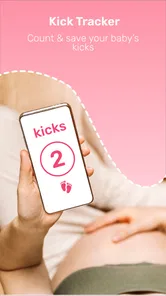
A practical example: you are at home in the evening, notice a pattern of movement, and want to keep a record to discuss later. The kick counter can make that task more orderly than trying to remember the details the next morning. But if the pattern concerns you, the useful next step is contacting your care team, not repeatedly checking the counter. The app works best when it supports your attention without becoming the decision-maker.
When the app may not be the cause
If information seems out of date or a feature behaves oddly, the cause may be a mistaken date, a temporary connection issue, or a phone problem rather than the pregnancy content itself. Rechecking the entered timeline and restarting the app are reasonable first moves. For anything health-related, though, troubleshooting should never delay professional advice. I also would not treat a baby or parent heart-rate tool as a diagnostic instrument; readings from a phone-based feature should not overrule a clinician’s assessment.
Who will get the most from it
This kind of tracker suits someone who likes having pregnancy milestones and practical tools gathered in one place, especially a first-time parent who wants a simple daily touchpoint. It may be less appealing if you already use a detailed pregnancy journal, prefer an app centered on appointments and medical records, or do not want to enter personal notes on a phone. Compared with a paper diary, it is quicker for timed observations; compared with a clinician’s records, it is not authoritative. That distinction is important: convenience is the benefit, not clinical completeness.
It can also be handy for a partner or another trusted person who wants to understand the stage of pregnancy and be more involved in a practical way. I would use it as a prompt for conversation—what the pregnant person wants help remembering, or which questions they want to bring to an appointment—not as a way for someone else to monitor them. The person who is pregnant should stay in control of what gets recorded and shared.
Using the tools without adding pressure
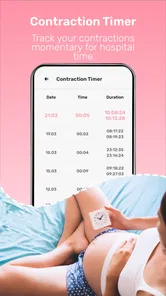
One non-obvious advantage of a kick counter is that it can shift the task from “I should remember this later” to a focused moment of observation. I would use it only when tracking is appropriate for my situation and according to guidance from my care team, not as a daily scorecard. Likewise, a contraction timer is most helpful as a way to organize timing when you have been advised to monitor contractions; it is not a labor diagnosis. Keeping those tools purposeful avoids turning ordinary variation into a reason for needless worry.
A small workflow choice can make the notes more useful later: decide what you want to remember before starting a timed session, and keep the observation focused rather than trying to log every sensation throughout the day. If you plan to raise something at an appointment, a short, factual note is easier to explain than a long stream of entries. I would also avoid comparing one person’s pattern with another’s; pregnancy experiences vary, and an app cannot tell you what a comparison means for your own care.
What to expect from the content and interface
Pregnancy apps often combine a timeline with educational material, reminders, social features, and tracking tools. The attraction here is having pregnancy information alongside counters in one app, rather than switching between a calendar and a separate timer. The trade-off is that a bundle can feel busier than a single-purpose tool, particularly if all you want is to time one observation. I would spend a few minutes identifying the screens I expect to use, then ignore the rest unless they become relevant.
The developer is duff hl studio, and the app was released on June 9, 2022. That background may help when checking compatibility or deciding whether to keep using it, but the practical test is simpler: do the parts you need remain easy to find and useful to you? I’d judge it by that personal fit rather than by install numbers or ratings alone. A popular app can still be the wrong choice for someone who wants a very private, paper-based routine or a clinician-led record.
A grounded verdict
For families who want a free starting point, the app offers a mix of pregnancy tracking and practical counters, with optional paid items for people who want to explore more. Its strongest use is helping you organize observations and stay engaged with the changing stages of pregnancy. The trade-off is that no tracker can personalize medical advice, and a phone tool should not be treated as a substitute for care. I would try it if a compact pregnancy companion sounds useful, while keeping important questions and concerns between you and your healthcare professional.
Why You Need This App in Your Life
Okay, let’s dive right into the good stuff. Picture this: you're eagerly awaiting the arrival of your little one, and each day is a new adventure. With Pregnancy Tracker, Maternity, you get to follow your baby's journey week by week. It's not just about tracking your baby’s growth; it’s about understanding the entire process. The app offers insights into what's happening inside your belly, like when your baby’s fingernails start to grow or when they begin to hear your voice.
Features that Make It Stand Out
Let me break it down for you. One of the coolest features is the daily tips. Each day, you get a nugget of wisdom that’s super useful. From dietary advice to exercise suggestions, it's like having a personal coach cheering you on. And, oh, the kick counter and contraction timer are lifesavers for when the big day approaches. You won’t need to scribble notes in your diary anymore!
The app also includes a community forum, which is a fantastic place to connect with other expecting parents. It’s like a social media platform but focused on pregnancy. You can share your experiences, ask questions, and even vent a little when those hormones get the best of you.
Easy to Navigate
Now, let’s talk usability. The interface is super friendly — even my tech-challenged aunt could use it without a hitch. The design is clean, intuitive, and clutter-free. It’s easy to find exactly what you’re looking for without getting lost in a maze of options. Plus, the visuals are adorable, featuring cute illustrations of babies at each stage of development.
One practical way to make the app work for you is to avoid treating every screen as a task you must complete. I’d choose a couple of useful touchpoints—perhaps checking the stage information when curiosity strikes and opening a counter only when there is a clear reason. That keeps the experience light, especially on days when pregnancy already brings enough appointments, planning, and decisions.
Final Thoughts
All in all, Pregnancy Tracker, Maternity is a must-have for anyone on the magical journey of pregnancy. It’s like having a best friend who happens to know everything about pregnancy right there in your pocket. So if you're expecting, or know someone who is, this app is definitely worth checking out. It's not just about tracking; it’s about making the journey as smooth and enjoyable as possible. Download it, and thank me later!
Pregnancy Tracker, Maternity Frequently Asked Questions
Who develops Pregnancy Tracker, Maternity, and what is it designed to do?
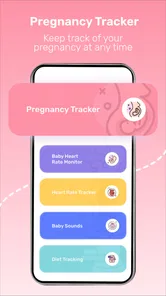
Pregnancy Tracker, Maternity is a parenting app from duff hl studio. Its short description is simply “Pregnancy Tracker,” while its broader focus is helping users follow pregnancy-related information and use practical tracking tools. The app’s summary highlights pregnancy tracking, a kick and contraction counter, and baby and mom’s heart-rate monitoring. It is intended as a companion for expecting parents, not a replacement for professional medical care.
Is Pregnancy Tracker, Maternity suitable for everyone, and what is its age rating?
The app has an Everyone content rating, making its age classification suitable for a broad audience. That rating describes the app’s content classification, rather than guaranteeing that every feature is appropriate for every individual or pregnancy. If you are considering the app for a younger user or planning to share information with family, take a look at its features together and use your own judgment about what feels suitable.
What devices and software does Pregnancy Tracker, Maternity support?
Pregnancy Tracker, Maternity is a parenting app for Android devices running version 6.0 or later. It is rated for Everyone, so its age classification is suitable for a broad audience. Before downloading, check that your phone meets the minimum operating-system requirement and that you are choosing the app from the appropriate store for your device.
Is Pregnancy Tracker, Maternity free to download, and are there optional costs?
The app is free to download, and it also offers in-app purchases priced from $4.99 to $29.99 per item. You can try the free version first and decide whether any paid options suit your needs. If you prefer not to make purchases, review the purchase prompts carefully and check your device’s purchase settings before using the app.
What features does the Pregnancy Tracker app offer for expecting mothers?
The Pregnancy Tracker app provides a comprehensive suite of features for expecting mothers. It includes weekly updates on fetal development, personalized health tips, a contraction timer, and a kick counter. Additionally, it offers a community forum for mothers to share experiences, as well as a journal to document the pregnancy journey. These tools help mothers stay informed and connected throughout their pregnancy.
Pros
- Comprehensive weekly updates
- User-friendly interface
- Daily informative articles
- Customizable reminders
- Community support available
Cons
- Ads can be intrusive
- Limited free features
- In-app purchases necessary
- Requires internet connection
- Some data might be inaccurate












