Pocket Radar® Sports
- 102.00
- 3.2
- Installs
- 100.00K
- Price
- Free

Screenshots
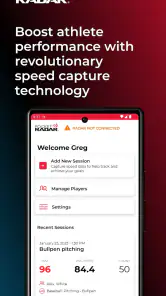
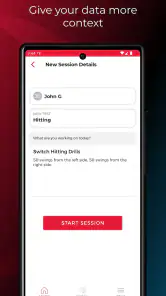
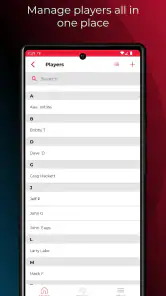
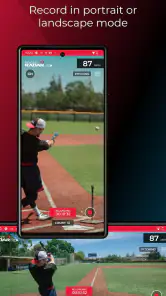
Analysis by Reviewed
I approached Pocket Radar® Sports as a practical training companion rather than a simple speed display. It is a free sports app from Pocket Radar, Inc., but the important starting point is that it requires a compatible Smart Coach Radar Device. Without that hardware, the app is not a complete standalone solution. With the radar ready, the idea is appealing: capture speed, connect that reading with video training, and turn a short practice session into something easier to review later.
That distinction shaped my experience. This is not the kind of app I would open casually to browse drills or track a workout with only my phone. It belongs beside a radar device, a ball, a player, and a person who wants more useful feedback than “that throw felt fast.” The app sits in the sports category, is rated for Everyone, and has passed the 100K+ installs mark. Those details suggest a fairly accessible audience, but the hardware requirement still makes it a specialist tool rather than a universal sports app.
From a raw practice session to something you can review
The starting condition matters more than the download
Before opening the app, I would decide what I actually want to learn. A radar reading can be interesting, but collecting isolated numbers is not the same as improving. The strongest use case is a focused session: a pitcher checking consistency, a throwing athlete comparing effort levels, or a coach trying to give a player feedback that can be revisited after practice.
That preparation avoids a common mistake with training technology. If the goal is vague, the session can turn into a race to produce the highest reading. I found the workflow more sensible when the question came first: Is the athlete maintaining speed late in a session? Does a technical adjustment change the result? Is the movement repeatable, or was one attempt simply unusual? The app can support those questions, but it does not create a training plan for you.
The phone is only one part of the setup. The Smart Coach Radar Device is the essential handoff between the physical action and the app. That means I would check the radar’s position before worrying about the screen. A poor angle, an obstructed view, or a rushed setup can make the recorded result less useful, and an app cannot repair a measurement problem created before the reading reaches it.
This is also where the product differs from a normal sports tracker. A phone-only app can often begin with motion sensors, manual entries, or a simple stopwatch. Pocket Radar® Sports is built around a dedicated measurement device, so the initial cost and setup effort are not represented by the free download alone. For someone who already owns the required radar, that is a reasonable extension. For someone starting from nothing, it is a larger commitment than the app-store price suggests.
My practical step-by-step flow
I would begin by placing the radar where it has a clear relationship with the action being measured, then open the app and make sure the device connection is ready before the athlete starts. This order is important. Starting the drill first and trying to connect while the player is already moving creates avoidable interruptions, especially when a coach is also throwing, filming, or keeping a group organized.
More From Our News Desk

Clash of Clans Is Won Between the Battles

Android Auto Makes the Case for Quieter Car Software

MobiOffice: Transforming Mobile Productivity with Seamless Integration

EA SPORTS FC™ Mobile Soccer: Redefining Mobile Sports Gaming

How Microsoft OneDrive Became a Mobile Productivity Giant

How Google Translate Breaks Language Barriers Effortlessly
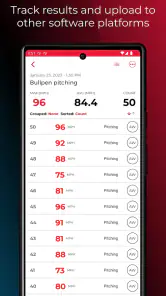
Next comes the recording phase. The useful habit is to treat each attempt as part of a sequence rather than as an isolated highlight. A single impressive speed can be encouraging, but a group of readings gives better context. I would keep the drill consistent for a while, avoid changing several variables at once, and make a quick mental note when something changes, such as a different distance, technique cue, or level of effort.
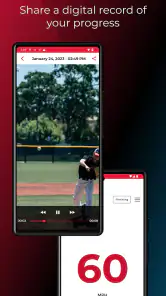
The video side is where the workflow becomes more valuable than a radar display alone. A number tells me what happened at the measurement point; video can help me inspect what the athlete did immediately before it. Those two pieces should be considered together, not treated as separate trophies. If a reading improves but the movement looks strained, the result may not be worth repeating. If the speed stays similar while the motion becomes smoother, that may be the more useful outcome.
I would also keep the camera position repeatable. Changing the angle between attempts makes comparisons harder, even if the radar readings remain consistent. A fixed viewpoint gives the later review a better chance of revealing differences in balance, timing, or follow-through. This is one of the less obvious advantages of using a video-oriented training workflow: the recording becomes a reference for coaching language, not merely proof that a session happened.
After the active portion, I would review the session while the details are still fresh. The best time to interpret a result is not always immediately after the fastest attempt. Looking across the sequence helps separate a repeatable change from a lucky one. I would identify one or two clips worth discussing, connect them with the corresponding speed information, and choose a small adjustment for the next round.
That creates a useful loop: set up the measurement, perform the action, capture the evidence, review the relationship between movement and result, then repeat with one deliberate change. The app is most convincing inside that loop. Used only as a number collector, it feels narrower; used as a bridge between measurement and coaching, it has a clearer purpose.
The handoffs between athlete, coach, device, and phone
The physical handoff is easy to underestimate. The athlete produces the movement, the radar captures the speed, the phone receives or presents the training information, and the coach or athlete interprets it. Every stage can introduce friction. A coach may be ready to give feedback while the app is still being prepared. An athlete may repeat an attempt before confirming that it was captured. A busy practice can make these small delays feel larger than they would during a private session.
For solo training, I would simplify the routine before trying to analyze everything. Prepare the phone and radar, use a repeatable camera position, complete a short block of attempts, and review afterward. Trying to operate the device, perform the movement, and judge each result in real time is likely to distract from technique. The app can organize the evidence, but it cannot replace a second person when the athlete needs immediate observation.
For a coach working with one player, the handoff is more natural. The coach can manage the setup while the athlete concentrates on the drill, then use the recorded material for a short review. With several athletes, however, the workflow needs discipline. Labeling or mentally separating sessions becomes important, because mixed clips and readings can quickly lose their meaning. I would use short, clearly defined blocks instead of leaving the system running through an entire chaotic practice.
Parents can also find a sensible role here, particularly when they want to support development without turning every session into a competition. The app can provide a shared reference for discussing progress, but I would avoid presenting every reading as a verdict on talent. Speed is one outcome, not a complete assessment of mechanics, control, decision-making, or long-term development.
Another handoff happens after practice, when the person who recorded the session becomes the person reviewing it. This is where the app’s video-training concept can save time compared with relying on memory. Instead of saying “your arm looked different on the last few attempts,” I can point to a moment and compare it with another. That makes feedback more specific, although the quality of the conclusion still depends on the camera angle and the reviewer’s understanding of the sport.
What the workflow gives back
The immediate result is a more structured conversation about performance. Rather than relying only on feel, I can look at a speed reading alongside the movement that produced it. That combination is useful when deciding whether an adjustment is helping, when checking consistency across a session, or when showing an athlete why a technically sound attempt may be more valuable than a single peak result.
I especially like the possibility of using the app to compare effort and repeatability. A player may produce a high reading once but struggle to reproduce it. Another player may show a slightly lower result while maintaining a much steadier pattern. The second situation can be more promising for training, and a video-plus-radar workflow makes that distinction easier to explain.
There is also value in delayed review. Athletes often interpret a movement differently when they are no longer tired or emotionally invested in the last attempt. A short review later can reveal that the most dramatic attempt was not the cleanest one. This is a concrete reason to record selectively rather than treating video as decoration: it turns a fleeting practice moment into material for a calmer decision.
For coaches, the result can be a more efficient feedback session. Instead of correcting every detail after every attempt, I would note a pattern, let the athlete complete a block, and then review the most informative examples. That reduces interruption and gives the athlete a chance to feel the movement before hearing an explanation. The app does not perform that coaching judgment, but it can make the evidence easier to organize.
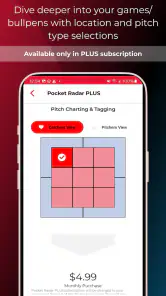
The free price of the app itself lowers the barrier to trying this workflow if the required radar device is already available. There are in-app purchases ranging from one dollar to forty-nine dollars and ninety-nine cents per item, so I would still inspect the purchase prompts carefully before building the app into a regular training routine. The free download is attractive, but the overall setup should be judged as a hardware-and-app system, not as a phone-only utility.
Where the flow breaks down
The first break is the device dependency. If I want a quick measurement while traveling, at an informal game, or during a spontaneous practice, this is less convenient than a phone app that works immediately. The Smart Coach Radar Device has to be present and ready, and that makes the system better suited to planned sessions than to casual use.
The second break is interpretation. A clean-looking clip and a precise-looking number can create false confidence. The app may help me collect evidence, but it does not automatically tell me whether the athlete’s mechanics are safe, whether the effort was appropriate, or why a result changed. Anyone expecting automated coaching will probably find the workflow incomplete. Its strength is documentation and review, not replacing a qualified coach.
There is also a social friction point. Some athletes perform differently when they know every attempt is being measured and recorded. That can be positive for focus, but it can also encourage chasing the biggest number. I would explain the purpose before starting and agree on what counts as a successful session. Otherwise, the technology can quietly change the behavior it is meant to evaluate.
Phone handling can become another obstacle. Recording video, watching the athlete, checking the radar, and protecting the device from the surroundings are separate responsibilities. In bright outdoor conditions, screen visibility and positioning may require extra attention. I would bring a stable way to place the phone and avoid making the athlete wait between attempts while the operator searches through menus.
The app’s average rating is 3.2 from around 526 ratings, with roughly 102 written reviews. I read that as a sign to keep expectations practical rather than assuming the experience will be effortless for every setup. A rating in that range does not erase the value of the workflow, but it does reinforce my advice to test the connection and recording routine before scheduling an important practice around it.
The current version is 2.4.2, and the app requires operating system version 10 or newer. That is worth checking before installation, particularly if the phone used for training is an older spare device. Compatibility is not the only concern: the phone also needs to be comfortable handling the recording and the physical environment. A device that technically runs the app but struggles to remain useful outdoors is not a good training tool.
Who should use it, and who should choose something else
I would recommend this app to athletes, parents, and coaches who already have the Smart Coach Radar Device and want a repeatable way to connect speed readings with video review. It is particularly suitable for planned individual sessions, small-group coaching, and situations where progress needs to be discussed after the action rather than judged from memory.
I would also consider it for a coach who values evidence but does not want to interrupt every repetition. The workflow supports a useful compromise: record a focused block, review representative attempts, and select one adjustment for the next block. That is more productive than collecting endless clips or stopping after every reading.
I would skip it if I only want a basic stopwatch, a general fitness log, or a phone-only speed estimate. Those alternatives are simpler when the goal is convenience rather than radar-supported training. I would also look elsewhere if I expect a fully automated coach that diagnoses technique and prescribes progressions. Pocket Radar, Inc. provides the app as part of a measurement and video system; the human still has to decide what the evidence means.
Compared with a manual notebook, this approach offers richer review but demands more setup. Compared with a generic camera app, it adds a meaningful measurement layer but depends on dedicated hardware. Compared with a simple radar display, it has a stronger path from raw result to visual feedback. The trade-off is clear: more context in exchange for more equipment, more preparation, and more responsibility during interpretation.
My final take after following the complete workflow
The real value is not the biggest number; it is the connection between an attempt and the reason it worked. When the radar, phone, athlete, and coach are coordinated, the app can turn a noisy practice session into a sequence that is easier to inspect and discuss. That is a worthwhile role for a sports app, especially when memory alone is not enough.
Still, I would not describe it as an effortless download-and-go experience. The free app is only one piece of the system, and the required Smart Coach Radar Device determines whether the product fits your situation. Setup quality, camera placement, session organization, and coaching judgment all affect the outcome. Those are not flaws unique to the interface; they are part of using measurement technology responsibly.
My recommendation is therefore conditional but positive. If you already have the radar and are willing to run short, organized sessions, Pocket Radar® Sports gives you a practical route from physical action to reviewable evidence. If you want instant convenience from a phone alone, a simpler sports app will be a better match. For the right user, this is a focused training tool—not a replacement for coaching, but a useful way to make coaching conversations more concrete.
Pocket Radar® Sports Frequently Asked Questions
Is Pocket Radar® Sports free to download, and are there in-app purchases?
Pocket Radar® Sports is free to download, so you can install it without paying an upfront app price. In-app purchases are offered, with listed items ranging from $1 to $49.99 each. The app is designed as part of a speed and video training system, so check the purchase details in the app before buying to understand which option suits your needs.
What devices and operating systems can I use with Pocket Radar® Sports?
Pocket Radar® Sports is available for Android and iOS, and its current version is 2.4.2. The minimum operating system requirement is version 10, so check your device’s software before installing. Because the app is intended to work with a Pocket Radar device, also make sure your particular radar model supports your phone and the app’s connection requirements.
Is Pocket Radar® Sports suitable for children and families?
The app has an Everyone content rating, making it suitable for a general audience. Its sports-training focus may appeal to players, coaches, and parents who want to track speed during practice. Keep in mind that using the app as intended requires a compatible Pocket Radar device, and younger users may need an adult to help with setup and safe equipment use.
What is Pocket Radar® Sports used for?
Pocket Radar® Sports is designed to measure the speed of moving objects, especially balls used in sports such as baseball, softball, soccer, and tennis. It can help players, coaches, and parents track throwing, pitching, kicking, or serving speed during practice. The app is most useful when paired with a compatible Pocket Radar device, rather than being treated as a standalone speed-measuring tool.
Does Pocket Radar® Sports work without a Pocket Radar device?
In most cases, the app is intended to work with compatible Pocket Radar hardware that detects the object and sends the speed reading to the mobile device. Installing the application alone does not turn an Android phone or iPhone into a professional radar gun. Before downloading, check the current compatibility list, required accessories, and connection method for your specific Pocket Radar model, since features can differ between devices and operating systems.
Pros
- Accurate radar readings help track pitching
- hitting
- and throwing progress.
- Simple operation makes it suitable for practices
- drills
- and casual training.
- Portable design fits easily in a sports bag or equipment case.
- Useful for comparing performance over time during individual workouts.
- Works well for coaches
- athletes
- and parents monitoring development.
Cons
- Performance can vary when the device is poorly positioned or used at an angle.
- Some advanced features or accessories may require additional purchases.
- Readings may be affected by nearby objects
- players
- or crowded environments.
- Not every sport or training situation benefits equally from radar measurements.
- Users may need practice to interpret speed data in a meaningful way.
- Category
- Sports
- Version
- 2.4.2





