Pocket - AI Personal Assistant
- 225.00
- 4.8
- Installs
- 50.00K
- Price
- Free

Screenshots
Analysis by Reviewed
I approached Pocket as a practical productivity tool rather than another chatbot to open when I feel stuck. Its purpose is more focused: it is designed to help with meetings, spoken ideas, transcripts, and the follow-up work that usually gets forgotten once a conversation ends. That makes the important question less “Can it do everything?” and more “Will it reliably reduce the small amount of mental housekeeping around my day?”
After using it in that way, my view is positive but specific. Pocket is most appealing if you regularly move between conversations and tasks, especially when your notes are messy, your ideas arrive while you are busy, or you need a clearer bridge from discussion to action. It is less convincing as a complete replacement for a calendar, a dedicated notes system, or a full project-management workspace. The value comes from connecting those moments, not from pretending to replace every productivity app.
How I decided whether Pocket was useful
I judged Pocket by what happens after a conversation, not just by whether it can preserve one. In this section, I explain the practical checks I used to decide whether its captured material could become reliable follow-up, and why the right test depends on the kind of work you actually do.
The real test is what happens after a conversation
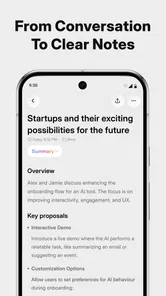
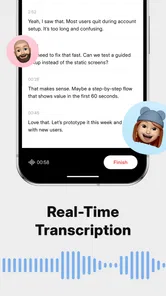
Many meeting tools impress during the recording or transcription stage and become less helpful afterward. I judged Pocket by the handoff: could I move from a spoken discussion to a usable understanding of what happened, what mattered, and what I should do next? That is a better test than simply checking whether text appears on screen.
The app sits in the productivity category and comes from OpenVisionEngineering. It is free to start, with optional in-app purchases ranging from $19.99 to $239.99 per item. I would not treat that pricing range as a reason to buy immediately. First, I would use the free experience with the kind of meetings and ideas I actually have, then decide whether the time saved is worth paying for.
My second test was friction. A personal assistant is only useful if I remember to use it. If capturing an idea requires too many steps, I will return to a quick note or a voice message to myself. If reviewing a transcript feels like reading a wall of text, I will avoid it. Pocket makes sense when it shortens that path rather than adding another inbox to maintain.
Who is likely to benefit most
I can see the strongest fit for freelancers, students, consultants, small teams, researchers, and anyone whose work depends on remembering conversations. It is also useful for people who think aloud. A short spoken idea can be more complete than a hurried typed note, and a transcript gives that idea enough shape to revisit later.
More From Our News Desk

Weather by Xiaomi Review: Clear at a Glance, Less Clear Up Close

X Under Pressure: Can It Recover When Posting Goes Wrong?

Clash of Clans Is Won Between the Battles

Android Auto Makes the Case for Quieter Car Software

MobiOffice: Transforming Mobile Productivity with Seamless Integration

EA SPORTS FC™ Mobile Soccer: Redefining Mobile Sports Gaming
There is a particularly good use case for people who attend several informal discussions rather than one tightly managed corporate schedule. A conversation in a café, a planning call, or a quick exchange with a collaborator can produce several loose commitments. Pocket is valuable when those commitments would otherwise remain in memory until they disappear.
I would be more cautious if your work involves highly sensitive material. An AI assistant that handles meeting content deserves the same care as any other service that processes personal or professional information. Before using it for confidential conversations, I would read its current privacy and data-handling details and follow the rules of my workplace or school. That is not a criticism unique to Pocket; it is a sensible boundary for this entire category.
A realistic everyday workflow
Imagine I finish a planning conversation with a colleague while walking between appointments. I do not want to write a polished summary immediately, and I probably will not remember every decision by evening. I can use Pocket to preserve the discussion, return to the transcript later, and turn the useful parts into a short list of follow-up actions. The important benefit is not merely having a record. It is having a record that can be revisited when I have enough attention to organize it.
I would then check the result against my memory instead of accepting it automatically. Names, deadlines, technical terms, and implied decisions are exactly the kinds of details that deserve a quick human review. My preferred habit is to correct the transcript while the conversation is still fresh, then rewrite action items in my own words. That small step makes the output much more dependable.
Where Pocket feels stronger than ordinary notes
A conventional notes app is excellent when I already know what I want to write. Pocket has a different advantage: it can begin with a conversation or an unstructured thought. That matters when the problem is not storage but capture. I do not have to decide on a title, outline, or filing system before preserving the idea.
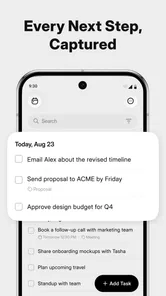
The distinction becomes clearer with action items. In a normal note, I must notice the commitment, phrase it, and place it somewhere useful. An assistant built around transcripts can help surface those moments. I still verify them, but the mental burden is lower. The best reason to use Pocket is the transition from spoken information to something I can act on.
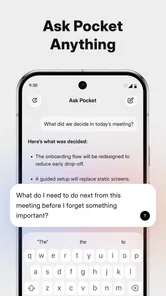
It also has a different feel from a standard chatbot. A general chatbot usually starts with a prompt that I compose. Pocket is more naturally tied to the material I capture. That can make it better for reviewing a particular meeting or idea, while a broader assistant may be better for open-ended research, drafting, or questions unrelated to my own conversations.
Three habits that make the app more useful
- Review for decisions, not just words. I look for changed plans, unresolved questions, and commitments rather than reading every line equally. This turns a transcript into a working document.
- Separate confirmed tasks from possible tasks. A conversation can contain suggestions that sound like promises. I label only clear commitments as actions and keep ideas in a separate group until someone agrees to them.
- Capture context before the meeting ends. If a term, person, or deadline is important, I add a short reminder while it is still obvious to me. This helps compensate for the fact that automated text can lose meaning when several people speak quickly.
These habits are not flashy features, but they reveal the app's practical trade-off. Pocket can reduce the effort of organizing information, yet it does not remove the need for judgment. The more important the meeting, the more valuable a brief human check becomes.
Where other categories may fit better
If I mainly need typed notes, a traditional notes app may be simpler and faster. It gives me direct control over headings, folders, formatting, and long-term organization without asking me to process a conversation first. For a shopping list, a short reminder, or a carefully written project outline, Pocket may be more than I need.
If my main concern is scheduling, a calendar remains the better center of gravity. A transcript can reveal that something needs to happen, but a calendar is where I normally protect time for it. Likewise, a task manager is preferable when I need recurring work, priorities, dependencies, and a dependable overview of many projects. Pocket can help identify actions, but I would not make it my only system for complex workload management.
There is also a place for dedicated transcription software. Someone who needs specialized controls, detailed speaker handling, or a workflow built around long recordings may prefer a tool designed primarily for that job. Pocket's appeal is broader and more personal: it connects transcripts with ideas and actions. That breadth is useful, but it may not satisfy a specialist who wants deep control over one narrow stage.
Finally, a general AI assistant may be the better choice for drafting emails, brainstorming from outside material, explaining concepts, or transforming text that did not originate in a meeting. Pocket seems most natural when the source is my own captured conversation or thought. Choosing between them depends on whether I need a conversation memory tool or a general-purpose writing and reasoning partner.
The switching cost people often overlook
Starting Pocket is easy if I treat it as a capture layer. The harder part is deciding where the results should live. If I already use a notes app, a task manager, and a calendar, I need a small routine for moving confirmed actions into those places. Without that routine, Pocket can become another archive that I consult only when something goes wrong.
My practical approach would be to give each type of information a home. I would keep the transcript in Pocket for context, copy final tasks into my task system, and place actual appointments in my calendar. This avoids asking one app to become the permanent source of truth for everything. It also makes switching easier if my needs change later.
There is a second cost: learning to trust the output without trusting it blindly. At first, I would spend extra time checking summaries and action items. That may feel slower than writing a tiny note, especially for very short conversations. The benefit appears when the discussion is long, scattered, or full of details I would otherwise lose.
People should also consider the emotional cost of recording their own thoughts and meetings. Some users will enjoy having a searchable memory; others will find the process distracting or uncomfortable. If capturing every conversation makes participants less natural, the productivity gain may not justify it. Good judgment about when not to use the app is part of using it well.
What the current app details mean in practice
Pocket is available for everyone by its content rating, and it supports devices running Android 7.0 or later. That makes it approachable for people who are not using a recent phone, although the real experience will still depend on the device, microphone quality, and the setting in which I capture audio.
The current version is 0.6.76, which gives me a reason to keep expectations realistic. I would look for an actively evolving experience rather than assuming every workflow is already mature. A relatively early version can improve quickly, but it can also contain rough edges in navigation, recognition, or the way information is organized. I would test it on low-stakes meetings before making it central to my work.
The app has an average rating of 4.8 from around 2.1 thousand ratings, and it has passed 50 thousand installs. Those figures suggest that many people are finding the concept worthwhile, but they do not answer the personal questions that matter most: whether the capture process suits my habits, whether the output is accurate enough for my conversations, and whether I will actually review it afterward.
That is why I would not choose it solely because it is popular or free. I would judge it by one week of real use. I would capture a few different situations, check the resulting transcripts, and see whether the action-focused review saves time compared with my current method. The app earns its place when it changes what I do after a meeting, not simply when it produces more text.
Questions I would ask before committing
Would I use Pocket for every meeting? No. For a quick exchange with no follow-up, opening a dedicated assistant may be unnecessary. I would reserve it for conversations with decisions, instructions, creative ideas, or several people whose comments I need to remember.
Can it replace my existing task manager? I would not plan on that. I see it as a source of possible actions, while my task manager remains the place where I track due dates and progress. Keeping those roles separate is safer and makes the workflow easier to understand.
Is the free version enough? It may be enough to test whether the central workflow fits, but the answer depends on how often I capture content and which capabilities I need. Since optional purchases are present, I would explore the free path first and compare the time saved with the cost of upgrading. I would avoid paying until I had identified a repeated problem Pocket solves for me.
Is it suitable for private or regulated conversations? I would not assume that automatically. I would check the app's current privacy information, obtain consent where appropriate, and avoid recording material that my organization prohibits. Convenience should never override confidentiality.
What if I prefer writing? Then Pocket may not be the right first choice. Its strongest case is for people who lose ideas while typing or who struggle to turn spoken discussions into organized follow-up. If writing is already quick and reliable for me, a simpler notes workflow could remain better.
My recommendation depends on the job
I recommend Pocket to anyone who regularly finishes conversations with the uneasy thought, “I know there was something I needed to do.” It is especially promising for people who want one place to preserve ideas, revisit transcripts, and identify next steps without manually constructing every note from scratch. The app's focus gives it a clear identity within AI productivity tools.
I would not recommend making it the only productivity system. Pair it with a calendar for scheduled commitments, a task manager for execution, and a notes system for information that needs careful long-term structure. That combination respects what Pocket does well while avoiding the common mistake of asking an assistant to become an entire personal operating system.
My final decision guide is simple: choose Pocket if your main bottleneck is remembering and organizing spoken information. Choose a conventional notes app if your bottleneck is structured writing. Choose a task manager if your bottleneck is execution across many projects. Choose a general AI assistant if your work begins with broad questions rather than your own meetings and ideas.
For me, Pocket is worth trying because it addresses a real gap between listening and doing. I like that it can start with imperfect, natural input instead of demanding a polished note. I also appreciate that its best results invite a review rather than pretending automation removes responsibility. Use it as a thoughtful capture and follow-up companion, not as an unquestioned record of reality. With that expectation, the free starting point makes sense, and the app has a credible place in a personal productivity routine.
Pocket - AI Personal Assistant Frequently Asked Questions
Who develops Pocket - AI Personal Assistant, and what devices can run it?
Pocket - AI Personal Assistant is a productivity app developed by OpenVisionEngineering. Its listed minimum operating system is version 7.0, which helps Android users check basic compatibility before downloading. The app is intended for personal productivity, including work with meetings, ideas, transcripts, and action items. Check the app store on your device for the platform-specific listing and compatibility details.
What is Pocket - AI Personal Assistant, and what can it do?
Pocket - AI Personal Assistant is designed to help with everyday tasks through AI-powered conversations and productivity features. Its focus includes meetings, ideas, transcripts, and action items, making it potentially useful when turning information into organized next steps. It is best viewed as a convenient digital helper rather than a fully autonomous assistant that can reliably complete every task without user review.
Does Pocket - AI Personal Assistant require an internet connection?
Most AI assistants depend on an internet connection because requests are generally processed through remote servers. Pocket’s conversational answers and other cloud-based functions may not work correctly without Wi-Fi or mobile data. Users should also consider connection stability and data usage, particularly when sending long prompts, uploading files, or using voice-related features.
Is Pocket - AI Personal Assistant free to use?
Pocket is free to download, but in-app purchases are available, with listed prices ranging from around twenty dollars to around two hundred and forty dollars per item. Before making a purchase, check the current pricing and what is included in each option on the relevant app store. Availability of specific tools and limits may differ between Android and iOS versions or change after updates.
How private is my information when using Pocket?
Because AI assistants process user requests, privacy is an important consideration before entering personal, confidential, financial, medical, or work-related information. Review Pocket’s privacy policy to understand what data is collected, how conversations are stored, whether information is shared with service providers, and how deletion requests work. Avoid submitting sensitive details unless you are comfortable with the app’s stated data practices.
Pros
- Natural voice conversations make hands-free interaction convenient.
- Can help organize reminders
- tasks
- and everyday planning in one place.
- Useful for brainstorming
- summarizing
- and rewriting content quickly.
- Personalized responses improve as it learns your preferences over time.
- Simple interface makes the assistant approachable for first-time users.
Cons
- AI responses can occasionally be inaccurate or misunderstand context.
- Some advanced features may require a paid subscription.
- Continuous access may depend on a stable internet connection.
- Sharing personal details raises privacy concerns for some users.
- Voice features can be less reliable in noisy surroundings.











