PlushCare: Online Doctor
- 3.61K
- 4.8
- Installs
- 100.00K
- Price
- Free

Screenshots

Analysis by Reviewed
When I need medical advice but do not want to spend half a day arranging a clinic visit, PlushCare: Online Doctor takes a practical approach: it brings a doctor visit to video, with prescriptions, testing and lab-related care handled through the same service. I reviewed it as a medical app rather than treating it like a simple appointment calendar, because its real value is the way it connects a remote consultation with the next steps that usually make healthcare feel fragmented.
That focus makes PlushCare: Online Doctor especially useful for ordinary, non-emergency problems. It is not a replacement for an emergency department, a physical examination that truly requires hands-on care, or a long-term relationship with a specialist. However, for a situation where I know I need professional guidance and want a more convenient starting point, the video appointment model can remove several frustrating steps.
Why the video visit matters more than a basic booking tool
The most important capability here is the doctor visit by video. That sounds familiar now, but the difference is in what happens around the call. A video consultation is most helpful when it is part of a complete workflow: describe the issue, speak with a clinician, discuss whether medication is appropriate, and understand whether testing or lab work belongs in the next step.
In my experience, that is more useful than an app that merely sends me a reminder about an appointment. The video format lets me explain symptoms in my own words and answer follow-up questions from home. I can also keep relevant information nearby instead of trying to remember every detail while sitting in a waiting room. The conversation still depends on the clinician’s judgment, but the app makes the first contact less disruptive.
PlushCare is developed by Accolade, Inc., and sits in the medical category. It is free to install and carries an Everyone age rating, which makes the app approachable for households looking for a digital route to care. The service itself should still be considered healthcare rather than a casual wellness tool: the quality of the visit depends on giving accurate information and following the clinician’s instructions carefully.
The app has a 4.8 average from around 8,300 ratings, with roughly 3,600 written reviews, and has passed 100,000 installs. Those figures suggest that it has built a substantial user base, but I would not use popularity as a substitute for checking whether the service suits my particular medical need. A convenient app can still be the wrong choice if I need immediate physical assessment or a provider with a very specific specialty.
A realistic everyday use case
Imagine I wake up with a problem that is uncomfortable but not obviously an emergency. I may be tempted either to search random health pages or postpone care because getting to a clinic is difficult. With PlushCare, I can use the video route to explain what is happening, answer questions, and discuss what should happen next. If the clinician believes a prescription or testing is appropriate, those parts belong to the same care journey instead of forcing me to begin again with a separate service.
The benefit is not just saving travel time. It is reducing the mental load of deciding which healthcare door to open first. I do not have to guess whether I should start with a general information site, a pharmacy conversation, or a clinic booking page. The consultation gives me a professional conversation before I decide what action to take.
There is also a useful preparation advantage. Before starting a visit, I would keep a short timeline of symptoms, a list of current medicines, relevant allergies, and any recent test information close at hand. This is a small habit, but it can make a remote appointment much more productive. Video cannot provide every physical clue that an in-person examination can, so clear descriptions and organized details matter more.
What the workflow feels like in practice
The central workflow is straightforward: arrange a visit, join by video, discuss the concern, and use the resulting guidance to decide whether medication, testing, lab work or another form of care is appropriate. The important point is that I should not treat the appointment as an automatic prescription machine. The clinician may decide that a prescription is unsuitable, that an examination is needed, or that another level of care is safer.
This is one of the app’s strengths. By placing prescriptions and testing in the same general experience, it gives the consultation a clearer purpose. The visit is not only about receiving an answer on a screen; it can help organize the next decision. That is particularly valuable when I am unsure whether my symptoms call for monitoring, treatment or additional investigation.
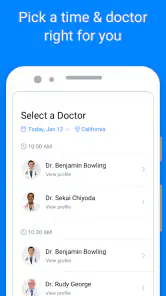
The advertised appointment spacing of every fifteen minutes creates an expectation of quick access, but I would still approach each visit with realistic expectations. A short appointment works best when the issue is focused and I can explain it clearly. A complicated history, several unrelated concerns, or symptoms that are changing rapidly may require more time or an in-person assessment. Trying to squeeze every health question into one remote visit can make the experience feel rushed.
For the smoothest appointment, I would test the camera and microphone beforehand, choose a quiet place, and use a stable connection. I would also avoid joining while driving, shopping or managing children at the same time. A clinician needs my attention, and I need to hear instructions accurately. These details are easy to overlook because the app makes remote care feel casual, but the medical conversation deserves the same focus as an in-person visit.
Where prescriptions and testing fit
The prescription capability is convenient when a clinician decides medication is suitable, but it should not be interpreted as a guarantee that every consultation ends with medicine. That distinction is important for anyone comparing PlushCare with a service chosen mainly for fast prescription requests. I prefer the more responsible expectation: the video visit is for evaluation, and treatment is one possible outcome.
Testing and lab support can also be useful when symptoms cannot be evaluated properly through conversation alone. In practice, this creates a bridge between remote care and information that has to come from a test. I would ask during the visit what the test is intended to clarify, how the result will affect the next decision, and what I should do while waiting. Those questions turn a test from a vague extra step into part of a plan.
One non-obvious advantage is that the app can help me avoid treating a lab result in isolation. A number on a report is not a diagnosis by itself. Discussing the result in the context of symptoms and medical history is more useful than searching for a matching interpretation online. The app’s value is strongest when I use it as a conversation with a clinician, not as a shortcut around clinical judgment.
When this app is a particularly good fit
I see the strongest fit for adults who have a non-urgent concern, a busy schedule, limited transport, or difficulty getting to a clinic during ordinary hours. It can also suit someone who wants a professional first opinion before deciding whether an in-person appointment is necessary. The video format is especially practical for issues that can be described clearly and do not obviously require physical examination.
It may help parents or caregivers who need to organize a conversation from home, although I would prepare the patient’s information carefully and make sure the clinician receives an accurate account. It can also be useful for people who travel within the service’s supported care area and want a more consistent digital starting point, provided they confirm that the service is appropriate for their location and situation.
Another good use is follow-up thinking. After a consultation, I would write down the agreed next step, warning signs that should prompt faster care, and any testing or medication instructions. This habit is valuable because remote appointments can feel informal, making it easy to close the app and forget part of the conversation. The app can make access easier, but I still have to take responsibility for remembering and acting on the plan.
The trade-offs I would consider before relying on it
The biggest limitation is inherent to video medicine: the clinician cannot perform every physical check through a phone. Certain symptoms need examination, equipment or immediate observation. If I have severe breathing difficulty, signs of a stroke, serious injury, intense chest pain, major bleeding or another urgent condition, I would seek emergency help rather than wait for a video appointment.
Privacy and environment also affect the experience. A video consultation from a noisy shared room may make it difficult to discuss sensitive information honestly. Someone without a reliable connection, a suitable device or a private place may find a traditional clinic more comfortable and dependable. The free download does not remove those practical requirements.
There is a trade-off between speed and depth. A convenient appointment can be excellent for one focused problem, but it is not automatically the best format for a complicated medical history. If I have several symptoms across different body systems, need specialist interpretation, or expect a detailed physical assessment, I would favor an established in-person provider or specialist service instead.
Another point is continuity. A digital visit can solve the immediate access problem, but it should not replace regular primary care when ongoing monitoring matters. If I need repeated follow-up, medication management, preventive care or a complete review of my health history, my usual doctor may be better positioned to see the larger picture. I would use PlushCare as a convenient channel, not assume that one remote encounter can cover every healthcare need.
How it compares with the usual alternatives
Compared with searching the web, PlushCare offers something the search results cannot: a conversation with a clinician who can ask follow-up questions and respond to my specific situation. Search tools are useful for learning vocabulary or preparing questions, but they can encourage self-diagnosis. The app is a better choice when I need professional assessment rather than more possibilities to worry about.
Compared with a walk-in clinic, the app is more convenient when the issue is suitable for remote care and travel is the main obstacle. A walk-in clinic remains stronger when I need examination, on-site testing, immediate treatment or a broader physical assessment. I would choose based on the medical problem, not simply on which option feels faster.
Compared with a standard primary-care appointment, PlushCare can be easier to access for a focused concern. The usual doctor may still offer better continuity, a fuller record and a deeper understanding of my history. That difference matters more as the issue becomes chronic, complicated or connected to several existing conditions.
Compared with a pharmacy-only consultation, the app’s doctor-visit model can provide a broader evaluation and a more direct discussion of prescriptions or testing. A pharmacist may be the better first contact for a straightforward medicine question, especially when the issue is about how to use an existing treatment. PlushCare becomes more compelling when I need symptoms assessed rather than a product explained.
Small habits that make the service more useful
I would begin by writing one sentence that explains why I am booking the visit. For example, “I need help deciding whether this symptom requires testing” is more useful than arriving with a long, unorganized list. I would then separate the main concern from secondary questions. If time is limited, this helps the clinician address the most important issue first.
I would also keep a record of what happens after the visit. If a prescription is discussed, I would note the instructions and ask what changes should lead me to contact a doctor again. If testing is recommended, I would ask how the result will be reviewed and what the next decision will be. These questions are not obvious from the app’s download page, but they make the video model safer and more actionable.
A third useful habit is knowing when to stop using the app as the main route. If symptoms worsen quickly, a remote appointment feels inconclusive, or the clinician advises in-person care, I would follow that direction rather than repeatedly booking another video visit. Convenience is valuable only when it leads to the right level of care.
Device support and overall usability
The current version is 6.93.0, and the listed minimum operating-system requirement is version 10. I would check the device before planning an appointment, particularly if I use an older phone or tablet. A medical video call is not the right moment to discover that the operating system, camera or microphone is incompatible.
The app’s free status makes trying the digital route straightforward, while the Everyone rating keeps the presentation accessible to a broad audience. Still, the important cost question is not answered by the download price alone; healthcare services can involve considerations connected with the visit, treatment or testing. I would review the appointment details and any applicable coverage information before relying on it for planned care.
The high average rating and growing install count make PlushCare look established enough to consider, but my recommendation is based more on its workflow than on those figures. The app earns its place when video care, prescription discussion and possible testing belong together. It is less persuasive when I already have easy access to a trusted doctor or when the problem clearly needs hands-on evaluation.
My final recommendation
I would recommend PlushCare: Online Doctor to someone who wants a convenient medical starting point for a focused, non-emergency concern and values the ability to discuss prescriptions, testing and lab-related next steps in the same care journey. The video capability has a real effect: it turns a remote conversation into a decision-making process rather than leaving me with general information and no clear direction.
I would not recommend using it as a substitute for emergency care, a complete physical examination or ongoing primary care. Its best role is narrower and more useful: a practical bridge between wondering what to do and speaking with a clinician. If that is the gap I need to close, the free app is worth trying. If my situation is urgent, complex or dependent on continuity, I would choose an in-person or established care option instead.
Overall, my view is positive but measured. The strongest reason to use PlushCare is not merely avoiding a waiting room; it is having a structured path from video consultation to the next appropriate healthcare step. Used with sensible preparation and clear limits, that makes it a genuinely useful medical app rather than just another appointment screen.
Pros
- Board-certified doctors are available for many common health concerns.
- Appointments can often be scheduled quickly
- including same-day visits.
- Prescriptions can be sent directly to a nearby participating pharmacy.
- The app supports follow-up care for some ongoing conditions.
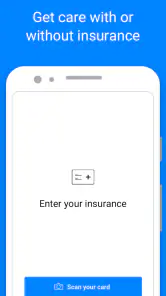
- Insurance details can be checked before completing a visit.
Cons
- Availability varies by state
- provider schedule
- and medical specialty.
- Some medications and controlled substances may not be prescribed online.
- Lab tests and referrals may require separate in-person appointments.
- Visit fees can be high without insurance or eligible coverage.
- A stable internet connection and a compatible device are required.

- Category
- Medical
- Version
- 6.93.0