

Play Disney Parks
- 1.67K
- 4.3
- Installs
- 1.00M
- Price
- Free

Screenshots



Analysis by Reviewed
I see Play Disney Parks as a park companion, not a replacement for a map, a ride, or a conversation with the people you’re visiting with. Its best idea is simple: give waiting and walking a little more purpose through activities tied to Disney parks. That makes it most appealing when you already plan to spend time exploring, especially with children or friends who enjoy small challenges. I’d treat it as an optional layer of fun rather than something every visitor needs to keep open all day.
Why it works best between plans
The most useful way to fit a location-based app into a busy outing is to let the day lead and the app follow. I’d open it after deciding where to go next, rather than starting with the app and letting its prompts set the route. That simple order helps preserve flexibility: if a ride, meal, or quiet break becomes the priority, there’s no need to finish an activity first.
It can also give different ages an easy point of connection. One person can read a question aloud, another can guess, and younger visitors can take the lead in spotting what is around them. The point isn’t to turn the group into a team of collectors; it’s to create a small shared moment without needing to agree on a full game or activity.
A low-pressure way to handle waiting
The practical question is whether an app adds enough to a park day to justify the attention it asks for. In this case, the strongest use is turning a lull into a shared activity. If a queue is moving slowly, a short game or trivia prompt can give a group something to do together; if everyone would rather talk, watch the surroundings, or take a break from screens, there’s no reason to force it. I like that distinction: the app can fill spare minutes without needing to become the plan for the whole visit.
It also suits visitors who enjoy noticing details and collecting small milestones. Those rewards can make exploration feel more deliberate, particularly for a child who wants a goal between attractions. A useful approach is to check the app when you arrive at an area, choose one activity that looks appealing, then put the phone away and enjoy the place. That keeps the digital layer from competing with the park itself.
Setting the Scene: A Whole New World of Fun
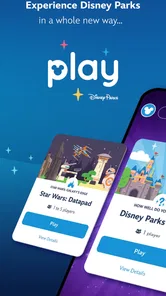
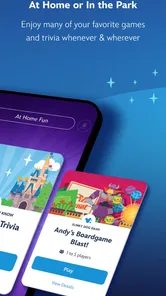
Imagine standing in line for your favorite ride, the sun shining, and the excitement building. Instead of just waiting, the Play Disney Parks app transforms this time into an interactive adventure. It offers a range of location-based games, trivia, and challenges that you can only access while you're at the park. Trust me, it makes those long waits fly by! Whether you’re a trivia buff or a gaming enthusiast, the app has something for everyone, from classic Disney trivia to new interactive games themed around the latest attractions.
What the in-park tools are good for
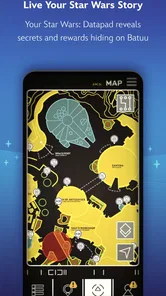
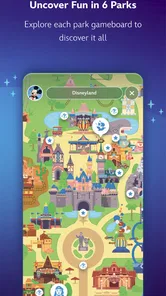
One of the coolest features, in my opinion, is the interactive map. It not only helps you navigate the park but also highlights the games and activities available at each location. The app also rewards you with achievements and digital collectibles as you complete tasks. I found myself getting quite competitive, trying to collect as many as possible!
More From Our News Desk

 Weather - By Xiaomi
Weather by Xiaomi Review: Clear at a Glance, Less Clear Up Close
Xiaomi’s weather app makes everyday forecasts quick to scan, but its calm surface can leave useful details and recovery paths harder to find than they should be.

 X
X Under Pressure: Can It Recover When Posting Goes Wrong?
A resilience-focused review of X, examining setup, mistaken posts, interruptions, weak connections, and the gaps that matter when recovery needs to be dependable.

 Clash of Clans
 Is Won Between the Battles
Its raids are quick; its community is a long-term project of coordination, teaching, rivalry, and shared responsibility—with all the friction that entails.

 Android Auto
 Makes the Case for Quieter Car Software
The car interface is no longer judged by how much it can do, but by how quietly it helps. Android Auto shows what drivers now expect—and what still gets in the way.

 MobiOffice: Word, Sheets, PDF
MobiOffice: Transforming Mobile Productivity with Seamless Integration
MobiOffice: Word, Sheets, PDF is redefining mobile productivity with a surprising blend of functionality and innovation.

 EA SPORTS FC Soccer Mobile 26
EA SPORTS FC™ Mobile Soccer: Redefining Mobile Sports Gaming
Dive into EA SPORTS FC™ Mobile Soccer, where immersive gameplay and strategic depth transform mobile sports gaming.
Latest News



That map is most helpful as a discovery tool, not necessarily as the only guide for every decision. I’d use it to see whether there’s something engaging near a place I’m already visiting, then compare that with the group’s energy and priorities. This avoids a common trap with location-based activities: crossing the park just because a digital marker suggests something is there. A nearby activity can be a bonus; a detour should earn its place in the day.
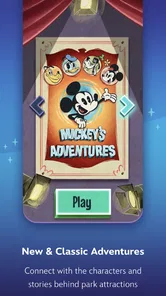
Plus, the app keeps the little ones entertained with fun activities designed just for them. The Disney character experiences are especially popular, providing kids with the chance to interact with their favorite characters in a new way. For parents, this means fewer meltdowns and more smiles all around.
Where it sits beside other park apps
Compared with a general map or a practical trip-planning tool, this app has a more playful job. A conventional map is the better choice when the group needs a direct route or wants to keep the phone use brief. A broader planner is more useful when coordinating the day’s practical details is the priority. This Disney-focused option makes more sense when the group wants themed activities tied to its surroundings, rather than another place to manage the itinerary.
That difference also affects how I’d use it alongside alternatives. I wouldn’t ask it to replace a navigation tool that everyone already understands, and I wouldn’t keep switching between screens while walking. I’d settle the next destination first, use the Disney app for a nearby activity or discovery, and close it again. That division of labor is less distracting and makes its distinctive content feel like a bonus rather than a competing source of instructions.
Planning around the app’s limits
Because its activities are tied to park locations, this is not the best choice for a long journey, a day at home, or a visit where you want a straightforward route from one place to another. A standard map or a dedicated navigation tool is a better fit when directions are your main concern. I’d also avoid making a child’s day depend on unlocking a particular activity: queues, tiredness, and changing plans can make a phone-based goal more hassle than fun.
For a realistic day, imagine arriving with a family group and using the map to spot an activity near the next area you already intend to visit. You can try it while waiting, then move on without detouring just to collect everything. That small choice matters: it keeps the app working around your itinerary instead of letting collectibles dictate it. It’s also sensible to agree on when the phone goes away, so the screen doesn’t take attention from rides, meals, or time together.
As a travel and local app from Disney, it has a narrower purpose than general park-planning alternatives: it is aimed at adding playful, place-specific engagement, rather than being a universal trip organizer. That focus is a strength if you want Disney-themed activities, but a limitation if you expect one app to handle every practical detail of a visit. The app is free, has an Everyone age rating, and is on version 2.35.1; those details make it easy to consider, though they don’t change the fact that its appeal depends on being at a participating park and wanting this kind of interaction.
There’s a practical trade-off in relying on a phone for entertainment in a place where the group is already navigating, taking pictures, and checking plans. I’d save the battery and attention for moments when the activity genuinely adds something: a slow-moving wait, a pause between areas, or a child who needs a fresh distraction. If everyone is absorbed in the visit already, leaving the app closed is a perfectly good choice.
Enjoy the storytelling without making it a task
One of the highlights of using the app was the immersive storytelling. As I roamed the park, the app would occasionally pop up with interesting facts and stories about the attractions. It added a layer of depth to the experience that I hadn't expected. Also, the app integrates seamlessly with the MagicBand, allowing you to unlock extra features and surprises throughout your visit.
I’d treat those extra discoveries as a reason to look around, not as a checklist to complete. A useful habit is to pause before opening the phone and ask whether the group is curious or simply tired. If it’s curiosity, a bit of context can make a familiar attraction feel more considered; if it’s tiredness, a seat, a snack, or a screen-free break is likely the kinder answer. The app works best when it supports the mood of the moment rather than trying to change it.
The ability to share your achievements and photos directly from the app to social media is another big plus. It’s a great way to keep your friends and family updated on your magical adventures in real time.
For anyone who prefers not to post while out, that sharing option is easy to regard as an extra rather than a central reason to use the app. I’d keep the visit itself ahead of documenting it, especially when traveling with people who don’t want to wait while a photo or achievement is prepared. The strongest value is still in the activity and the discoveries you can enjoy together in the park.
Who will get the most from it
I’d recommend it to Disney visitors who like exploring, enjoy trivia, or want a low-effort activity to share with kids during downtime. Disney lists 1M+ installs, a 4.3 average from around 6.2K ratings, and 1.7K reviews, suggesting it has found an audience among parkgoers. The developer is Disney, and the app has been available since June 28, 2018. Those figures are useful context, but your own visit style is more important: if you prefer to stay off your phone or simply want rides and shows without extra prompts, you can comfortably skip it.
It is also a reasonable option for a visitor who has already explored the basic planning tools and wants something more playful, rather than another schedule to maintain. On the other hand, if you are visiting alone and prefer to move quickly from one attraction to the next, the activities may feel like a distraction. The same is true for anyone who finds collecting achievements stressful or would rather keep a child’s attention on the people and places around them. The app has a clear audience, but it doesn’t need to suit every parkgoer to be worthwhile.
Before relying on it for a particular day, I’d check that the app is installed and ready before entering the park, then explore its map once you’re there rather than trying to plan every activity in advance. Location-based tools are most useful when you use them in the moment. I’d also keep expectations flexible: the best result is a welcome diversion or an interesting discovery, not a guarantee that every wait will feel short or every visitor will want to play.
If a child is especially keen to use it, I’d set expectations before the day gets busy: activities are optional, and the group can stop whenever it’s time to move on. That small agreement prevents an enjoyable extra from becoming a negotiation at every turn. For adults, the same principle applies in a quieter way: choose the moments when opening the app feels worthwhile, and don’t let the promise of one more discovery crowd out the reason you came.
A sensible verdict for the right kind of visit
Final Thoughts
In a nutshell, the Play Disney Parks app is a must-have for anyone planning a trip to a Disney park. It turns what could be mundane moments into memorable experiences and keeps the magic alive from the moment you enter the park until you leave. While it might not replace the thrill of the rides or the joy of meeting Mickey in person, it certainly adds an extra layer of fun and engagement that enhances the overall experience. So, next time you’re headed to Disney, don’t forget to download the app and let the magic unfold!
My more measured recommendation is to think of it as an optional companion, not an essential part of admission or planning. It earns its place when your group enjoys trivia, playful exploration, or a quick way to share a lull; it is easy to skip when the day is already full or screen time is unwelcome. For the right visitor, that modest role is exactly the point: it can add a little texture to time between attractions without asking to take over the visit.
Play Disney Parks Frequently Asked Questions
Who is the Play Disney Parks app designed for?
Play Disney Parks is a travel and local app from Disney for people who want to add interactive entertainment to a Disney theme park visit. Its activities can make waiting time feel more engaging and give visitors another way to explore. The app is rated for Everyone, so its general audience includes families and Disney fans looking for games and themed experiences.
What is the purpose of the Play Disney Parks app?
The Play Disney Parks app is designed to enhance your experience at Disney theme parks by offering interactive adventures, games, and activities. It's a companion app that makes your visit more engaging and fun by unlocking new experiences and providing entertainment while you wait in line for attractions.
Is the Play Disney Parks app free to use?
Yes, the Play Disney Parks app is free to download and use. However, to fully enjoy all its features, you need to be inside a Disney park, as many activities are location-based. Additionally, certain in-app purchases or features may require a valid theme park admission or registration.
Can I use the Play Disney Parks app offline?
Unfortunately, the Play Disney Parks app requires an active internet connection to function properly. This is because many of its interactive features and games rely on real-time data and location services within the park. It’s recommended to have a reliable data plan or access to Wi-Fi during your visit.
What kind of activities does the Play Disney Parks app offer?
The app offers a variety of games, challenges, and interactive experiences that are themed around Disney attractions and characters. From trivia and quizzes to scavenger hunts and musical challenges, the app provides entertainment tailored to different areas of the park, enhancing your overall visit with unique, themed interactions.
Pros
- Engaging interactive park maps.
- Exclusive in-park experiences.
- Family-friendly games.
- Real-time wait times and updates.
- Free to download and use.
Cons
- Limited features outside parks.
- Requires constant internet connection.
- Battery drains quickly.
- Some features can be buggy.
- Not all parks are supported.













