PlatoVPN: Super VPN Fast Proxy
- 392.00
- 4.5
- Installs
- 5.00M
- Price
- Free

Screenshots
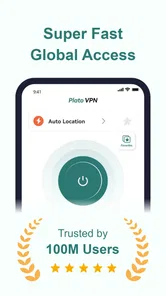
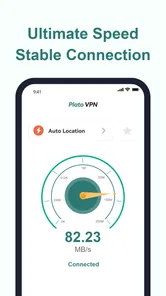
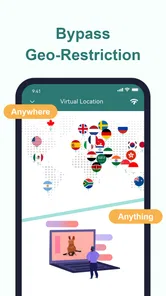
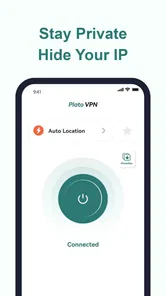
Analysis by Reviewed
I judge a VPN by the everyday job it can do, not by promises that sound impressive on a store page. Plato VPN: Super Unlimited VPN is a free productivity app for people who want a simple way to route their connection through a VPN, whether they are trying to reach a site while travelling or adding a layer of privacy on public Wi-Fi. Its main appeal is easy to grasp, but a VPN also changes how your internet traffic is handled, so it is worth considering both the convenience and the limits before relying on one.
What you can expect from the free option
The app is free to install, while optional in-app purchases range from $6.99 to $39.99 per item. That makes it possible to try it without paying upfront; it does not mean every use or capability will necessarily be available on the free option. I would treat the paid range as a reason to check the purchase screen carefully before committing, especially if you only need a VPN occasionally. The exact cost you see can depend on the item offered in the app, so I would not assume the top price is a subscription or that every purchase unlocks the same thing.
That distinction matters because “free” is useful only when it fits your routine. If you want occasional protection while checking email on café Wi-Fi, starting without a payment is a reasonable way to see whether the app suits you. If you expect to use a VPN every day, compare the in-app purchase choices with what other services charge and what they explicitly include. I would make that comparison before paying, rather than choosing a plan based only on the word “unlimited.”
How Plato VPN fits into everyday use
Ever find yourself caught in a sticky situation where you desperately need to access a website, but alas, it’s blocked in your region? Or maybe you're just fed up with sluggish internet speeds when trying to watch your favorite shows? Well, let me introduce you to Plato VPN: Super Unlimited VPN, a handy app that might just be the hero you need.
Unlock the World with Ease
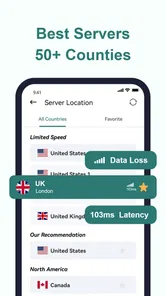
With Plato VPN: Super Unlimited VPN, you can wave goodbye to those pesky geo-restrictions. I mean, who doesn’t want to check out that new series on a streaming service that's not available in their country? This app is like your personal key to the internet. It provides a wide range of server locations, allowing you to choose where you want to appear from. Whether you're in the mood for some British drama or Korean pop, this VPN has got you covered.
Simplicity at its Best
One of the things I adore about this app is how user-friendly it is. Seriously, even if tech isn’t your thing, you’ll find it a breeze to navigate. The interface is clean and straightforward, so you won’t be left scratching your head trying to figure out what’s what. With just a few taps, you can connect to a server and start surfing safely.
Speed and Performance
Now, let’s talk speed. Nobody likes buffering, right? Thankfully, Plato VPN delivers solid performance in this area. While using it, I noticed minimal slowdowns, which is a huge plus. Whether you're streaming, browsing, or gaming, the app ensures a smooth experience. It's like having a fast lane on the internet highway.
More From Our News Desk

Weather by Xiaomi Review: Clear at a Glance, Less Clear Up Close

X Under Pressure: Can It Recover When Posting Goes Wrong?

Clash of Clans Is Won Between the Battles

Android Auto Makes the Case for Quieter Car Software

MobiOffice: Transforming Mobile Productivity with Seamless Integration

EA SPORTS FC™ Mobile Soccer: Redefining Mobile Sports Gaming
Even so, I would not make a blanket promise that a VPN will improve a slow connection. Routing traffic through another server can affect speed, and the result depends on the network and the destination you choose. For a quick search or reading, a small change may not matter much; for a video call or a large download, it is sensible to test the connection first. If something becomes sluggish, switching server locations or disconnecting when privacy is not needed can help you work out whether the VPN route is the bottleneck.
Security - Your Digital Shield
In today’s world, security is everything, and Plato VPN doesn’t skimp on that front. It offers robust encryption, ensuring your data stays safe from prying eyes. Whether you’re using public Wi-Fi or just want to keep things private, this app acts as a digital shield, keeping your information secure.
I still see a VPN as one part of safer browsing, not a replacement for careful habits. It can route traffic through a VPN connection, but that alone does not make every website trustworthy or prevent someone from being tricked into sharing a password. I would keep using unique passwords, avoid suspicious links, and check that sensitive accounts are protected. That is a more realistic way to think about the app’s role than treating any VPN as complete online protection.
A practical routine for travel and public Wi-Fi
Picture arriving at a hotel after a long day and needing to check a booking email or send a work message over the available Wi-Fi. I would open the app, connect before opening those accounts, and then disconnect once I am back on a connection I trust if I no longer need the VPN. That simple order makes the tool easier to use consistently: connect first, do the sensitive task, and avoid leaving a VPN running by habit if it interferes with a service you need.
A useful small habit is to decide in advance what you want the VPN for. If the goal is privacy on a shared network, connect before launching apps that handle personal information. If the goal is to reach a particular site, choose a location and test that site directly rather than assuming every page will respond the same way. This makes troubleshooting more straightforward: you can tell whether the issue is the selected route, the site itself, or your underlying connection.
For travel, I would also keep expectations grounded. A VPN may help with access when a service treats traffic differently by location, but it cannot guarantee that a streaming service will accept a connection or that every catalogue will be available. Services can restrict VPN traffic, and a page may still be unavailable for reasons unrelated to your location. I would install the app as a convenient option, not build an important trip plan around a particular site working through it.
Choosing a server without making it complicated
Having server locations to choose from is useful, but more choice is not automatically better. For ordinary browsing, I would start with a location that makes sense for the task and see whether pages load reliably. For a site that is meant for a particular region, selecting a server there is the obvious first test. For privacy on public Wi-Fi, the nearest suitable location is often a practical starting point because a distant route can add delay. These are troubleshooting steps, not guarantees of speed or access.
If one location performs poorly, changing it is a better first move than repeatedly disconnecting and reconnecting to the same one. I would also test a normal page before starting a video or call, since a quick page load gives a fast indication of whether the connection is usable. If the VPN causes trouble with a payment page, work service, or account sign-in, temporarily disconnecting may be the sensible choice; some services are cautious about connections that appear to come from another location.
How it compares with other VPN choices
Compared with manually configuring a VPN or choosing a service with a more involved setup, Plato VPN’s straightforward approach is better suited to someone who wants to connect with a few taps. That simplicity is valuable if you are new to VPNs and do not want to learn technical settings before using one. A more configurable alternative may be a better fit for people who want detailed control over connection behaviour, clear explanations of privacy practices, or a specific set of tools. I would compare those details directly rather than assuming that all VPN apps offer the same protections because they share the same basic purpose.
It also occupies a different place from a browser’s private mode. Private browsing can help keep local browsing history out of a normal browser session, but it is not the same thing as routing traffic through a VPN. Conversely, a VPN is not a substitute for private browsing if you are trying to avoid saving history on a shared device. I find it useful to choose the tool for the job: a VPN for the connection route, browser privacy settings for local traces, and account security practices for protecting logins.
For someone who only wants to reach a single blocked page, a browser feature or another legitimate access method may be enough and involve less setup. For someone who often uses unfamiliar networks, a dedicated VPN app is more convenient because it can cover traffic beyond one browser session while connected. The trade-off is that a VPN introduces another service into the path between the device and websites, so I would not choose one solely because it claims broad access. Ease of use matters, but so does understanding what you are paying for and what information you are comfortable routing through a provider.
What to check before relying on it
Before using any VPN for sensitive work, I would look through the app’s privacy information and the purchase details, then decide whether they answer my own questions. In particular, consider whether the service’s handling of connection data is clear enough for your needs and whether the paid option’s terms make sense to you. I would not infer those answers from the app’s name, a security claim, or a simple connect button. If you need a VPN for confidential business, regulated work, or a specific privacy requirement, choose a provider whose documentation you have reviewed and whose controls meet that requirement.
Another practical point is that a VPN can change how websites identify your apparent location. That can trigger extra sign-in checks, make a site display different content, or complicate access to a service tied to your usual region. If you depend on a banking, workplace, or travel account, keep a normal connection available as a fallback. This is not a reason to avoid VPNs altogether; it is a reason to test important services before you need them in a hurry.
Parents should also note the app’s Everyone content rating as a general age classification, not as a promise that the internet connection itself filters unsuitable material. A VPN is not a parental-control system. If a child uses the device, I would use the platform’s family settings and talk through safe browsing rather than expecting a VPN to manage access or content.
Who is likely to get good value
The app is most appealing to someone who values quick setup and wants a free way to try VPN use before deciding whether a paid purchase is worthwhile. It can suit a traveller checking everyday sites on shared Wi-Fi, a casual user who wants to test access from different server locations, or a person who simply prefers a direct connect-and-browse routine. Its productivity classification is a reasonable fit for these practical tasks: the value is less about entertainment on its own and more about making internet access feel easier in certain situations.
It is less compelling for someone who expects a VPN to guarantee streaming access, fix a poor internet connection, or provide complete anonymity. I would also look elsewhere if your main priority is detailed technical controls or if you need documented assurances for sensitive work. Those needs call for careful comparisons, not just a friendly interface. And if you rarely use public networks, do not need location-based access, and already have a setup that meets your needs, there may be little reason to add another app or pay for an option you will seldom use.
Plato VPN: Super Fast VPN Proxy Master is the developer behind the app, which is listed as free and has optional purchases. It has an average rating of 4.6 from around 43,000 ratings, with more than a million installs and 304 written reviews. Those figures suggest that plenty of people have tried it, but popularity cannot tell me whether its privacy approach or paid options are right for an individual. I would treat the ratings as context, then make the decision based on how it performs for my own connection and whether its terms match my expectations.
The app was released on September 22, 2024, and version 1.4.5 supports devices running Android 7.0 or later. It is rated for Everyone. If your device meets that requirement, installation is a straightforward way to see whether the interface and connection routine suit you; still, I would review the current app details before buying anything, since version and purchase offerings can change over time.
My buy-or-skip verdict
For me, Plato VPN is worth trying if you want a simple, no-upfront-cost starting point for everyday VPN use and understand that access, speed, and privacy depend on more than a one-tap connection. I would start free, test it on the networks and sites I actually use, and only consider an in-app purchase after checking exactly what that item provides. That keeps the decision tied to real value rather than a general promise of unlimited use.
I would skip it, or compare it with a more transparent and configurable alternative, if you need specific privacy assurances, dependable access to a particular streaming catalogue, or advanced controls. Those are not small details when choosing a VPN. The app’s easy approach is its strongest practical draw, but convenience should not replace checking whether a service fits the sensitivity of your browsing or the features you need.
In conclusion, if you’re on the hunt for a reliable and easy-to-use VPN app, Plato VPN: Super Unlimited VPN is definitely worth checking out. It’s perfect for anyone looking to unlock content from around the globe, maintain fast internet speeds, and keep their online activities private. Give it a whirl, and you might wonder how you ever lived without it!
PlatoVPN: Super VPN Fast Proxy Frequently Asked Questions
Is Plato VPN easy to set up for someone who has never used a VPN?
Plato VPN is intended for people looking for a VPN for privacy and website access, and its store summary describes it as an unlimited VPN. If you are new to VPNs, take a moment to review the connection options and settings when you open the app so you understand when the VPN is active. You can also check how it affects the way you access websites before relying on it for everyday browsing.
Can I use Plato VPN on both my phone and tablet?
Plato VPN supports Android and iOS devices, making it an option for people using smartphones or tablets on either platform. Before downloading, make sure you select the version for your device and check that it meets the app’s operating-system requirement. If you plan to use it on more than one device, review the relevant app-store options for each platform.
What should I check before installing Plato VPN?
Plato VPN is a free app in the productivity category, intended for users who want a VPN for privacy and access to websites. Before installing, check that your device meets its operating-system requirement and review the app’s permissions and settings so you understand what you are enabling. It is also worth considering whether you want to use only the free option or explore in-app purchases.
Does Plato VPN require a recent Android version?
The app supports Android devices running version 7.0 or later. If your device uses an older version, check its operating-system details before attempting to install Plato VPN. It is listed for both Android and iOS users, so people choosing between phones or tablets can look for the appropriate version in their platform’s app store.
What is Plato VPN and how does it work?
Plato VPN is a virtual private network (VPN) service that offers unlimited access to secure and private internet browsing. It works by routing your internet connection through an encrypted tunnel, masking your IP address and protecting your online activities from prying eyes. This ensures anonymity and privacy, making it ideal for accessing restricted content or maintaining privacy on public Wi-Fi networks.
Pros
- Unlimited bandwidth for free users.
- No registration or login required.
- Simple and intuitive interface.
- Fast connection speeds.
- Supports multiple devices.
Cons
- Occasional connection drops.
- Limited server locations.
- Ads in the free version.
- No customer support chat.
- Some features locked in free version.











