Plant Identifier: Plantiary
- 270.00
- 4.5
- Installs
- 100.00K
- Price
- Free

Screenshots
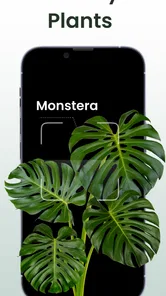
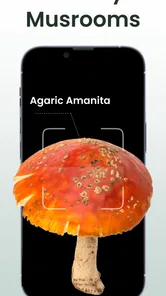
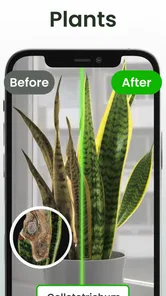
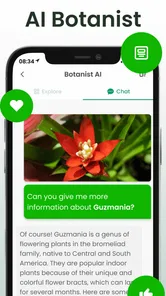
Analysis by Reviewed
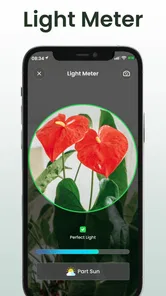
I approached Plant Identifier: Plantiary as a practical productivity tool rather than a novelty camera app. Its main appeal is straightforward: when I found a plant, insect, or mushroom I did not recognize, I could use the app as a first step toward an answer, then use the care-reminder side to keep everyday plant tasks from disappearing into the background. That combination gives it a more useful place on my phone than a one-time identification tool.
My overall impression is positive, but I would use it with sensible limits. An identification result can guide curiosity and routine care, yet it should not replace a specialist when a poisonous mushroom, serious plant disease, or risky insect is involved. The app is free to start, is rated for Everyone, and comes from Blacke. Its average rating is 4.5 from around 5K ratings, with about 270 written reviews, while its install count has passed 100K. Those figures suggest a healthy level of interest without being a reason to trust every result automatically.
What the app is really useful for
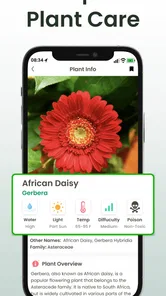
The strongest idea here is the pairing of recognition and follow-up. Many identification apps help answer “What is this?” and then leave the user alone with the next question. Plantiary is more appealing when I want to turn recognition into a small routine: identify a houseplant, remember when it needs attention, and return later instead of relying on memory.
That workflow suits people who are building a collection of indoor plants, learning names while walking outdoors, or trying to make sense of a garden inherited from someone else. It is also helpful for beginners who know a plant is struggling but do not yet know the vocabulary needed to search for advice. A name can make later research much more focused than a vague description such as “the plant with yellow leaves.”
I would not treat the app as a botanical authority. Visual identification is affected by lighting, camera angle, leaf damage, seasonal changes, and the fact that several species can look similar. A photograph of one leaf may not show the stem, flowers, growth pattern, or habitat clues that separate close relatives. My practical rule would be to take the result as a likely starting point, compare it with the whole plant, and avoid making safety decisions from one screen alone.
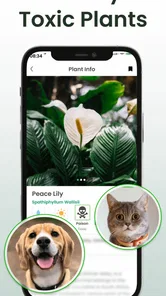
The same caution applies to insects and mushrooms. Those categories can be interesting to explore, but they carry different levels of risk. For an insect, an incorrect label may simply make a nature walk less accurate. For a mushroom or an unfamiliar plant that someone might eat or touch, the consequences are more serious. I would use the app to generate a research lead, not to approve consumption, treatment, or handling.
A realistic everyday workflow
Imagine bringing home a plant from a local shop without a clear care label. I would photograph it in good daylight, check the suggested identity, and look at the visible characteristics rather than accepting the first match blindly. Once I had a reasonable name, I could set a reminder around the care task I tend to forget, such as checking the soil or giving the plant attention on a regular schedule.
More From Our News Desk

Weather by Xiaomi Review: Clear at a Glance, Less Clear Up Close

X Under Pressure: Can It Recover When Posting Goes Wrong?

Clash of Clans Is Won Between the Battles

Android Auto Makes the Case for Quieter Car Software

MobiOffice: Transforming Mobile Productivity with Seamless Integration

EA SPORTS FC™ Mobile Soccer: Redefining Mobile Sports Gaming
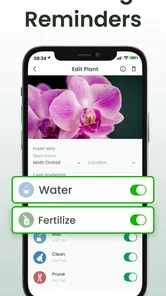
The useful part is not merely receiving a name. It is reducing the gap between discovery and action. A reminder can prompt me to inspect the plant instead of watering automatically, which matters because a fixed routine is not always appropriate for changing light, temperature, pot size, or soil conditions. I would still touch the soil and observe the leaves before watering; the app can remind me to check, but it cannot see the plant’s current condition for me.
For outdoor use, I would make the process slower. I would photograph the entire specimen, then take a closer image of distinctive details if the first result feels uncertain. I would also note where I found it and whether it was flowering. That extra context makes the identification process more thoughtful and prevents the common mistake of photographing only a damaged leaf and treating the result as final.
Where it fits among familiar alternatives
The usual alternative is a general visual-search service. Those tools can be excellent for a quick answer and may be more convenient when I want to identify almost anything, not just living things. Their weakness is that the plant-care follow-up may be scattered across search results, notes, calendar entries, or another app. Plantiary makes more sense when I want identification and ongoing attention in one focused place.
A second alternative is a dedicated plant journal or reminder app. That can be better for someone who already knows every plant’s name and mainly wants detailed records, photographs, measurements, or a carefully organized collection. Plantiary is more attractive at the beginning of the process, when recognition is still part of the problem. If my priority were advanced horticultural record-keeping, I would compare it closely with a specialist journal before moving my whole collection.
There is also the traditional route: a field guide, nursery expert, local gardening group, or botanist. Those options are slower but can provide context that an image match cannot. A field guide encourages attention to habitat and structure; a person can ask follow-up questions; and a specialist may notice a dangerous ambiguity. Plantiary is best as a convenient first layer, not as a replacement for those sources in high-stakes situations.
Trust, controls, and moments that deserve attention
Because this app uses images and reminders, I would pay attention to the choices presented during setup and everyday use. I prefer to know when the camera is being used, what I am choosing to photograph, and whether a reminder is something I created or an automatic suggestion. The most trustworthy experience is one in which each action feels visible rather than hidden behind a confusing flow.
I would avoid photographing anything that accidentally includes private material, such as family documents, addresses, faces, or a wider view of my home than necessary. A close crop of the plant is usually the better habit anyway. It improves the subject of the image and reduces unnecessary exposure of surrounding details. This is a small but meaningful way to keep control over what I share through any image-based service.
When I use an identification feature, I would also watch for the difference between a confident-looking label and a genuinely certain conclusion. A polished result can feel authoritative even when the photograph is poor. I would compare the suggested name with visible traits and, for unusual specimens, check an independent reference. The app should support my judgment, not quietly replace it.
Reminders create a different kind of data-sensitive moment. A plant-care schedule can reveal habits, travel patterns, or the size of a collection if someone else sees the phone. I would choose reminder wording that is useful without being overly revealing, especially if notifications appear on a shared screen. I would also review old reminders from plants I no longer own, because a cluttered list makes the genuinely important tasks easier to miss.
The app is free, but in-app purchases range from $0.99 to $49.99 per item. That makes it worth slowing down before confirming any optional purchase. I would inspect the wording, understand whether an item is a one-time purchase or part of a broader upgrade path, and decide whether the extra value matches how often I will use the app. Someone who only identifies a plant occasionally may find the free experience sufficient, while a committed hobbyist may judge additional tools differently.
I also like to think about account control before building a long-term collection. If I were entering many plants or relying heavily on reminders, I would look carefully at how the app presents sign-in, settings, deletion, and notification choices. I would not assume that a useful feature automatically means I must create an account or share more information than needed. The best approach is to make only the choices necessary for the workflow I actually want.
Practical limits I noticed in the concept
The app’s convenience can encourage overconfidence. If the first identification looks plausible, it is tempting to stop checking. That is especially risky when two species have similar leaves or when the specimen is photographed outside its normal season. I would improve my results by using even lighting, avoiding blurry close-ups, including more than one part of the plant, and retaking the image when the result conflicts with what I can see.
Care reminders can also become misleading when treated as automatic instructions. Plants do not follow a perfect calendar. A reminder to inspect is safer than a reminder that makes me water without checking. I would use the schedule as a prompt for observation and adjust my behavior for the plant’s light, pot, soil, and environment. This is one of the app’s most important trade-offs: structure helps memory, but rigid repetition can create bad care.
Another limitation is that identification alone does not diagnose every problem. Yellow leaves may come from several causes, and a visible insect does not always explain the full condition of a plant. I would not expect a name to provide a complete treatment plan. If a plant is deteriorating quickly, I would photograph the symptoms, seek a reliable horticultural source, and ask an experienced person rather than relying on a single automated suggestion.
Compatibility is straightforward for many users: the current version is 5.2.56 and it requires Android 8.0 or later. That makes the app accessible to people using a reasonably recent Android phone, but anyone with an older device should check compatibility before planning around it. I would also keep the app updated when possible, particularly if identification or notification behavior is important to my routine.
Who will get the most from it
I would recommend Plantiary to a beginner who wants a gentle bridge between taking a photograph and learning how to care for a plant. It is also a good fit for someone who repeatedly forgets small maintenance tasks, provided they use reminders as prompts to inspect rather than commands to act without thinking. Nature walkers may enjoy the insect and mushroom angle as an educational starting point, with the safety boundaries kept firmly in mind.
It is less suitable for a professional grower, serious collector, or researcher who needs rigorous taxonomy, detailed environmental logs, or a dependable archive of every observation. Those users may prefer a specialized database, a structured journal, or expert verification. I would also suggest skipping it as a primary tool if the only goal is identifying a dangerous mushroom or deciding whether an unknown plant is safe to eat. That is a situation where convenience is not enough.
Families can use it as a learning aid, but the Everyone age rating should not be mistaken for a guarantee that every result is appropriate for unsupervised experimentation. Children may enjoy photographing leaves and insects, yet an adult should handle questions involving touching, tasting, wild mushrooms, stings, or unfamiliar sap. The app can make observation more engaging, while basic safety still belongs outside the screen.
For privacy-conscious users, my advice is simple: keep photographs tightly framed, review visible choices during setup, and do not enter information that the task does not require. I would be more comfortable using it for ordinary plant photos than for images that reveal private rooms, locations, or other people. That is not a criticism unique to this app; it is a sensible habit for any camera-based service.
My cautious verdict
After looking at how the identification and reminder ideas work together, I see Plant Identifier: Plantiary as a useful companion for everyday plant curiosity. Its value is strongest when I use it to build a repeatable workflow: photograph carefully, question the result, record the useful name, and create a reminder that encourages observation. That is more practical than opening a visual search tool every time and then forgetting what I learned.
I would start with the free option and use it for a few real situations before considering any in-app purchase. The price range for individual purchases is broad enough that I would not buy impulsively. I would first decide whether the app has become part of my routine and whether the extra option solves a problem I actually have.
Blacke’s app has a clear place in the productivity category, but its usefulness depends on responsible use. It can help me organize attention around plants and make identification less intimidating. It cannot guarantee a correct answer from an imperfect photograph, replace expert advice, or turn a care schedule into a universal rule. My recommendation is yes for curious beginners and casual plant owners, with one condition: treat every result as a helpful lead and keep the final judgment in your own hands.
Plant Identifier: Plantiary Frequently Asked Questions
Who is Plant Identifier: Plantiary designed for?
Plant Identifier: Plantiary may suit curious gardeners, nature enthusiasts, and anyone who wants a convenient starting point for learning about plants. It combines plant recognition with care reminders, so it can be useful both when exploring outdoors and when looking after plants at home. Its content rating is Everyone, while identification results are best treated as suggestions rather than expert advice.
What is Plant Identifier: Plantiary, and how does it work?
Plant Identifier: Plantiary is a mobile app designed to help users recognize plants by taking a photo or selecting an image from their device. After analyzing visible characteristics such as leaves, flowers, and overall shape, it suggests a likely plant match and may provide related information. Results should be treated as helpful guidance rather than guaranteed botanical identification.
How accurate is Plant Identifier: Plantiary when identifying plants?
The app can be useful for common plants and clear, well-lit photographs, but its accuracy depends heavily on image quality, the angle of the subject, and whether distinctive features are visible. Similar-looking species may be confused, especially when the plant is young, damaged, or photographed without flowers. Always verify important identifications with a trusted botanical source.
Does Plant Identifier: Plantiary require an internet connection?
Plant Identifier: Plantiary may need an internet connection for image processing, database searches, account features, or loading detailed plant information. Identification performance can therefore vary when you are outdoors with weak reception or no data service. Before relying on it during a hike or garden visit, check which features remain available offline and whether previous results can still be viewed.
Can Plant Identifier: Plantiary help me remember when to care for my plants?
Plant Identifier: Plantiary includes care reminders, which can help users keep plant-care tasks in mind alongside identification. This may be handy for building a routine, especially when looking after several plants. Treat reminders as prompts rather than a substitute for observing each plant: watering and other needs can vary with the plant, its environment, and changing conditions.
Pros
- Identifies many common plants from a single photo in seconds.
- Useful care tips can help beginners recognize basic plant needs.
- Simple interface makes it easy to start an identification.
- Plant records can help organize discoveries and saved specimens.
- Convenient for hikes
- gardening
- and learning about local flora.
Cons
- Photo results may be less accurate with blurry or poorly lit images.
- Rare species can be misidentified or receive limited information.
- Some features or detailed results may require a subscription.
- Plant care advice may not suit every climate or growing environment.
- Frequent identification use can consume mobile data and battery.











