Plague Inc: Scenario Creator
- 648.00
- 4.3
- Installs
- 100.00K
- Price
- $3.99

Screenshots
Analysis by Reviewed
When I use Plague Inc: Scenario Creator, I’m less interested in simply making a harder outbreak and more interested in seeing how a small design choice changes the whole challenge. It is a creative companion to Plague Inc., not a general-purpose writing or planning tool, so its appeal depends on whether you enjoy shaping the rules of a strategy scenario. I’d think of it as a focused workshop for players who want to make, revisit, and exchange custom ideas.
Where connectivity becomes part of the experience
The creator is built around scenarios that can be shared and explored, so network access matters most when you want to exchange your work or find creations from other players. That social side can turn a finished idea into a fresh challenge, but it also means the app’s usefulness is not only about what you make by yourself. I would plan to handle browsing and sharing when I have a steady connection, rather than assume every community action will be available everywhere.
There is a practical creative benefit to that distinction: I can sketch a scenario concept in my head before opening the app, then use a connected session to look at community examples and decide what kind of challenge feels distinct. That helps me avoid making a near-copy of a familiar setup. The trade-off is that discovery is less convenient if I’m trying to use a brief spare moment with weak reception.
Create Your Own Epidemic
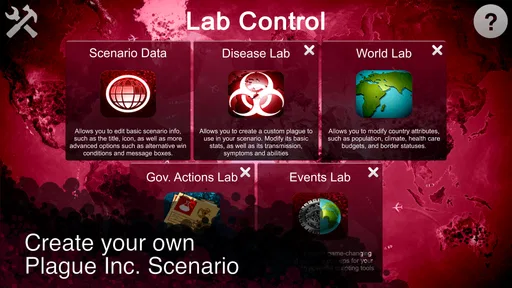
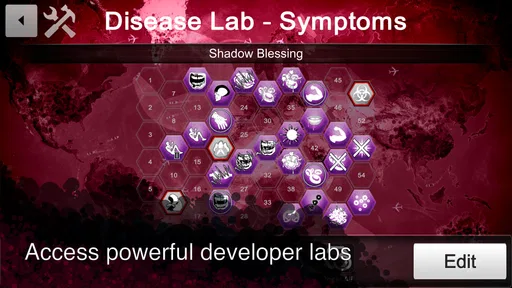
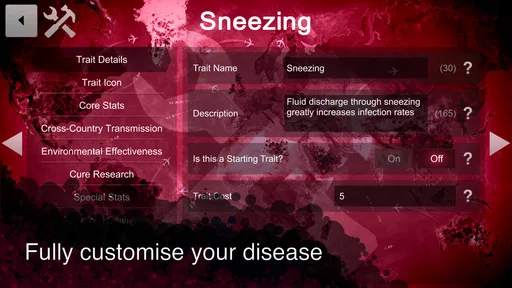
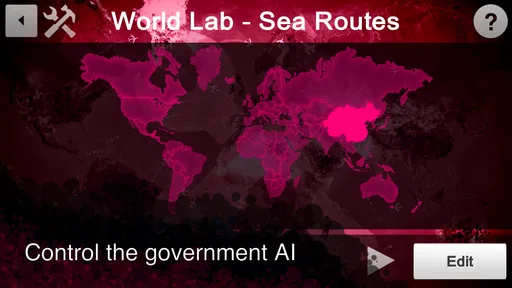
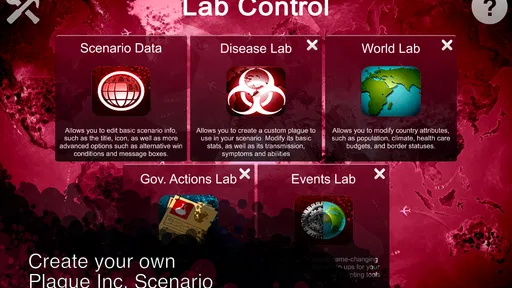
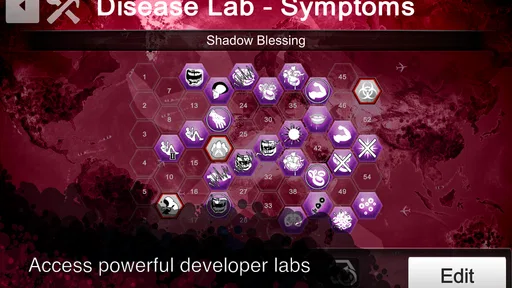
So, what’s the deal with this app? Essentially, the Plague Inc: Scenario Creator lets you design and share your own custom disease scenarios. The app is equipped with a comprehensive set of tools that allow you to tweak everything from symptoms, transmission rates, and even cure responses. It’s like being a mad scientist, minus the ethical dilemmas.
Intuitive Interface
One of the things I love about this app is its user-friendly interface. You don’t need a degree in virology to navigate through its features. The layout is intuitive, and each tool has a simple guide to help you along the way. You can jump right in and start creating without having to spend hours figuring out how things work.
Still, an approachable layout does not remove the need to test your choices. I find it useful to change one major element at a time, then play through the result before adding more complexity. If a scenario feels too easy or too punishing, that gradual approach makes it easier to identify which adjustment caused the imbalance. It is a more reliable workflow than changing several settings at once and guessing afterward.
Endless Possibilities
The possibilities are practically endless. Whether you want to create a scenario where cats are the primary carriers of a deadly virus or design a world where a sneeze can bring nations to their knees, this app has got you covered. You can adjust the lethality, spread, and even the environmental factors that affect your disease. It’s like playing god, but with more spreadsheets.
More From Our News Desk

Weather by Xiaomi Review: Clear at a Glance, Less Clear Up Close

X Under Pressure: Can It Recover When Posting Goes Wrong?

Clash of Clans Is Won Between the Battles

Android Auto Makes the Case for Quieter Car Software

MobiOffice: Transforming Mobile Productivity with Seamless Integration

EA SPORTS FC™ Mobile Soccer: Redefining Mobile Sports Gaming
That flexibility is most rewarding when I give a scenario a clear premise before touching the controls. For example, on a quiet evening I might aim for a short challenge built around one unusual transmission idea, then test whether the other settings support that premise instead of competing with it. A compact concept is easier to balance and explain to friends than a long list of dramatic effects. It also gives me a clear question to answer during testing: does the central idea actually shape the playthrough?
There is a real design trade-off here. More extreme settings may sound amusing, but piling them together can make a scenario feel arbitrary rather than clever. I would rather make one demanding choice that changes how a player thinks than simply push every danger upward. If I’m creating for other people, I’d test the scenario from the player’s perspective and make sure its difficulty feels connected to its premise.
Community Sharing
The app also boasts a community sharing feature. Once you’ve crafted your perfect scenario, you can share it with other players. Likewise, you can download scenarios created by others, offering a never-ending supply of new challenges. This community aspect adds a layer of replayability that keeps the game fresh and exciting.
Sharing works best when I treat it as part of the design process, not just a final button press. I can try other people’s scenarios to see how they communicate a premise through their choices, then bring that lesson back to my own work without copying it. A strong community creation can also be a better pick than building from scratch when I only want a new challenge for a short session.
Compared with ordinary productivity apps, this is a narrow creative tool rather than a place to manage tasks, notes, or schedules. Compared with simply replaying standard Plague Inc. content, its value is the chance to experiment with custom setups and encounter player-made ones. If you do not already enjoy Plague Inc.’s strategy, or you want an app for everyday organization, I would skip this and choose a tool designed for that purpose instead.
Using it on the move
On a phone, I’d use the creator in short, focused stretches: adjust a few parameters while waiting somewhere, then return to the scenario when I have enough time to test it properly. The small-screen format suits quick edits, but careful balancing is easier when I’m not rushing or frequently interrupted. A useful habit is to keep the core idea simple enough to remember, so I can resume without having to rethink the entire design.
If a connection drops while I’m trying to browse or share, I would avoid making assumptions about whether an action completed. I’d check the relevant screen before repeating it, especially if I’m unsure whether a scenario was submitted or downloaded. That cautious approach helps prevent confusion, while keeping a local note of the scenario’s intended premise can make it easier to reconstruct an edit if I need to revisit it.
For data-conscious use, the sensible distinction is between designing and interacting with community content. I would reserve browsing and sharing for a connection I’m comfortable using, and avoid repeatedly refreshing community areas just to see whether something has changed. The app’s $3.99 price makes it a paid choice rather than a casual free download, so I’d buy it for the creator and its connection to Plague Inc., not on the assumption that it will replace a broader productivity app.
Details worth knowing before installing
Ndemic Creations developed this productivity app, which is rated for Everyone and requires Android 6.0 or later. It was released on April 25, 2017, and version 1.2.8 is the current version. It has a 4.0 average from around 2,700 ratings, with over 100,000 installs and 639 written reviews. Those figures suggest an established niche audience, but they do not tell me whether the specific community scenarios will match my taste; I’d approach browsing with curiosity rather than expect every creation to be polished.
Before buying, I’d ask myself whether I want to spend time making scenarios or mainly want something to play right away. The creator’s strongest value comes from treating a setup as a design problem: form an idea, make a few changes, test the result, and revise. If that cycle sounds enjoyable, the paid price may feel reasonable for a focused creative companion. If I expect a large catalogue of ready-made content to do all the work for me, I’d be more cautious about spending money.
A practical way to start
For a first session, I would avoid trying to build a sprawling scenario. I’d choose one central twist, adjust only the settings that support it, and play a test run before deciding whether it needs more complications. This makes the outcome easier to judge and gives me a useful baseline for later experiments. If I’m creating for friends, I’d describe the premise plainly and see whether the challenge itself delivers on that promise.
A realistic use for the app is a short evening project: I have an idea during a commute, jot down its central premise, then work on it later when I can concentrate and test it. If I have only a few minutes, browsing other people’s creations may be more satisfying than starting a design I cannot properly check. The key distinction is between making a quick edit and finishing a balanced scenario; the former fits a spare moment, while the latter deserves a more deliberate session.
That workflow also helps answer whether the tool suits a casual player. Someone who likes experimenting with cause and effect can enjoy it without treating scenario design as a serious hobby. Someone who prefers a polished, fixed campaign with no tuning may find the editor’s freedom more like work than play. I’d choose based on whether the process of shaping a challenge is part of the fun for me.
What community browsing adds—and what it doesn’t
Community scenarios are useful not only as extra challenges but as examples of how different people interpret the same creative space. I’d look for a clear premise and a setup that seems internally consistent, rather than assume that a dramatic title guarantees a satisfying run. Trying a few examples can help me spot which kinds of difficulty I enjoy before investing time in my own project.
There is a trade-off between variety and curation. Player-made content can surprise me in ways a fixed set of official scenarios may not, but quality and style can vary from one creation to another. When I want a dependable, carefully shaped experience, the familiar Plague Inc. content is the safer choice. When I’m curious and willing to sample, the community side offers a different kind of replay value.
Sharing my own work also changes what I consider “finished.” A scenario that makes sense to me may be confusing to someone encountering it cold, so I’d test whether its central challenge comes through without a long explanation. That is a useful reason to keep the premise focused: other players can judge the design through play rather than needing me to explain every choice first.
Choosing the right moment to connect
Because browsing and exchanging scenarios are the clearest network-dependent parts, I’d separate those from the thinking and testing I can do around a design. I might spend time refining an idea when I’m away from a reliable connection, then leave discovery or sharing for a better-connected moment. This avoids making a weak signal the center of a session and keeps the creative task from turning into repeated attempts to load community content.
If an upload or download seems interrupted, checking the screen and the scenario list before trying again is a sensible habit. It reduces the chance of creating uncertainty about which version I’m working on or whether an action completed. For an important design, I’d also keep a concise note of its premise and intended challenge outside the app; that is not a replacement for the editor, but it gives me a reference point if I need to pick the work back up.
I would not choose this app for a data-heavy browsing session on an uncertain connection, nor would I install it expecting a general offline productivity workspace. Its appeal is tied to a specific game and to optional community exchange. If those parts fit how I play, connectivity supports the experience; if I want a self-contained note editor or a broad creation suite, another app is a better match.
Details worth knowing before installing
Ndemic Creations developed this productivity app, which is rated for Everyone and requires Android 6.0 or later. It was released on April 25, 2017, and version 1.2.8 is the current version. It has a 4.0 average from around 2,700 ratings, with over 100,000 installs and 639 written reviews. Those figures suggest an established niche audience, but they do not tell me whether the specific community scenarios will match my taste; I’d approach browsing with curiosity rather than expect every creation to be polished.
Final Thoughts
In conclusion, Plague Inc: Scenario Creator is a must-have for fans of the original game looking to expand their creativity. It’s not just about wiping out humanity; it’s about doing it with style. Whether you’re a strategic mastermind or just looking to have some fun, this app provides hours of entertainment. Just remember, it’s all fun and games until someone designs a scenario that hits a little too close to home!
My recommendation is strongest for players who like tinkering, testing, and sharing ideas, and weaker for anyone who only wants a quick, ready-made game or a conventional tool for productivity. Connectivity adds a useful route to community-made challenges, but it is not the reason to install the app if you have no interest in creating or exploring scenarios. If the appeal is making a premise play well—not merely making it extreme—this focused creator has a satisfying niche.
Plague Inc: Scenario Creator Frequently Asked Questions
Who developed Plague Inc: Scenario Creator, and what is the app’s purpose?
Plague Inc: Scenario Creator is developed by Ndemic Creations. It is a creative companion for Plague Inc, built around making custom scenarios rather than simply playing a prepared one. You can shape your own take on the game’s world and share scenarios with other players, giving fans a way to explore ideas beyond the standard experience. Its focus makes it most appealing to players who enjoy designing as well as playing.
What should I know about the cost and age rating before downloading?
Plague Inc: Scenario Creator costs $3.99 and is rated Everyone. That gives you a straightforward starting point when deciding whether it suits your budget and household. The app is a productivity-style creation tool for Plague Inc, so its value will depend on whether you want to build and share custom scenarios. If you are mainly looking to play the original game, this app serves a different purpose.
What is Plague Inc: Scenario Creator?
Plague Inc: Scenario Creator is an innovative tool that allows players to craft their own custom scenarios for the popular strategy simulation game, Plague Inc. Users can design unique diseases, modify world events, and share their creations with others. This app enhances the gaming experience by enabling creativity and personalized storytelling.
How do I create a scenario in Plague Inc: Scenario Creator?
To create a scenario, open the app and start by selecting the 'New Scenario' option. You can then customize various elements such as disease type, transmission methods, and government responses. The intuitive interface allows for easy modification of gameplay mechanics. Once completed, scenarios can be saved and shared with the community.
Is Plague Inc: Scenario Creator available for both Android and iOS?
Yes, Plague Inc: Scenario Creator is available on both Android and iOS platforms. Players can download the app from Google Play Store for Android devices and from the Apple App Store for iOS devices. It ensures cross-platform accessibility, allowing a wide range of users to engage with its features.
Pros
- Extensive customization options
- User-friendly interface
- Engaging community features
- Regular updates with new tools
- Supports creativity and learning
Cons
- Limited free resources
- Requires in-app purchases
- Occasional performance lags
- Complex for beginners
- Limited offline functionality













