Pikmykid Parent
- 572.00
- 3.6
- Installs
- 100.00K
- Price
- Free

Screenshots




Analysis by Reviewed
School pickup is one of those everyday tasks that looks simple until several adults, changing schedules, and a waiting child have to fit together. I tried Pikmykid Parent with that situation in mind, and my impression is that it is most useful when a household needs a dedicated place for pickup coordination rather than another general chat thread. It is a free productivity app from Sachi Tech Inc, designed for parents and listed for everyone to use.
The important distinction is that this is not a broad family organizer. I would not install it expecting a complete calendar, shared shopping list, or replacement for ordinary messaging. Its value is narrower: it gives parents a school-pickup-focused tool to work with, which can make a specific part of the afternoon less dependent on scattered texts and last-minute phone calls.
Where it fits in a real household routine
Imagine a weekday when one parent is working from home, another is in transit, and a grandparent may need to handle dismissal. In a normal group chat, the useful information can quickly disappear among unrelated messages. A parent-focused pickup app is easier to justify in that situation because everyone involved can concentrate on the same task instead of searching through a conversation.
I especially like the idea of using it as a shared household reference point. One adult can take primary responsibility for the school run while another keeps track of what is happening, and the family does not have to treat every change as a separate explanation. That does not eliminate the need for clear communication, but it can reduce the small misunderstandings that happen when pickup arrangements are passed from person to person.
There is a practical boundary here: the app only helps when the people who need to coordinate are actually connected to the relevant school and parent workflow. It is not a magic bridge between every caregiver and every institution. Before relying on it for a busy afternoon, I would make sure each participating adult understands what the app is being used for and where ordinary communication is still necessary.
For a single parent who always handles pickup personally, the benefit may be modest. The app becomes more worthwhile when responsibility moves between adults, when schedules change, or when a child’s dismissal routine needs to be handled consistently by more than one person.
Keeping a shared device from becoming a shared account
Households often use an old phone or tablet as a common family device. That can be convenient, but I would be careful about treating a shared screen as permission for everyone to use the same parent account. A pickup tool deals with family logistics, so account boundaries matter. Each adult should know which account is active and should avoid making changes while another caregiver assumes the information is unchanged.
More From Our News Desk

Weather by Xiaomi Review: Clear at a Glance, Less Clear Up Close

X Under Pressure: Can It Recover When Posting Goes Wrong?

Clash of Clans Is Won Between the Battles

Android Auto Makes the Case for Quieter Car Software

MobiOffice: Transforming Mobile Productivity with Seamless Integration

EA SPORTS FC™ Mobile Soccer: Redefining Mobile Sports Gaming
My preferred arrangement would be simple: use the shared device for checking the current routine, but let the responsible adult manage account-related actions from their own phone whenever possible. That keeps the household device useful without turning it into an untracked control panel. If several adults share one screen, signing out when finished is a sensible habit, particularly in a home where children can reach the device.
I would also avoid letting a child use the parent account as if it were a child-facing app. The store age rating is Everyone, but that does not mean every account action is appropriate for a child to perform. The age label tells me the app is broadly suitable for its listed audience; it does not replace adult judgment about who should manage school pickup information.
This is one of the less obvious decisions with a family logistics app: convenience and accountability are not the same thing. A shared tablet may make information visible, but it can also make it unclear who changed something or who is responsible for checking it. Establishing that rule before an emergency is much easier than sorting it out during dismissal.
Setting it up without overcomplicating the routine
When I approach an app like this, I would start with the smallest useful setup rather than trying to involve every relative immediately. Begin with the parent who normally handles pickup and one backup adult. Once the basic routine is understood, add other caregivers who genuinely need access. This makes it easier to notice whether the app improves coordination or merely adds another place to check.
The app is currently version 4.5.15 and supports devices running Android 7.0 or later. That makes it approachable for households keeping an older Android phone in service, although compatibility alone does not guarantee that an aging device will feel comfortable to use. I would test the app on the actual phone that will be carried to school, not just on a newer household device.
A useful setup habit is to decide in advance who checks the app before leaving home, who handles a change during the journey, and who confirms the child has been collected. Those roles can be informal, but naming them prevents the classic problem where two adults each assume the other one is watching the latest update.
I would also keep the app’s purpose clear for children. If a child sees the shared device, explain that it is being used by adults to organize pickup, not as a general messaging space or a toy. That small explanation helps preserve trust and prevents a child from interpreting a change in the pickup plan without an adult present.
Using it alongside normal communication
My strongest recommendation is to treat Pikmykid Parent as the coordination layer, not the only communication channel. A family may still need a phone call for an urgent issue, a school’s established process for official instructions, or a direct message when a caregiver is unsure what to do. The app can organize the parent side of the routine, but it should not encourage anyone to ignore the school’s own directions.
This matters most when plans change close to dismissal. One person may see an update while another is already driving. A quick verbal confirmation can be safer than assuming that everyone has viewed the same information. In my view, the best workflow is: use the app for the planned arrangement, use direct communication for uncertainty, and follow the school’s instructions when they differ from a household assumption.
That approach also makes the app easier to compare with ordinary alternatives. A group chat is flexible and familiar, but it is easy for pickup details to get buried. A calendar is good for recurring schedules, but it is not built around the practical handoff of a child. A notes app can store instructions, yet it usually depends on someone remembering to update and read the right note. Pikmykid Parent is more focused than all three, which is its main advantage and also its main limitation.
If your family already has a reliable school-provided system that every caregiver uses consistently, adding another parent app may create duplication. In that case, the better choice may be to keep one official workflow and use a simple family message only for exceptions. I would choose this app when it fills a coordination gap, not merely because another download is available.
Trust, visibility, and the child’s age
Pickup arrangements involve more than convenience. They affect a child’s sense of who is coming, when the routine changes, and which adults are responsible. I would therefore introduce the app in a calm, age-appropriate way. A younger child may only need to know that the adults have organized the pickup. An older child may reasonably want to understand why a different person is collecting them, especially when the change happens unexpectedly.
The app should support that conversation, not replace it. I would never make a child responsible for monitoring the parent workflow or interpreting an update alone. Even with an Everyone rating, the meaningful question is whether the adults around the child are using the tool carefully and explaining changes honestly.
Shared-device use deserves extra attention here. If a child can open the family tablet, avoid leaving sensitive household information exposed unnecessarily. The practical solution is not to make the child anxious about the app; it is to establish a simple device rule, such as using the parent account only with an adult and returning to the device’s normal locked state afterward.
For older children who are becoming more independent, the app may be useful as part of a wider conversation about punctuality and responsibility, but I would not treat it as proof that a child can manage their own pickup. A digital status or arrangement still depends on real-world factors such as traffic, school procedures, and the adult who is physically present.
What the public reception suggests
The app has a 3.6 average from around nine hundred ratings, with over five hundred written reviews and more than one hundred thousand installs. I read those figures as a sign of a real but mixed experience rather than universal approval. There is enough adoption to show that the pickup problem is meaningful to families, while the middling average reminds me not to promise a frictionless experience for everyone.
That balance matches how I would evaluate it. A focused school-pickup tool can feel extremely helpful when it matches the family’s school process. It can feel unnecessary or confusing when the household has only one pickup person, when caregivers rarely change, or when the school already provides a system that works smoothly. The app’s usefulness depends heavily on fit.
I would pay attention to how your own school community uses it before making it central to the routine. A parent app is most effective when it reflects a shared process rather than becoming one person’s private workaround. If only one caregiver checks it and everyone else relies on texts, the household may still have the same communication gaps, just with one additional screen involved.
Small workflow choices that make a difference
One practical tip is to create a fixed checking point. For example, the primary caregiver can review the pickup arrangement before leaving work, while the backup adult checks only when they are asked to take over. This avoids a situation where everyone is constantly refreshing the app but nobody clearly owns the final decision.
A second tip is to use ordinary language when discussing changes at home. Instead of telling a child that “the app changed,” explain which adult is coming and what the child should do at dismissal. The tool is for adults; the child needs a clear, human instruction.
A third trade-off concerns backup plans. Do not assume that having a digital arrangement means the household has an emergency plan. Keep a clearly understood alternative for a missed notification, a dead phone, or an adult who is delayed. The app can make the normal workflow more organized, but resilience still comes from people knowing what to do when the normal workflow fails.
A fourth insight is to review access whenever family circumstances change. A new caregiver, a changed work schedule, or a move to a different school can make an old arrangement misleading. Rather than leaving every previous participant involved indefinitely, I would periodically confirm who still needs to coordinate pickup and who should step back.
Who should use it, and who should skip it
I would recommend trying Pikmykid Parent if your household regularly shares school pickup duties, has a backup caregiver, or needs a more focused alternative to a busy group chat. It is particularly appealing when the same coordination problem happens several times a week and the adults involved are willing to follow one agreed process.
I would be less enthusiastic for a household where one parent always collects the child and there are no changes to the routine. In that case, the app may add little beyond a calendar reminder or the school’s existing communication method. I would also hesitate if your school does not use the relevant parent workflow, because a tool for coordinating pickup cannot solve a mismatch between the app and the institution.
Families that want a complete household organizer should look elsewhere or combine this with another tool. Pikmykid Parent is not the right choice for managing chores, appointments, homework, groceries, and family conversations in one place. Its focused nature is helpful only if pickup coordination is the problem you actually need to solve.
My household verdict
After looking at it as a parent tool rather than a general productivity download, I see a clear purpose. Pikmykid Parent can bring structure to school pickup when several adults share responsibility, especially in a home where group messages and verbal reminders are no longer dependable. The free price removes the main barrier to trying it, and the Everyone rating makes it broadly approachable from an age-classification standpoint.
Still, I would use it with defined account boundaries, a named adult responsible for checking the arrangement, and a backup communication plan. Those habits matter more than simply installing the app. The tool can organize a routine, but it cannot replace judgment, school instructions, or a direct conversation when plans become uncertain.
My final recommendation is conditional but positive: try it when your family needs a dedicated pickup workflow and can agree on how to use it. Skip it when your existing school system already works or when you are looking for an all-purpose family organizer. For the right household, the real benefit is fewer ambiguous handoffs, not more notifications. That is a modest goal, but for a busy school afternoon, it can be exactly the useful one.
Pikmykid Parent Frequently Asked Questions
Is Pikmykid Parent free, and which devices can run it?
Pikmykid Parent is a free productivity app from Sachi Tech Inc. It is suitable for a broad audience, with an Everyone age rating, and the listed minimum operating-system requirement is 7.0. Before installing, check that your device meets that requirement and that you can access the contact details associated with your child’s school account.
What is Pikmykid Parent, and what is it used for?
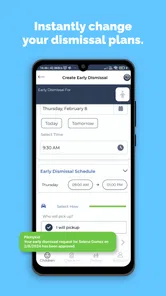
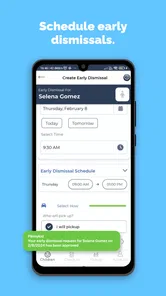
Pikmykid Parent is a school dismissal and student-pickup app designed to help families communicate with participating schools. Parents can typically use it to manage pickup plans, notify the school when they are on the way, authorize other people to collect their child, and receive dismissal updates. Its exact features depend on whether the child’s school has enabled and configured the service.
How do I create an account and connect my child to Pikmykid Parent?
After installing Pikmykid Parent, you generally need to register using the contact information associated with your child’s school records. The school must then match or approve your account before student information and dismissal options appear. If your child is missing, your details are rejected, or the app shows incorrect information, contact the school office rather than creating multiple accounts.
Can I authorize another person to pick up my child?
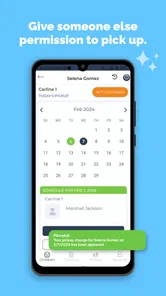
In participating schools, Pikmykid Parent commonly allows parents or guardians to add approved pickup contacts, such as relatives, friends, or caregivers. You may need to provide their name and other identifying information, and some schools may require additional approval. Always review the school’s rules, because adding someone in the app may not replace required written authorization or identity checks at dismissal.
Does Pikmykid Parent show real-time dismissal or pickup information?
The app can provide dismissal-related notifications and may let parents indicate that they are arriving, but the availability and timing of updates depend on the school’s setup, staff procedures, internet connection, and local policies. It should not be treated as a guaranteed live tracking system. Keep notifications enabled and follow the school’s instructions if the app and onsite information differ.
Pros
- Quickly confirms pickup plans and dismissal changes.
- Real-time notifications help reduce uncertainty at school pickup.
- Supports authorized pickup contacts for added safety.
- Useful for families managing multiple children at one school.
- Pickup instructions can be shared without calling the school.
Cons
- Requires the school to use Pikmykid for full functionality.
- Notifications may be delayed by weak internet or phone settings.
- Some features depend on permissions configured by school staff.
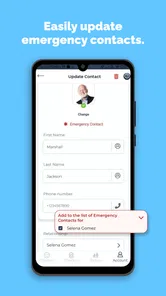
- Parents may need to update contacts and schedules manually.
- The interface can feel confusing until the pickup process is learned.











