

PhotoShare Frame v2
- 1.55K
- 4.8
- Installs
- 100.00K
- Price
- Free

Screenshots



Analysis by Reviewed
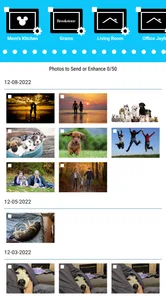
PhotoShare Frame v2 is the kind of House & Home app that makes sense when a digital photo frame is already part of your family routine. I used it with one simple goal: move personal photos from a phone to a PhotoShare Frame without turning the process into a small technical project. That focus is both its strength and its boundary. It is not a general photo editor, cloud gallery, or social network. Its job is narrower: help you send images to the frame that displays them at home.
That narrow purpose can be surprisingly useful. A frame in a living room, hallway, kitchen, or care home often works best when the people who contribute photos are not standing next to it. Instead of waiting for a visit or handling a memory card, I can prepare a picture on my phone and send it toward the shared display. The experience feels more personal than leaving the frame with the same small set of images for months.
PhotoShare Frame v2 is free to use, is suitable for Everyone, and comes from SimplySmart Home by Switchmate. It has reached over one hundred thousand installs, with an average rating of 4.8 from around four thousand ratings. Those figures suggest that the basic idea is landing well with its intended audience, but they do not change the most important question: whether your frame-and-phone setup has a reliable connection when you actually want to update it.
How connectivity shapes the everyday experience
I find the connection works best when I treat photo sharing as a small delivery workflow, not an instant screen update. A quick check of the frame’s usual location and a pause after sending help me avoid duplicate attempts. The next section looks at how to choose and pass along pictures so the frame stays personal without becoming an unfiltered copy of a phone gallery.
The useful moment happens away from the frame
The best use case is not “I am beside the frame and want to change a picture.” It is “I am somewhere else, I have a meaningful photo on my phone, and I want it to appear on a frame used by someone at home.” That distance is what gives the app its value. A family member can share a new birthday picture, a holiday snapshot, or an ordinary moment from the week without needing to explain a technical step to the person looking at the frame.
That also means the app depends on a chain of communication rather than a single tap. The phone needs to reach the service, and the PhotoShare Frame needs to receive the update through its own connected setup. When everything is available, the process feels pleasantly direct. When one part of that chain is unavailable, the result can feel less immediate than sending a picture in a messaging app.
I found it helpful to think of each upload as a delivery rather than an instant screen change. After choosing a photo, I would give the frame time to receive it instead of repeatedly pressing the send control. That small change in expectation prevents unnecessary retries and makes it easier to tell whether a genuine connection problem exists.
More From Our News Desk

 Instagram
Instagram’s Power Comes From Its Place in Your Phone
A close look at how Instagram turns Meta’s reach, recommendation systems and everyday camera habits into durable platform power—and what that costs users.

 Gmail
GmailGmail in a Busy Inbox: Who Benefits Most?
From first account to crowded workday, Gmail earns its place through dependable search and flexible sorting—but its best fit depends on how much inbox maintenance you can tolerate.

 Prime Video
Switching to Prime Video: What Changes in Your Viewing Routine
Prime Video can make a compelling second home for streaming, but switching means learning a different catalog, rental layer, and route from browsing to playback.

 Universal TV Remote Control
Universal TV Remote Control Works Best as a Reliable Backup
A phone remote earns its place through quick setup and reliable habits. Here is how to get more from Universal TV Remote Control—and where its limits show.

 Weather - By Xiaomi
Weather by Xiaomi Review: Clear at a Glance, Less Clear Up Close
Xiaomi’s weather app makes everyday forecasts quick to scan, but its calm surface can leave useful details and recovery paths harder to find than they should be.

 X
XX Under Pressure: Can It Recover When Posting Goes Wrong?
A resilience-focused review of X, examining setup, mistaken posts, interruptions, weak connections, and the gaps that matter when recovery needs to be dependable.
Latest News



Why the network matters more than the photo itself
The app’s central task is simple, so most friction comes from connectivity, not from image selection. A beautiful photo cannot reach the frame if the phone is temporarily struggling with its connection or the frame is not communicating properly. This is especially important in homes where the frame sits in a room with a weaker signal, or where the device is moved between rooms and forgotten.
For a shared household frame, I would set it up in its permanent location before inviting several people to contribute. That makes troubleshooting much easier. If the frame is still being tested on a table near the router, a later move can create confusion: the app may appear to work during setup but become unreliable in the place where the frame will actually live.
The practical lesson is simple: connectivity is part of the product experience, not an invisible background detail. The app can make photo sharing easier, but it cannot make an unstable home connection behave like a dependable one.
Using it from a phone without making the phone the whole experience
The mobile context is comfortable because the photos I want to send are usually already on my phone. I do not have to search through a desktop folder or prepare a separate export just to share a recent image. That makes spontaneous updates realistic: a quick family photo can become part of the frame’s rotation while the moment is still fresh.
There is a trade-off, though. A phone is also full of distractions, duplicates, screenshots, cropped images, and pictures that were never meant for a large display. Before sending, I recommend taking a second look at the selected image. A photo that looks fine in a small phone preview may be poorly framed for the frame’s layout, especially if the main subject is close to an edge or if the image is a vertical shot with important details near the top and bottom.
My more useful workflow was to create a small temporary selection first rather than sending every recent picture. I would choose a few images with a clear subject, check them for accidental screenshots or private details, and then send the group. This keeps the frame feeling curated instead of turning it into a mirror of the phone’s camera roll.
A realistic family scenario
Imagine a grandparent has a PhotoShare Frame in the living room while children and grandchildren live in different cities. One person takes a picture at a school event and wants it displayed at home. The phone is the natural starting point, and the app removes the need to transfer the file manually. If the home frame is connected and ready, the recipient can see a new family moment without opening a messaging thread or navigating a gallery.
The benefit is emotional as much as technical. A message is something you read and may forget to revisit. A frame turns selected photos into part of the room. The app is valuable because it supports that ongoing visual connection, not because it offers a long list of editing tools.
However, this scenario also exposes the main limitation. If the recipient expects every image to appear immediately, or if contributors are sending photos from several different places at once, expectations can become unclear. I would agree on a simple household routine: send only the photos worth displaying, allow a little time for delivery, and check the frame before assuming an upload failed.
What to do when an image does not appear
When a photo fails to show up, I would avoid treating the send button as a guarantee. First, I would check whether the phone has a working connection and whether the frame is powered and positioned where it normally receives its connection. Then I would wait briefly before trying again. Repeatedly sending the same image can create uncertainty about whether there are duplicates waiting to arrive.
If the problem continues, I would reduce the situation to one test photo. Choose a single ordinary image, send it, and observe the frame rather than testing with a large batch. This separates a general connection problem from a problem caused by the particular selection. It also gives you a cleaner starting point if you need to restart the frame or reopen the app.
Another useful habit is to keep track of what has already been sent during troubleshooting. When people are sharing from multiple phones, it is easy to assume an image failed simply because nobody remembers which contributor sent it. A small shared note or a quick confirmation message can prevent unnecessary retries, particularly for family members who are less comfortable with connected devices.
Recovery should be calm, not repetitive
The app is easiest to live with when I treat occasional delays as a reason to diagnose the connection, not as a reason to keep tapping. Close and reopen the app only when the screen itself seems stuck, and restart the frame only after checking the obvious basics. The goal is to change one thing at a time so you know what helped.
For a household with several contributors, one technically confident person should handle the initial setup and keep the process consistent. That does not mean everyone needs technical knowledge. It means the family avoids changing settings on several phones at once, which can make a small connection issue look like a problem with the entire service.
This is also where a conventional alternative may be better. If your priority is guaranteed immediate viewing on another person’s phone, a messaging app is more familiar and gives clearer conversational feedback. If your priority is displaying a carefully managed collection from a computer, a USB-based frame or a broader photo-management system may offer a more predictable workflow. PhotoShare Frame v2 is strongest when the destination is specifically the PhotoShare Frame and the value comes from updating a physical display.
Being thoughtful with mobile data and photo selection
Because the app is designed around sending photos, I would use it deliberately when I am away from a trusted home connection. A few selected images are easier to manage than a large batch, and they reduce the chance of sending something accidentally or using more mobile data than intended. This is not about avoiding the app outside the home; it is about making uploads intentional.
I also recommend checking the audience before sending. A frame in a shared room is different from a private phone gallery. Photos may be seen by visitors, children, or anyone passing through the space. Selecting images for the room rather than merely selecting images that look good on the phone is a small but important change in judgment.
For families, a rotating contribution schedule can work well. One person might share a few images after a weekend trip, while another adds everyday moments later. This avoids flooding the frame and gives each contributor a clear role. It also makes the frame feel alive without requiring constant attention from the person who owns it.
Who will appreciate it most
I would recommend this app to people who already own a PhotoShare Frame and want an uncomplicated way to keep its content current. It is particularly suitable for families spread across different locations, relatives who want to contribute from their phones, and anyone who likes the idea of a physical photo display rather than another gallery hidden inside a device.
It can also suit a home where one person manages the frame for others. A technically comfortable user can select and send images while the frame remains in a shared space used by people who do not want to manage apps themselves. That division of responsibility is one of the most practical reasons to use it.
I would be more cautious about recommending it to someone who has not chosen a compatible PhotoShare Frame, wants a general-purpose photo backup tool, or expects advanced editing and organization. The app’s value is tied closely to the physical frame. Without that destination, its purpose becomes much less compelling.
What the current version tells me about the experience
The current version is 4.0.15, and the app was released on June 13, 2022. It supports devices running Android 5.1 or later, which gives it a broad compatibility range for Android users with older phones. That is useful in a family setting, where not everyone upgrades devices at the same time.
Still, compatibility is not the same as identical comfort on every phone. Older hardware may make browsing a large photo collection feel slower, while newer phones may encourage faster sharing habits. I would keep the selection process tidy on any device, but especially on an older one: choose a small group, review it, and avoid treating the app as a full replacement for the phone’s gallery.
The Everyone content rating also fits the app’s household purpose. The more meaningful safety decision is personal rather than age-based: decide which images belong on a communal display and which should remain private. That simple review step matters more than sending every attractive picture automatically.
Where it sits beside the usual alternatives
Compared with sending photos through a chat app, the frame-focused approach is less conversational but more ambient. A message asks someone to open it; a frame places the image in the room. Compared with storing photos in a cloud album, it is less about building a searchable archive and more about choosing what people should see today.
Compared with a memory card, the app is more convenient for contributors who are not physically present. A card can be dependable for a fixed collection, but it requires access to the frame and a willingness to manage files manually. The app makes remote contribution the central workflow, provided the connection between phone, service, and frame is behaving properly.
That distinction helps clarify the purchase decision. If you want a digital frame that family members can update from their phones, this is a sensible companion. If you want a photo backup, a collaborative album, or a professional display system with detailed controls, I would choose a tool built for that purpose instead.
My connectivity verdict
After using it as intended, I see PhotoShare Frame v2 as a focused bridge between mobile photos and a physical home display. Its best moments happen when the phone is in one place and the frame is in another, turning a recent image into something visible to the people at home. The experience is personal, easy to understand, and well suited to family sharing.
Its weakness is the same thing that enables its convenience: the workflow relies on connected devices. A delayed or missing image can require patience and basic troubleshooting, and the app does not replace the need for a stable setup. I would not choose it for people who dislike network-dependent gadgets or who need a guaranteed offline transfer method.
For everyone else, the recommendation is straightforward. Keep the frame in a reliable location, send small and thoughtfully chosen groups, allow time for delivery, and use a single test photo when something goes wrong. With those habits, the app stays out of the way and lets the frame do what it is meant to do: keep selected family moments present in the home.
PhotoShare Frame v2 Frequently Asked Questions
Is PhotoShare Frame v2 compatible with my phone?
PhotoShare Frame v2 is an app in the House & Home category, and it requires Android 5.1 or later. Before downloading, check that your phone’s operating system meets that requirement. The app is designed to send photos to a PhotoShare Frame, so you will also need a compatible frame to use its central sharing feature.
Who is PhotoShare Frame v2 intended for?
PhotoShare Frame v2 is a practical choice for people who want to send pictures to a PhotoShare Frame, particularly households sharing family photos. Its purpose is focused rather than broad: the short description is simply “PhotoShare Frame,” and its central task is sending photos to the frame. The app is rated for Everyone, making it suitable for a general audience.
What is PhotoShare Frame v2 and what can it do?
PhotoShare Frame v2 is a digital photo-frame application designed to display and share pictures on a compatible frame or connected device. After reviewing its main functions, the app appears focused on importing photos, organizing albums, and sending images for slideshow viewing. It is especially useful for families who want to share everyday moments remotely, although the exact features may depend on the frame model and the permissions enabled during setup.
Is PhotoShare Frame v2 easy to set up for first-time users?
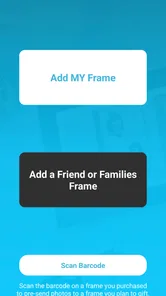
The setup process is generally straightforward, but first-time users should be prepared to grant access to photos, notifications, and possibly local network or Bluetooth functions. You typically need to pair the app with a compatible PhotoShare frame before sending images. The experience is easier when the frame is connected to a stable Wi-Fi network and both the app and frame software are updated.
Can I send photos to another person’s PhotoShare frame?
Yes, PhotoShare Frame v2 is intended to make remote photo sharing possible, provided the recipient’s frame supports the feature and has been correctly connected to the account or sharing system. Before sending pictures, check that you have the correct frame or recipient selected. This is important because shared images may appear automatically on the device, depending on its slideshow and approval settings.
Pros
- Simple setup for turning an Android device into a digital photo frame.
- Supports automatic photo rotation for hands-free viewing.
- Useful for displaying family pictures
- artwork
- or event photos.
- Can give an old spare device a practical second life.
- Designed for continuous viewing with minimal user interaction.
Cons
- May consume noticeable battery power during extended slideshow use.
- Older devices may show limited image quality or slower transitions.
- Advanced editing and photo-management tools are not a main focus.
- Some features may depend on the device’s Android version.
- The interface may feel dated compared with newer photo-frame apps.







