PhotoDirector: AI Photo Editor
- 23.62K
- 4.1
- Installs
- 50.00M
- Price
- Free

Screenshots
Analysis by Reviewed
I find PhotoDirector: AI Photo Editor most useful when a phone photo is close to what I wanted but needs a little help—or when I want to try a more playful direction without moving to a computer. Its appeal is not just the number of effects; it is the way ordinary corrections and more imaginative edits sit side by side. That flexibility is convenient, though it also means I get better results when I decide what I want to change before tapping through options.
Reading the screen and finding a sensible path
PhotoDirector is a photography app from Cyberlink Corp, and its editing approach is built around choosing a tool for the job rather than learning a full desktop-style workspace first. I find that distinction useful for someone opening an editor for the first time: the task can be as small as improving a photo or as creative as changing its mood. The app is free to download, and its Everyone age rating makes it broadly approachable, although the editing process itself still asks for attention and visual judgment.
When I am deciding whether to keep an edit, I compare the original and the result instead of trusting the first preview. That habit is particularly valuable with AI changes, because a pleasing thumbnail can conceal an awkward edge or an altered detail. I zoom in on the area that matters, then zoom back out to see whether the whole picture still feels coherent. It is a simple workflow, but it helps me avoid sharing an edit that only looks convincing at a glance.
A closer look at everyday editing
For a practical test, imagine taking a quick photo during a family outing: the people are worth keeping, but the sky looks flat and a distracting object pulls attention from the scene. I’d start with a restrained enhancement, consider replacing the sky only if the lighting still feels believable, then inspect the result at full size before sharing. That last check matters: AI edits can look convincing in a small social-media preview while edges around hair, trees, or buildings look less natural when enlarged.
That workflow is where this photography app makes sense to me. It brings several kinds of editing together, so I can try a targeted correction and then decide whether the image needs a filter, a retouch, or nothing more. Compared with a basic phone gallery editor, it gives me more room to shape a picture; compared with a desktop editor, it is less suited to careful, pixel-by-pixel work. I’d choose it for quick creative changes, not for a job where every edge and color must be exact.
Creative control, comfort, and everyday use
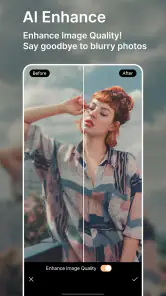
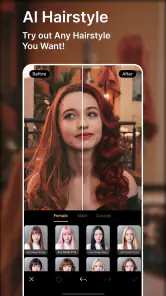
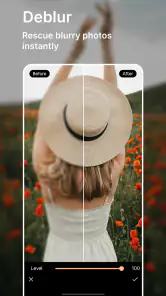
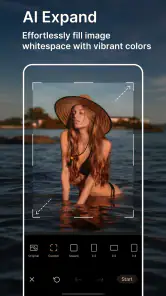
What truly sets PhotoDirector apart is its impressive AI-powered features. We all know that getting the perfect shot isn’t always easy, but with this app, you can easily enhance your photos with just a few taps. The AI technology is super smart—it can identify the elements in your photos and suggest edits that can make them pop.
One of my favorite features has to be the AI sky replacement. Ever taken a fantastic picture only to be let down by a dull, gray sky? With this app, you can swap that out for a vibrant sunset or a dramatic cloudy sky. It’s almost like cheating, but in the best way possible!
More From Our News Desk

Clash of Clans Is Won Between the Battles

Android Auto Makes the Case for Quieter Car Software

MobiOffice: Transforming Mobile Productivity with Seamless Integration

EA SPORTS FC™ Mobile Soccer: Redefining Mobile Sports Gaming

How Microsoft OneDrive Became a Mobile Productivity Giant

How Google Translate Breaks Language Barriers Effortlessly
Filters and Effects: Endless Possibilities
Another standout aspect of PhotoDirector is its vast collection of filters and effects. Whether you’re going for a vintage vibe or a modern look, this app's got you covered. I found myself spending hours just exploring different filters, each transforming my photos in unique ways.
And if you’re into getting creative, the animation effects are a must-try. You can add motion to static images, bringing them to life in a way that’s sure to catch anyone’s eye on social media.
Making creative edits feel manageable
Filters are most useful when I treat them as a starting point rather than a one-tap finish. I compare a few looks on the same image, then stop once the subject still feels like the moment I remember. For portraits, that restraint is especially helpful: strong color effects can be fun, but they can also make skin tones look less natural. If I plan to use an image for a personal profile or a family album, I prefer a subtle result over an effect that overwhelms the people in it.
Animation is better for a different purpose. I’d save it for a single eye-catching post or a playful image, rather than apply motion to every photo in a set. A still image is often easier to reuse in a printed album or a simple message, while movement can draw attention online. That choice is one reason I see the app as a flexible creative tool, not a replacement for a straightforward editor when I only want to crop or make a small brightness adjustment.
Keeping edits believable and efficient
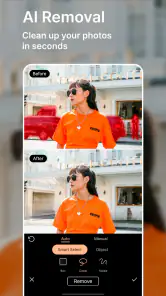
One trade-off I keep in mind is that the most dramatic option is not necessarily the most useful one. If I remove an object from a busy background, I check nearby lines, repeated patterns, and shadows; those areas can make a repair feel conspicuous if they no longer fit together. With a sky change, I look at the light on the people and buildings as well as the sky itself. If the scene’s lighting tells a different story, I’d rather keep the original than force a polished but implausible result.
For a group of photos from the same occasion, I also avoid treating each image as an isolated experiment. I settle on a restrained look for one representative photo, then use that as a visual reference while editing the rest. This does not guarantee identical results, but it helps a family album or a set of social posts feel less scattered. If every image gets a different filter or a strong effect, the collection can lose the shared atmosphere that made the occasion memorable.
Easy Editing with Professional Results
Even if you’re not a photo editing expert, you’ll find PhotoDirector’s interface incredibly user-friendly. The tools are intuitive, and the learning curve is practically nonexistent. I was amazed at how quickly I could adjust lighting, remove unwanted objects, and fine-tune my images to perfection.
The app also offers a range of templates and collage options, perfect for those who want to create something special without spending hours on it. It’s like having a professional photo editor by your side, guiding you through the process.
Comfort, access, and practical limits
In my experience, a tool-led editing app is easier to approach than a desktop workspace crowded with panels: I can focus on one kind of change at a time instead of learning a complicated editing system first. That can help casual users who want to make a picture shareable without studying photography terminology. Still, editing involves visual comparison and precise taps, so it may be tiring for someone who finds small on-screen controls or extended screen time difficult. I’d take breaks, make one change at a time, and check the finished image at a comfortable size.
Context also affects whether it is convenient. If I’m editing a picture on the move, I’d keep the goal small—perhaps a quick retouch or a filter—rather than try to perfect a complicated composite in a distracting setting. For a batch of carefully matched product shots, a larger screen and more controlled desktop workflow may be the better choice. PhotoDirector is most appealing when I want creative options close at hand, not when the work demands painstaking consistency across many images.
Using it in different situations
A realistic everyday use is getting home from a walk and wanting to send one good photo to a family chat. I might make a modest enhancement, remove a small distraction, and leave the rest untouched. That is a better fit for the app than trying to repair every picture from the outing at once. I can spend a few minutes on the image that matters, inspect it before sharing, and keep a more natural version for relatives who would prefer the scene as it happened.
On a bright commute or in a noisy waiting area, I would avoid detailed edits that depend on carefully judging color and edges. The same screen can feel different under glare or when I am in a hurry, and a rushed choice is more likely to leave an effect too strong. I’d save a draft or wait until I can look at the photo in calmer conditions. For someone who finds visual tasks tiring, working on one image and taking breaks is more comfortable than turning a quick edit into a long session.
For motor comfort, the practical question is whether tapping and comparing edits feels manageable on your device. I would keep the workflow simple, avoid repeated fine adjustments when my hand is tired, and use the undo option if an edit moves in the wrong direction. That advice is not a claim about special accessibility tools; it is a way to reduce friction in a touch-based editing task. If precise gestures are difficult, a basic editor with only a few large, familiar controls may be the less frustrating choice.
Who will get the most from it?
PhotoDirector is a good fit for someone who enjoys experimenting, wants to improve everyday phone photos, or likes making occasional social posts and collages. It is also useful when I want to test a creative direction before deciding whether a photo needs more work. Someone who only wants basic cropping may find a built-in gallery editor quicker, while a photographer who needs precise layers and detailed manual control may prefer a more advanced desktop app.
The app is free to download, with in-app purchases ranging from $0.99 to $234.99 per item, so I would explore the tools I actually use before paying for anything. It is made by Cyberlink Corp, is rated for Everyone, and its current version is 20.7.2 for devices running Android 10 or later. Those details make it straightforward to check basic compatibility, but the best way to decide whether its editing approach suits you is to try a small, nonessential photo first.
Choosing between a phone editor and other options
Against the editor already included with a phone, PhotoDirector makes more sense when I want effects, object removal, or a creative treatment beyond basic cropping and light adjustments. The built-in option remains the faster pick for a quick fix, especially if I do not want to explore several tools. A desktop editor has the opposite advantage: it is better when a project depends on careful selections, repeatable color decisions, or close control over many images. PhotoDirector sits between those choices, trading some fine control for an accessible, all-in-one creative workflow.
That middle ground will not suit everyone. If I need accurate documentation, such as an image where the scene must not be materially altered, I would stick to simple corrections and avoid changing what is depicted. If I am preparing a polished set for work, I would choose a more controlled process and review the images on a larger display. For a personal post, invitation, or playful collage, the phone-first approach is much easier to justify.
Final Thoughts
In a world where everyone is a photographer thanks to smartphones, PhotoDirector: AI Photo Editor gives you the tools to stand out. It’s more than just an editing app; it’s a creative companion that helps you tell your story through visuals. Whether you’re a casual snapper or a budding photographer, this app will make your photos shine.
So, if you’re looking for an app that combines ease of use with powerful editing capabilities, give PhotoDirector a try. It’s like having a whole creative suite in your pocket, and once you start using it, you’ll wonder how you ever lived without it!
Its place among photo apps
There is a reason this style of editor appeals to so many people: it bridges the gap between a phone’s quick built-in adjustments and a more involved creative suite. PhotoDirector has an average rating of 4.1 from around 947,000 ratings, with more than 24,000 written reviews and over 50 million installs. I read that reach as a sign that the app serves a broad mix of casual editors, not as proof that every AI result will suit every photo.
It first arrived on March 6, 2014, and the current version is 20.7.2. That history sits alongside its newer AI-focused tools, but I would still judge it by the task in front of me: a quick visual experiment is a strong match; dependable, exact retouching is a reason to slow down and inspect every edit. If the result looks artificial, undoing the change or choosing a gentler treatment is often better than trying to make the effect work.
A balanced recommendation
My practical advice is to keep an original copy of an important image and compare it with the edited version before sharing. This is especially worthwhile after object removal or sky replacement, where an edit can alter the mood of a scene as well as its appearance. For everyday memories, that flexibility is enjoyable; for documentary, work, or other situations where the scene should remain faithful, I would avoid edits that imply something happened when it did not.
Overall, I’d recommend PhotoDirector to people who want accessible creative choices and are happy to use their judgment about when an effect has gone too far. It is less compelling for anyone seeking a purely minimal editor or exact professional control, and its paid options mean it is sensible to check which tools meet your needs before spending. For casual photo-making, though, I like having the option to move from a simple correction to a more imaginative treatment without leaving the same app.
PhotoDirector: AI Photo Editor Frequently Asked Questions
Can PhotoDirector: AI Photo Editor remove unwanted objects from a photo?
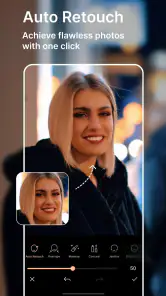
Yes. Removing unwanted elements is one of the AI-assisted editing tasks highlighted for PhotoDirector. This can be useful for cleaning up distractions in a picture before sharing it or making other edits. The app also includes tools for enhancing and retouching images, so you can combine a cleanup with other adjustments in the same editing workflow.
Can I use PhotoDirector: AI Photo Editor to make quick edits for social media?
PhotoDirector is designed for creating and editing images, with familiar adjustments alongside AI-assisted options such as removing unwanted elements, enhancing photos, retouching, and applying filters. That mix can work well when you want to polish a picture on your phone without starting with a complicated editing process. You can explore the available tools and choose the changes that suit your image.
Is PhotoDirector: AI Photo Editor a good choice for casual photo editing?
PhotoDirector may suit casual editing as well as more creative experiments. Its tools cover common aims such as improving a photo, retouching it, removing an unwanted element, or applying a filter. The app is free to download, so you can try its basic editing experience and decide whether it fits your routine before considering any optional purchases.
Who develops PhotoDirector: AI Photo Editor, and what is it for?
PhotoDirector: AI Photo Editor is a photography app developed by Cyberlink Corp. It is designed for creating and editing images, combining familiar adjustments with AI-assisted tools for tasks such as removing unwanted elements, enhancing photos, retouching, and applying filters. It may suit people who want to make quick changes on a phone as well as those who enjoy experimenting with more creative edits.
Does PhotoDirector: AI Photo Editor work on my device?
PhotoDirector: AI Photo Editor is available for Android and iOS, so it can be an option for users on either mobile platform. On Android, the listed minimum operating system is version 10; check your device’s system settings before downloading to make sure it meets that requirement. The app’s current version is 20.7.2, and compatibility can depend on your device and its software.
Pros
- Extensive editing tools available.
- User-friendly interface.
- AI features enhance photos.
- Regular updates with new features.
- Supports high-resolution images.
Cons
- Contains in-app purchases.
- Some features require premium.
- Occasional ads interrupt workflow.
- Large app size.
- Limited free version features.
- Category
- Photography
- Version
- 20.7.2












