

PowerDirector - Video Editor
- 68.64K
- 4.2
- Installs
- 100.00M
- Price
- Free

Screenshots





Analysis by Reviewed
I judge a mobile editor by whether it makes a real project easier to finish, not by how many buttons it can fit on a screen. PowerDirector - Video Editor appeals to me when I want to shape phone footage into something more deliberate than a quick trim: I can arrange clips, adjust their pacing, and use effects where they help the story. It is a substantial tool for a phone, though that extra control comes with a learning curve and a smaller workspace than a computer can offer.
What free access means in practice
PowerDirector is a free video editing app from Cyberlink Corp, so you can try its editing workflow without paying upfront. There are in-app purchases, listed from $0.99 to $249.99 per item, which makes it worth checking what a particular paid option includes before spending. I would treat the free access as a way to decide whether the tools suit your projects, rather than assuming every effect or export choice is included at no cost.
The app is rated for Everyone, has a 4.3 average from around 1.7 million ratings, and has passed 100 million installs. Those figures suggest it has reached a broad audience, but they don’t tell me whether it will fit your style: the better test is to bring in a short clip and see how comfortably you can trim, layer, and finish it on your device.
A practical way to judge its value
Before paying for anything, I’d make a complete test project with the tools available at no cost: import a few clips, arrange them, add only the adjustments you need, and check the finished result. That tells you more than browsing effect thumbnails because it tests the whole routine, including whether the controls make sense to you and whether the final video meets your needs.
I’d also decide what problem a purchase is meant to solve. If you repeatedly reach for a particular paid option, it may be worth evaluating on its own merits; if you are only tempted by a feature because it looks entertaining, I’d wait until a real project calls for it. The wide listed range makes this a sensible habit rather than an argument for buying the most expensive option.
Feature-packed Editing Powerhouse
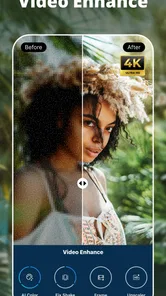
The PowerDirector - Video Editor is not just any video editing app; it's a powerhouse of features that can cater to both beginners and pros. What really blew me away was its 4K video editing capability. I mean, who would have thought you could edit such high-quality videos on a mobile device? It's perfect for those who want to create content with a professional touch.
User-friendly Interface
One of the things I love about PowerDirector is its user-friendly interface. You don't need to be a tech wizard to navigate through the app. The layout is intuitive and easy to understand, making the editing process less daunting. Whether you're trimming clips, adding transitions, or layering effects, everything is right where you need it to be.
More From Our News Desk

 Gmail
GmailGmail in a Busy Inbox: Who Benefits Most?
From first account to crowded workday, Gmail earns its place through dependable search and flexible sorting—but its best fit depends on how much inbox maintenance you can tolerate.

 Prime Video
Switching to Prime Video: What Changes in Your Viewing Routine
Prime Video can make a compelling second home for streaming, but switching means learning a different catalog, rental layer, and route from browsing to playback.

 Universal TV Remote Control
Universal TV Remote Control Works Best as a Reliable Backup
A phone remote earns its place through quick setup and reliable habits. Here is how to get more from Universal TV Remote Control—and where its limits show.

 Weather - By Xiaomi
Weather by Xiaomi Review: Clear at a Glance, Less Clear Up Close
Xiaomi’s weather app makes everyday forecasts quick to scan, but its calm surface can leave useful details and recovery paths harder to find than they should be.

 X
XX Under Pressure: Can It Recover When Posting Goes Wrong?
A resilience-focused review of X, examining setup, mistaken posts, interruptions, weak connections, and the gaps that matter when recovery needs to be dependable.

 Clash of Clans
Clash of Clans Is Won Between the Battles
Its raids are quick; its community is a long-term project of coordination, teaching, rivalry, and shared responsibility—with all the friction that entails.
Latest News



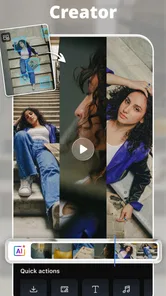
The app also offers a wide range of editing tools. From basic trimming and splitting to advanced features like chroma key and slow motion, there's something for every video editing enthusiast. Plus, the library of effects and transitions is vast, giving you endless possibilities to enhance your videos.
Turning features into a useful workflow
For a practical example, imagine filming a few short clips during a family outing. I’d first trim each clip to keep only the moments that move the story along, then arrange them before adding transitions. I’d save effects for the places where they help the viewer follow the action; using a different transition on every cut can make a personal video feel busier than the footage deserves.
Chroma key is especially useful when you have footage made for a green-screen background, but it is not a magic fix for every shot. Even lighting and a clear separation between subject and background matter, so I’d test a brief section before building a whole project around it. Slow motion also works best when there is a clear reason to linger on a movement, rather than being applied just because the option is available.
A small-screen editing habit that helps
When I’m assembling a video on a phone, I find it useful to separate creative decisions into passes. First I choose the clips and settle their order; next I refine their length and pacing; only then do I add effects or transitions. That sequence makes it easier to notice whether an effect is helping, and it avoids having to revisit decorative choices every time I change the basic cut.
I’d also preview the whole piece rather than judging each shot in isolation. A transition can look attractive on its own and still interrupt the rhythm between two clips. For a short birthday message, travel recap, or quick demonstration, clear cuts and a consistent pace often feel more polished than a crowded mix of visual treatments.
Seamless Performance
Now, let's talk about performance. I've used several video editing apps before, and the one thing that always bothered me was lag. But with PowerDirector, editing is as seamless as it gets. The app runs smoothly, even when you're working on large files, which is a huge relief for someone like me who hates interruptions when creativity strikes.
Another cool feature is the ability to edit videos directly from your phone's gallery or SD card, and export them in various formats, including MP4 and GIFs. This flexibility is a game-changer, especially for social media enthusiasts who want to share their creations across different platforms.
Choosing an export with a purpose
Having more than one output format is useful when the same footage needs to serve different purposes. I might keep a conventional video version for sharing a sequence of moments, then make a GIF when a brief visual reaction works better without relying on a full clip. I’d make that choice after editing, though: the format should fit how someone will watch the result, not just be another setting to explore.
Direct access to footage in the gallery or on an SD card can also simplify a casual workflow because it avoids an extra transfer step. The trade-off is that a tidy source collection matters. If a phone contains many similar clips, I’d identify the intended shots before editing so I’m not spending my time sorting through unrelated footage once the project is underway.
Where the trade-offs show
Mobile editing still involves a compromise: a phone screen gives you less room to inspect a detailed timeline than a desktop editor does. When a project has many clips, layers, or precise timing changes, I find it sensible to work in small passes and review the result before exporting. A bigger-screen editor may be the better choice for long, intricate projects or work that needs careful frame-by-frame control.
Large source files can also make a phone workflow feel less convenient, even when editing itself is responsive. I’d keep the original footage organized and avoid adding effects until the basic cut is settled; that makes revisions easier and helps prevent a simple social clip from becoming an unnecessarily complicated project. The current version is 15.9.0, and the app requires Android 9 or later, so older Android devices may not be able to use it.
When a different editor makes more sense
Compared with a phone’s built-in editor, PowerDirector is the more appealing choice when I need effects, layers, chroma key, or a more considered sequence instead of a quick crop. The simpler tool can still win for a one-off job: if I only want to shorten a clip before sending it, opening a full editing app may add steps without improving the result.
Against desktop video software, the advantage is convenience rather than workspace. I can work with footage already on my phone, but the small display becomes a real disadvantage when a timeline grows complicated or timing needs close inspection. I would choose a computer for a long edit with many revisions, and keep PowerDirector for compact projects where being able to edit on the device is more important than having a large screen.
Who will get the most value
I’d recommend trying it if you regularly turn phone footage into short videos, want more than basic trimming, or are curious about tools such as chroma key and slow motion. It also makes sense for someone who prefers editing from a gallery or SD card rather than moving every clip to a computer first. The app’s release date is June 4, 2014, and its long-running presence makes it a familiar option in mobile video editing, though a large audience alone doesn’t guarantee it matches every person’s workflow.
A realistic use case is putting together a short recap after a weekend away. I’d select a handful of clips, remove the pauses, arrange the best moments into a simple progression, and use a restrained transition only where the change of scene needs softening. That approach uses the app’s editing control without turning a personal memory into a showcase of every available effect.
It is less suited to someone who rarely edits, dislikes learning a fuller set of controls, or expects precise work to feel effortless on a small screen. I’d also think twice about using a phone as the main workspace for a lengthy production. In those situations, a basic editor is quicker for a tiny task, while desktop software is more comfortable for sustained, detailed work.
If you only need to shorten a clip once in a while, your phone’s built-in editor may be quicker and easier. If your main priority is a highly detailed, multi-track production, a desktop editor will usually offer a more comfortable workspace. Compared with simpler mobile alternatives, PowerDirector gives you more room to shape a video; the trade-off is that you’ll spend more time learning which tools genuinely improve the result.
Final Thoughts
All in all, if you're looking for a reliable and feature-rich video editing app, you can't go wrong with PowerDirector. It's got everything you need to create stunning videos, whether you're making a quick vlog or working on a more elaborate project. The combination of its powerful features, ease of use, and smooth performance makes it a must-have for any aspiring video editor.
So why not give it a shot? Download the app, unleash your creativity, and see what masterpieces you can create with PowerDirector. Trust me; you won't regret it!
My buy-or-skip take
For me, the strongest reason to try it is the amount of editing control available before committing to a purchase. Start with a small project, check which tools you can use comfortably, and only consider an in-app purchase if a specific option solves a real need. Since paid items range from $0.99 to $249.99, I wouldn’t buy on impulse; I’d confirm the exact item and its value in the app first.
My verdict is that PowerDirector is worth a look for people who edit videos often enough to appreciate layers, effects, and flexible exports, but it is not automatically the best choice for everyone. Casual users may be happier with a simpler built-in editor, while demanding projects may call for a computer. If the phone-based workflow fits your habits, its free entry point makes trying it a reasonable first step.
PowerDirector - Video Editor Frequently Asked Questions
Can PowerDirector help me create videos quickly from clips on my phone?
PowerDirector is a video editor for making and refining video projects, so it can be useful when you want to turn personal clips into a finished edit. Its store summary highlights AI effects and green-screen editing, while the available editing tools give you room to shape a project more deliberately. The app is free to download, and optional in-app purchases are available.
Who develops PowerDirector, and what should I know about its general standing?
PowerDirector is developed by Cyberlink Corp and is a video-editing app. It has an average rating of 4.3 from around 1.7 million ratings, with about 68,000 written reviews and over 100 million installs. Those figures suggest it is widely used, but your experience will still depend on your device and the editing tools you need.
What kinds of projects can I make with PowerDirector?
PowerDirector is a video editor for making and refining video projects, with tools such as effects, transitions, green-screen editing, and AI effects. It can suit personal clips as well as more polished edits, depending on how much control you want over the finished video. The app is free to download, with optional in-app purchases for people who want access to paid features or content.
What devices and operating systems can run PowerDirector?
PowerDirector is available for Android and iOS devices, so you can edit on a compatible phone or tablet. On Android, the minimum operating system requirement is version 9; check that your device meets this before downloading. The app is published by Cyberlink Corp and is rated for Everyone. If you use more than one platform, download the version made for your device from its app store.
What features does PowerDirector offer for video editing?
PowerDirector is a powerful video editing app that offers a wide range of features including multi-track timeline editing, video stabilization, chroma key for green screen effects, slow motion and time-lapse options, voiceover recording, and a variety of transitions and effects. It is designed to cater to both beginners and advanced users with its user-friendly interface and extensive editing tools.
Pros
- User-friendly interface for beginners
- Wide range of editing features
- Supports 4K video editing
- Fast rendering speed
- Frequent updates with new features
Cons
- Contains in-app purchases
- Watermark on free version
- Some features require subscription
- Ads can be intrusive
- Limited music library












