Photo Frame & Collage Maker
- 875.00
- 4.8
- Installs
- 5.00M
- Price
- Free

Screenshots


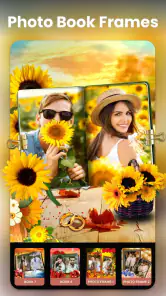
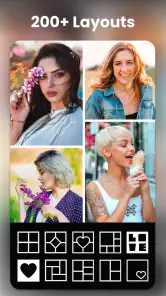

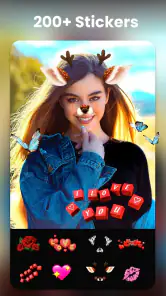
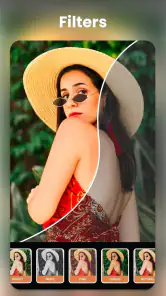

Analysis by Reviewed
I like photo editors that help me finish a small creative task without turning it into a project. Photo Frame & Collage Maker is aimed at that quick, decorative kind of editing: combining pictures, giving them a frame, and making a shareable keepsake. It is a free photography app from Video Recorder & Photo Collage, and its appeal is convenience rather than deep control. If you want a polished collage without learning a full editing suite, it is an approachable option; if you care most about precise retouching, it is not the tool I would reach for first.
A quick way to make a photo feel finished
The main appeal here is not replacing a camera app or giving every image a professional makeover. It is having a direct route from a handful of pictures to a finished composition with a decorative frame or a collage layout. I find that distinction useful when deciding whether to install it: this is for presentation, not for repairing a photo that is poorly lit or rescuing an awkward crop.
That focus makes the app a good fit for small, personal jobs that might otherwise be left undone. A quick birthday greeting, a few pictures from a weekend walk, or a framed image to send to family can all benefit from a ready-made design. The result is more intentional than sending several unrelated photos, without requiring the time or patience of assembling every element by hand.
Where it earns its place
The app’s scale is a practical advantage: it has more than a thousand layouts to browse, so I can start with a structure instead of manually arranging every image. That matters when the goal is a birthday collage, a family snapshot, or a quick group of holiday photos. With a 4.8 average from around 54,000 ratings and over 5 million installs, it has clearly found an audience for this kind of lightweight creation, though popularity alone cannot tell you whether its style suits yours.
Frames and layouts work best when I treat them as a starting point, not a guarantee that every picture will fit perfectly. For a cleaner result, I’d choose photos with similar lighting and crop them before adding decorative elements. If one image is much darker or busier than the others, it can pull attention away from the whole collage. A simple layout with fewer pictures often looks more intentional than filling every available space.
Choosing images before choosing a template
One small habit makes a noticeable difference: I decide which photo matters most before browsing designs. If the point is a portrait, I pick a layout that gives the face room rather than choosing a frame first and forcing the picture into it. For a set of event photos, I look for a visual thread—similar colors, the same people, or one moment unfolding—so the finished grid reads as a memory rather than a random assortment.
I would also avoid treating every empty space as an invitation to add another image or decoration. The strongest result is often a little less full than the template allows. Keeping the background and embellishments quiet gives faces and important details more attention, and it makes the collage easier to view when it is shared as a small image on a phone.
You May Like

Clash of Clans Is Won Between the Battles

Android Auto Makes the Case for Quieter Car Software

MobiOffice: Transforming Mobile Productivity with Seamless Integration

EA SPORTS FC™ Mobile Soccer: Redefining Mobile Sports Gaming

How Microsoft OneDrive Became a Mobile Productivity Giant

How Google Translate Breaks Language Barriers Effortlessly
Getting Started with the App
Once you’ve got the Photo Frame & Collage Maker installed, you’re greeted with a user-friendly interface that even my grandma could navigate. The home screen offers a plethora of options, from creating simple collages to crafting elaborate photo frames that look straight out of a professional studio. It’s like having a mini Photoshop in your pocket without the overwhelming complexity.
Features That Stand Out
The app is packed with a ton of features that are both fun and functional. You can choose from hundreds of templates to create your own unique collage. Whether it’s a birthday bash or a serene sunset, there’s a template to capture the essence perfectly. Plus, the photo frames are absolutely delightful, offering everything from vintage vibes to sleek modern looks.
One feature that I found particularly cool is the text overlay option. You can add quirky captions or heartfelt messages to your photos, making them even more personal. And don't even get me started on the stickers! With a vast library ranging from cute to downright hilarious, they add an extra layer of fun.
Making a collage feel deliberate
A useful way to work is to decide on the story before choosing a frame: a few moments from one afternoon usually make a more coherent collage than a random mix from the camera roll. I’d place the clearest, most expressive photo in the most prominent spot, then use supporting images to show details or reactions. Text is most effective when it adds context—such as a short occasion or place—rather than repeating what the pictures already show. Stickers can be fun, but using one or two keeps the image from feeling crowded.
For an everyday example, imagine putting together photos from a child’s school event before sending them to relatives. I’d pick a small group of images, use a layout that gives faces enough room, add a brief caption, and save one finished version to share. That workflow is less fiddly than building a collage from scratch in a general editor, and it makes the app useful for quick personal updates as well as special occasions.
A useful workflow for keepsakes and messages
For a greeting or a small family keepsake, I would start with the intended recipient in mind. A relative who likes seeing everyone clearly may appreciate a few larger pictures more than a dense collage of tiny snapshots. For a simple announcement, a single framed image and a short line of text can feel more personal than a busy layout. The practical advantage is that I can tailor the amount of decoration to the message instead of treating every picture as a poster.
There is also a sensible way to avoid spending too long browsing. I would choose the occasion, decide whether the output needs one picture or several, and then look only at layouts that suit that choice. With so many designs available, browsing without a goal can turn a quick task into indecision. A clear starting point helps the variety work for me rather than against me.
Ease of Use
What really impressed me about this app is how intuitive it is. The drag-and-drop functionality makes it super easy to arrange your photos and elements just the way you like them. I didn’t have to spend hours watching tutorials or reading guides; everything was straightforward, and I could dive right in.
Where it asks for patience
A large template library is only helpful if you can settle on a design, and browsing many decorative options can slow down a task that was meant to be quick. I’d narrow the choice by deciding first whether I want a frame around one image or a multi-photo layout. The app’s emphasis on ready-made styling also means less room for the fine-grained adjustments I’d expect from a dedicated photo editor. If I needed careful color correction, detailed retouching, or a consistent look across a batch of images, I’d choose a more specialized tool and use this one for the finishing collage instead.
It is free to try, with in-app purchases listed at $8.99 per item, so I’d make sure the basic workflow suits me before paying for anything. The Everyone age rating makes it broadly suitable for casual family use, but that does not mean every decorative choice will fit every occasion; a restrained frame is usually better for a formal announcement than a playful sticker-heavy design. The current version is 2.2.7, and the app requires Android 7.0 or later.
What to expect compared with other photo tools
Compared with the standard editor that comes with a phone, this app is better suited to combining images and adding a deliberate decorative treatment than to making small corrections to one photo. A built-in editor is usually the quicker choice for a crop, a basic adjustment, or a natural-looking image that needs no frame. Here, the benefit is having layouts and embellishments ready to use; the trade-off is that a template can impose a look when what you really want is subtle editing.
A full-featured creative editor is the other common alternative. That kind of tool is preferable when I need precise control, a particular visual style, or detailed retouching. For a casual collage, though, its wider range of controls can feel like unnecessary work. I see this app as the middle ground: more decorative and purpose-built than a basic gallery editor, but less suited to meticulous image work than a dedicated editing suite.
Who should choose it
I’d recommend it to anyone who regularly turns phone photos into greeting-style images, small event collages, or framed keepsakes and prefers templates to a blank canvas. It is especially handy when I want to make something presentable on the spot rather than transfer pictures to a computer. People who mainly want to crop, adjust exposure, remove distractions, or preserve a natural, unembellished look may be happier with a conventional editor or the tools already built into their phone.
When I would choose something else
I would skip it if my main task were correcting a batch of photos, removing an unwanted object, or matching the color and brightness across a whole set. Those jobs call for controls that prioritize image correction, not frames and ready-made compositions. I would also choose a simpler option if I only wanted to crop one photo and send it; opening a collage-focused app for that can add an unnecessary step.
It is a stronger match for someone who enjoys making a picture feel like a small gift: a parent preparing a school-event collage, a friend making a birthday message, or anyone who likes a decorative border around a favorite portrait. If you prefer minimal edits and want the photograph itself to do all the work, the app’s playful elements may feel like clutter rather than a benefit. The right audience is not every phone photographer, but people who often share images with a little extra context or personality.
Sharing and the practical finish
Once you’ve crafted your masterpiece, sharing it with the world is a breeze. The app integrates seamlessly with social media platforms like Instagram, Facebook, and WhatsApp, making it easy to share your creations with just a tap. You can also save them to your device in high resolution, ensuring your memories are preserved in the best quality possible.
Before sharing, I’d take a moment to check that faces and captions aren’t too close to the edges; a design that looks balanced in the editor can feel cramped once viewed on a smaller screen. I also prefer to keep an unedited copy of the original photos, especially if I might want to reuse them in a different layout later. That small habit makes experimentation less risky and avoids treating a decorative collage as the only version worth keeping.
Small checks that prevent a disappointing result
Before I save a finished design, I look at it at the size where it will actually be viewed. Fine text that seems readable while editing may disappear in a message preview, and a border that looks delicate on a bright screen can compete with a detailed photo. I keep captions short, leave breathing room around faces, and avoid putting the key part of an image close to the edge of its frame.
For anything I might print or reuse, I would also check the finished file rather than assume that every decorative layout will suit every output. A collage intended for a quick phone message has different priorities from a keepsake someone may want to display. Keeping the original images separate gives me options if I later decide I want a different arrangement or a cleaner version.
My verdict
In conclusion, if you’re looking for an app that’s both fun and functional, the Photo Frame & Collage Maker is definitely worth checking out. It’s incredibly easy to use, packed with features, and perfect for adding a personal touch to your photos. So why not give it a whirl and let your creativity run wild?
My recommendation is more specific: I’d keep it for quick, warm, template-led compositions, not as my main photo editor. Its free entry point, accessible controls, and broad choice make it easy to try, while the purchase options and decorative focus are worth keeping in mind. With an average rating of 4.8 and around 875 written reviews, it appears well regarded by users, but the right test is whether its frames and layouts match the way you like to present your own pictures.
The kind of user who will get the most from it
If you often send relatives a cluster of pictures after an outing, make informal greeting images, or like adding a frame before posting a favorite portrait, this app has a clear role. I would keep it around as a focused creative utility rather than expect it to handle every photography task. Its free starting point makes it reasonable to try the basic workflow first, then decide whether the available designs are worth paying for in your own routine.
For someone who rarely makes collages, the large choice of layouts may not justify another editor on the phone. Likewise, a user who values a clean, unaltered photograph above decoration may find that the app’s central idea is simply not a match. My overall view is that its convenience is real, but most valuable when the desired result is already clear: a framed image, a small set of photos, and a finished piece to share.
Photo Frame & Collage Maker Frequently Asked Questions
Can I use Photo Frame & Collage Maker without an internet connection?
If you want to edit photos while travelling or away from Wi-Fi, it is worth considering how you usually work with your images. Photo Frame & Collage Maker focuses on frames, collages, and background changes, but whether every tool and template works offline can depend on the feature. Try opening the options you need after installation, and keep a copy of finished designs on your device.
Will Photo Frame & Collage Maker change my original photos?
Many people prefer to keep their original pictures untouched when trying frames, layouts, or background edits. A sensible approach is to begin with a copy of a photo and check how the app saves your finished design before editing an important image. That way, you can retain the original and decide whether the completed composition suits your needs.
Does Photo Frame & Collage Maker support multiple languages?
Language support can affect how comfortable an editing app feels, especially when browsing templates and using its controls. Photo Frame & Collage Maker is a photography app focused on frames, collages, and background changes, so its main appeal is visual editing. Before downloading, check that the app’s displayed language and menus are easy for you to follow on your device.
Is Photo Frame & Collage Maker suitable for children?
The app is rated Everyone, which makes it suitable for a general audience. Its focus is creating photo frames and collages, rather than playing a game or browsing a social feed. As with any photo editor, parents may still want to guide younger users when they choose images, add text, or share finished creations from a device.
What features does the Photo Frame & Collage Maker app offer?
The Photo Frame & Collage Maker app offers a variety of features designed to enhance your photo editing experience. Users can choose from a wide range of frames and collage templates to create unique photo compositions. The app also includes editing tools such as filters, stickers, text overlays, and cropping options to customize photos to your liking. Its store summary highlights more than 1,000 layouts, love frames, and background-changing options, giving users several ways to arrange and personalize pictures.
Pros
- User-friendly interface for easy navigation.
- Wide variety of frames and templates.
- Quick sharing options to social media.
- High-resolution output for prints.
- Supports multiple photo formats.
Cons
- Ads can be intrusive and frequent.
- Limited free features.
- Occasional app crashes reported.
- Slow performance on older devices.
- In-app purchases required for full access.

- Category
- Photography
- Version
- 2.2.7












