

Phone Tracker Locator With GPS
- 12.00
- 4.1
- Installs
- 100.00K
- Price
- Free
Screenshots
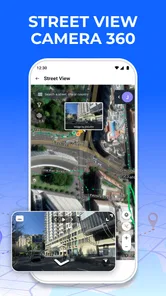
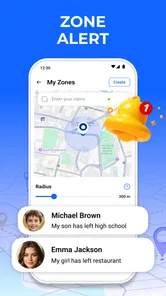
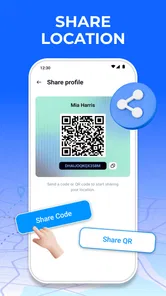
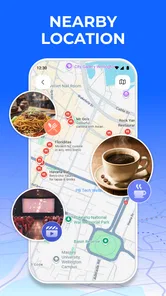
Analysis by Reviewed
Phone Tracker Locator With GPS is the kind of Maps & Navigation app I would consider when the main question is simple: where is a phone right now, and can I stay aware of that location without constantly calling? I found its central idea more useful than a long list of extra tools. The app focuses on live location awareness, alerts, and privacy, so its value depends less on browsing maps and more on turning location sharing into something practical for everyday routines.
That focus makes it different from a normal navigation app. A navigation service helps me get somewhere; this app is aimed at helping me understand where a connected phone is. That distinction matters. It can be helpful for coordinating with family, checking whether someone has reached an expected place, or keeping track of a device during a busy day. It is not the first tool I would choose for turn-by-turn directions, detailed travel planning, or exploring places.
Developed by Avn Global Application, the app is free to install and is suitable for Everyone. It has reached over one hundred thousand installs and holds a 4.1 average from more than three hundred ratings. Those figures suggest a real user base, although I would still approach any location-sharing app thoughtfully because usefulness depends heavily on how comfortably the people involved agree to use it.
Real-time location is the feature that decides everything
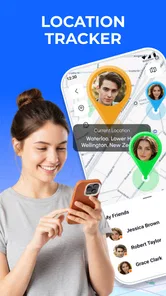
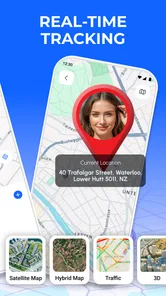
The strongest part of Phone Tracker Locator With GPS is its emphasis on seeing a current location rather than relying on occasional messages. In practice, that can remove a surprisingly common source of friction. Instead of sending “Where are you?” and waiting for a reply, I can use the location view as a shared point of reference. That is especially useful when plans are moving, a meeting place is crowded, or someone is traveling through an unfamiliar area.
The important word is “real-time.” A location shown on a map is only valuable if I understand it as a current indication, not as an unquestionable statement of where a person is at every second. Phones can be indoors, stationary, temporarily disconnected, or affected by weak positioning conditions. I would therefore treat the map as a practical aid for coordination, not as a substitute for communication in an emergency.
Smart alerts add another layer to that idea. Rather than opening the app repeatedly, I can rely on a notification to draw attention to a relevant change. This is where the app can become more helpful than a basic map pin. A pin tells me what I am looking at now; an alert can make the information useful when I am busy doing something else. The benefit is convenience, but the quality of the experience depends on setting alerts carefully instead of creating a stream of unnecessary interruptions.
Privacy is also part of the capability, not a decorative extra. Location sharing affects more than the person holding the phone. It can reveal routines, frequent destinations, and periods when someone is away from home. I would only use the app with clear agreement from everyone involved, and I would review who can see a location before treating the service as part of a regular family or personal routine. Consent should be the starting point, not an afterthought.
More From Our News Desk

 Weather - By Xiaomi
Weather by Xiaomi Review: Clear at a Glance, Less Clear Up Close
Xiaomi’s weather app makes everyday forecasts quick to scan, but its calm surface can leave useful details and recovery paths harder to find than they should be.

 X
XX Under Pressure: Can It Recover When Posting Goes Wrong?
A resilience-focused review of X, examining setup, mistaken posts, interruptions, weak connections, and the gaps that matter when recovery needs to be dependable.

 Clash of Clans
Clash of Clans Is Won Between the Battles
Its raids are quick; its community is a long-term project of coordination, teaching, rivalry, and shared responsibility—with all the friction that entails.

 Android Auto
Android Auto Makes the Case for Quieter Car Software
The car interface is no longer judged by how much it can do, but by how quietly it helps. Android Auto shows what drivers now expect—and what still gets in the way.

 MobiOffice: Word, Sheets, PDF
MobiOffice: Transforming Mobile Productivity with Seamless Integration
MobiOffice: Word, Sheets, PDF is redefining mobile productivity with a surprising blend of functionality and innovation.

 EA SPORTS FC Soccer Mobile 26
EA SPORTS FC™ Mobile Soccer: Redefining Mobile Sports Gaming
Dive into EA SPORTS FC™ Mobile Soccer, where immersive gameplay and strategic depth transform mobile sports gaming.
Latest News



What I would do before relying on it
My first step would be to define the purpose of the location connection. Is it for meeting up, checking arrival, keeping an eye on a shared device, or maintaining awareness during a journey? A narrow purpose makes the app easier to live with. It also helps me decide which alerts are genuinely useful and which ones would only create noise.
I would then test the workflow during an ordinary day rather than waiting until I needed it urgently. I would check whether the location view is understandable, whether alerts arrive in a useful way, and whether the other person knows when location sharing is active. This small trial is one of the most valuable practical tips for this type of app: a tracker is only dependable in real life if every participant understands what they are seeing.
I would also keep a backup habit. If I am meeting someone at a large venue, I would still agree on a meeting point and a simple message plan. If I am checking whether a family member has arrived, I would not assume that a map update alone proves everything is fine. The app can reduce uncertainty, but it cannot remove the need for judgment.
A realistic day with the app
Imagine a family member traveling across town to meet me at a busy station. Rather than exchanging several messages about which entrance they are using, we could use the location view to understand whether they are still on the way or already nearby. If an alert indicates a meaningful change, I can adjust my timing without repeatedly opening a chat. Once we meet, I would stop treating the location as necessary for that outing instead of leaving a permanent connection running without a clear reason.
That scenario shows the app’s real strength: it can turn location into shared context. The map is not the destination. The useful result is fewer ambiguous messages and a better sense of timing. This is more valuable for people whose routines overlap but do not always line up precisely, such as relatives, partners, or friends coordinating around work and school.
A second useful workflow is checking an expected arrival. If someone says they are heading home, a location view may help me understand whether they are still traveling or have reached the area. I would use that information to decide whether to start dinner, wait outside, or send a message. I would not use it to monitor every small movement, because constant checking can quickly become stressful for both sides and can turn a convenience into an unhealthy habit.
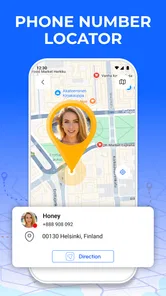
There is also a practical device-finding angle implied by the phone-tracker format. If I am trying to keep awareness of a phone’s position, the app may be more relevant than a standard navigation tool. Still, I would distinguish between locating a phone and recovering a lost device. A tracker can help me understand a location, but I would not assume it replaces the dedicated security and recovery tools built into a phone’s operating system.
Why alerts can be better than watching a map
One non-obvious advantage of alerts is that they can change my behavior. A map encourages me to check manually, which is easy to overdo. An alert-based routine lets me wait until something relevant happens. For example, I might look only when an expected arrival or location change matters to my plan. That makes the app less demanding and helps preserve attention during work, travel, or family responsibilities.
The trade-off is that an alert must be meaningful. Too many notifications can make me ignore the important ones. I would begin with the smallest number of alerts needed for the situation, observe how they fit into my day, and adjust from there. This is a better approach than enabling every possible warning immediately, especially when several people or devices are connected.
Another useful habit is to explain the alert arrangement to the person being located. They should know what the alert is intended to accomplish and when the arrangement will end. That conversation improves trust and prevents the app from feeling like an invisible monitoring tool. In my view, this human setup is just as important as the map itself.
Where it fits among familiar alternatives
Compared with a normal navigation app, Phone Tracker Locator With GPS is more specialized. Google Maps, Apple Maps, and similar services are stronger choices when I need directions, traffic context, route planning, or place discovery. I would not replace those tools with this app for a road trip or a walk through an unfamiliar neighborhood.
Compared with ordinary messaging, this app can be more convenient when location is the main subject. A chat message depends on someone remembering to send an update, and the information can become outdated quickly. A location-focused workflow can make coordination more continuous. On the other hand, messaging is better for context, reassurance, and explaining a delay. I see the two as complementary rather than interchangeable.
Compared with built-in phone-location services, the choice depends on the people and devices involved. System-level tools may be preferable when my priority is recovering my own lost phone or using features tightly integrated with a particular mobile platform. Phone Tracker Locator With GPS is more appealing when I want an app centered on shared location awareness and alerts. I would choose the simpler, more integrated option when I only need occasional device recovery.
The app’s free entry point makes it easy to try without committing money immediately. However, in-app purchases range from $5.99 to $49.99 per item, so I would read each purchase screen carefully before confirming anything. A free installation does not mean every possible function is free. For a casual user who only wants occasional location awareness, the paid options may not be worthwhile; for someone who relies on the workflow regularly, the value depends on which functions are included and how often they are actually used.
The friction points I would take seriously
Location tools are inherently sensitive. Even when the purpose is reasonable, the same capability can feel intrusive if expectations are unclear. I would skip this app for any situation where one person is expected to share a location under pressure or without an easy way to stop. The app is a poor fit for secret monitoring, relationship surveillance, or trying to control another adult’s movements.
Accuracy and freshness also deserve realistic expectations. A displayed position can be useful without being perfectly precise. If I needed confirmed information during a safety-critical incident, I would contact the person or emergency services rather than relying on a tracker screen. The app can support a decision, but it should not become the only source of truth.
Battery and connectivity are practical considerations for any GPS-based workflow. I would expect the experience to be less useful when a phone is unavailable, disconnected, or unable to provide a timely position. That is why I would test the app before depending on it for a long journey, and why I would keep a phone call or message as a backup.
There is also a mental cost to continuous checking. The app may reduce uncertainty for one person while increasing anxiety for another. I would set boundaries around when location is shared and when it is not. A scheduled, purpose-driven check is healthier than opening the map every few minutes with no clear decision to make.
The current release is version 1.2.2_09072026 and it requires Android 7.0 or later. That makes compatibility fairly approachable for many Android users, but I would still check the device before planning a shared setup. The app is listed for Android, so iPhone users should not assume that the same experience is available on their platform. That platform distinction matters when a family uses a mix of phones.
Who will get the most from it?
I think the best audience is people with a clear, mutual reason to share location. A family coordinating arrivals, friends meeting in a crowded area, or a person keeping track of a phone during a planned journey can all understand the benefit quickly. The app is especially suitable for users who prefer alerts over repeatedly sending status messages.
It may also suit someone who wants a dedicated location workflow rather than combining map pins, chat messages, and calendar reminders. The focused design can make the purpose easier to understand: open the app to see location context, use alerts to reduce manual checking, and keep privacy decisions visible in the routine.
I would recommend a different option to someone who mainly needs directions, public transit information, business searches, or route alternatives. I would also point a person toward a built-in device-recovery service if their only concern is finding their own misplaced phone. In those cases, a broader map app or a system tool is likely to be more direct and less complicated.
Parents and caregivers should think carefully before using it as part of a routine. The technology may help with agreed check-ins, but it should not replace conversation or become a way to inspect every movement. For teenagers especially, I would establish the purpose, the hours of use, and the circumstances in which sharing ends. That makes the app part of a safety plan rather than a source of constant supervision.
My practical recommendation before installation
Before installing, I would ask three questions: who needs the location, what decision will the information help me make, and when should sharing stop? If I cannot answer those questions, I probably do not need a tracker yet. If I can answer them, I would install the free app, test one simple scenario, and avoid paying for anything until the basic workflow proves useful.
I would also make sure every participant understands the arrangement. The strongest setup is not the one with the most tracking; it is the one with the clearest expectations. Keep the number of alerts manageable, use a backup communication method, and treat the map as guidance rather than proof of a person’s exact condition.
After trying it, I would judge the app by whether it genuinely saves time and reduces confusion. If I still need to send repeated messages, constantly refresh the map, or explain what the location means, the benefit may be too small. If it lets everyone coordinate calmly with fewer interruptions, then its focused approach has earned a place in the routine.
My overall view is that Phone Tracker Locator With GPS is most convincing when used for one agreed purpose: shared, real-time location awareness supported by sensible alerts. It is not a replacement for navigation, conversation, or emergency help, and its privacy implications require more care than those of an ordinary map. Used openly and selectively, it can make everyday coordination smoother. Used without boundaries, the same capability can create distraction and mistrust. For users who understand that trade-off, this free Maps & Navigation app from Avn Global Application is worth testing, especially if alerts are more useful to them than another general-purpose map.
With its Everyone rating, Android 7.0 minimum requirement, and growing presence on the platform, Phone Tracker Locator With GPS is accessible to a broad group of Android users. I would keep expectations grounded, start with a small real-life test, and decide based on whether the app improves a specific routine. That is where it has the clearest value: not in watching a screen all day, but in giving the right people timely location context when it actually helps.
Phone Tracker Locator With GPS Frequently Asked Questions
What devices and operating systems can run Phone Tracker Locator With GPS?
Phone Tracker Locator With GPS is an app in the Maps & Navigation category, and it requires Android 7.0 or later. Before downloading, check that your device meets this requirement and that location services are available on your phone. The app is free to download, though some features may involve in-app purchases.
Who develops Phone Tracker Locator With GPS, and is it suitable for everyone?
Phone Tracker Locator With GPS is developed by Avn Global Application and has an Everyone content rating. That rating makes it broadly suitable for general audiences, but location sharing still calls for careful, responsible use. Before installing, consider who will be able to see a device’s location and make sure everyone involved understands and agrees to the arrangement.
What is Phone Tracker Locator With GPS and how does it work?
Phone Tracker Locator With GPS is designed to help users view and share real-time or approximate device locations using GPS, mobile networks, and Wi-Fi positioning. After installation, the app may require location permissions and account or contact setup before tracking features become available. Accuracy can vary depending on signal strength, device settings, indoor coverage, and whether the phone has an active internet connection.
Does Phone Tracker Locator With GPS require permission from the person being tracked?
Yes. Location tracking should only be used with the clear knowledge and consent of the person whose device is being located. The app may request access to location services, notifications, contacts, or background activity, depending on its features. Users should review these permissions carefully and avoid using any tracking tool for hidden surveillance, harassment, or monitoring someone without authorization.
Can I track a phone if it is offline, turned off, or has GPS disabled?
Phone Tracker Locator With GPS generally depends on the target device being powered on, connected to the internet, and allowed to share its location. If GPS, Wi-Fi, mobile data, or location permissions are disabled, the displayed position may be delayed, approximate, or unavailable. A phone that is switched off normally cannot transmit a live location, although a previously recorded location may remain visible.
Pros
- Live GPS location sharing helps families stay connected.
- Location history can make retracing recent trips easier.
- Geofencing alerts notify you when someone enters or leaves an area.
- Emergency location sharing can provide extra peace of mind.
- The interface is generally simple for first-time users.
Cons
- Accurate tracking depends on GPS
- mobile data
- and battery availability.
- Continuous location access can drain the phone battery quickly.
- Background tracking may raise privacy concerns for some users.
- Some useful tracking features may require a paid subscription.
- Location updates can be delayed indoors or in areas with weak signal.













