PGA TOUR
- 3.38K
- 2.9
- Installs
- 1.00M
- Price
- Free

Screenshots


Analysis by Reviewed
I reach for the official PGA TOUR app when I want to follow a tournament without committing to a full broadcast. It turns a spare moment—waiting for a meeting to start or checking my phone during a break—into a quick way to see how the day is unfolding. As a free sports app from PGA TOUR, it suits both devoted golf followers and people who mainly tune in when a familiar player is in contention.
Starting with a reason to follow
Before opening the app, it helps to know what you want from a tournament check-in. I might be tracking a favorite golfer, trying to understand who is leading, or looking for a recap after missing the action. Those are different jobs, and the app is more satisfying when I use it as a focused golf companion rather than expecting it to replace every way of watching or reading sports.
If I am new to professional golf, I would begin with one event or one player rather than trying to follow the whole field at once. A single point of interest gives the leaderboard and player information a useful frame: I can see how a round is developing and then decide whether I want more context. That approach also keeps a quick check from turning into an aimless scroll through scores and stories.
Choosing what to follow
Before the action gets busy, I’d start by selecting favorite players and tournaments. That small bit of setup makes the experience feel more useful: instead of treating every event as equally important, I can focus on the names and competitions I actually care about. If you follow several golfers, this is a practical way to make alerts more relevant rather than letting every update compete for attention.
There is a trade-off, though. Personalization helps most when you already know who you want to track. A newcomer who has no favorite players may need to browse around first, using the news and profiles to decide where to focus. I would treat the app as a guide into the tour, not as a substitute for learning the basics of golf or deciding which events matter to you.
Following a tournament in short visits
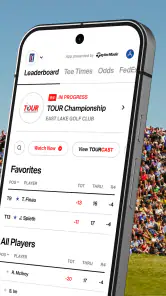
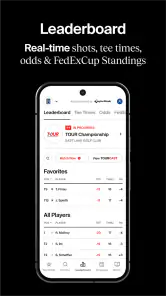
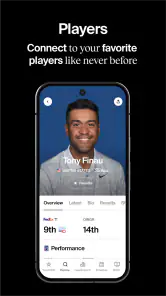
Once play is underway, the live leaderboard is the natural first stop. I can check who is moving up or slipping back, then open a player profile when I want context beyond a single score. That combination is more useful than repeatedly refreshing a bare list: the leaderboard answers what is happening, while a profile helps explain why a player has caught my attention through statistics and career highlights.
A realistic routine is to glance at the standings during lunch, save a player or tournament as a favorite, and return when an alert points to a change worth checking. This works especially well when I cannot watch live coverage continuously. The app gives me a quick status check and a reason to follow up, while the broadcast remains the better choice when I want every shot and the atmosphere around it.
More From Our News Desk

Clash of Clans Is Won Between the Battles

Android Auto Makes the Case for Quieter Car Software

MobiOffice: Transforming Mobile Productivity with Seamless Integration

EA SPORTS FC™ Mobile Soccer: Redefining Mobile Sports Gaming

How Microsoft OneDrive Became a Mobile Productivity Giant

How Google Translate Breaks Language Barriers Effortlessly
Turning a score into context
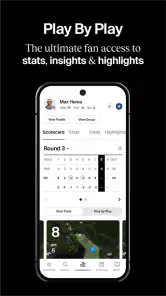
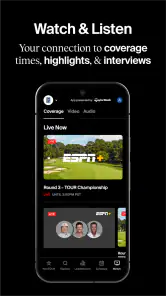
When a leaderboard change raises a question, I can move from the score to news, player information, or video highlights. That handoff is one of the app’s strongest ideas: a result becomes a prompt to understand the player or moment behind it. Short clips are handy when I have a minute, while interviews and behind-the-scenes material make more sense when I have time to settle in and explore.
The app is therefore most rewarding for fans who enjoy following the story around a tournament, not just checking who is ahead. If all you want is a quick number, a general sports scores app may be simpler and less focused. If you want golf-specific player context and tournament material in one place, the official app has a clearer purpose than a broad scores feed.
Making notifications work for you
Notifications are useful when I am away from a screen, but I would be selective about which players and tournaments I follow. A carefully chosen set of alerts can bring me back for a meaningful lead change or memorable moment; too many can turn a tournament into a stream of interruptions. I’d review my choices before a busy day rather than assuming every notification will be worth stopping for.
There is also a difference between being informed and watching the event. An alert can tell me that something important has happened, but it cannot recreate the pace of a round or replace the detail of live coverage. I use notifications as a reminder to open the app, then decide whether a score check, a highlight, or a longer viewing session is what I want.
First Impressions and Interface
When I first launched the app, I was greeted with a clean and intuitive interface. The design is sleek, making it easy for anyone to navigate through the various sections. The home screen provides quick access to live scores, player profiles, and the latest news. It’s like having a personal golf hub right in your pocket!
Features That Stand Out
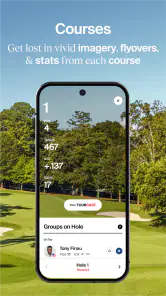
The app offers a plethora of features that cater to every golf fan's needs. One of the standout features is the live leaderboard, which keeps you updated with real-time scores. It’s perfect for those moments when you can’t be glued to your TV but still want to keep track of your favorite players.
Another feature worth mentioning is the player profiles. These profiles offer in-depth statistics and career highlights, so you can get to know the pros a bit better. It’s fascinating to delve into the stats and see how your favorite golfer stacks up against the competition!
Personalization and Alerts
One of the things I love about this app is the level of personalization it offers. You can customize your experience by selecting your favorite players and tournaments. This way, you receive tailored notifications and alerts about what matters most to you.
The alert system is timely and ensures you never miss a critical moment. Whether it’s a hole-in-one or a sudden lead change, you’re always in the loop. It’s like having a personal caddy whispering updates in your ear!
Multimedia Experience
For those who enjoy a multimedia experience, the app doesn’t disappoint. The video highlights section is packed with stunning shots and memorable moments from recent tournaments. Watching these clips makes you feel like you’re right there on the green, witnessing the action firsthand.
Moreover, the app includes exclusive interviews and behind-the-scenes content that you won’t find anywhere else. It’s a treasure trove for those who want to dive deeper into the world of professional golf.
Using it between other commitments
One useful way to fit the app into an ordinary day is to treat it as a series of deliberate check-ins. I might open the leaderboard before a commute, look up a player’s profile later, and save a video highlight for a quiet moment. This is more practical than trying to keep the app open throughout a round, and it lets me decide how much attention the tournament deserves without losing track of the main story.
There is a small but important handoff in that routine: the app can point me toward a moment, but I still choose what to do with it. A quick score check may be enough if I only want to know whether a player is near the top. If the standings are close or a player’s performance surprises me, the profile and news provide a reason to spend longer. If I want the tension of each shot, I switch to live coverage instead of expecting a score screen to supply that feeling.
Who will get the most from it
I’d recommend it most to people who follow professional golf across a tournament week, especially if they have a few favorite players and like to understand the numbers behind a performance. It is less compelling if you rarely watch golf, dislike notifications, or simply need a neutral scoreboard for many different sports. In those cases, a general sports app or the broadcast you already use may fit better.
The app is rated for Everyone, has been available since Mar 2, 2011, and its current version is 2025.2.17, with Android 9 as the minimum operating system requirement. It has passed one million installs, with an average rating of 2.9 from around 18,000 ratings and roughly 3,400 reviews. Those figures suggest a substantial audience alongside mixed reactions, so I would try it for its golf-specific focus rather than assume every part of the experience will suit every fan.
How it compares with other ways to follow golf
A broad sports app is usually the more convenient choice if I want one place for scores across several sports. Its advantage is range; the official PGA TOUR app’s advantage is focus. Player profiles, golf-specific news, and tournament highlights make more sense here than in a general scoreboard, while a general app can be quicker when I only need a result and do not care about the surrounding story.
Live television or another broadcast option serves a different purpose again. It gives me the continuous viewing experience that a phone check cannot provide, while the app is easier to dip into between commitments. I would not choose between them as if they were identical products: I use the app to keep a thread of the tournament when I am away, and turn to a broadcast when watching the round itself is the point.
What to expect before installing
The app is free, which makes it easy to test during a tournament instead of deciding from the description alone. I’d begin with one favorite player and one event, then see whether the balance of scores, news, alerts, and video is useful to me. That limited setup also makes it easier to tell whether notifications are helping or just adding noise.
One practical distinction is that following a score is not the same as following a round. The app is convenient for checking developments and catching selected highlights, but anyone who wants uninterrupted shot-by-shot viewing should keep a live broadcast or another viewing option in the mix. I see it as a companion for the moments between watching, not a promise that a phone screen can replace the full event.
Where the experience can fall short
The main limitation is the gap between a useful update and the complete event. A leaderboard can show who has moved, but it cannot explain every swing or give the same sense of rhythm as watching play unfold. Highlights help fill that gap after the fact, though they are not a substitute for seeing the round as it happens. For a fan who wants a self-contained viewing service, this is not the right tool on its own.
There is also a learning curve in deciding what deserves attention. Fans who already follow players can make personalization work quickly; newcomers may need a little browsing before the profiles and alerts become meaningful. I would avoid turning on every possible update at the start. Begin with a narrow selection, use the app through a few check-ins, and widen it only if you find yourself wishing you had followed more of the field.
The mixed average rating is worth keeping in perspective. It does not tell me which particular parts other users found frustrating, but it is a reason not to assume the experience will be perfect on every device or for every routine. I would judge it by the tasks I actually need—following a player, checking standings, and finding golf-focused context—rather than by expecting a single app to deliver every form of coverage equally well.
Final Thoughts
In conclusion, the PGA TOUR app is a must-have for any golf enthusiast. Its comprehensive features, user-friendly interface, and personalized alerts make it a fantastic companion for following the sport. Whether you’re tracking scores, watching highlights, or reading up on the latest news, this app has you covered.
So, if you haven’t already, head over to your app store and give it a try. Who knows? You might even find yourself becoming a bigger golf fan than you ever imagined!
PGA TOUR Frequently Asked Questions
Is the PGA TOUR app suitable for someone who only wants basic golf updates?
Yes. The PGA TOUR app is designed to help golf fans follow the action, and its coverage includes scoring, news, and video highlights. You can focus on the players and tournaments you care about rather than treating it as a general sports app. If you mainly want occasional updates, its leaderboard and news features offer useful ways to check in.
Does the PGA TOUR app cover golf beyond scores?
The app offers more than leaderboard results. Its coverage includes tournament news and video highlights, alongside player profiles and in-depth statistics. These features can help you follow how players are performing and catch up on notable moments. The app is centered on PGA TOUR golf, so it is most relevant for users who want updates and coverage tied to those events.
What is the current version of the PGA TOUR app?
The current Android version is 2025.2.17. Keeping the app up to date is a sensible way to use its latest available release and receive routine improvements. Before installing or updating, check that your Android device meets the app’s operating-system requirement. If you use an iPhone or iPad, check the relevant App Store page for its current release details.
Which devices can run the PGA TOUR app?
The PGA TOUR app is available for Android and iOS devices, making it easy to follow golf on a phone or tablet. On Android, it requires version 9 or later. The app is in the Sports category and is rated Everyone, so its content is intended for a broad audience. Check your device’s operating system before downloading.
What is the PGA TOUR app and what features does it offer?
The PGA TOUR app is a comprehensive platform for golf enthusiasts, offering real-time scoring, news, and video highlights from various PGA TOUR events. It features in-depth statistics, player profiles, and a customizable leaderboard, allowing users to follow their favorite players and tournaments closely. Additionally, the app provides live streaming of select events, ensuring you never miss a moment of the action.
Pros
- Comprehensive player stats available.
- Real-time leaderboard updates.
- High-quality video highlights.
- Customizable notifications for events.
- User-friendly interface.
Cons
- Requires stable internet connection.
- Frequent ads disrupt experience.
- Limited offline features.
- Occasional app crashes reported.
- Some features behind paywall.

- Category
- Sports
- Version
- 2025.2.17