

Petro Path
- 70.00
- 4.0
- Installs
- 10.00K
- Price
- Free

Screenshots
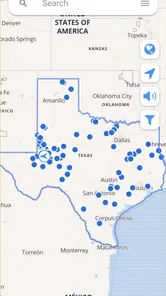
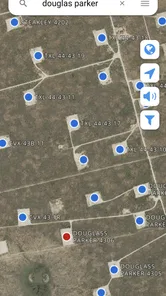
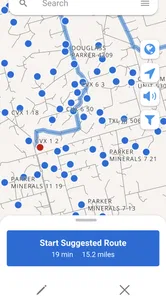
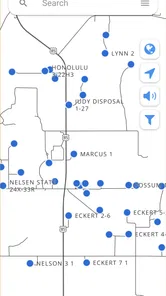
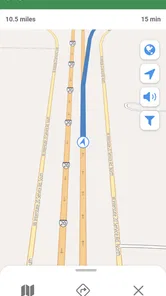
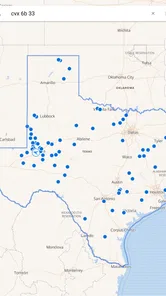
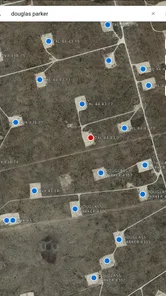
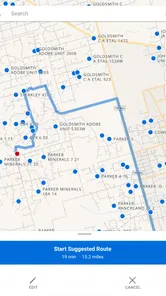
Analysis by Reviewed
Finding a particular oil or gas well is not always as simple as opening a general map and typing a name. Field locations can be remote, labels can be inconsistent, and the useful information is often the information you have already collected yourself. That is where Petro Path makes a convincing first impression. This free business app from Petro Path is built around well directions, searching, sharing, and saving, so its value is less about visual polish and more about making repeated field work easier to organize.
I approached it as a practical tool rather than something I would casually browse every day. The central question is not whether it feels exciting during the first few minutes, but whether it deserves a permanent place on a worker’s phone after the novelty disappears. My answer is generally positive for people who regularly deal with oilfield locations, although the app’s usefulness depends heavily on how carefully you maintain the information you use with it.
What the first week feels like
The strongest early appeal is its narrow focus. Instead of asking a general navigation app to understand oilfield terminology and location habits, Petro Path gives the task its own space. Searching for a well, keeping a useful location available, and sharing directions are the kinds of actions that can quickly become part of a field routine. That focus makes the app easier to judge: it is not trying to replace every map or office system, but to support the moment when someone needs to get from a familiar road to a specific well.
During the first week, I would use it as a personal working index. A sensible routine is to save locations as soon as they become relevant, rather than waiting until the next visit. When a dispatcher, supervisor, or colleague asks about a site, the saved entry can be more useful than searching through messages or handwritten notes. Sharing also matters here. A location that is easy to pass along can reduce the back-and-forth that often happens when one person knows a well by a local nickname and another needs a usable direction.
The app’s simple store summary points to four practical verbs: search, share, save, and find directions. Those actions suggest a workflow that is more valuable in combination than individually. Search helps locate the record, saving keeps it available for later, and sharing turns it into something the rest of a crew can use. The directions function then connects the stored information with the actual trip. The real benefit is the repeatable workflow, not any single button.
That workflow is especially useful for someone who visits a changing group of wells rather than one fixed site. A field technician might receive a new location in the morning, store it before leaving, share it with a second vehicle, and return to the same record during a later inspection. A landman or operations worker could also use saved entries as a quick reference when moving between sites. In both cases, the app earns attention because it reduces small pieces of friction that otherwise accumulate across a workday.
I would not expect the first week to transform navigation habits immediately. If your current method is a well-maintained spreadsheet, a dedicated mapping system, or a company platform that already handles locations and directions, adding another tool can feel unnecessary. Petro Path makes more sense when your current information is scattered across notes, texts, memory, and ordinary map searches. It is a focused layer for people who need a personal, accessible way to handle oilfield destinations.
More From Our News Desk

 Gmail
GmailGmail in a Busy Inbox: Who Benefits Most?
From first account to crowded workday, Gmail earns its place through dependable search and flexible sorting—but its best fit depends on how much inbox maintenance you can tolerate.

 Prime Video
Switching to Prime Video: What Changes in Your Viewing Routine
Prime Video can make a compelling second home for streaming, but switching means learning a different catalog, rental layer, and route from browsing to playback.

 Universal TV Remote Control
Universal TV Remote Control Works Best as a Reliable Backup
A phone remote earns its place through quick setup and reliable habits. Here is how to get more from Universal TV Remote Control—and where its limits show.

 Weather - By Xiaomi
Weather by Xiaomi Review: Clear at a Glance, Less Clear Up Close
Xiaomi’s weather app makes everyday forecasts quick to scan, but its calm surface can leave useful details and recovery paths harder to find than they should be.

 X
XX Under Pressure: Can It Recover When Posting Goes Wrong?
A resilience-focused review of X, examining setup, mistaken posts, interruptions, weak connections, and the gaps that matter when recovery needs to be dependable.

 Clash of Clans
Clash of Clans Is Won Between the Battles
Its raids are quick; its community is a long-term project of coordination, teaching, rivalry, and shared responsibility—with all the friction that entails.
Latest News



A realistic day in the field
Imagine receiving a request to inspect a well you have not visited recently. Instead of asking for the location again, you search your saved entries and check the direction information you previously kept. You then share the relevant location with a coworker who is following in another vehicle. On the way back, you can keep the record available for the next visit rather than rebuilding the route from scratch. That scenario is not dramatic, but it is exactly the kind of repeated task that determines whether a business app becomes useful or forgotten.
There is also a less obvious advantage to treating saved locations as working references rather than disposable search results. A search result helps only at the moment you need it. A saved record can become part of a personal pattern: wells visited in a particular area, sites associated with a recurring inspection route, or destinations that are difficult to identify from a public road. The app becomes more valuable as the user builds a dependable collection inside it.
Why the value changes from month to month
After the first month, the question changes from “Can this help me find a well?” to “Does it save me enough effort to keep using it?” For regular oilfield work, the answer can be yes because the app’s usefulness is cumulative. Every accurately saved location has the potential to shorten a later search. The more often you revisit the same operating area, the more practical that accumulated reference becomes.
However, cumulative value is not automatic. Saved information must remain understandable. If entries are created with vague names, inconsistent abbreviations, or no personal context, the collection can become difficult to use. My advice is to adopt a naming habit from the beginning. Use a format that makes sense when you are tired, driving between tasks, or answering a question quickly. The app can help preserve locations, but the user still determines whether the saved library is orderly or confusing.
A useful monthly routine would be to review the locations you actually use and remove or correct anything that creates uncertainty. This is one of the less obvious trade-offs of a location-saving tool: a larger collection is not always a better collection. A short, trusted list may be more useful than a crowded one filled with duplicates and outdated references. If your work area changes frequently, the app may serve best as an active project list rather than a permanent archive.
The sharing function can also create recurring value beyond personal navigation. When a team uses the same location reference, it can reduce the need for each person to interpret directions independently. That does not make the app a full team-management platform, and I would not treat it as one. Its strength is narrower: getting a useful location from one person to another without turning every handoff into a long explanation.
There is a practical boundary here. Petro Path is more attractive for field workers who repeatedly deal with well destinations than for someone who only needs occasional directions. A person who visits one site once a year may gain little from building a saved collection. In that situation, a regular maps application may be quicker because it is already familiar and does not require maintaining a separate work list.
Where it fits beside ordinary map apps
General navigation apps are usually better for broad travel planning, traffic awareness, public places, and everyday driving. They are designed for a wide audience and are often the first choice when the destination is a business, street address, or recognizable landmark. Petro Path has a different role. It is more appealing when the important unit is the well itself and when the user wants to search, save, and share oilfield locations as part of an ongoing work process.
I would use both rather than forcing one to replace the other. Petro Path can act as the organized source for the destinations you care about, while a familiar navigation tool may remain preferable for the larger journey or general road guidance. This two-tool approach is not a weakness by itself; it reflects the app’s specialized purpose. The mistake would be expecting a focused well-direction app to provide every capability of a broad mapping service.
The same comparison applies to workplace systems. A company may already have a shared database or operational platform with authoritative records. If that system is mandatory and well maintained, Petro Path may be unnecessary for official recordkeeping. Its best position is as a convenient personal companion, especially when the formal system is slow to access, difficult to use in the field, or not designed around quick sharing between coworkers.
Maintenance is the price of lasting usefulness
The main maintenance burden is not complicated setup; it is attention. Any app that stores destinations becomes less trustworthy when users save information once and never review it. Roads, access points, naming conventions, and work assignments can change. Even when the location itself remains valid, an old label can make the record harder to recognize. I would therefore treat saved entries as working notes that deserve occasional checking, not as permanent truth.
Before relying on a saved destination for an important visit, I would confirm that I am selecting the right entry and that the directions still make sense for the planned approach. This is particularly important when several wells have similar names or when different people have contributed to the same collection. The app can reduce searching, but it cannot remove the need for field judgment.
Another maintenance habit is to avoid saving every possible location without a purpose. If I saved a destination only because it appeared in a conversation, I would either add it to a clearly temporary group in my own workflow or decide later whether it deserves a permanent place. That small discipline prevents the saved list from becoming a digital junk drawer.
The current version is 4.9.5, and the app runs on Android starting with version 5.0. That makes it accessible to people using older compatible devices, which can matter in work environments where phones are kept in service for a long time. At the same time, anyone using a very old handset should judge the experience in practical terms: a field app is only helpful if the device remains responsive and dependable during the workday.
Petro Path is free to install, which lowers the barrier to testing it with a real set of work locations. It also includes optional in-app purchases ranging from $1.99 to $19.99 per item. I would not make a purchase simply because the app is specialized. I would first use the free experience long enough to see whether searching, saving, and sharing genuinely fit my routine. The right question is whether an optional feature removes a recurring problem, not whether it adds more buttons.
What can cause fatigue over time
The first source of fatigue is repetition without organization. If every saved location looks different, the app can eventually require as much interpretation as the notes it replaced. The solution is to create a consistent personal method immediately. Keep names concise, use recognizable identifiers, and avoid relying on memory to explain why an entry matters.
A second source is divided attention between multiple tools. If one person sends a location through a message, another keeps a separate map pin, and a third uses Petro Path, the team may still experience confusion. The app works best when everyone understands what it is being used for. I would define it as the quick reference for well locations and sharing, while leaving broader route planning or official operational records to the tools designed for those jobs.
A third issue is trust. A specialized app can feel excellent when the saved information is accurate and frustrating when it is not. Users should resist treating the act of saving as proof that a location has been verified. Before a trip, especially to an unfamiliar site, I would compare the entry with the latest work instruction or confirmation from the person who supplied it. That extra check is a small cost compared with arriving at the wrong place.
There is also a personal habit question: will you remember to open the app when a new location arrives? If your coworkers naturally send everything through another system, adoption may be weak. Petro Path earns lasting space only when it becomes the place where you deliberately keep useful well references. Without that habit, it remains an occasionally opened utility.
Who should keep it installed
I think Petro Path is a good fit for oilfield workers, contractors, inspectors, and coordinators who repeatedly search for well locations and need a convenient way to preserve or pass them along. It is particularly suitable for someone whose work involves many destinations but not necessarily a large formal database. The app’s focused design can turn a messy collection of location details into something easier to consult during a busy day.
It is less suitable for a person who wants a complete navigation replacement, advanced fleet coordination, or a general-purpose map with broad travel features. It may also be a poor fit if your organization already provides a reliable location system that everyone must use. In those cases, another personal app could create duplication instead of saving time.
The age rating is Everyone, so the app is presented as suitable for a broad audience. In practice, its usefulness is professional and specialized rather than recreational. The audience is defined less by age than by whether oilfield destinations are part of the user’s regular responsibilities.
The app has an average rating of 4.0 from around 158 ratings, with roughly 70 written reviews, and it has passed 10 thousand installs. Those figures suggest a modest but established user base rather than a mass-market product. I would read that as consistent with its narrow purpose: it does not need to appeal to everyone to be worthwhile, but its value will be strongest for people whose daily work matches the problem it addresses.
What I appreciate most is that the app does not need to pretend to be more than a focused utility. Search, saving, directions, and sharing are enough to support a meaningful routine when the user applies them consistently. What holds it back is the responsibility placed on the user. The quality of the experience depends on disciplined naming, regular checking, and knowing when to use a broader map or an official workplace system instead.
My long-term verdict
After the initial novelty fades, Petro Path can earn lasting space on the phone, but only for the right kind of user. Its recurring value comes from building a trusted collection of well locations and making those references easier to retrieve and share. That is a practical benefit, not a flashy one, and it becomes more noticeable over weeks of repeated field work.
I would recommend trying it if your current process involves scattered messages, repeated searches, or handwritten location notes. Give it a real trial with the destinations you actually visit, establish a naming system, and see whether it shortens the small tasks around each trip. If it does, keeping it installed is easy to justify because the habit compounds over time.
I would skip it if you rarely deal with oilfield wells or already have a dependable shared system that covers the same workflow. In that situation, the extra maintenance may outweigh the convenience. For everyone else, Petro Path is a sensible specialist app from Petro Path: free to begin with, focused enough to understand quickly, and useful over the long term when its saved information is treated as a living work reference rather than a forgotten list.
Petro Path Frequently Asked Questions
What is Petro Path used for?
Petro Path is a business app for finding and sharing oil and gas well directions. Its store summary highlights options to search, share, and save directions, making it relevant to people who need to keep track of well locations or pass directions along to others. The app is free to download, though optional in-app purchases are available.
Who develops Petro Path, and is it available on Android?
Petro Path is developed by Petro Path and is available as an app for Android devices running version 5.0 or later. It has an Everyone content rating, so it is presented as suitable for a broad audience. Before installing, check that your device meets the minimum operating system requirement and has enough free space for the app.
What is Petro Path, and how does the game work?
Petro Path is a puzzle and strategy game centered on connecting routes through an oil-themed environment. Players generally need to plan paths, link points, and complete objectives while managing limited space, moves, or resources. Its appeal comes from gradually increasing difficulty, requiring both quick decisions and careful planning. Before downloading, remember that the exact objectives, level structure, and available modes may vary depending on the version installed.
Is Petro Path free to download and play?
Petro Path can typically be downloaded without an upfront purchase, but users should check the current Google Play or App Store listing for the latest pricing information. Free versions may include advertising, optional in-app purchases, extra lives, hints, cosmetic items, or other upgrades. If the game is used by children, reviewing purchase settings and enabling device-level purchase restrictions is recommended to prevent accidental transactions.
Does Petro Path require an internet connection?
Whether Petro Path works fully offline depends on the platform version and the feature being used. Basic gameplay may be available without a constant connection, which is useful when traveling or playing with limited mobile data. However, advertisements, cloud synchronization, updates, leaderboards, account features, or purchases may require internet access. It is best to test the game offline after installation rather than assuming every feature will function without connectivity.
Pros
- Simple interface makes route planning easy for new users.
- Useful for comparing nearby fuel stations and their prices.
- Can help reduce fuel costs during regular commutes.
- Convenient station information is available while traveling.
- Lightweight design should work well on most modern phones.
Cons
- Fuel prices may be outdated or depend on user-submitted reports.
- Coverage and accuracy can vary significantly by location.
- Some features may require an active internet connection.
- Limited usefulness in regions with few listed stations.
- Location access may raise privacy concerns for some users.











