

PetPage
- 149.00
- 4.8
- Installs
- 100.00K
- Price
- Free

Screenshots
Analysis by Reviewed
Keeping track of a pet’s care can become surprisingly scattered. Appointment details live in one place, identification information in another, and the small pieces of information you need during a rushed phone call are often buried in messages or paperwork. PetPage brings those routine tasks into a single mobile app, and I found that its value comes less from flashy extras than from making pet-related administration easier to repeat.
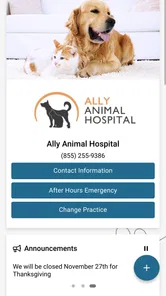
Developed by AllyDVM, this free medical app is designed around access to your pet’s information, appointment requests, and a shareable Pet ID. It is available to everyone in terms of content rating, and its simple purpose makes it approachable for first-time users as well as people managing several animals. The app has reached over 100 thousand installs and holds a 4.8 average from around 1.3 thousand ratings, which fits my impression that its straightforward approach is appealing to many pet owners.
I would not describe PetPage as a replacement for a veterinarian, an emergency service, or a complete personal health journal. I see it more as a practical connection point between you and the veterinary information you need to access repeatedly. That distinction matters: the app is strongest when it supports an existing care routine, rather than when someone expects it to diagnose problems or organize every possible aspect of pet ownership.
How I use PetPage for the everyday pet-care routine
I use PetPage as a dependable starting point, not as a place to manage every detail of a pet’s life. This section looks at how I fit it into ordinary care, from checking which animal I’m handling to preparing a routine request. That everyday pattern also makes it easier to decide what should be checked before relying on the app.
Starting with one reliable place for information
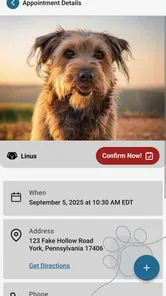
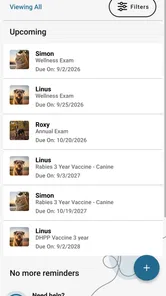
My preferred way to use PetPage is to treat it as the first stop before contacting the veterinary practice. Instead of searching through old emails or trying to remember which details were discussed at the last visit, I open the app and look for the relevant pet information. That small change reduces preparation time, especially when an appointment request comes up unexpectedly.
The basic workflow is easy to understand. I open the app, choose the pet or information I need, and then move toward the task at hand, such as requesting an appointment or sharing the Pet ID. This is not a complicated system that demands a long setup session before it becomes useful. The benefit appears when I repeat the same actions often enough that they become automatic.
A realistic example is a weekday morning when I notice that my dog needs a routine checkup. I can use PetPage to access the available pet information before requesting the visit, rather than making the request first and then searching for details if the clinic asks for them. If a family member is taking the dog instead, the Pet ID can be shared as part of that handoff. The important advantage is not saving a dramatic amount of time once; it is avoiding the same little scramble every time.
More From Our News Desk

 Instagram
Instagram’s Power Comes From Its Place in Your Phone
A close look at how Instagram turns Meta’s reach, recommendation systems and everyday camera habits into durable platform power—and what that costs users.

 Gmail
GmailGmail in a Busy Inbox: Who Benefits Most?
From first account to crowded workday, Gmail earns its place through dependable search and flexible sorting—but its best fit depends on how much inbox maintenance you can tolerate.

 Prime Video
Switching to Prime Video: What Changes in Your Viewing Routine
Prime Video can make a compelling second home for streaming, but switching means learning a different catalog, rental layer, and route from browsing to playback.

 Universal TV Remote Control
Universal TV Remote Control Works Best as a Reliable Backup
A phone remote earns its place through quick setup and reliable habits. Here is how to get more from Universal TV Remote Control—and where its limits show.

 Weather - By Xiaomi
Weather by Xiaomi Review: Clear at a Glance, Less Clear Up Close
Xiaomi’s weather app makes everyday forecasts quick to scan, but its calm surface can leave useful details and recovery paths harder to find than they should be.

 X
XX Under Pressure: Can It Recover When Posting Goes Wrong?
A resilience-focused review of X, examining setup, mistaken posts, interruptions, weak connections, and the gaps that matter when recovery needs to be dependable.
Latest News



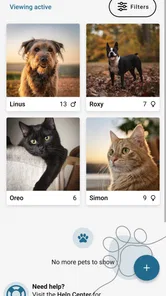
For households with more than one animal, the habit of checking the selected pet before taking action is particularly useful. I make that pause deliberate because appointment requests and identification details are the kind of tasks where choosing the wrong profile would create unnecessary confusion. PetPage’s usefulness depends on treating each action as belonging to a specific animal, not simply opening the app and tapping through quickly.
Appointment requests without confusing them with urgent care
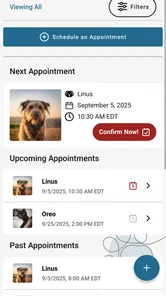
The appointment-request function is best suited to planned veterinary contact. I would use it for a checkup, a follow-up, or another situation where the practice can respond in its normal workflow. I would not rely on an appointment request when a pet may be seriously ill or injured. In that situation, calling the veterinary practice or an emergency provider directly is the safer choice because an app request may not be seen immediately.
This is one of the most important boundaries to understand. PetPage can make routine communication more organized, but it does not change the speed or seriousness of the medical situation. A request sent through the app should be treated as a request, not as a confirmed appointment or an instant clinical response. I recommend checking for confirmation through the practice’s normal process rather than assuming that tapping the request completes the booking.
Compared with calling every time, the app offers a quieter way to begin a routine request. Compared with keeping your own notes, it connects that request to pet information and the veterinary relationship represented inside the app. Still, people who prefer speaking to a receptionist, need to explain a complicated concern, or want immediate reassurance may find a phone call more suitable.
Using Pet ID as a handoff tool
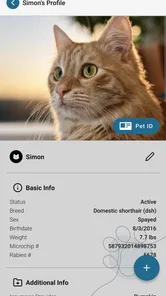
The Pet ID is more useful to me as a practical sharing feature than as something I would open constantly. It can help when another person needs to deal with a pet’s veterinary information, such as a partner, relative, or trusted caregiver. Rather than forwarding a collection of messages or explaining which animal is which, I can share the relevant identification information from the app.
That creates a useful habit before travel or a change in caregiving. I would check that I am viewing the correct pet, open the identification area, and share it with the person who actually needs it. I would avoid sending it casually to a large group because identification information should be shared purposefully. The feature is strongest when it supports a clear handoff, not when it becomes a substitute for discussing the pet’s needs with the caregiver.
A less obvious advantage is that Pet ID can reduce ambiguity in homes where pets have similar names or where several people handle appointments. It gives the household a common reference point. That does not remove the need to communicate about medications, behavior, feeding, or special instructions, but it can make the administrative part of the handoff cleaner.
Settings, shortcuts, and repeatable habits that make it easier
I find that the most useful “shortcut” is a small routine: know the task, confirm the pet, and choose the right way to contact the practice. Here I focus on setup checks and habits that can prevent avoidable mix-ups, especially when several people share responsibility. Those habits also help distinguish an app hiccup from a delay or issue elsewhere in the care process.
What I check before relying on the app
PetPage is simple enough that I would not spend a long time changing settings before using it. I would, however, review the account and pet information carefully during the first session. The quality of the experience depends on selecting the correct pet and keeping the information you use for requests and sharing accurate. A few minutes of careful setup can prevent mistakes later.
I also recommend checking how the app presents appointment requests and whether the practice has responded before assuming that the process is complete. The app’s role is connected to the veterinary practice, so the most useful habit is to treat its status and messages as part of an ongoing exchange. If something is time-sensitive, I would use a direct contact method instead of waiting inside the app.
Notifications are worth considering as part of that routine. If the app offers alerts on your device, I would keep them enabled when I am actively waiting for a response, then review whether they are helpful rather than allowing every notification to become background noise. If notifications are not part of your preferred routine, opening PetPage at a planned time can still work for non-urgent requests. The key is choosing one method you will actually check.
My shortcut is a habit, not a complicated configuration
The fastest PetPage users are unlikely to be the ones who tap randomly through the interface. They are the ones who decide in advance what the app is for. I use it for three repeatable jobs: checking a pet’s information, starting a routine appointment request, and sharing Pet ID when another person needs it. Keeping those jobs in mind makes the app feel faster because I am not searching for an undefined feature.
Before opening PetPage, I gather the small amount of context I will need. For an appointment request, I know which pet needs attention and whether the matter is routine. For sharing, I know who will receive the information and why. This preparation prevents the common mistake of beginning a request while still trying to work out the basic details.
Another useful pattern is to review the selected pet immediately before submitting or sharing anything. It takes only a moment, but it is a meaningful safeguard for multi-pet households. I would also avoid making several requests for the same issue simply because I have not yet received a response. Repeated submissions can create confusion for the practice; if the matter becomes urgent, direct contact is the better escalation path.
For a family, I would agree on who normally handles requests and who is allowed to share Pet ID. That is not a special PetPage setting, but it is an effective household workflow. One person can manage routine communication while another can access the information when caring for the animal. Clear responsibility is often more useful than giving everyone the same task without a process.
Where it fits beside familiar alternatives
The usual alternative is a phone call. Calling remains better when you need an immediate answer, want to describe symptoms in detail, or are unsure whether the situation is urgent. PetPage is more convenient when the request is routine and you want to start it without waiting on the phone. I see the two methods as complementary rather than competing.
Email and text messages can also work, particularly for sending a quick question or confirming a detail. Their weakness is that pet information can become mixed with unrelated conversations, and a caregiver may not know which message is current. PetPage provides a more focused place for the pet-related workflow, though it cannot replace a direct conversation when the issue needs explanation or judgment.
Personal notes, calendar reminders, and document folders still have a role. I would use a calendar for remembering an appointment time and personal notes for observations I want to discuss with a veterinarian. PetPage is most valuable for the connection between the pet, the veterinary information, the appointment request, and the Pet ID. Trying to force it to become every other tool at once would make the overall system less clear.
Small friction points I noticed
The app’s focused design is also its main limitation. If you want a broad pet-management platform with extensive lifestyle tracking, training plans, feeding logs, or a large collection of educational material, PetPage may feel narrow. Its purpose is administrative and veterinary access, so people looking for a full digital scrapbook of their pet’s life may be better served by another app or by combining several simpler tools.
There is also a dependence on the veterinary practice’s communication process. An app can organize the request, but it cannot guarantee that the response will be immediate or that every practice handles requests in exactly the same way. I would therefore keep the practice’s direct phone number accessible and understand when the app is appropriate before an urgent situation occurs.
Another trade-off is that convenience can encourage overconfidence. Seeing pet information in an app may make the process feel complete, but medical decisions still belong in a conversation with a qualified professional. I would use PetPage to prepare, request, identify, and share—not to interpret symptoms or delay care while waiting for a digital response.
Compatibility and practical expectations
The current version is 2.0.23, and the app supports Android devices running version 7.0 or later. That makes it accessible on many older Android phones, although the smoothness of any app can still depend on the individual device and its operating environment. Since PetPage is free, there is no purchase decision standing between a pet owner and trying its core workflow.
The free model is especially helpful for households that only need occasional access to veterinary information and appointment requests. I would not choose it based on the expectation of advanced paid tools; I would choose it because the basic purpose is practical and easy to test. The Everyone content rating also makes it suitable for a family device, though adults should still decide who can access or share pet information.
Before depending on it during a trip or a busy day, I would open the app while I have a stable connection and confirm that I can reach the information I need. This is a sensible precaution for any service connected to an external practice. It also gives me a chance to verify that I am signed in correctly and that I know where the appointment and Pet ID actions are located.
Who will get the most from PetPage?
I think PetPage is a strong fit for people who regularly lose track of veterinary details, households that share responsibility for an animal, and owners who prefer requesting routine appointments digitally. It is also useful for anyone who wants a consistent way to identify a pet when another caregiver becomes involved. The app’s best quality is that it turns occasional administrative tasks into a repeatable routine.
It may be less suitable for someone whose veterinary practice does not use the connected workflow, someone who prefers handling every request by phone, or someone searching for a complete health-record and lifestyle-management system. It is also not the right first choice for emergencies. Those are not flaws in the basic concept; they are boundaries that help set realistic expectations.
After using it, my recommendation is straightforward: install PetPage if your main problem is keeping pet information, appointment requests, and identification access together. Start by checking each pet carefully, test the routine request process before you need it, and decide how your household will use Pet ID. Those habits make a bigger difference than trying to discover a complicated set of advanced options.
AllyDVM has kept the experience focused, and that focus is why I would recommend it to a friend who wants less friction around ordinary veterinary administration. I would still keep direct contact details and personal notes for situations the app is not designed to handle. Used that way, PetPage is a useful companion: not a medical authority and not an all-purpose pet organizer, but a convenient bridge between you, your pet’s information, and routine care.
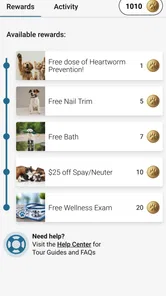
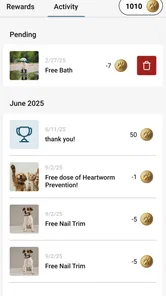
My final view: PetPage is worth trying when simple access and dependable habits matter more to you than a long list of extras. Its free availability, approachable design, and practical Pet ID workflow give it a clear place in everyday pet care. Just remember that the fastest digital route is not always the right medical route, and use a direct call whenever urgency or detailed discussion enters the picture.
PetPage Frequently Asked Questions
What should I know about PetPage before downloading it?
PetPage is a free medical app developed by AllyDVM, with an Everyone content rating. It is available for Android and iOS, and its store summary highlights access to a pet’s information, appointment requests, and sharing a Pet ID. These functions make it worth considering for owners who want convenient access to pet-related details.
What is PetPage, and what can I use it for?
PetPage is designed to help pet owners organize and manage important information about their animals in one convenient place. Depending on the features available in your version, you may be able to create pet profiles, record health details, store documents, track appointments, and keep useful notes. It can be especially helpful for households with multiple pets or owners who want an easier way to keep records organized.
Is PetPage suitable for all types of pets?
PetPage is primarily intended for common household pets, but its suitability depends on the profile options and tracking tools included in the current app version. Dogs and cats are usually the easiest to manage, while owners of birds, reptiles, rabbits, or other animals should check whether the app allows custom details. Before downloading, review the supported pet categories and available fields to ensure they match your needs.
Can I use PetPage to manage veterinary records and appointments?
PetPage may be useful for keeping veterinary information together, including vaccination dates, medical notes, prescriptions, and upcoming appointments. However, it should be treated as an organizational tool rather than a replacement for professional veterinary care. Users should still confirm critical information with their veterinarian and maintain backups of essential records, particularly when changing phones or sharing information during an emergency.
Does PetPage protect my personal and pet information?
Privacy is an important consideration before adding personal details, contact information, veterinary records, or photographs to PetPage. The level of protection depends on the app’s permissions, account system, storage method, and privacy policy. Before creating a profile, check what data is collected, whether information is synchronized online, and whether you can delete your account or export your records.
Pros
- Quick access to pet profiles
- records
- and important care information.
- Helpful way to organize vaccination and appointment details in one place.
- Useful for sharing pet information with family members or caregivers.
- Clean interface makes browsing pet-related content simple and approachable.
- Can help owners keep essential pet details available when traveling or visiting vets.
Cons
- Some features may require creating an account or entering personal information.
- The app’s usefulness depends on keeping pet records updated regularly.
- Not a replacement for professional veterinary advice or emergency services.
- Availability of certain tools may vary by location or device.
- Users may need to manage notifications to avoid receiving unnecessary reminders.











