Perry Weather
- 23.00
- 3.1
- Installs
- 10.00K
- Price
- Free

Screenshots
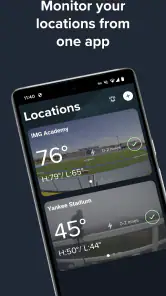
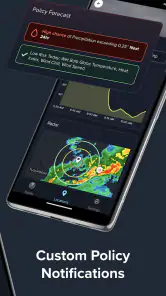
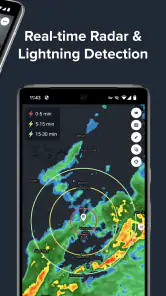
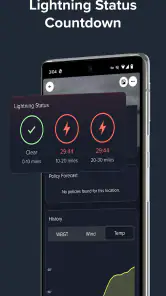
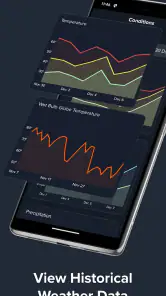
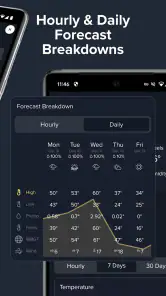
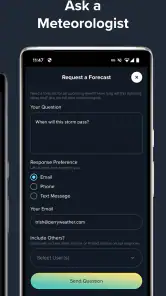
Analysis by Reviewed
Weather apps usually try to do everything at once: forecasts, radar, maps, warnings, widgets, and long-range outlooks. Perry Weather takes a narrower and more practical route. I found it most useful when the question was not simply “Will it rain today?” but “Is lightning or incoming precipitation close enough to change what I am doing right now?” That focus gives it a clear purpose, although it also means it will not replace a full-featured forecast service for every kind of planning.
Developed by Perry Weather, Inc., this free weather app is aimed at real-time awareness, especially around lightning strikes, precipitation, and weather alerts. It is available to users of all ages, and its modest community footprint—over ten thousand installs, with an average rating of 3.1 from around forty ratings—suggests that it is more of a specialized tool than a universally adopted daily-weather companion. After spending time with it, my view is straightforward: Perry Weather is strongest as a quick safety check for outdoor decisions, not as a complete replacement for the weather app already on your phone.
Where Perry Weather earns its place
The app’s most convincing quality is its emphasis on immediacy. A normal forecast can tell me that thunderstorms are possible during the afternoon, but that information is often too broad when I am already outside. Perry Weather is built around the more useful moment-to-moment question: is the situation changing now? That makes it relevant before a practice, during an outdoor event, on a work site, or while deciding whether to keep walking, cycling, or playing.
I particularly appreciate the distinction between general weather information and an alert that may require a decision. A forecast is something I consult in advance. A lightning or precipitation alert is something I use to decide whether to pause an activity, move indoors, or wait before continuing. Those are different jobs, and the app’s identity is much clearer when viewed through that lens.
In an everyday scenario, imagine organizing a weekend football session. A standard weather app may show clouds and a storm icon, but the session could still be safe for the next half hour—or the weather could be deteriorating faster than the hourly forecast suggests. Perry Weather gives that decision a more immediate place in the workflow. I would check it shortly before players arrive, keep it available during the session, and use changes in the live weather picture as a reason to reassess rather than relying only on the morning forecast.
That workflow is also useful for people who spend long periods outdoors. A gardener, grounds worker, coach, event volunteer, or recreational athlete may not need a detailed climate dashboard. They need a fast answer when conditions become uncertain. Perry Weather’s concentration on lightning strikes and precipitation makes it easier to treat the phone as a practical safety tool instead of browsing through several forecast screens.
Real-time information is more valuable when paired with a decision
One of the less obvious lessons from using a focused weather app is that alerts are only helpful when they are connected to a personal rule. I would not open Perry Weather repeatedly without a reason. Instead, I would decide beforehand what action follows a warning: stop the activity, move people to shelter, delay departure, or check again after a short pause. This prevents the common mistake of watching weather data without actually changing behavior.
More From Our News Desk

Weather by Xiaomi Review: Clear at a Glance, Less Clear Up Close

X Under Pressure: Can It Recover When Posting Goes Wrong?

Clash of Clans Is Won Between the Battles

Android Auto Makes the Case for Quieter Car Software

MobiOffice: Transforming Mobile Productivity with Seamless Integration

EA SPORTS FC™ Mobile Soccer: Redefining Mobile Sports Gaming
For outdoor groups, that simple rule can make the app more useful than a richer but less focused forecast. One person can monitor the app while another manages the activity. The value is not just in seeing a weather signal; it is in reducing hesitation when conditions become questionable. That is a practical strength that does not come through in a short store description.
There is another useful trade-off here. A specialized app can be less distracting than a general weather service filled with extended forecasts, news cards, lifestyle information, and promotional panels. If my immediate concern is lightning or rain arriving near an outdoor location, I would rather begin with the relevant information than search through unrelated details. Perry Weather feels better suited to that narrow task than to casual browsing.
What the app does not replace
I would not install Perry Weather as my only weather source. For planning a trip several days ahead, comparing morning and evening temperatures, checking wind direction, or deciding what clothes to pack, a conventional forecast app is usually more convenient. Those services tend to organize the day and the week more clearly, while this app’s appeal lies in the live-weather decision.
That limitation is important because a real-time alert can be valuable without being a complete forecast. If I am planning a hike tomorrow, I still want a broader view of expected conditions, not merely a check for current lightning or precipitation. If I am deciding whether to drive across town, I may also care about visibility, road conditions, wind, and the timing of several weather changes. Perry Weather can contribute to that decision, but it should not carry the whole responsibility.
The average rating of 3.1 indicates that the experience is not universally satisfying. I can understand why. A focused weather app may feel excellent to someone who needs live alerts and unnecessary to someone who only wants a simple temperature forecast. The same narrow design that makes it useful for outdoor monitoring can make it feel limited for everyday weather browsing. Before installing it, I would be clear about that distinction.
Another point of friction is alert interpretation. No weather alert should be treated as permission to continue an activity simply because the screen looks quiet for the moment. Weather can change, and a person’s surroundings may make a situation more dangerous than the app alone suggests. I would use Perry Weather as one part of a safety routine, alongside local guidance, visible conditions, and common sense. The app can support a decision, but it cannot physically move people to shelter or judge every local hazard.
A practical routine for outdoor users
My preferred way to use Perry Weather is in three stages. First, I would check the broader forecast before committing to an activity. Second, I would open Perry Weather shortly before starting, looking specifically for current lightning and precipitation information. Third, I would keep a clear stopping rule in mind and check again if the sky changes, an alert appears, or the activity lasts longer than expected.
This approach avoids two opposite mistakes. The first is checking once in the morning and assuming the rest of the day will follow the forecast exactly. The second is refreshing constantly without knowing what information matters. Perry Weather works best between those extremes: use it at meaningful decision points, then respond to the information rather than treating it as background noise.
For a coach, a useful habit would be to check before players arrive and again before restarting after a weather delay. For a grounds worker, the app could be part of the decision to pause work rather than waiting until rain is already falling. For a family at an outdoor venue, it offers a quick reason to reconsider staying outside. These are modest workflows, but they show where the app has a practical advantage over a generic forecast screen.
I would also avoid depending on a single person’s phone if an activity involves a large group. The app may help one organizer make a timely decision, but the group should still have a communication plan. That is a broader operational point: weather information becomes safer when everyone knows what an alert means and where to go next.
Who should install it
Perry Weather makes the most sense for people whose plans are directly affected by lightning and nearby precipitation. Outdoor sports organizers, school activity leaders, maintenance teams, event staff, campers, and frequent walkers are the clearest audience. If I regularly make go-or-stop decisions outside, I can see a reason to keep this app alongside my main forecast service.
It is also a reasonable choice for someone who finds broad weather apps overwhelming. The store summary centers on real-time lightning strikes, precipitation, weather data, and alerts, and that focus is exactly what gives the app its identity. Someone who wants a specialized monitoring tool may prefer it to a crowded app that mixes forecasts with many secondary features.
On the other hand, I would skip it if my needs are limited to checking tomorrow’s high temperature, finding a ten-day outlook, or viewing a familiar hourly forecast. In those cases, the default weather app on an Android or iOS device may be faster and more comfortable. I would also look elsewhere if I needed one application to combine detailed maps, travel planning, air quality, pollen, and a broad set of forecast layers.
The age rating of Everyone makes it suitable for general household use, but that does not remove the need for adult judgment during severe weather. I would be comfortable showing the app to family members or using it with a group, while still making sure children understand that an alert means following the agreed safety instruction rather than debating the screen.
Compatibility, cost, and day-to-day expectations
The app is free, which lowers the barrier to trying it as a companion tool. I could install it without first deciding whether a specialized alert service justifies a subscription. That matters for occasional users, such as someone who only needs extra awareness during an outdoor season or for a particular event.
Its current version is 4.8.0, and it supports devices running Android 7.0 or later. That gives it a useful reach across older Android phones, although the practical experience will still depend on the device and the surrounding conditions. I would install it before an important event rather than waiting until a storm is already approaching, then spend a few minutes learning where the live information and alerts appear.
The developer’s focus is visible in how specifically the app is positioned. Perry Weather, Inc. is not presented here as a general lifestyle platform; the product is centered on weather awareness where timing matters. That specialization is reassuring when it matches my needs, but it also reinforces the recommendation to treat the app as a companion rather than an all-purpose replacement.
One useful preparation step is to decide how often I genuinely need to monitor conditions. If I am at home, a normal forecast may be enough. If I am responsible for people outdoors, I would make checking the app part of the event plan. If I am traveling through changing conditions, I would combine it with a broader service and local instructions. The right setup depends less on the app’s presence than on the consequence of getting the decision wrong.
My final assessment
After weighing its purpose against its limits, I see Perry Weather as a focused instrument rather than a universal weather solution. Its strongest case is immediate outdoor awareness: lightning, precipitation, and alerts that can help me decide whether to continue, pause, or move inside. That is a meaningful job, and a general forecast app does not always make that decision as directly.
Its weakness is equally clear. Anyone expecting a rich, all-in-one forecast experience may find it too narrow, and the middling average rating reflects that it will not suit every weather-app habit. I would not use it alone for travel planning or long-range decisions, and I would never treat a quiet moment on the screen as a guarantee that outdoor conditions are safe.
My recommendation is therefore specific: install Perry Weather if lightning and rapidly changing precipitation can affect your work, sport, event, or family plans. Keep a conventional weather app for broader forecasts, and use this one at the moments when a live safety check matters most. For that audience, it offers a sensible free addition; for everyone else, it may be more specialized than necessary.
In short, I would recommend it to a friend who regularly has to make outdoor go-or-stop decisions, with one condition: use the alerts as part of a clear safety routine, not as the only source of judgment. That is where real-time weather monitoring becomes genuinely useful, and it is also the boundary that keeps expectations realistic.
Perry Weather Frequently Asked Questions
What devices and operating systems can run Perry Weather?
Perry Weather is a weather app for mobile devices, with a minimum operating system requirement of version 7.0. Before downloading, check that your device meets this requirement and that you can install apps from the relevant store. Keeping your device’s software current can also help the app run smoothly and receive weather updates and alerts.
Who develops Perry Weather, and what can I learn from its user feedback?
Perry Weather is developed by Perry Weather, Inc. Its store profile shows an average rating of 3.1 from 43 ratings, along with 23 written reviews. Those figures give a quick sense of how users have responded, but experiences can differ depending on device, account access, settings, and how the app is used. Reading recent reviews may help you judge whether it suits your needs.
What is Perry Weather, and what does the app do?
Perry Weather is a weather monitoring and safety platform designed to provide timely alerts about conditions that may affect outdoor activities, events, construction projects, schools, sports facilities, and other operations. Depending on the account and configuration, it can display forecasts, lightning warnings, severe weather notifications, and site-specific updates. Its main purpose is helping users make informed decisions before and during changing weather conditions.
Does Perry Weather provide real-time lightning and severe weather alerts?
Yes, Perry Weather is built around weather monitoring and alerting, including notifications for lightning and potentially hazardous conditions. The exact alerts you receive can depend on the location, account permissions, subscribed services, and settings configured by an organization. Users should enable notifications, allow location or site access when requested, and understand that alerts support safety decisions but should not replace official emergency instructions.
Can individuals use Perry Weather, or is it mainly for organizations?
Perry Weather is primarily aimed at organizations and professional environments that need coordinated weather monitoring, such as venues, schools, sports programs, municipalities, construction companies, and event operators. Individual access may be available when an organization invites you or provides account credentials. Before downloading, check whether your employer, school, venue, or event uses Perry Weather, since some features may require an authorized account.
Pros
- Real-time alerts help users prepare for dangerous weather conditions.
- Location-based forecasts make warnings more relevant to your area.
- Useful for outdoor work
- sports
- events
- and daily planning.
- Clear risk information can support faster safety decisions.
- Weather updates are designed for quick access when conditions change.
Cons
- Some features may require location access and background permissions.
- Accuracy can vary depending on local weather data coverage.
- Frequent alerts may feel excessive during rapidly changing conditions.
- The app may be less useful in regions without supported services.
- Battery and mobile data use can increase with continuous location updates.
- Category
- Weather
- Version
- 4.8.0











